Material Question--Kerkythea
-
I haven't seen this before. I exported a model to KT and a couple of the materials (the walnut materials) don't seem to go over correctly. The model looks like this in SketchUp:
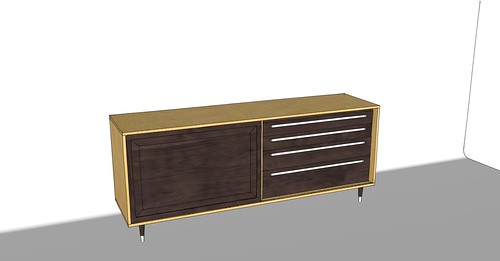
But the walnut looks like this in KT:

The texture images in the TX folder show as the same bright green.
The maple texture I used on the case was created in exactly the same way as the walnut but it works fine. Any idea of the fix?
I posted on the KT forum but I figured I'd ask here since there's a lot more traffic here than there.
-
If you want to post the model I will have a go at exporting it and see what happens.
-
Thanks Nick, I sent you a PM.
-
Sometimes exploding & regroup may help. Or maybe export photomatched. Also make sure that no CMYK color textures are used.
-
do you mind to share a monochrome style image of the model please?
-
Majid, I don't have access to the SketchUp file at the moment but if you're wondering if faces are reversed, I can assure you they are not. I'm very particular about not having exposed back faces in my models.
FWIW, I think this issue was sorted out on the KT forum. Everything pointed to the material image not being in RGB format.


Hello! It looks like you're interested in this conversation, but you don't have an account yet.
Getting fed up of having to scroll through the same posts each visit? When you register for an account, you'll always come back to exactly where you were before, and choose to be notified of new replies (either via email, or push notification). You'll also be able to save bookmarks and upvote posts to show your appreciation to other community members.
With your input, this post could be even better 💗
Register Login


Advertisement