Creating SketchUp scene from saved files using Ruby script
-
<span class="syntaxdefault"><br />model </span><span class="syntaxkeyword">=</span><span class="syntaxdefault"> Sketchup</span><span class="syntaxkeyword">.</span><span class="syntaxdefault">active_model<br />definition </span><span class="syntaxkeyword">=</span><span class="syntaxdefault"> model</span><span class="syntaxkeyword">.</span><span class="syntaxdefault">definitions</span><span class="syntaxkeyword">.</span><span class="syntaxdefault">load</span><span class="syntaxkeyword">(</span><span class="syntaxdefault"> skp_file </span><span class="syntaxkeyword">)<br /></span><span class="syntaxdefault">tr </span><span class="syntaxkeyword">=</span><span class="syntaxdefault"> Geom</span><span class="syntaxkeyword">;;</span><span class="syntaxdefault">Transformation</span><span class="syntaxkeyword">.</span><span class="syntaxdefault">rotation</span><span class="syntaxkeyword">(</span><span class="syntaxdefault"> point</span><span class="syntaxkeyword">,</span><span class="syntaxdefault"> vector</span><span class="syntaxkeyword">,</span><span class="syntaxdefault"> angle </span><span class="syntaxkeyword">)<br /></span><span class="syntaxdefault">model</span><span class="syntaxkeyword">.</span><span class="syntaxdefault">active_entities</span><span class="syntaxkeyword">.</span><span class="syntaxdefault">add_instance</span><span class="syntaxkeyword">(</span><span class="syntaxdefault"> definition</span><span class="syntaxkeyword">,</span><span class="syntaxdefault"> tr </span><span class="syntaxkeyword">)<br /></span><span class="syntaxdefault"></span>Some general info on instances and definitions in SketchUp:
http://www.thomthom.net/thoughts/2012/02/definitions-and-instances-in-sketchup/General info on SketchUp plugin development:
http://www.thomthom.net/thoughts/2012/01/golden-rules-of-sketchup-plugin-development/ -
Thanks Thomthom. It works perfectly. One last question, can you save the new scene automatically (if possible without showing the SketchUp GUI)?
I used the following command and I even could not locate the file.
` model=Sketchup.active_model
definition=model.definitions.load('sofa.skp')
tr= Geom::Transformation.translation [0, 0, 0]
model.active_entities.add_instance(definition,tr)
definition1=model.definitions.load('table.skp')
tr1= Geom::Transformation.translation [0, 0, 0]
model.active_entities.add_instance(definition1,tr1)Sketchup.active_model.save "c:/Desktop/room.skp"`
-
@mead said:
can you save the new scene automatically
Do you actually mean Scene here - as in the saved views you have in SketchUp - or simply model (which is what your code indicate).
@mead said:
Sketchup.active_model.save "c:/Desktop/room.skp"
Are you sure you have the correct path? 'C:/Desktop' - do you really have a folder of that name?
-
Hello Thomthom,
Thanks for your prompt response. Just to clarify my previous question:
@thomthom said:
Do you actually mean Scene here - as in the saved views you have in SketchUp - or simply model (which is what your code indicate).
I just meant simply model.@thomthom said:
Are you sure you have the correct path? 'C:/Desktop' - do you really have a folder of that name?
Yes, I have the folder. In fact,I tried to save it in many folders and I could not locate it in any of the folders. -
What is the return value of Model.save ?
-
No you cannot run SketchUp in "headless" mode (without the GUI.)
BUT you CAN write a C/C++ application (and compile it,) that uses the SketchUp C++ SDK. Your application (be it a command line utility,) can create and save model files with no GUI.
-
? Did he ask about that?
Sent from my LT25i using Tapatalk 2
-
@unknownuser said:
by MeAd » March 19th, 2013, 8:36 pm
Dear All,
I want to create a sketchup file by automatically populating with locally saved 3D sketchup models using ruby script executed from command line.
Here a ruby script executed from command line.
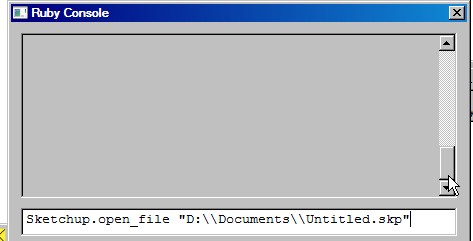
you can populate skp file with a drop down inputbox on a second moditor display then copy and paste to display one.
A good outline for drop down is my Plugins_loader_dj v1.6
I have a plugin that can helps you copy and paste to your presentation
2) Another_Sketchup_dj v1.6
3) Another_Sketchup_Plus_dj v1.6
that can be found here
http://sketchucation.com/forums/viewtopic.php?f=323&t=46688
projectEditor_dj 1.6
Copyright Feb 4, 2013
by DukeJazz: James Cochran@unknownuser said:
I also want to apply a transformation (rotation + translation) on each of the imported models and finally save the sketchup file. For example, I created two files: 'sofa.skp' and 'table.skp'.
for (rotation + translation)
[Plugin] scaleGroupFloat_dj Ver 1.6.5 Feb 15, 2013by dukejazz » May 11th, 2012, 3:36 pm
http://sketchucation.com/forums/viewtopic.php?f=323&t=45254
scaleGroupFloat_dj Ver 1.6.5
Copyright Feb 15, 2013
DukeJazz: by James Cochran@unknownuser said:
I want to load these files onto a new file 'room.skp' after rotating and translating these objects in ruby script. Any ideas?
- Another_Sketchup_dj v1.6
- Another_Sketchup_Plus_dj v1.6
-
Thanks Thomas. As you suggested, I used the model.save status to see if it is saved correctly and I found out that it was not. Somehow I saw unintentional character in the command and removed it. Now, everything is working.
Now, whenever I run the ruby script from the command line, it automatically save it as .skp. However, every time I run the ruby script, it opens a new SketchUp GUI, which i am not fond of since I am creating many models. My very last question, is it possible to perform the task without opening any SketchUp GUI?
Thanks a bunch Thomas.
-
Thank you all for your help.




Hello! It looks like you're interested in this conversation, but you don't have an account yet.
Getting fed up of having to scroll through the same posts each visit? When you register for an account, you'll always come back to exactly where you were before, and choose to be notified of new replies (either via email, or push notification). You'll also be able to save bookmarks and upvote posts to show your appreciation to other community members.
With your input, this post could be even better 💗
Register Login


Advertisement