Save As Plugin
-
Hi,
I was wandering if anyone can help me - I am looking for a ruby script to perform the following:
-
Open a fresh window of SketchUp (leaving all the currently open windows as they are)
-
Save the newly opened blank model to the desktop as 'temp.skp'
Is this possible with the API?
I know it only takes a few seconds to do these actions manually, but I am required to do this so often a script would be very valuable.
Thanks
Ross
-
-
mac of pc?
-
PC
-
The hardware shouldn't matter, but whether it's the Windows or OS X version of SketchUp.
The OS X version can open multiple documents in the same SketchUp application, whereas in the Windows version you have to launch a new instance of the application. This new instance then doesn't know whether you opened it or whether it is supposed to be the temp.skp.
Let me suggest a different perspective on the problem: You want a new SketchUp model, based on a template and saved on your desktop. Basically we copy your template to the desktop and open it.
module Ross def self.new_file_on_desktop template = File.expand_path(Sketchup.template) home = ENV["HOME"] || ENV["USERPROFILE"] || ENV["HOME"] home = File.expand_path(home) target = File.join(home, "Desktop", "temp.skp") #FileUtils.cp(template, target) system("copy #{template.inspect} #{target.inspect}") UI.openURL(target) if File.exists?(target) end UI.menu("File").add_item("New file on desktop"){ Ross.new_file_on_desktop } end -
Aerilius thanks very much for this - that is a clever approach.
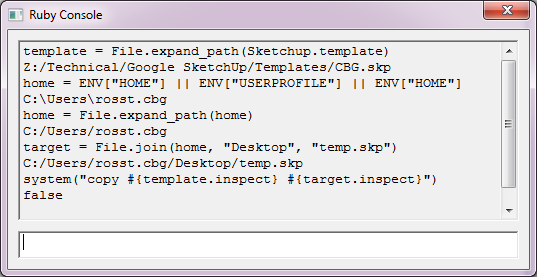
I have tried running the module you have written. However it opens command prompt with an error message "The system cannot find the file specified. 0 file(s) copied".
I have tried debugging through the ruby console (see attachment) and the script correctly identifies my custom template file and the path to my desktop.
However line 8 returns 'false' when trying to copy the file.
I don't understand why this would be the case.
Do you have any ideas?
Thanks
Ross
Hello! It looks like you're interested in this conversation, but you don't have an account yet.
Getting fed up of having to scroll through the same posts each visit? When you register for an account, you'll always come back to exactly where you were before, and choose to be notified of new replies (either via email, or push notification). You'll also be able to save bookmarks and upvote posts to show your appreciation to other community members.
With your input, this post could be even better 💗
Register Login


Advertisement