sketchucation logo sketchucation
    • 登入
    Oops, your profile's looking a bit empty! To help us tailor your experience, please fill in key details like your SketchUp version, skill level, operating system, and more. Update and save your info on your profile page today!
    ⚠️ Important | Libfredo 15.6b introduces important bugfixes for Fredo's Extensions Update

    I need some Graphics Help / Advice Please

    已排程 已置頂 已鎖定 已移動 Corner Bar
    21 貼文 7 Posters 1.5k 瀏覽 7 Watching
    正在載入更多貼文
    • 從舊到新
    • 從新到舊
    • 最多點贊
    回覆
    • 在新貼文中回覆
    登入後回覆
    此主題已被刪除。只有擁有主題管理權限的使用者可以查看。
    • jeff hammondJ 離線
      jeff hammond
      最後由 編輯

      [alan- yes.. i agree with your methods and definitely overcook these numbers when i'm doing my own stuff.. 600ppi? sure, why not 😄]

      it's just that joe says things like "still using a pretty old win xp machine that's starting to act up on me." and "trying to keep the file size down.."

      so what i'm going for up there is minimums for an acceptable print..

      dotdotdot

      1 條回覆 最後回覆 回覆 引用 0
      • Alan FraserA 離線
        Alan Fraser
        最後由 編輯

        Yes Jeff, Joe's machine is getting pretty long in the tooth now. Joe, are you still using a CRT monitor, or have you got a flatscreen yet? 😉
        I'm very sceptical (British spelling) that it would take to kindly to being asked to handle 10 pics in a lossless format that were each over 6000 pixels wide, which is why I suggested 300 ppi. If it's good enough for book covers and glossy magazines, it's probably ok for CDs.

        3D Figures
        Were you required to walk 500 miles? Were you advised to walk 500 more?
        You could be entitled to compensation. Call the Pro Claimers now!

        1 條回覆 最後回覆 回覆 引用 0
        • jeff hammondJ 離線
          jeff hammond
          最後由 編輯

          @alan fraser said:

          I'm very sceptical (British spelling) .

          well, being the sceptic that i am.. i had to check 😆

          screen 2013-01-16 at 10.27.19 AM.jpg

          but it almost looks as if it would be pronounced 'septical' (septic) when written that way.. surely not i hope 😉

          dotdotdot

          1 條回覆 最後回覆 回覆 引用 0
          • TIGT 離線
            TIG Moderator
            最後由 編輯

            Link Preview Image
            Sceptic vs. skeptic

            How do you spell Sceptic vs. skeptic? Learn the correct spelling of Sceptic vs. skeptic & other commonly misspelled words & phrases in the English language. Learn more!

            favicon

            GRAMMARIST (grammarist.com)

            TIG

            1 條回覆 最後回覆 回覆 引用 0
            • pbacotP 離線
              pbacot
              最後由 編輯

              What a place, huh? Start out with woodwork design, and end up with etymology. All kinds of help.

              MacOSX MojaveSketchUp Pro v19 Twilight v2 Thea v3 PowerCADD

              1 條回覆 最後回覆 回覆 引用 0
              • Joe WoodJ 離線
                Joe Wood
                最後由 編輯

                Darn, so sorry for not replying sooner, really appreciate all the help, I'm just preoccupied with other matters now. I'll be trying this out later and will post back if I run into any problems.

                thanks Folks!

                Joe Wood
                woodsshop.com/

                1 條回覆 最後回覆 回覆 引用 0
                • Joe WoodJ 離線
                  Joe Wood
                  最後由 編輯

                  Boy, forum is very slow again today, this will take awhile.

                  OK, I’m all ready, got it all figured out about what I’d like to do 🙂 now with a little help from my friends I can create a nice set of plans on two sheets of 2’ x 3’ paper.

                  I have 15 Plans Pages, plus a site plan, and the title block, to put on two sheets. I’ve been experimenting with making these plans using Corel Draw, and Corel Photo Paint. Which one should I use for this?

                  These are the Plans Pages I’ve been experimenting with, exported as jpg images at 4,000 pix wide, and resized in Picasa to 1,000 pix wide at maximum quality. I know not proper image size or type.

                  PlansPages.jpg

                  In Sup I’ve arranged my layout on a 2’ x 3’ paper, I’ve scaled all the images to 10 x 6 ½” and fit them on the paper.

                  Layout.jpg

                  I’ve been messing with Corel Paint. First I created a 2’ x 3’ paper size (I choose RGB), but which should I choose? B& White, Greyscale?

                  PaperSetup.jpg

                  Then I used the Ruler tool to make 1” borders around the edges. I brought in a few of the resized images. I can position them fairly well, and have been grabbing corners to resize them, not quite sure what I’m doing, it would be nice to bring them in at correct size?

                  CorPaint.jpg

                  So to do this properly, from SUp how do I export and create an image at correct resolution and DPI to end up with a 10” wide image I can bring in to Corel without having to resize it in Corel?

                  How do I put a border around each image?

                  After I’ve arranged them, do I do, Object > Combine > All objects with background? What settings do I use when exporting the 2’ x 3’ image? What type image should I export to send to the local print shop?

                  This is for a local solar patio cover design, hopefully I’ll get to build it too!

                  1Perspective.jpg

                  Joe Wood
                  woodsshop.com/

                  1 條回覆 最後回覆 回覆 引用 0
                  • J 離線
                    jpalm32
                    最後由 編輯

                    Been to your site Joe. Found it in a search for patio roofs awhile back.
                    Real nice stuff. Clean drawings & nice layout.
                    Someone of your talent needs a proper machine.

                    1 條回覆 最後回覆 回覆 引用 0
                    • Joe WoodJ 離線
                      Joe Wood
                      最後由 編輯

                      Well JP it does what I ask it to, just like trusty 'ol @Last SUp Ver 5, it does what I need it to do 🙂

                      sorry bout my last post, I came back here after a month and a half and didn't read what had been posted, sorry about that. All the image size Info I need!

                      so I'm experimenting with tifs, exported some at 975 x 1500 for a 6.5 x 10" , made a greyscale 2' x 3' paper size in Corel PPaint, brought in those tifs and we'll see how far I get with this!

                      Joe Wood
                      woodsshop.com/

                      1 條回覆 最後回覆 回覆 引用 0
                      • Joe WoodJ 離線
                        Joe Wood
                        最後由 編輯

                        allright, I do think I almost have it!

                        resized those tifs at 150 dpi, brought them into a greyscale 2x3'at 150 dpi paper,

                        and I've got them all arranged it looks like. I can't figure out how to make the image borders, then I'll Combine all objects with background,

                        then Publish > PDF ?

                        Corel.jpg

                        Joe Wood
                        woodsshop.com/

                        1 條回覆 最後回覆 回覆 引用 0
                        • Joe WoodJ 離線
                          Joe Wood
                          最後由 編輯

                          Should I be using Corel Draw or Photo Paint for something like this?

                          I have it all set up in P Paint but have a nagging thought that I should be using Draw ..

                          Joe Wood
                          woodsshop.com/

                          1 條回覆 最後回覆 回覆 引用 0
                          • Joe WoodJ 離線
                            Joe Wood
                            最後由 編輯

                            Well I used Corel Draw X3, and figured out how to do borders, Effects > Create Boundary.

                            then I did > Publish To PDF.

                            Looked at the pdf full size and it looks pretty good.

                            before I Published it, should I have done anything to the file, like Combine with Background, or Flatten?

                            looking back at what I did, should I have done anything differently?
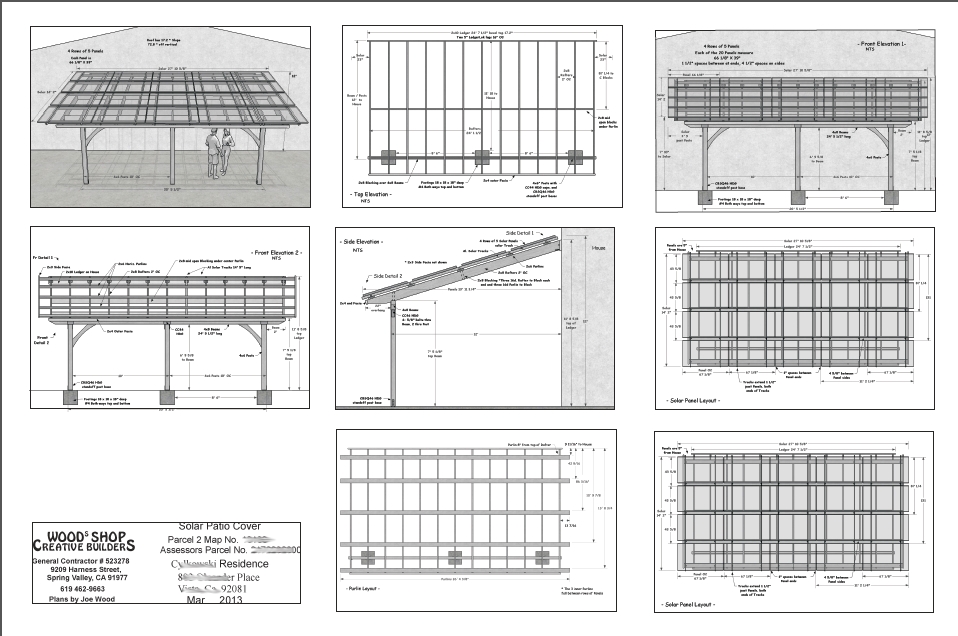
                            PDF.jpg

                            Joe Wood
                            woodsshop.com/

                            1 條回覆 最後回覆 回覆 引用 0
                            • 1
                            • 2
                            • 2 / 2
                            • 第一個貼文
                              最後的貼文
                            Buy SketchPlus
                            Buy SUbD
                            Buy WrapR
                            Buy eBook
                            Buy Modelur
                            Buy Vertex Tools
                            Buy SketchCuisine
                            Buy FormFonts

                            Advertisement
