CNC pattern
-
@unknownuser said:
Why not try the process 3 posts above with the little prog of conversion?
Sketchup --> OBJ --> 3DM --> Rhino ?I'm on a Mac though ??
-
you should be able to import SU directly into rhino. saying that I am not sure if imprter is implemented in beta.
-
Yeah I can get geometry into Rhino from sketch up as polygonal mesh
Is there anyway I can make this into a manifold or start creating the surfaces onto the model in Rhino, I suppose this is what spaceclaim does.....
-
There are some plugins but I believe they are mostly windows for now....
Have a look at here.
http://wiki.mcneel.com/rhino/meshtonurb -
@unknownuser said:
I'm on a Mac though ??
Use an emulator, virtualisator...

Or send me your file by PM if not top secret with something like Mediafire -
@unknownuser said:
@unknownuser said:
I'm on a Mac though ??
Use an emulator, virtualisator...
Or send me your file by PM if not top secret with something like MediafireI might take you up on that Pilou thankyou
-
No problem!

-
Just to highlight the limitations, and don't get me wrong I'm a sketchup affection ado
OK here is the panel when I run SU Solid it messes it up, the Round corner plug in looks great but has created many anomalies. Solid inspector finds loads of problems but
I don't know what they are : if you delete the geometry and draw it back it still has the problem and the face has to go there ??The result is that Protomold and firstcut won't even look at it and said that Sketch up files are unusable
Larger manufacturers are more then happy to fix it themselves but when your spending $40 k for tooling I'm sure there notIf anyone can help please
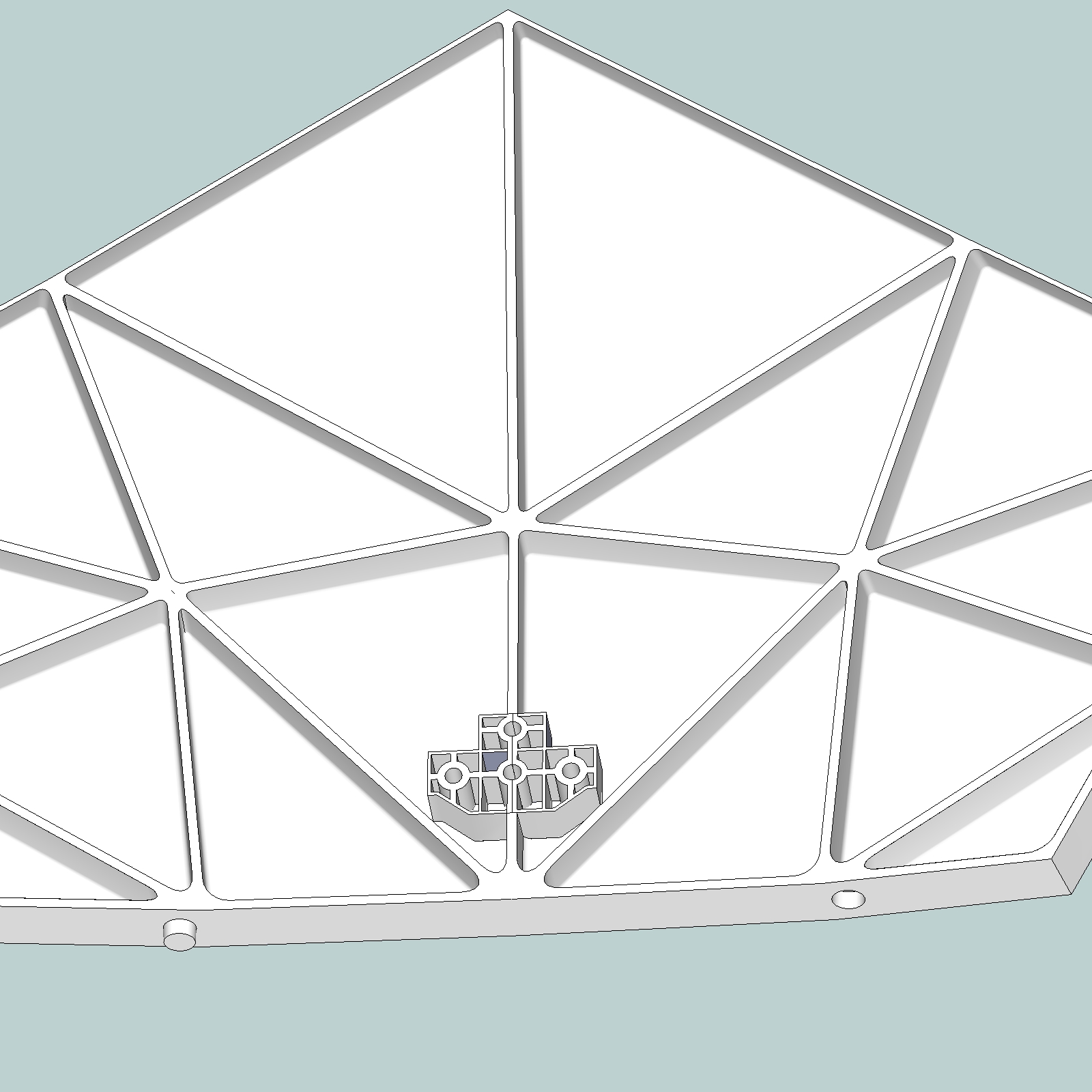
-
Its sounds rough, but you may just have to redraw it in a NURBs based program.
I'm learning Solidworks for this very reason - its usually easier just to start over in a manufacturing compatible modeling app. Luckily I have access to Solidworks at a local makerspace, so I don't have pony up 5K or whatever it costs for a license, but there are cheaper alternatives.
-
BTW, if you need to fix holes in an STL exported from Sketchup, use this: cloud.netfabb.com
Its awesome - just upload the STL, and in a few mins you can download the cleaned version.

-
@d12dozr said:
Its sounds rough, but you may just have to redraw it in a NURBs based program.
I'm learning Solidworks for this very reason - its usually easier just to start over in a manufacturing compatible modeling app. Luckily I have access to Solidworks at a local makerspace, so I don't have pony up 5K or whatever it costs for a license, but there are cheaper alternatives.
I thought as much especially as I'm on Mac. I have tried the free Rhino version but it's not the full package and isn't very stable. I have Maya on trial but it's basic modeling is a steep learning curve....
Thanks Anywayz
-
@d12dozr said:
BTW, if you need to fix holes in an STL exported from Sketchup, use this: cloud.netfabb.com
Its awesome - just upload the STL, and in a few mins you can download the cleaned version.
looks like a cool service I'll give it a whirl thanks
-
http://www.punchsoftware.com/p-24-viacad-pro-v7.aspx
also look at SharkFX8,I had an FX7 extended trial (with full import/export enabled) to output iges files for a pitch...
It worked really well, but I didn't get the job, so didn't buy.
Download the trial, then email the developer [Tim?] and ask to extend import/export for testing, worth a shot.
john
-
Driven, you have the right idea. There is no need to redraw.
Download the free and fully-operational 14-day trial version of ViaCAD 2D/3D from Punch! software. Here is a current link...

404 Not Found 2
At Punch!CAD, it is our mission to make computer aided design software that matches up perfectly with your needs, regardless of your industry or expertise. Whether you’re an architect, engineer, CAD drafter, 3D printing expert, furniture designer, student, or DIY hobbyist, you can always find the right tools for the job.
(www.punchcad.com)
ViaCAD 2D/3D can 'import' native Sketchup V7 files and many others including (but not limited to) file types that are important to us like STL, STEP, and DWG/DXF!
So please note...if you are using SU V8 or higher, (until ViaCAD updates their software) you will need to do a SaveAs V7 on your model first or ViaCAD will not import the file. ViaCAD does not warn you when you try to open SU V8. Basically, nothing appears on the screen and there are no failure notices. So make sure you SAVEAS V7 first. SU free version allows you to SaveAs all of its older file formats.
Make sure you check the 'Facets to NURBs' checkbox of the SU import dialog.
Once your model is in ViaCAD 2D/3D, choose Export from the File menu, then choose from the wide variety of file formats, including ACIS (SAT), Adobe Illustrator, BMP, CGM, DWG/DXF, EPS, Facet, FACT, IGES, JPG, RAW, STEP, STL, Text, Viewpoint Media, FRML, and Wavefront OBJ. I only tested a couple of these.
My only minor complaint is that ViaCAD software does not provide any sort of clue when an export process fails. A log file would have saved me some time in determining problems with my SU models.
Basically, this is a fantastic piece of CAD software and the $99 price is well-worth it if you need to export your SU files to a solid-model file type like I did. MAC users can rejoice also as they have a MAC version as well.
ViaCAD appeares to be a highly capable 2D and 3D package for those looking for something affordable. I hope to dig into it more over time. It appears to be well-conceived and even has the push-pull method for shape manipulation that Sketchup help make famous.
Have fun.
Steve
-
Hi Steve,
glad you found it useful, at the time I was 'playing' ViaCad didn't have all the import export features (which have come down from Shark).
Shark itself is fantastic, but way more than I need, so I may give VC a go myself.
I found the forum and developer to be really open to questions, so ask about SU V8 importer, he may have a Beta kicking around, also I think there would be a log, you could ask how to expose it...
good luck
john


Advertisement