sketchucation logo sketchucation
    • Login
    Oops, your profile's looking a bit empty! To help us tailor your experience, please fill in key details like your SketchUp version, skill level, operating system, and more. Update and save your info on your profile page today!
    Mac User? | Join the Rayscaper Beta for Mac Learn More

    CNC pattern

    Scheduled Pinned Locked Moved Corner Bar
    32 Posts 7 Posters 3.3k Views 7 Watching
    Loading More Posts
    • Oldest to Newest
    • Newest to Oldest
    • Most Votes
    Reply
    • Reply as topic
    Log in to reply
    This topic has been deleted. Only users with topic management privileges can see it.
    • C
      congellous
      last edited by

      Is STL only available on windows, I don't have it on Mac OSX Pro 8

      1 Reply Last reply
      Reply Quote 0
      • D
        Dropout
        last edited by

        It's a plugin. Save to DXF or something. Don't know about Mac.

        1 Reply Last reply
        Reply Quote 0
        • C
          congellous
          last edited by

          I have designed a 3D double curving panel system with thickness on sketch up
          I now have access to a CNC machine that reads DXF or that's what the technician has asked for
          I have set the curves in maya and tested them by importing them to SKetchup
          When exported DXF obviously breaks it down into lines and I really want curves so I don't have to manually rub down the plug, is there any other option
          I'm on Mac so none of the solidworks or space claim does the job

          1 Reply Last reply
          Reply Quote 0
          • C
            congellous
            last edited by

            Well at the risk of talking to myself, if anyone has the same issue, there is a STL exporter online

            1 Reply Last reply
            Reply Quote 0
            • C
              congellous
              last edited by

              The next installment of this project is CNC cutting and SU Solid worked fine until you get to Injection Moulding or Rapid prototyping stage....

              The companies want IGES constructed on Solidworks, I've tried STL files and the IGES plug in and it exports a mesh mess

              Anybody doing this kind of work got any other ideas, Sketch up into Solidworks ??

              1 Reply Last reply
              Reply Quote 0
              • D
                d12dozr
                last edited by

                You can export a dxf or stl from Sketchup and import that into Solidworks, but that doesn't usually cut it for injection molding. You either have to rebuild it in Solidworks, or try Spaceclaim to convert to IGES or STEP.

                Here's mode about using Sketchup and Spaceclaim: a Youtube video
                Sketchupdate blog post.

                3D Printing with SketchUp Book
                http://goo.gl/f7ooYh

                1 Reply Last reply
                Reply Quote 0
                • C
                  congellous
                  last edited by

                  @d12dozr said:

                  You can export a dxf or stl from Sketchup and import that into Solidworks, but that doesn't usually cut it for injection molding. You either have to rebuild it in Solidworks, or try Spaceclaim to convert to IGES or STEP.

                  Here's mode about using Sketchup and Spaceclaim: a Youtube video
                  Sketchupdate blog post.

                  Thanks, that was my conclusion too - Spaceclaim is only Windows though.
                  Is there any tips for making the transfer from sketch up to Solidworks easier, I have to translate my idea's to the product designer and an awful lot of time has already gone into it for it to be a redraw

                  1 Reply Last reply
                  Reply Quote 0
                  • S
                    sepo
                    last edited by

                    Hi there

                    I find the best route would be via Rhino. Here is the link which explains how to take it from rhino to solidworks. You have ability in Rhino to to resurface it and use nurbs. To bring it to rhino I would sugest either .obj or .dwg.
                    http://www.rhinojungle.com/forum/topics/rhino-model-to-solidworks-for-cfd-analysis?xg_source=activity

                    hope it helps

                    1 Reply Last reply
                    Reply Quote 0
                    • S
                      sepo
                      last edited by

                      @unknownuser said:

                      @d12dozr said:

                      You can export a dxf or stl from Sketchup and import that into Solidworks, but that doesn't usually cut it for injection molding. You either have to rebuild it in Solidworks, or try Spaceclaim to convert to IGES or STEP.

                      Here's mode about using Sketchup and Spaceclaim: a Youtube video
                      Sketchupdate blog post.

                      Thanks, that was my conclusion too - Spaceclaim is only Windows though.
                      Is there any tips for making the transfer from sketch up to Solidworks easier, I have to translate my idea's to the product designer and an awful lot of time has already gone into it for it to be a redraw

                      but hey solidworks is only windows as far as I know.... rhino has open beta for Mac so that maybe your salvation.

                      1 Reply Last reply
                      Reply Quote 0
                      • C
                        congellous
                        last edited by

                        Yeah solidworks is windows as well. Rhino uses the same manifold 3D as solidworks ? And, will it be OK for injection moulding, I know it does nurbs as I have used it in Uni

                        1 Reply Last reply
                        Reply Quote 0
                        • pilouP
                          pilou
                          last edited by

                          Maybe this can interest you (for PC)
                          Sketchup to Rhino or any Nurbs programs : format OBJ to format 3Dm πŸ˜‰

                          It's a free Prog "Obj23dmWireframe" made by Michael Gibson the creator of Moi β˜€
                          (unzipp it)

                          Just export your model from SU in OBJ format by the TIG OBJ_Exporter (if you have just free version of SU)

                          Then launch the "Obj23dmWireframe" prog!
                          You have 2 choices

                          • each segments will became a simple line (without double)
                            or more interesting!
                          • each planes faces will become a closed polylines! So can be easily a face in a Nurbs prog! πŸ‘
                            And of course can be filleted etc... 😎

                          Can of course works with any "obj file"! πŸ˜‰
                          But don't take obj files like OBJ Zbrush file (millions of polygons) πŸ˜’
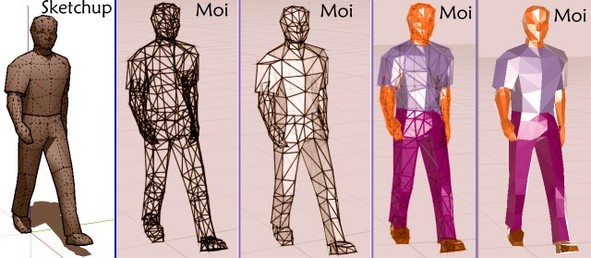
                          Walk Man OBJ
                          Walk Man 3DM

                          http://moiscript.weebly.com/uploads/3/9/3/8/3938813/3531936.jpg?598


                          su_3dm.jpg

                          Frenchy Pilou
                          Is beautiful that please without concept!
                          My Little site :)

                          1 Reply Last reply
                          Reply Quote 0
                          • S
                            sepo
                            last edited by

                            @unknownuser said:

                            Yeah solidworks is windows as well. Rhino uses the same manifold 3D as solidworks ? And, will it be OK for injection moulding, I know it does nurbs as I have used it in Uni

                            Rhino is good for injection moulding, rapid prototyping etc. You will have to make sure that nurbs surfaces do not have naked edges...means you have to produce clean geometry.
                            Btw Rhino has been used a lot in industry to convert 3rd party files to solidworks geometry.
                            As Pilou says MOI is as well good option for .3DM.

                            1 Reply Last reply
                            Reply Quote 0
                            • C
                              congellous
                              last edited by

                              Thanks guys, I have Rhino up and running

                              In some tests the STL and IGES files exported from Sketchup have various holes and anomalies and come in as meshes even after SU SOLID plug has made them water tight solids

                              Is there a process for sorting this out, I'm trying the "fill holes" Join, weld tools etc just wondered if anyone had a process

                              1 Reply Last reply
                              Reply Quote 0
                              • pilouP
                                pilou
                                last edited by

                                Why not try the process 3 posts above with the little prog of conversion?
                                Sketchup --> OBJ --> 3DM --> Rhino ?

                                Frenchy Pilou
                                Is beautiful that please without concept!
                                My Little site :)

                                1 Reply Last reply
                                Reply Quote 0
                                • C
                                  congellous
                                  last edited by

                                  @unknownuser said:

                                  Why not try the process 3 posts above with the little prog of conversion?
                                  Sketchup --> OBJ --> 3DM --> Rhino ?

                                  I'm on a Mac though ??

                                  1 Reply Last reply
                                  Reply Quote 0
                                  • S
                                    sepo
                                    last edited by

                                    you should be able to import SU directly into rhino. saying that I am not sure if imprter is implemented in beta.

                                    1 Reply Last reply
                                    Reply Quote 0
                                    • C
                                      congellous
                                      last edited by

                                      Yeah I can get geometry into Rhino from sketch up as polygonal mesh

                                      Is there anyway I can make this into a manifold or start creating the surfaces onto the model in Rhino, I suppose this is what spaceclaim does.....

                                      1 Reply Last reply
                                      Reply Quote 0
                                      • S
                                        sepo
                                        last edited by

                                        There are some plugins but I believe they are mostly windows for now....
                                        Have a look at here.
                                        http://wiki.mcneel.com/rhino/meshtonurb

                                        1 Reply Last reply
                                        Reply Quote 0
                                        • pilouP
                                          pilou
                                          last edited by

                                          @unknownuser said:

                                          I'm on a Mac though ??

                                          Use an emulator, virtualisator... πŸ˜‰
                                          Or send me your file by PM if not top secret with something like Mediafire

                                          Frenchy Pilou
                                          Is beautiful that please without concept!
                                          My Little site :)

                                          1 Reply Last reply
                                          Reply Quote 0
                                          • C
                                            congellous
                                            last edited by

                                            @unknownuser said:

                                            @unknownuser said:

                                            I'm on a Mac though ??

                                            Use an emulator, virtualisator... πŸ˜‰
                                            Or send me your file by PM if not top secret with something like Mediafire

                                            I might take you up on that Pilou thankyou

                                            1 Reply Last reply
                                            Reply Quote 0

                                            Hello! It looks like you're interested in this conversation, but you don't have an account yet.

                                            Getting fed up of having to scroll through the same posts each visit? When you register for an account, you'll always come back to exactly where you were before, and choose to be notified of new replies (either via email, or push notification). You'll also be able to save bookmarks and upvote posts to show your appreciation to other community members.

                                            With your input, this post could be even better πŸ’—

                                            Register Login
                                            • 1
                                            • 2
                                            • 2 / 2
                                            • First post
                                              Last post
                                            Buy SketchPlus
                                            Buy SUbD
                                            Buy WrapR
                                            Buy eBook
                                            Buy Modelur
                                            Buy Vertex Tools
                                            Buy SketchCuisine
                                            Buy FormFonts

                                            Advertisement