sketchucation logo sketchucation
    • 登入
    Oops, your profile's looking a bit empty! To help us tailor your experience, please fill in key details like your SketchUp version, skill level, operating system, and more. Update and save your info on your profile page today!
    🔌 Smart Spline | Fluid way to handle splines for furniture design and complex structures. Download

    [req] follow me helix

    已排程 已置頂 已鎖定 已移動 Plugins
    35 貼文 14 Posters 16.4k 瀏覽 14 Watching
    正在載入更多貼文
    • 從舊到新
    • 從新到舊
    • 最多點贊
    回覆
    • 在新貼文中回覆
    登入後回覆
    此主題已被刪除。只有擁有主題管理權限的使用者可以查看。
    • boofredlayB 離線
      boofredlay
      最後由 編輯

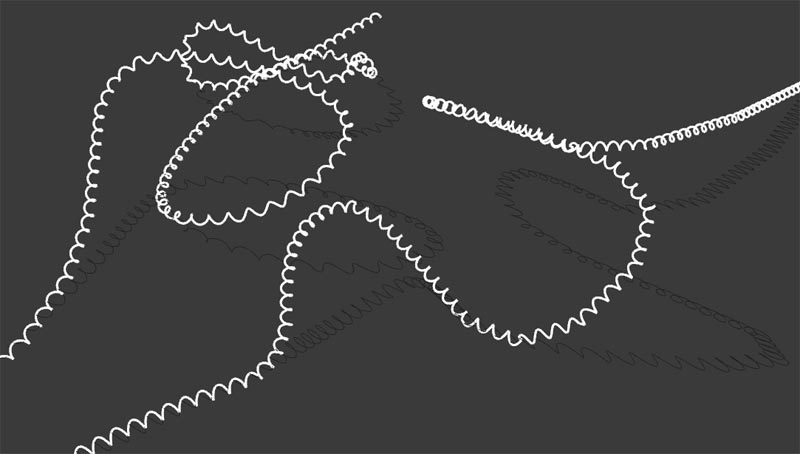
      Woah, great work Sam!


      Helix.jpg

      http://www.coroflot.com/boofredlay

      1 條回覆 最後回覆 回覆 引用 0
      • soloS 離線
        solo
        最後由 編輯

        Eric,

        That must have taken some time to 'follow me' 😲

        http://www.solos-art.com

        If you see a toilet in your dreams do not use it.

        1 條回覆 最後回覆 回覆 引用 0
        • EarthMoverE 離線
          EarthMover
          最後由 編輯

          Reminds me of the days before cordless phones! 😆

          3D Artist at Clearstory 3D Imaging
          Guide Tool at Winning With Sketchup
          Content Creator at Skapeup

          1 條回覆 最後回覆 回覆 引用 0
          • boofredlayB 離線
            boofredlay
            最後由 編輯

            Ha ha, no Pete, I just changed the profiles of the lines to 5 and did a screengrab.

            http://www.coroflot.com/boofredlay

            1 條回覆 最後回覆 回覆 引用 0
            • tridemT 離線
              tridem
              最後由 編輯

              it works magic! Thanks sdmitch

              1 條回覆 最後回覆 回覆 引用 0
              • numbthumbN 離線
                numbthumb
                最後由 編輯

                Thank you, sdmitch!

                Comfortably numb...

                1 條回覆 最後回覆 回覆 引用 0
                • boofredlayB 離線
                  boofredlay
                  最後由 編輯

                  You know what Pete, it was late last night and I think I read your question wrong. It did take some time for the helix to follow that path. I thought you meant I did a pipe along path afterwards. Sorry.

                  This plugin is nice for making stitching. Just run it then scale the helix to almost flat. Around a curve might take some tweaking like I did for this one. I actually made the helix on one segment, scaled it "flat" then copied it around the curve. I am also finding out that the longer the helix the less responsive it is to moving or editing. Even though the straight line one is just that, a straight line, it was difficult to manipulate. Best bet is to do a short segment then copy it inside a group or component.
                  Anyway, enough of my rambling.
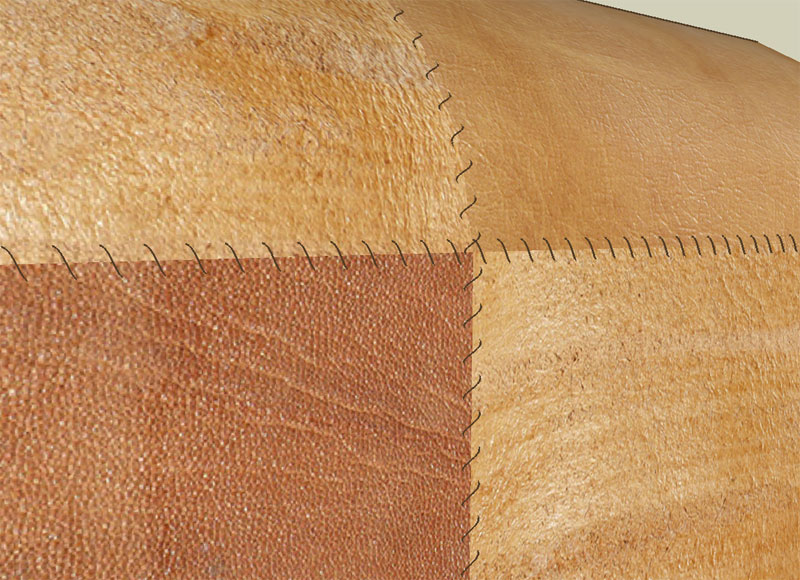

                  Stitch.jpg

                  http://www.coroflot.com/boofredlay

                  1 條回覆 最後回覆 回覆 引用 0
                  • EarthMoverE 離線
                    EarthMover
                    最後由 編輯

                    Perhaps change the OP to reflect [Plugin] and attach the script to the first post.

                    3D Artist at Clearstory 3D Imaging
                    Guide Tool at Winning With Sketchup
                    Content Creator at Skapeup

                    1 條回覆 最後回覆 回覆 引用 0
                    • J 離線
                      Jim
                      最後由 編輯

                      @earthmover said:

                      Perhaps change the OP to reflect [Plugin] and attach the script to the first post.

                      But best to start a new post.

                      Hi

                      1 條回覆 最後回覆 回覆 引用 0
                      • I 離線
                        ivreich
                        最後由 編輯

                        cool plugin!

                        next step: allow the helix radius to change along center path according to target points. 💚

                        joel

                        1 條回覆 最後回覆 回覆 引用 0
                        • mitcorbM 離線
                          mitcorb
                          最後由 編輯

                          Hi:
                          Using Fredo6's Bezier curve with 20segments and two control points, follow me helix with 1' diameter, 0.25" segs, and 30 degrees(I think), the result shows some odd kinks in the curve.
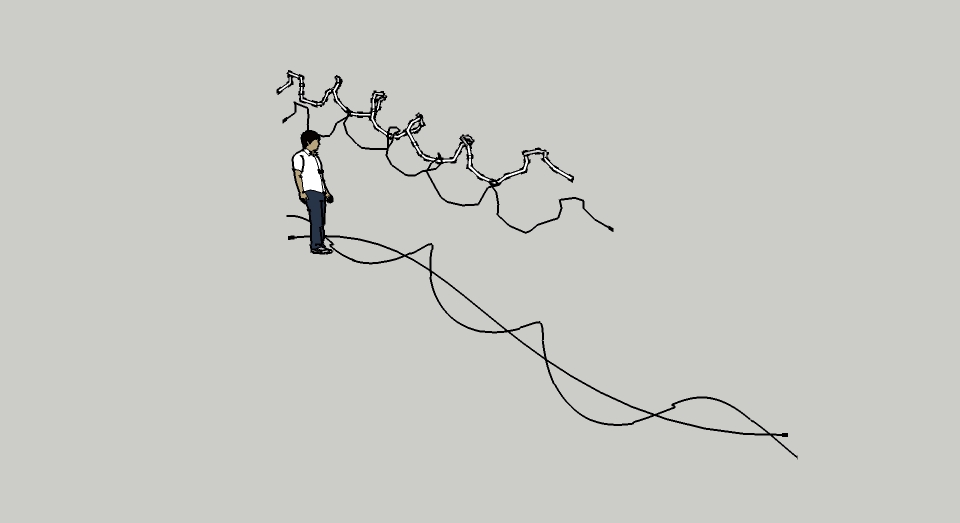

                          FMHtest.jpg

                          I take the slow, deliberate approach in my aimless wandering.

                          1 條回覆 最後回覆 回覆 引用 0
                          • sdmitchS 離線
                            sdmitch
                            最後由 編輯

                            Mitcorb, The kinks occur when the helix linear increment "spans" a start/end point of the centerline segment. If you have the original version posted, it made no attempt to account for this. The latest version I posted does try but is not totally successful. It is something that I am still working on.

                            Nothing is worthless, it can always be used as a bad example.

                            http://sdmitch.blogspot.com/

                            1 條回覆 最後回覆 回覆 引用 0
                            • mitcorbM 離線
                              mitcorb
                              最後由 編輯

                              Hi, modelhead:
                              The missing question is missing because I was merely reporting an observed condition in the instance. Unfortunately, I ran out of time to also include the .skp The stuff in the background was prior results with other parameters. If the skp might be helpful, I can upload it, but sdmitch may have answered the question I did not ask. I presume I have the current version of the script since I did not download it till just prior to testing today--whatever "today" means in this environment.

                              EDIT: I see that Follow Me Helix now has a [Plugin] heading. Let me download from that location and try the process again.

                              I take the slow, deliberate approach in my aimless wandering.

                              1 條回覆 最後回覆 回覆 引用 0
                              • T 離線
                                tractor12306
                                最後由 編輯

                                I don't know how to download this stuff,could you help me ?

                                1 條回覆 最後回覆 回覆 引用 0
                                • pbacotP 離線
                                  pbacot
                                  最後由 編輯

                                  look at the first post. It gives a link to another thread and you can see a file listed in the post . Click on that to download it.

                                  Here is the link again to the other post.https://sketchucation.com/forums/viewtopic.php?p=353348#p353348

                                  It's in the post by sdmitch. it says "ATTACHMENT" and file is called Follow Me Helix.rb. Whether or not it still works in later SU versions is the question. It is very old.

                                  MacOSX MojaveSketchUp Pro v19 Twilight v2 Thea v3 PowerCADD

                                  1 條回覆 最後回覆 回覆 引用 0
                                  • 1
                                  • 2
                                  • 1 / 2
                                  • 第一個貼文
                                    最後的貼文
                                  Buy SketchPlus
                                  Buy SUbD
                                  Buy WrapR
                                  Buy eBook
                                  Buy Modelur
                                  Buy Vertex Tools
                                  Buy SketchCuisine
                                  Buy FormFonts

                                  Advertisement