sketchucation logo sketchucation
    • Login
    Oops, your profile's looking a bit empty! To help us tailor your experience, please fill in key details like your SketchUp version, skill level, operating system, and more. Update and save your info on your profile page today!
    Mac User? | Join the Rayscaper Beta for Mac Learn More

    [Plugin] Stair Maker

    Scheduled Pinned Locked Moved Plugins
    110 Posts 37 Posters 128.8k Views 37 Watching
    Loading More Posts
    • Oldest to Newest
    • Newest to Oldest
    • Most Votes
    Reply
    • Reply as topic
    Log in to reply
    This topic has been deleted. Only users with topic management privileges can see it.
    • atelierpaarA
      atelierpaar
      last edited by

      Well, I dont get to type in any value.
      the plugin quits right after the first Dialog box

      1 Reply Last reply
      Reply Quote 0
      • sdmitchS
        sdmitch
        last edited by

        @atelierpaar said:

        Well, I dont get to type in any value.
        the plugin quits right after the first Dialog box

        That doesn't answer my question. If you could enter a number say 1234 mm as meters, would it be 1.234 or 1,234?

        p.s.

        Please check messages.

        Nothing is worthless, it can always be used as a bad example.

        http://sdmitch.blogspot.com/

        1 Reply Last reply
        Reply Quote 0
        • F
          filipebonito
          last edited by

          hello,

          i have the same problem, when i open the plugin, i see the dialogue to chose the stair type, but after that get no options...

          i use "," in numbers, lile "12,50"

          here is the ruby console:

          "Error: #<ArgumentError: Cannot convert "4.921259842519685" to Length>
          C:/Users/admin/AppData/Roaming/SketchUp/SketchUp 2015/SketchUp/Plugins/Stair Maker.rb:267:in to_l' C:/Users/admin/AppData/Roaming/SketchUp/SketchUp 2015/SketchUp/Plugins/Stair Maker.rb:267:in get_defaults'
          C:/Users/admin/AppData/Roaming/SketchUp/SketchUp 2015/SketchUp/Plugins/Stair Maker.rb:77:in reset' C:/Users/admin/AppData/Roaming/SketchUp/SketchUp 2015/SketchUp/Plugins/Stair Maker.rb:68:in initialize'
          C:/Users/admin/AppData/Roaming/SketchUp/SketchUp 2015/SketchUp/Plugins/Stair Maker.rb:25:in new' C:/Users/admin/AppData/Roaming/SketchUp/SketchUp 2015/SketchUp/Plugins/Stair Maker.rb:25:in block in <top (required)>'
          SketchUp:1:in `call'"

          what can i do?
          thanks
          filipe bonito

          1 Reply Last reply
          Reply Quote 0
          • sdmitchS
            sdmitch
            last edited by

            I have sent by Personal Message a version that should work for you.

            Nothing is worthless, it can always be used as a bad example.

            http://sdmitch.blogspot.com/

            1 Reply Last reply
            Reply Quote 0
            • R
              rabas
              last edited by

              Could i have , please, the comma version?

              1 Reply Last reply
              Reply Quote 0
              • sdmitchS
                sdmitch
                last edited by

                @rabas said:

                Could i have , please, the comma version?

                I have updated the plugin at the Plugin Store to work with comma or period. Delete the existing Stair Maker.txt file.

                Nothing is worthless, it can always be used as a bad example.

                http://sdmitch.blogspot.com/

                1 Reply Last reply
                Reply Quote 0
                • M
                  MattBram
                  last edited by

                  Hi,

                  I meet the same result as Filipe does in the console, and the same result in Sketchup, i.e. nothing appears after having completed the tables.

                  I tried using either "." and "," with the plugin download today, and I also tried working in inches as well as in mm without need of using decimals nor fraction.

                  What have I been doing wrong?

                  Thanks,

                  Matt

                  1 Reply Last reply
                  Reply Quote 0
                  • sdmitchS
                    sdmitch
                    last edited by

                    Deleting the existing StairMaker.txt file and allow the plugin to recreate it.

                    Nothing is worthless, it can always be used as a bad example.

                    http://sdmitch.blogspot.com/

                    1 Reply Last reply
                    Reply Quote 0
                    • J
                      johnwmcc
                      last edited by

                      Thanks, SD Mitch, for this very useful plugin.

                      Just installed this on iMac El Capitan. The input box dialogue is truncating the field names.
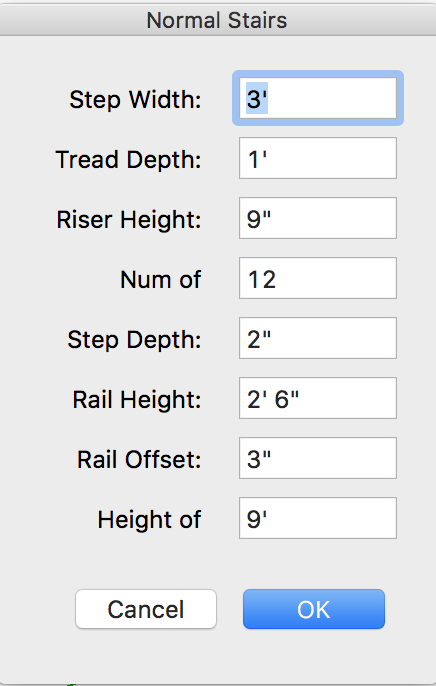
                      InputBox truncates field names.png
                      This is a known bug in InputBox on Mac, and can be fixed by adding extra spaces in the Prompts line of the call to inputBox.
                      prompts=["Step Width: ","Tread Depth: ","Riser Height: ","Num of Steps: ","Step Depth:","Rail Height:", "Rail Offset:","Height of Stairs:"]

                      The text above displays only one extra space added but in reality there are several - HTML is collapsing multiple spaces into one.

                      Result
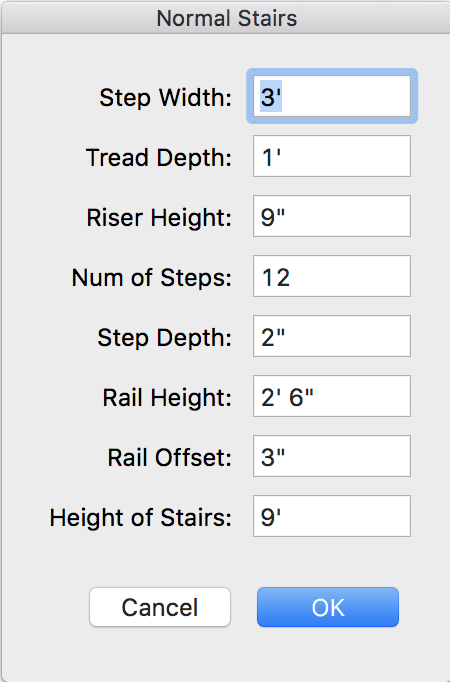
                      InputBox fixed.png

                      I've incorporated this change into my own copy. Could it be fixed for any future plugin updates?

                      1 Reply Last reply
                      Reply Quote 0
                      • sdmitchS
                        sdmitch
                        last edited by

                        Since I don't have or have access to a Mac, there is no way for me to address this problem.

                        Nothing is worthless, it can always be used as a bad example.

                        http://sdmitch.blogspot.com/

                        1 Reply Last reply
                        Reply Quote 0
                        • S
                          Silentip
                          last edited by

                          Hello. I'm trying to launch the Stair Maker plugin in SketchUp 2017. I get this error

                          Error: #<NameError: uninitialized class variable @@ss_height in SDM::Stair_Maker>
                          C:/Users/Silent_ip/AppData/Roaming/SketchUp/SketchUp 2017/SketchUp/Plugins/StairMaker/StairMaker.rb:287:in put_defaults' C:/Users/Silent_ip/AppData/Roaming/SketchUp/SketchUp 2017/SketchUp/Plugins/StairMaker/StairMaker.rb:84:in reset'
                          C:/Users/Silent_ip/AppData/Roaming/SketchUp/SketchUp 2017/SketchUp/Plugins/StairMaker/StairMaker.rb:54:in initialize' C:/Users/Silent_ip/AppData/Roaming/SketchUp/SketchUp 2017/SketchUp/Plugins/StairMaker/StairMaker.rb:9:in new'
                          C:/Users/Silent_ip/AppData/Roaming/SketchUp/SketchUp 2017/SketchUp/Plugins/StairMaker/StairMaker.rb:9:in block in <top (required)>' SketchUp:1:in call'


                          Code

                          1 Reply Last reply
                          Reply Quote 0

                          Hello! It looks like you're interested in this conversation, but you don't have an account yet.

                          Getting fed up of having to scroll through the same posts each visit? When you register for an account, you'll always come back to exactly where you were before, and choose to be notified of new replies (either via email, or push notification). You'll also be able to save bookmarks and upvote posts to show your appreciation to other community members.

                          With your input, this post could be even better đź’—

                          Register Login
                          • 1
                          • 2
                          • 3
                          • 4
                          • 5
                          • 6
                          • 6 / 6
                          • First post
                            Last post
                          Buy SketchPlus
                          Buy SUbD
                          Buy WrapR
                          Buy eBook
                          Buy Modelur
                          Buy Vertex Tools
                          Buy SketchCuisine
                          Buy FormFonts

                          Advertisement