[concept] plugin launcher
-
I think that idea appeared in the Plugin-Installer thread.
At the moment, I often have to move plugins around between the standard folder and a "plugins archive" folder (where I have umpteen plugins). I have to do this before I start SketchUp and I have to take a good decision about what plugins I really use often.The idea is a launcher with a quick search when you type. You search for any plugin/tool that you want to execute. If the plugin is not yet loaded (disabled), it will be loaded instantly.
The basic purpose is to keep only a small range of standard plugins (=> quicker start of SketchUp and uncluttered interface), but make it easy to load rarely used plugins when you need them. You don't have to bother anymore if a plugin is disabled/archived or not.
I created a prototype (that I will post later). It uses an index file that contains at least
- the name of the plugin
- the path from where to load it
- and eventually the command to execute
Edit: Here it is:
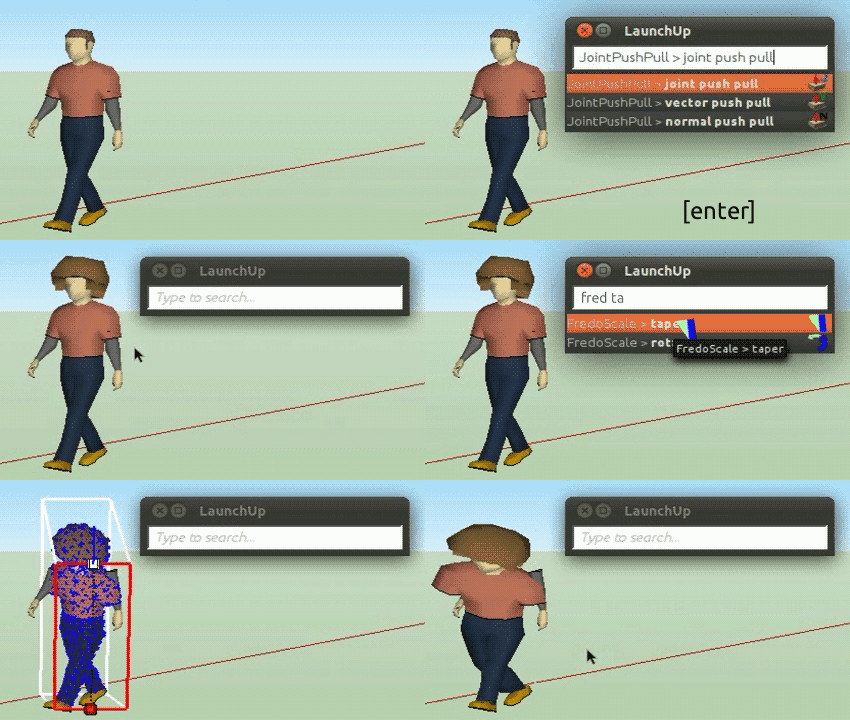
0.1
0.2.1
There are several things I'm worrying about:
It should be at least techinically possible to load any existing plugin that is disabled (since it isn't difficult to get the ruby file paths).But how to get the commands that should be executed, a proper name, icons, eventually keywords?
There is no easy way to get such metadata for the index. Unfortunately SketchUp doesn't provide access to the menus or toolbars. The same was the challenge for Jim's Custom Toolbars, it works only with the buttons that he provided, and users have to dig much into code in order to manually add more buttons of other plugins.
So either I create the metadata manually for each plugin (...) or I parse all ruby files in order to extract something useful
 .
.
That would definitely not work with all plugins (since some plugins contain complex structures of classes and wrapper methods, not to speak of .rbs plugins) but with some. It could also be very error-prone and it had no good performance.Is there a better solution?
Best would be if the API gave access to all commands created with UI::Command, then we had more control about how tools appear in the user interface (toolbar manager etc. or this quick launcher).
27.03.2013**[highlight=#bf0000:f5kkme6z]Update:[/highlight:f5kkme6z] This concept has been realized!
LaunchUp – A Quick Launcher for SketchUp**
It is able to launch all loaded tools and plugins. Plugins that you want to turn temporarily off are best wrapped in "SketchUp Extensions" (contact the developer if a plugin is not yet an extension). In LaunchUp you can also do "load [extension name]". -
You are confusing loading and running. Once you have the plugin loaded, then you have access to his functions in the menu and/or toolbar. The toolbar could be hidden, so that will add another step. Jim's toolbar plugin is an alternate toolbar. So it would need to know and mimic the particular calls/commands.
-
I believe I'm not confusing this, what I want is rather to combine the two. As I wrote, there are hundreds of plugins that could be useful, but many of us don't keep rarely used plugins in the main folder. It makes no sense to load hundreds of plugins at startup of SketchUp.
-
hi Aerilius,
I'm keen for this, but first some questions,
are you using the mac version for your teaser... the webdialog looks like it has a modified nib file.
have you looked at Alex's load single plugin script, I use it all the time on macs.
Maybe as your web dialog loads the 'desired tools' ruby, it could parse it and display clones of the tools buttons and sym links to the 'originals' commands.
just thinking out load...
john
-
 Good concept...Keep on, please
 -
I just found http://forums.sketchucation.com/viewtopic.php?t=22599.
 If I had found it before, maybe I wouldn't have realised this plugin. But on the other side it's similar but not really the same.
@driven said:
are you using the mac version
When I made the animation, I didn't have a windows or mac machine arround, but the webdialog should match automatically to the color scheme of any OS.
@driven said:
Maybe as your web dialog loads the 'desired tools' ruby,
I don't understand what you mean with "desire tools". I searchd for it, is that an existing plugin? Do you have a link for it? Or are you just referring to my index file?
-
Have been playing with this a little also and am starting to like it. A couple of I thoughts that I think would make it better:
- Be able to use multiple index.txt files to help organize the commands. It's easier to edit smaller files, and easier to group related commands (Fredo tools could go in fredo.txt, for example.)
- An option to close the dialog after a command is selected.
I think I can nearly do away with the Plugins menu using this - and that's a good thing!
-
This topic might get more views if it were moved to the Plugins forum. It could be tagged as a "concept" there also. I understand why it's posted in the Dev forum, but it is too hard to find here because it is not listed in the index.
-
Hi,
I've had a play on the mac,
I can only get some of it to work if I use 'enable debug' in scripts mode on the WebDialog.Once I've done that the Problems are:
auto resize is not taking the menu bar height into account.
when I have the WD menu with images, and click the image/area the commands to ruby don't run.Attached is the actual output html as seen by Safari in SU.
Safari_LaunchUp.htm.zipMaybe someone can spot the problem...
john
-
Hi,
I think it could have been the problem with Safari+onload. I added my current version (0.2).Note that that I added an index for demonstration purposes (it lists tools that are maybe not installed). That's because the fundamental obstacle is still that we don't have access to the commands of other plugins (I'm curious about Thomthom's aliasing or interception approach).
The plugin contains a method
LaunchUp.build_indexwhich parses the other plugins to find theirUI:Commands but the resulting index can contain mistakes and it's not a solution that I want to publish for common use, so it's still experimental.Actually a "search" user interface fits well in the scope of Google.
-
@aerilius said:
Hi,
I think it could have been the problem with Safari+onload. I added my current version (0.2).hi,
I got some of it working, sort of, and I don't think the loading was the issue, on Safari.
It seems more to do with the focus function and works better if I comment out line 261// $("combo-input").focus();otherwise you add to the placeholder text rather then replace it.
Tab and Return key codes are intermittent.
Mostly they appear to be locked into the input box, even after the arrows have worked as intended.When I changed it to show_modal, JPP worked once. soap skin, a couple of times...
also
in the ruby:
there seems to be an error line 90 it hasif widthI changed toif heightso it doesn't 'over' shrink now.
in html:
Input type "search" [with css- margin top:4px;] looks better and doesn't seem to add to the problems.john
-
I don't know what's going on - it's probably my computer. LaunchUp used to work, but now I get this at first:

And expanded:
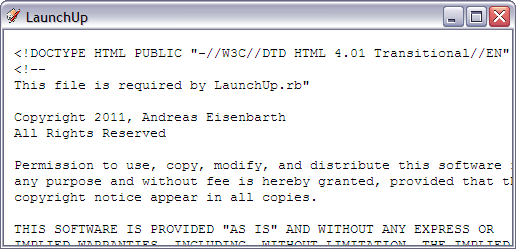
I do tend to have a lot of problems with WebDialogs. I've never been able to figure out what is happening.
-
@Jim,
did you ever get the default text?
what happens if you type into the box?john
-
-
@jim said:
- now a get the dialog which only shows me the source for the html. No idea what I did.
I would check other WD's first to see if it's a 'LaunchUp' specific problem
If you haven't touched the files, I'd look at the IE settings.
have you disabled js or set it to 'show as plain text'.
can you set those type of things a PC?
sorry, not very helpful
john
-
I have never seen this problem.
What happens when you create a webdialog on the console and then set_file(".../LaunchUp.htm") ?I don't believe that, but could there be a reason that Internet Explorer thinks it's a plain text file and not html? (confused mime type, or is the encoding or file header wrong?)
-
When I inspect the html in the dialog, I see it is incorrectly nested somehow..
<HTML><HEAD></HEAD> <BODY><PRE><!DOCTYPE HTML PUBLIC "-//W3C//DTD HTML 4.01 Transitional//EN" "http://www.w3.org/TR/html4/strict.dtd"> <!-- This file is required by LaunchUp.rb" Copyright 2011, Andreas Eisenbarth All Rights Reserved -
I'm not sure what is nested wrong? (I haven't found it yet)
I know many browsers internally prepend a<HTML><HEAD></HEAD><BODY><PRE>when they display plain text files, so maybe this is only the result instead of the cause why IE shows the plain text.I found that the doctype makes no sense (transitional <-> strict). Can you try
<!DOCTYPE HTML PUBLIC "-//W3C//DTD HTML 4.01//EN" "http://www.w3.org/TR/html4/strict.dtd"> -
I tried the new doctype - nope. I got rid of the doctype and comment beginning the .htm file with <html> and it started working again.
I put the doctype back in and removed just the comment - it worked.
-
I've got v2 stable enough to start looking at it on Safari... Selection from the search results only works with new keycodes and not the mouse...
HTML Changes include:
added a break after 'form' and moved the js to below that break... so line numbers reflect this.Line 01- DOCTYPE html
Line 22- added to body>> height:100%;
Line 23- changed in form>> top:4px;height:inherit;
Line 49- input type="search"
Line 57- [<]br /[>] ...without []
Line 59>>296- scripts
Line 210/211- // left-arrow: select first entry
if (keycode == 37) {
Line 222/223- // right-arrow: execute entry
if (keycode == 39) {
Line 275- // $("combo-input").focus(); #jb_macin the Rudy:
this forces it to only scroll down
Line 54- changed to@launchdlg = UI::WebDialog.new("LaunchUp", false, false, 0, 1140, 270, 50, true)
Line 92- added@launchdlg.set_position(1140,0)
to get it to show_modal
Line 98>>102 + Line 110>>102-if RUBY_PLATFORM.include?('darwin') # Do NOT 'do this if on a PC! @launchdlg.show_modal else @launchdlg.show end #mac _modalI also set a shortcut key in 'system' preferences and have started updating the txt file.
john



Advertisement