New Hardware Speed Test & how to really speed it up!
-
Hi, sketchyKev:
I notice your Display Adapter says nothing of OpenGL support, only DirectX. I am also given to understand that ATI cards are not necessarily first choice for Sketchup? However, I have also heard that lately the top graphics card producers have been working toward double compliance? (both OpenGL and DirectX).
Can anyone clarify this confusion? -
@mitcorb said:
Hi, sketchyKev:
I notice your Display Adapter says nothing of OpenGL support, only DirectX. I am also given to understand that ATI cards are not necessarily first choice for Sketchup? However, I have also heard that lately the top graphics card producers have been working toward double compliance? (both OpenGL and DirectX).
Can anyone clarify this confusion?Hi Mitcorb,
I had heard similar things, but the test proves my ATI card really does benefit from selecting "OpenGL hardware acceleration". It may be that the latest SU supports Direct X hardware acceleration as well (just guessing). My PC is fairly modern, but "bargain basement" with the greatest savings probably being made in the graphics card department and is the weakest link in the system. I am thinking of getting a better card, so I am hoping people will post some test results here so that we can can find out what systems really motor along and what systems to avoid. The proof is in the pudding, so get testing and please share!
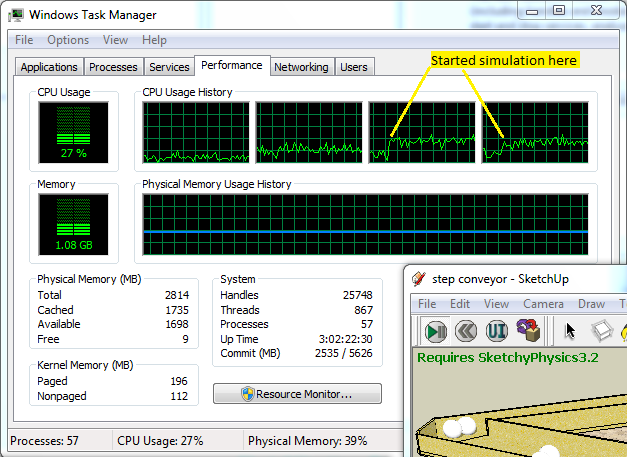
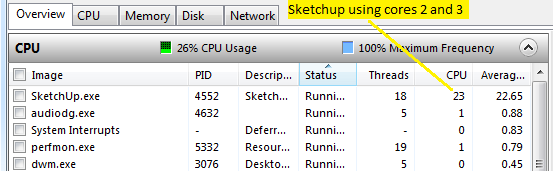
Another myth in an older speed test thread is that SU does not take advantage of more than one core processor. These screenshots of the performance monitor in Windows Task Manager shows that Sketchup 8 is using at least two cores when the simulation is running:
-
About the AMD (no longer ATI) issue: I've been using an HD6950 for several months and haven't noticed any issues with sketchup. I haven't run any tests to objectively say how fast it runs, but it's much quicker than my Nvidia 9800GT at work -- part of that is due to the processor, though (core 2 quad @ 2.66 ---> i5-2500k @ 3.7).
The point is, no problems with new AMD. -
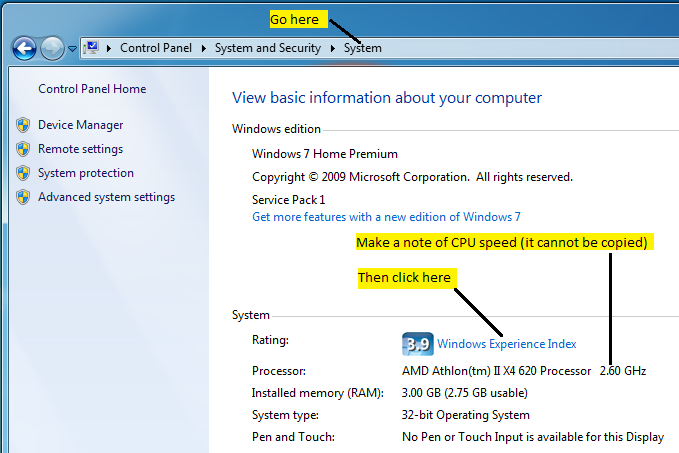
Here is how to easily find and copy and paste your system information in Windows 7.
(It took me while to figure it out
 )
)
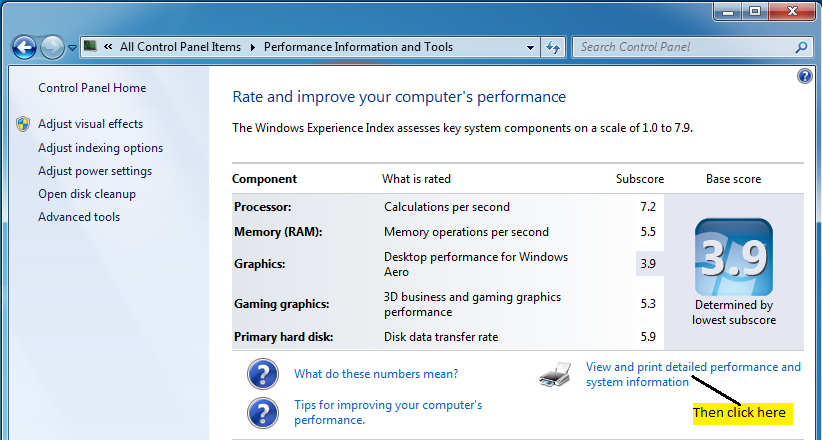
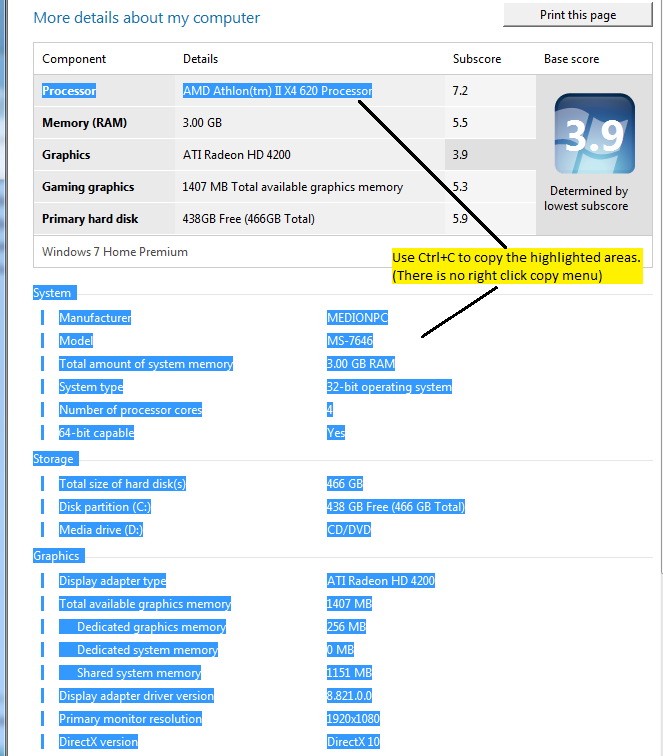
If all that seems too much trouble or accessing your operating system details is different, just manually post the basic details such as:
CPU model & speed:
No of cores:
Amount of memory:
OS & SU version:
Graphics Card model:That would still be very useful.

-
Hello!!
I did the test as you described. And the result was the following:@unknownuser said:
OpenGL ON
Shadow off: ["Time", 2.377, "Frames", 64, "Fps", 26.9246949936895]
Shadow on: ["Time", 5.117, "Frames", 65, "Fps", 12.702755520813]
OpenGL OFF
Shadow off: ["Time", 28.666, "Frames", 65, "Fps", 2.26749459289751]
Shadow on: ["Time", 30.419, "Frames", 65, "Fps", 2.13682238074887]
The difference is incredible. But OpenGL was active from the beginning, so I've never had that problem.
The computer specs:@unknownuser said:
Processor Intel(R) Core(TM) i5-2500K CPU @ 3.30GHz
Minne (RAM) 4,00 GB 7,5
Grafik Radeon HD 6800 Series 7,8
Spelgrafik 2807 MB tillgängligt grafikminne 7,8
Primär hårddisk 123GB ledigt (243GB totalt) 5,9
Windows 7 UltimateSystem
Tillverkare Gigabyte Technology Co., Ltd.
Modell PH67A-UD3
Total mängd systemminne 4,00 GB RAM
Systemtyp 64-bitars operativsystem
Antal processorkärnor 4Lagring (Storage)
Total mängd hårddiskutrymme 1081 GB
Diskpartition (C:) 123 GB ledigt (243 GB totalt)
Diskpartition (D:) 61 MB ledigt (100 MB totalt)
Diskpartition (E:) 29 GB ledigt (29 GB totalt)
Diskpartition (F:) 52 GB ledigt (492 GB totalt)
Diskpartition (G:) 29 GB ledigt (30 GB totalt)
Diskpartition (H:) 2 MB ledigt (2 MB totalt)
Diskpartition (I:) 149 GB ledigt (196 GB totalt)
Medieenhet (J:) CD/DVD
Diskpartition (K:) 11 GB ledigt (90 GB totalt)
Medieenhet (P:) CD/DVD
Medieenhet (Q:) CD/DVD
Medieenhet (R:) CD/DVD
Medieenhet (S:) CD/DVD
Medieenhet (T:) CD/DVDGrafik
Typ av grafikkort Radeon HD 6800 Series
Total mängd tillgängligt grafikminne 2807 MB
Dedikerat grafikminne 1024 MB
Dedikerat systemminne 0 MB
Delat systemminne 1783 MB
Grafikkortets drivrutinsversion 8.782.0.0
Primär bildskärmsupplösning 1920x1080
DirectX-version DirectX 10Everything is copied straight across, so most are in Swedish, but I think is enough to understand anyway.
Windows and Sketchup version is in the signature -
@hpnisse said:
Hello!!
I did the test as you described. And the result was the following:@unknownuser said:
OpenGL ON
Shadow off: ["Time", 2.377, "Frames", 64, "Fps", 26.9246949936895]
Shadow on: ["Time", 5.117, "Frames", 65, "Fps", 12.702755520813]
OpenGL OFF
Shadow off: ["Time", 28.666, "Frames", 65, "Fps", 2.26749459289751]
Shadow on: ["Time", 30.419, "Frames", 65, "Fps", 2.13682238074887]
Hi Hpnisse,
Thanks for getting the ball rolling. Very community spirited of you!
Your results are 50% faster than my system, but your system is obviously better, in fact I would have thought it would be even faster at a glance. I am curious why in another speed thread there was orders of magnitude differences in performance between systems, with some systems doing less than 2 fps and one mac achieving 120 fps!
 Hopefully we will get some more test results here and see what is going on.
Thanks again!
Kev.
-
I did the test today, but today I had no other programs running in the background.
So the result was the following:@unknownuser said:
[list:2z3c5kg9]OpenGL ON
Shadow on: ["Time", 3.912, "Frames", 60, "Fps", 15.3374233128834]
Shadow off: ["Time", 1.054, "Frames", 60, "Fps", 56.9259962049336]
OpenGL OFF
Shadow on: ["Time", 60.347, "Frames", 60, "Fps", 0.994249921288548]
Shadow off: ["Time", 24.993, "Frames", 60, "Fps", 2.4006721882127][/list
 2z3c5kg9]
I even tried to hide the edges, but it made minimal difference.
In order to get exactly 60 frames, I used LazyScript and "endSim ()" command. -
@hpnisse said:
I did the test today, but today I had no other programs running in the background.
So the result was the following:@unknownuser said:
[list:n7i7csve]OpenGL ON
Shadow on: ["Time", 3.912, "Frames", 60, "Fps", 15.3374233128834]
Shadow off: ["Time", 1.054, "Frames", 60, "Fps", 56.9259962049336]
OpenGL OFF
Shadow on: ["Time", 60.347, "Frames", 60, "Fps", 0.994249921288548]
Shadow off: ["Time", 24.993, "Frames", 60, "Fps", 2.4006721882127][/list
n7i7csve]I even tried to hide the edges, but it made minimal difference.
In order to get exactly 60 frames, I used LazyScript and "endSim ()" command.Hi Hpnisse,
That is more like what I thought your system would be capable of, you are really motoring now! You got nearly 57 fps with shadows off and I can only manage 18 fps with shadows off and no programs running in the background

Thanks for your contributions!
-
Sketchykev, these are my specs....Windows 7 32bit, intel core duo E7500 @ 2.93, Nvidea QuadroFX 380 LP
Rick
-
This is a quick summary of the results so far (all with hardware acceleration turned on). Thanks all
Operating System, CPU @ GHz, Cores, Graphics card, Shadows ON / Shadows OFF
WIndows 7 32 bit, AMD Athlon II X4 620 @ 2.60 GHz, 4 core, ATI Radeon HD 4200, 8 fps / 19 fps
Windows 7 32 bit, Intel Core duo E7500 @ 2.93 Ghz, 4 core, Nvidea QuadroFX 380 LP, 22 fps / 34 fps
Windows 7 64 bit, Intel Core i5-2500K @ 3.30 Ghz, 2 core, Radeon HD 6800 Series , 15 fps / 57 fpsSo far, all the listed cards benefit (in the region of an order of magnitude faster) from having OpenGL hardware acceleration enabled.

Hello! It looks like you're interested in this conversation, but you don't have an account yet.
Getting fed up of having to scroll through the same posts each visit? When you register for an account, you'll always come back to exactly where you were before, and choose to be notified of new replies (either via email, or push notification). You'll also be able to save bookmarks and upvote posts to show your appreciation to other community members.
With your input, this post could be even better 💗
Register Login


Advertisement