sketchucation logo sketchucation
    • Login
    Oops, your profile's looking a bit empty! To help us tailor your experience, please fill in key details like your SketchUp version, skill level, operating system, and more. Update and save your info on your profile page today!
    โš ๏ธ Update | Sketchucation Tools 5.0.8 released with licensing improvements and bugfixes Download

    Windows: Moving Floating Toolbars

    Scheduled Pinned Locked Moved Developers' Forum
    20 Posts 7 Posters 3.3k Views 7 Watching
    Loading More Posts
    • Oldest to Newest
    • Newest to Oldest
    • Most Votes
    Reply
    • Reply as topic
    Log in to reply
    This topic has been deleted. Only users with topic management privileges can see it.
    • J
      Jim
      last edited by

      Just tried experimenting with moving Toolbars in Windows using Win32API library. It works when a Toolbar is floating, anyway. Tyere may be some interesting possibilities for positioning/organizing them, at least when they are floating.

      Hi

      1 Reply Last reply
      Reply Quote 0
      • thomthomT
        thomthom
        last edited by

        ๐Ÿ˜ฒ ๐Ÿ˜ฎ

        Thomas Thomassen โ€” SketchUp Monkey & Coding addict
        List of my plugins and link to the CookieWare fund

        1 Reply Last reply
        Reply Quote 0
        • Dan RathbunD
          Dan Rathbun
          last edited by

          @jim said:

          Just tried experimenting with moving Toolbars in Windows using Win32API library. It works when a Toolbar is floating, anyway. Tyere may be some interesting possibilities for positioning/organizing them, at least when they are floating.

          Told ya' so.. told ya' so! ninny-nanny poo poo!

          Ref:
          @unknownuser said:

          , in Moving Toolbars responding in topic: Toolbar Registry Hacks":tcehfji3]

          Moving Toolbars
          In Win32 programming, everything on the screen, is a 'window'. Specifically all items are subclasses of class Window, and inherit base methods, etc. (So even a button is a window, that happens to have an image that makes it look like a button.)

          Floating: When toolbars are floated, they are basically re-styled as a non-modal dialog subclass; and re-adopted as a direct child of the application window (Sketchup's window.)
          So, Jim, you should be able to move them around in the same way you did the Console window, using Win32 API calls.

          Docked: When docked, they are re-adopted as a child window of the Toolbar Container Window, and restyled so as not to have frames, no caption bar, and add grips. If the caption names are not changed, you may be able to use the same methods you use for moving floating bars, just compensate for the different origins. (Screen origin vs the origins of the individual toolbar containers.)

          It only took ya' 8 months to try it.

          I'm not here much anymore.

          1 Reply Last reply
          Reply Quote 0
          • J
            Jim
            last edited by

            Better late than never?

            Hi

            1 Reply Last reply
            Reply Quote 0
            • J
              Jim
              last edited by

              Just playing with a dialog that toggles toolbars on and off. I thought it might be cool if the toolbar was moved near the cursor when opened, and then depending on the tool selected, automatically closed.
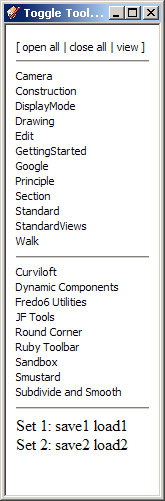
              461.png

              Hi

              1 Reply Last reply
              Reply Quote 0
              • thomthomT
                thomthom
                last edited by

                That's interesting.

                I was some time ago using the Win32API to get lists of toolbars in an effort to provide full access to all toolbars. Wanted to make an alternative API.

                Thomas Thomassen โ€” SketchUp Monkey & Coding addict
                List of my plugins and link to the CookieWare fund

                1 Reply Last reply
                Reply Quote 0
                • chrisglasierC
                  chrisglasier
                  last edited by

                  Seems reminiscent of the past Jim ... at least the basic idea ... I remember you felt SU menus could be improved in this way ... maybe more
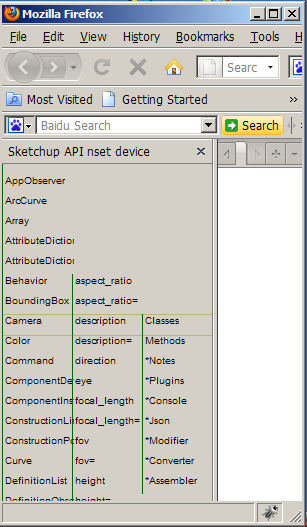

                  Jim toolbars.png

                  With TBA interfaces we can analyse what is to be achieved so that IT can help with automation to achieve it.

                  1 Reply Last reply
                  Reply Quote 0
                  • Dan RathbunD
                    Dan Rathbun
                    last edited by

                    @jim said:

                    Better late than never?

                    Just Razzin' ya'
                    ๐Ÿ˜› ๐Ÿ˜› ๐Ÿ˜›

                    I'm not here much anymore.

                    1 Reply Last reply
                    Reply Quote 0
                    • Dan RathbunD
                      Dan Rathbun
                      last edited by

                      @jim said:

                      Just playing with a dialog that toggles toolbars on and off. I thought it might be cool if the toolbar was moved near the cursor when opened, and then depending on the tool selected, automatically closed.

                      Localized Toolbar Captions

                      
                      dc_toolbar_caption = $dc_strings.GetString("Dynamic Components")
                      sb_toolbar_caption = $tStrings.GetString("Sandbox")


                      I was trying to get the actual toolbar object handles for these guys. I can get an array, via:

                      tba = [] ObjectSpace.each_object(UI::Toolbar) {|o| tba << o }

                      However there is not a .caption or .title getter method, nor apparently even an attribute (instance_variable,) nor local_variable that holds a toolbar title.
                      IF I make sure that the VERY first and second Ruby toolbars loaded are DC and Sandbox, respectively, then:

                      $Toolbars = Hash.new $Toolbars['Dynamic Components']=tba[0] $Toolbars['Sandbox']=tba[1]

                      Clunky.. but works. Now the Hash can be used to access the UI::Toolbar instance methods. (Later on the $Toolbars hash can be made to point to a @@hash inside class UI::Toolbar where it belongs. And we need a few more instance methods, as well as the constructor being updated to automatically push the objects into the hash.)

                      I'm not here much anymore.

                      1 Reply Last reply
                      Reply Quote 0
                      • J
                        Jim
                        last edited by

                        @chrisglasier said:

                        Seems reminiscent of the past Jim ... at least the basic idea ... I remember you felt SU menus could be improved in this way ... maybe more

                        Although we can recreate the menus and dialogs to some extent, there are enough settings which are missing from the API to make the effort frustrating - regardless of how the settings are presented to the user.

                        Hi

                        1 Reply Last reply
                        Reply Quote 0
                        • J
                          Jim
                          last edited by

                          As do I.

                          499.png

                          Hi

                          1 Reply Last reply
                          Reply Quote 0
                          • Dan RathbunD
                            Dan Rathbun
                            last edited by

                            @4dhans said:

                            Just have the DIALOG be the toolbar.

                            It's JUST not that simple. We know how to make WebDialogs. The workflow of making a webdialog takes alot longer than a toolbar.

                            We really need the native SU menu and toolbar classes updated.

                            But yes.. there are folks who like a "toolpanel" such as you demo in your post. But that is not what we are talking about, and is not a solution to missing methods and settings for native UI objects.

                            But thanks for sharing you nifty "toolpanel" example ... some users may like it.

                            EDIT: Yours is nice also, Jim.

                            I'm not here much anymore.

                            1 Reply Last reply
                            Reply Quote 0
                            • J
                              Jim
                              last edited by

                              @dan rathbun said:

                              We really need the native SU menu and toolbar classes updated.

                              Well, we've asked, and Google won't as a rule comment on the future, so just move forward with what we have.

                              @dan rathbun said:

                              EDIT: Yours is nice also, Jim.

                              thanks.

                              Hi

                              1 Reply Last reply
                              Reply Quote 0
                              • 4
                                4dHans
                                last edited by

                                Like Dan R. Said
                                @unknownuser said:

                                Just have the DIALOG be the toolbar.
                                Scripts by various people. Here is an example below: ๐Ÿ˜‰
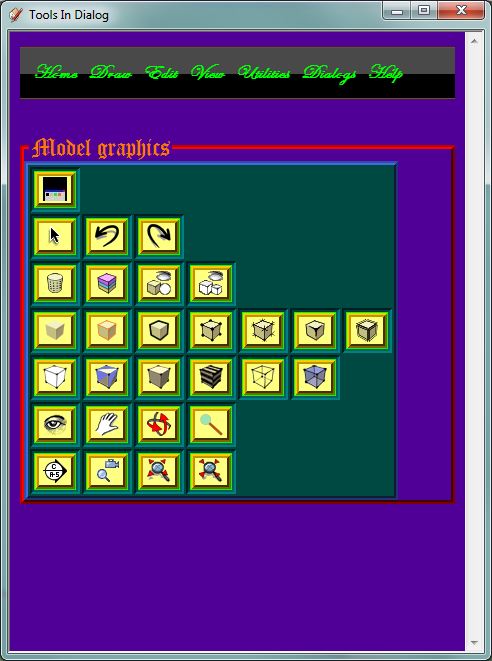

                                How It Looks


                                Tools In A Dialog

                                1 Reply Last reply
                                Reply Quote 0
                                • 4
                                  4dHans
                                  last edited by

                                  @dan rathbun said:

                                  @4dhans said:

                                  Just have the DIALOG be the toolbar.

                                  It's JUST not that simple. We know how to make WebDialogs. The workflow of making a webdialog takes alot longer than a toolbar.

                                  We really need the native SU menu and toolbar classes updated.

                                  But yes.. there are folks who like a "toolpanel" such as you demo in your post. But that is not what we are talking about, and is not a solution to missing methods and settings for native UI objects.

                                  But thanks for sharing you nifty "toolpanel" example ... some users may like it.

                                  EDIT: Yours is nice also, Jim.
                                  Oh. Just a little confused about the topic. ยซ ๐Ÿ˜• ยป

                                  1 Reply Last reply
                                  Reply Quote 0
                                  • J
                                    Jim
                                    last edited by

                                    Looks like you might be able to send the Toolbar a message via win32api and make it borderless, get the position, and line them up.


                                    622.png

                                    Hi

                                    1 Reply Last reply
                                    Reply Quote 0
                                    • thomthomT
                                      thomthom
                                      last edited by

                                      There's some pretty neat things one can do with the Win32API. One can even dock windows to the SU window.
                                      There was a guy here that posted images where he'd docked the tool windows to SU's viewport sides.

                                      But unfortunately he has not returned with any working samples. ๐Ÿ˜ž
                                      I was thinking it'd be cool to dock webdialogs. Or make them into Toolwindows.

                                      Thomas Thomassen โ€” SketchUp Monkey & Coding addict
                                      List of my plugins and link to the CookieWare fund

                                      1 Reply Last reply
                                      Reply Quote 0
                                      • KrisidiousK
                                        Krisidious
                                        last edited by

                                        @jim said:

                                        Looks like you might be able to send the Toolbar a message via win32api and make it borderless, get the position, and line them up.

                                        I want sum o dat...

                                        By: Kristoff Rand
                                        Home DesignerUnique House Plans

                                        1 Reply Last reply
                                        Reply Quote 0
                                        • A
                                          Aerilius
                                          last edited by

                                          Please, if you find out, that would be great!
                                          Some floating dialogs randomly stick to the cursor and follow the cursor over the screen. If I could dock those dialogs to the viewport sides, maybe I could get rid of that behaviour.

                                          1 Reply Last reply
                                          Reply Quote 0
                                          • J
                                            Jim
                                            last edited by

                                            One problem is that some of the floating toolbars do not remember their shape after re-starting Sketchup. Using the new "Save Toolbar Positions" does not help, and I haven't figured how to resize them.


                                            Hi

                                            1 Reply Last reply
                                            Reply Quote 0

                                            Hello! It looks like you're interested in this conversation, but you don't have an account yet.

                                            Getting fed up of having to scroll through the same posts each visit? When you register for an account, you'll always come back to exactly where you were before, and choose to be notified of new replies (either via email, or push notification). You'll also be able to save bookmarks and upvote posts to show your appreciation to other community members.

                                            With your input, this post could be even better ๐Ÿ’—

                                            Register Login
                                            • 1 / 1
                                            • First post
                                              Last post
                                            Buy SketchPlus
                                            Buy SUbD
                                            Buy WrapR
                                            Buy eBook
                                            Buy Modelur
                                            Buy Vertex Tools
                                            Buy SketchCuisine
                                            Buy FormFonts

                                            Advertisement