sketchucation logo sketchucation
    • Login
    Oops, your profile's looking a bit empty! To help us tailor your experience, please fill in key details like your SketchUp version, skill level, operating system, and more. Update and save your info on your profile page today!
    ⚠️ Update | Sketchucation Tools 5.0.8 released with licensing improvements and bugfixes Download

    What? No Menu?

    Scheduled Pinned Locked Moved Developers' Forum
    15 Posts 5 Posters 1.2k Views 5 Watching
    Loading More Posts
    • Oldest to Newest
    • Newest to Oldest
    • Most Votes
    Reply
    • Reply as topic
    Log in to reply
    This topic has been deleted. Only users with topic management privileges can see it.
    • Dan RathbunD
      Dan Rathbun
      last edited by

      Weird!
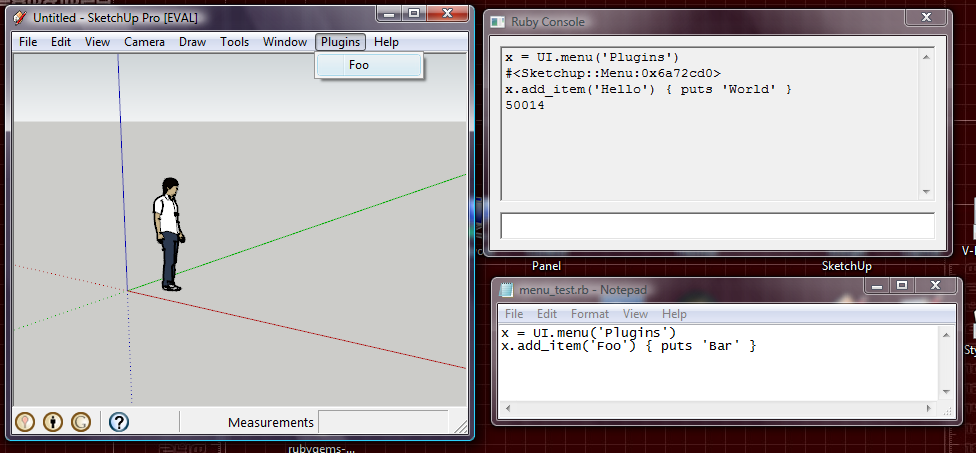
      If you send the following at the console, it works:
      UI.menu('Plugins').add_item('Hello') { puts "World" }

      Another thing. Each time you call UI.menu('Plugins') a new object is returned. I would think each of the standard menu objects would be created by the OEM extensions at startup, and the UI.menu method should return those, every time the method is called.

      Is this a bug that has creeped into the latter versions?

      I'm not here much anymore.

      1 Reply Last reply
      Reply Quote 0
      • thomthomT
        thomthom
        last edited by

        @dan rathbun said:

        Weird!

        "Maddening" was my thoughts on this. I really thought Iwas going mad as I thought I was doing something wrong. I spent and hour on this yesterday. Was testing some code in the console. Before I tried to paste it into a file.

        @dan rathbun said:

        Another thing. Each time you call UI.menu('Plugins') a new object is returned. I would think each of the standard menu objects would be created by the OEM extensions at startup, and the UI.menu method should return those, every time the method is called.

        That had me puzzled as well.
        The thing is, if you don't have any plugins installed, and you type UI.menu('Plugins') into the console, the Plugins top menu appear, but you still can't add menus to it via the console.

        @dan rathbun said:

        Is this a bug that has creeped into the latter versions?

        Dunno - didn't try any earlier versions...

        Thomas Thomassen — SketchUp Monkey & Coding addict
        List of my plugins and link to the CookieWare fund

        1 Reply Last reply
        Reply Quote 0
        • thomthomT
          thomthom
          last edited by

          Same thing in SU6.

          Thomas Thomassen — SketchUp Monkey & Coding addict
          List of my plugins and link to the CookieWare fund

          1 Reply Last reply
          Reply Quote 0
          • J
            Jim
            last edited by

            That has always worked for me and still does. I typically use it to quickly reload a file:

            UI.menu('Plugins').add_item("Reload and Run") { load "my_file.rb"; do_method }

            Hi

            1 Reply Last reply
            Reply Quote 0
            • thomthomT
              thomthom
              last edited by

              Yes, UI.menu('Plugins').add_item('Hello') { puts "World" } works.

              But does
              x = UI.menu('Plugins') x.add_item('Hello') { puts "World" }
              work for you?

              Thomas Thomassen — SketchUp Monkey & Coding addict
              List of my plugins and link to the CookieWare fund

              1 Reply Last reply
              Reply Quote 0
              • J
                Jim
                last edited by

                No, but this does:

                x=UI.menu('Plugins');x.add_item("hi") { puts "hi" }

                (single line.)

                Hi

                1 Reply Last reply
                Reply Quote 0
                • thomthomT
                  thomthom
                  last edited by

                  ...

                  This makes no sense...

                  😕 ❓

                  Thomas Thomassen — SketchUp Monkey & Coding addict
                  List of my plugins and link to the CookieWare fund

                  1 Reply Last reply
                  Reply Quote 0
                  • C
                    cjthompson
                    last edited by

                    I think it has something to do with the fact that UI.menu() returns a new object each time:

                    UI.menu("Plugins")
                    #<Sketchup;;Menu;0x5dbf1c0>
                    UI.menu("Plugins")
                    #<Sketchup;;Menu;0x5dbeff8>
                    UI.menu("Plugins")
                    #<Sketchup;;Menu;0x5dbee30>
                    UI.menu("Plugins")
                    #<Sketchup;;Menu;0x5dbec68>
                    UI.menu("Plugins")
                    #<Sketchup;;Menu;0x5dbeaa0>
                    
                    1 Reply Last reply
                    Reply Quote 0
                    • thomthomT
                      thomthom
                      last edited by

                      But still.... the exact same code saved as a .rb works.

                      Thomas Thomassen — SketchUp Monkey & Coding addict
                      List of my plugins and link to the CookieWare fund

                      1 Reply Last reply
                      Reply Quote 0
                      • C
                        cjthompson
                        last edited by

                        That's because the code is executed all during one frame, which also explains why the one-liner works.

                        My guess is that Sketchup creates a new menu , adds the items, and does the validation each frame, instead of just using one menu.

                        1 Reply Last reply
                        Reply Quote 0
                        • J
                          Jim
                          last edited by

                          frame?

                          Hi

                          1 Reply Last reply
                          Reply Quote 0
                          • C
                            cjthompson
                            last edited by

                            I suppose refresh is a better term. I was referring to a frame in animation.

                            1 Reply Last reply
                            Reply Quote 0
                            • Dan RathbunD
                              Dan Rathbun
                              last edited by

                              Thread may be a better word.

                              Examine the eval.c file in the Ruby source and you'll see that files are treated a bit differently.

                              I'm not here much anymore.

                              1 Reply Last reply
                              Reply Quote 0
                              • snicoloS
                                snicolo
                                last edited by

                                @cjthompson said:

                                That's because the code is executed all during one frame, which also explains why the one-liner works.

                                My guess is that Sketchup creates a new menu , adds the items, and does the validation each frame, instead of just using one menu.

                                This is exactly right. It depends on the context available when commands are executed.

                                Another way to specify multi-line commands in Ruby is to use ''
                                You could do:

                                x = UI.menu('Plugins') \
                                x.add_item('Hello') { puts "World" } \
                                x.add_item('Hello2') { puts "World2" } 
                                

                                and it would work and be all executed as a single command.

                                Simone Nicolo
                                QA Manager
                                http://www.sketchup.com

                                1 Reply Last reply
                                Reply Quote 0

                                Hello! It looks like you're interested in this conversation, but you don't have an account yet.

                                Getting fed up of having to scroll through the same posts each visit? When you register for an account, you'll always come back to exactly where you were before, and choose to be notified of new replies (either via email, or push notification). You'll also be able to save bookmarks and upvote posts to show your appreciation to other community members.

                                With your input, this post could be even better 💗

                                Register Login
                                • 1 / 1
                                • First post
                                  Last post
                                Buy SketchPlus
                                Buy SUbD
                                Buy WrapR
                                Buy eBook
                                Buy Modelur
                                Buy Vertex Tools
                                Buy SketchCuisine
                                Buy FormFonts

                                Advertisement