sketchucation logo sketchucation
    • Login
    Oops, your profile's looking a bit empty! To help us tailor your experience, please fill in key details like your SketchUp version, skill level, operating system, and more. Update and save your info on your profile page today!
    Mac User? | Join the Rayscaper Beta for Mac Learn More

    Bathroom

    Scheduled Pinned Locked Moved Gallery
    48 Posts 27 Posters 6.8k Views 27 Watching
    Loading More Posts
    • Oldest to Newest
    • Newest to Oldest
    • Most Votes
    Reply
    • Reply as topic
    Log in to reply
    This topic has been deleted. Only users with topic management privileges can see it.
    • C
      cmoreink
      last edited by

      Unbelievable!!! The renders are so good I'm not sure what to say 😉 Thanks for sharing your setup.
      Keep'em coming!

      my portfolio

      1 Reply Last reply
      Reply Quote 0
      • jarynzlesaJ
        jarynzlesa
        last edited by

        Thx for sharing *.visopt (and reply), your render are very inspiring 👍

        http://www.vizualizaceschodiste.mypage.cz/

        1 Reply Last reply
        Reply Quote 0
        • numbthumbN
          numbthumb
          last edited by

          Thanks for sharing, nektares, very much appreciated!
          As for your renders... 😲

          Comfortably numb...

          1 Reply Last reply
          Reply Quote 0
          • K
            KarinaGM
            last edited by

            I am still wondering how did you map the texture of the towel?

            **"Aquel que sacrifica un poco de libertad por seguridad, no se merece ninguna y terminará perdiendo ambas"

            -Benjamín Franklin.**

            1 Reply Last reply
            Reply Quote 0
            • N
              nektares
              last edited by

              jarynzlesa
              you are welcome 😄

              numbthumb
              your user image always makes me jiggle n_n

              KarinaGM
              i used Deep Exploration CAD edition
              import max models and save them as
              google sketchup, mapped in Deep Exploration,
              then i link the texture in SketchUp and voila!
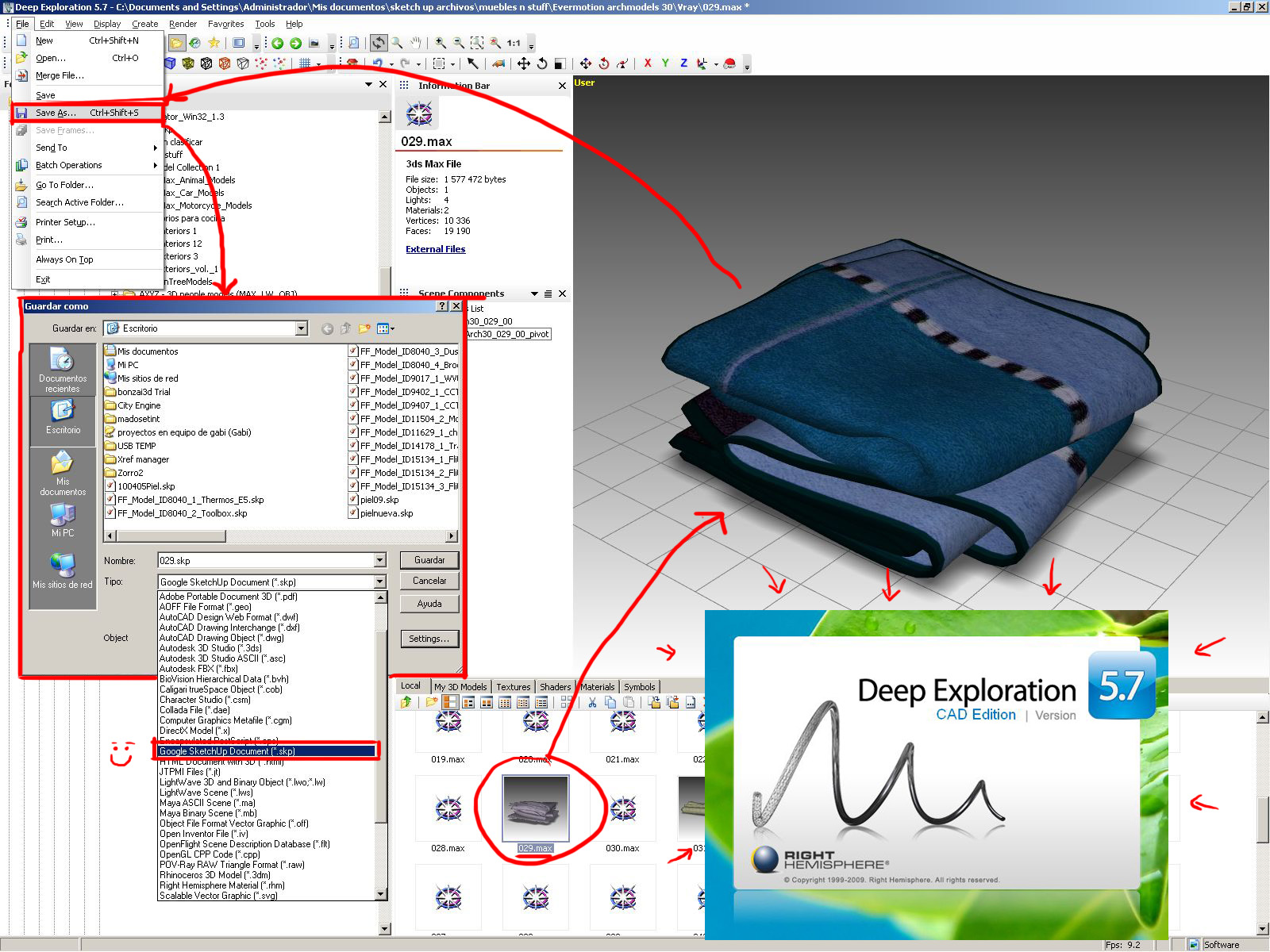
              Deep Exploration

              1 Reply Last reply
              Reply Quote 0
              • numbthumbN
                numbthumb
                last edited by

                Hehe, thanks, nektares, I´ll try to post more often 😉
                Thanks again for explaining your workflow (deep exploration is on my to-do list)
                BTW I see you´re using CityEngine?
                Cheers!

                Comfortably numb...

                1 Reply Last reply
                Reply Quote 0
                • N
                  nektares
                  last edited by

                  numbthumb:
                  I´m always happy to help!
                  I downloaded it to try it out n_n as bonzai but i didn´t
                  see too much use for it, and its like $5,000 usd hahaha
                  so no thanks 😛 it´s designed for urban designers, and
                  im much more into single houses and their interiors 😄 cheers mate!

                  1 Reply Last reply
                  Reply Quote 0
                  • R
                    robert111
                    last edited by

                    nektares , i need free Note Camera Point script plz , to realize DOF for sketchup

                    1 Reply Last reply
                    Reply Quote 0
                    • N
                      nektares
                      last edited by

                      Hey Robert! unfortunately i have not seen the note camera point plug-in for free
                      i payed for mine at smustard, i dont remember the cost but it was very cheap n_n.
                      I suggest you to buy it there if you really need it, but i must say i did not use
                      it for this render, i prefer using the Zdepth VFB channel with Pshop lens blur.
                      I made a quick tutorial since i'm in a rush, you see my mom cooked some delicious
                      food and i have go and eat it ASAP. i hope this helps!

                      see, you first have to include the Zdepth to export with your render
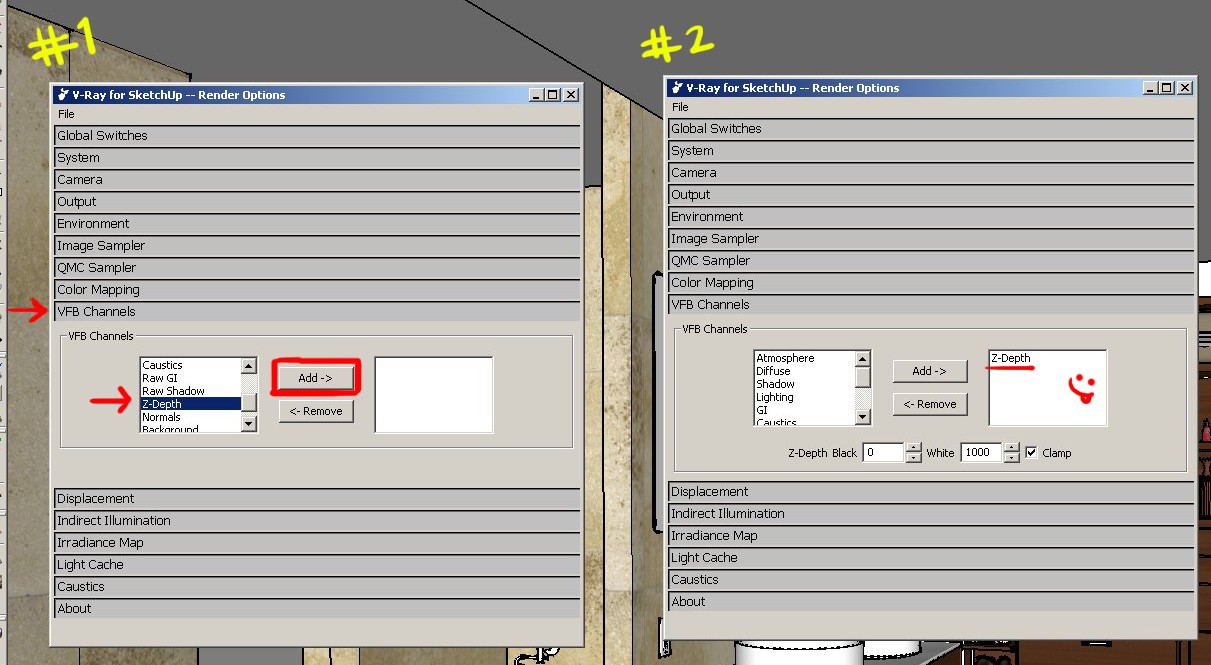
                      DOF VFB
                      that´s how one of those look 😲
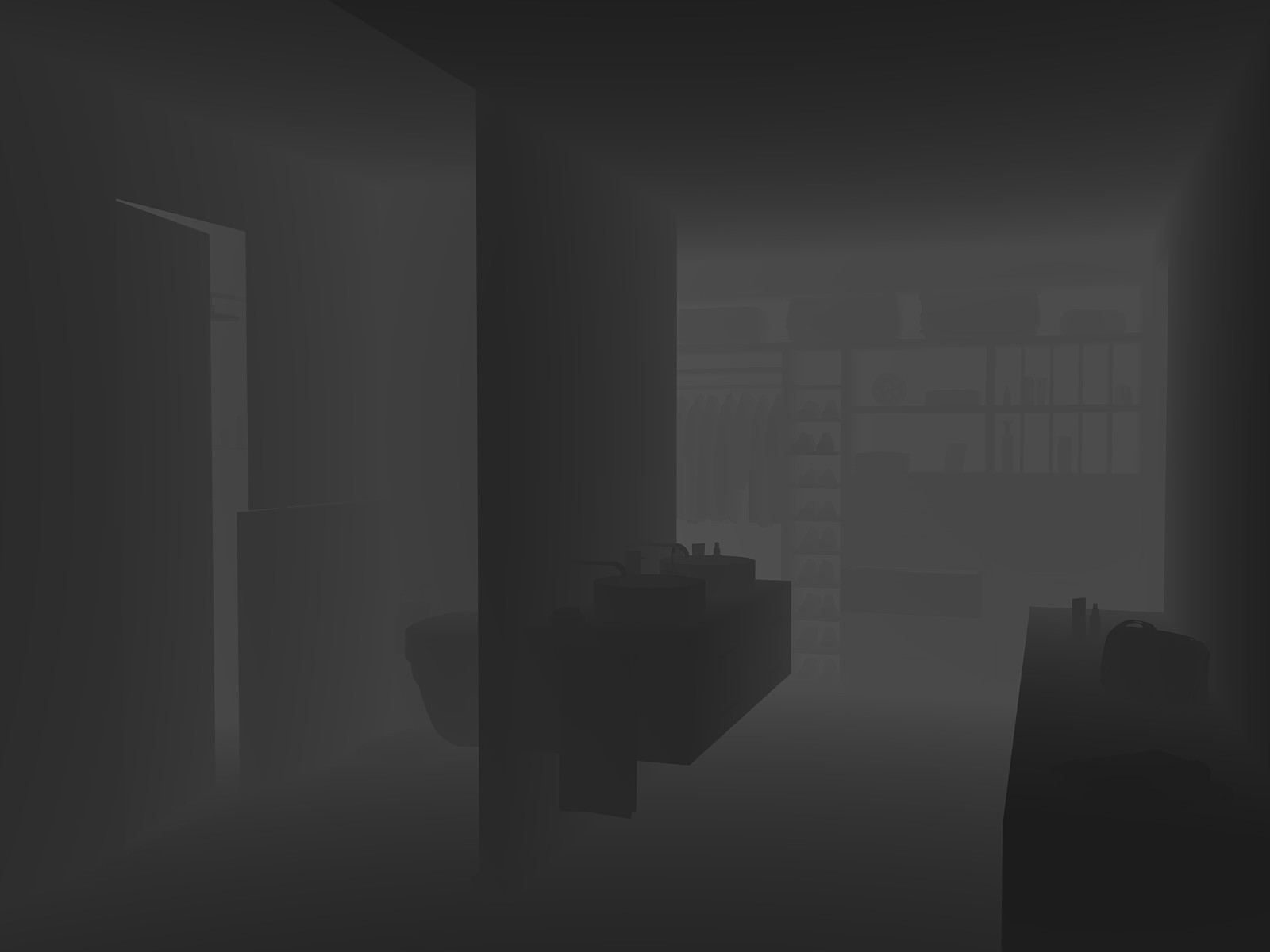
                      Zdepth map
                      Then when your render is done and you saved it
                      open the images in Pshop and add the Zdepht map
                      as a channel, and change its name.remember to
                      hide it clicking on the eye on the left side
                      of the channel, that way channel is off but still there 😄
                      Then just go to Filter > Blur > Lens Blur
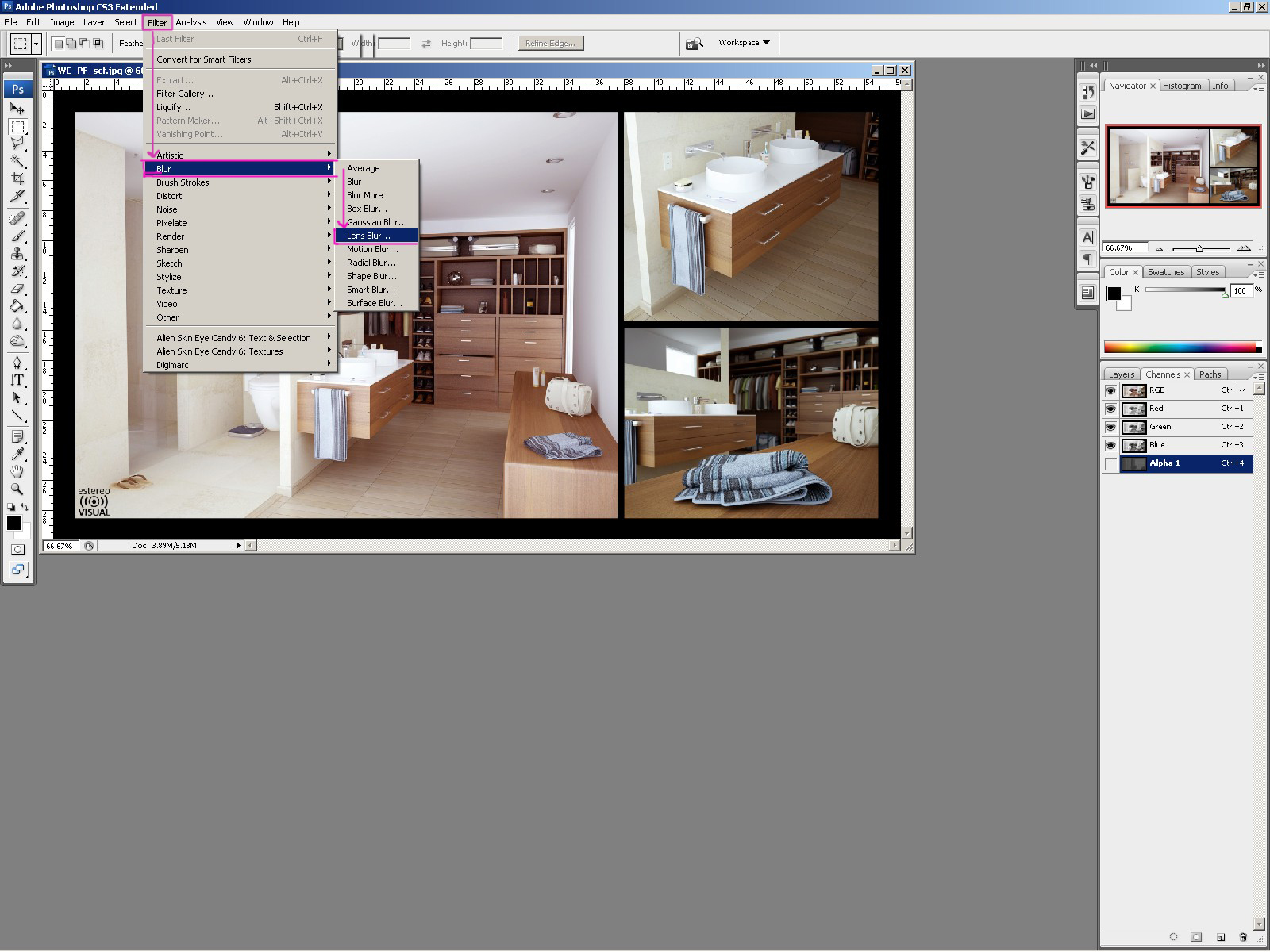
                      tut1
                      Here´s where you select the Zdepth channel
                      you have just added as a depthmap.
                      then just adjust to get the desired effect.
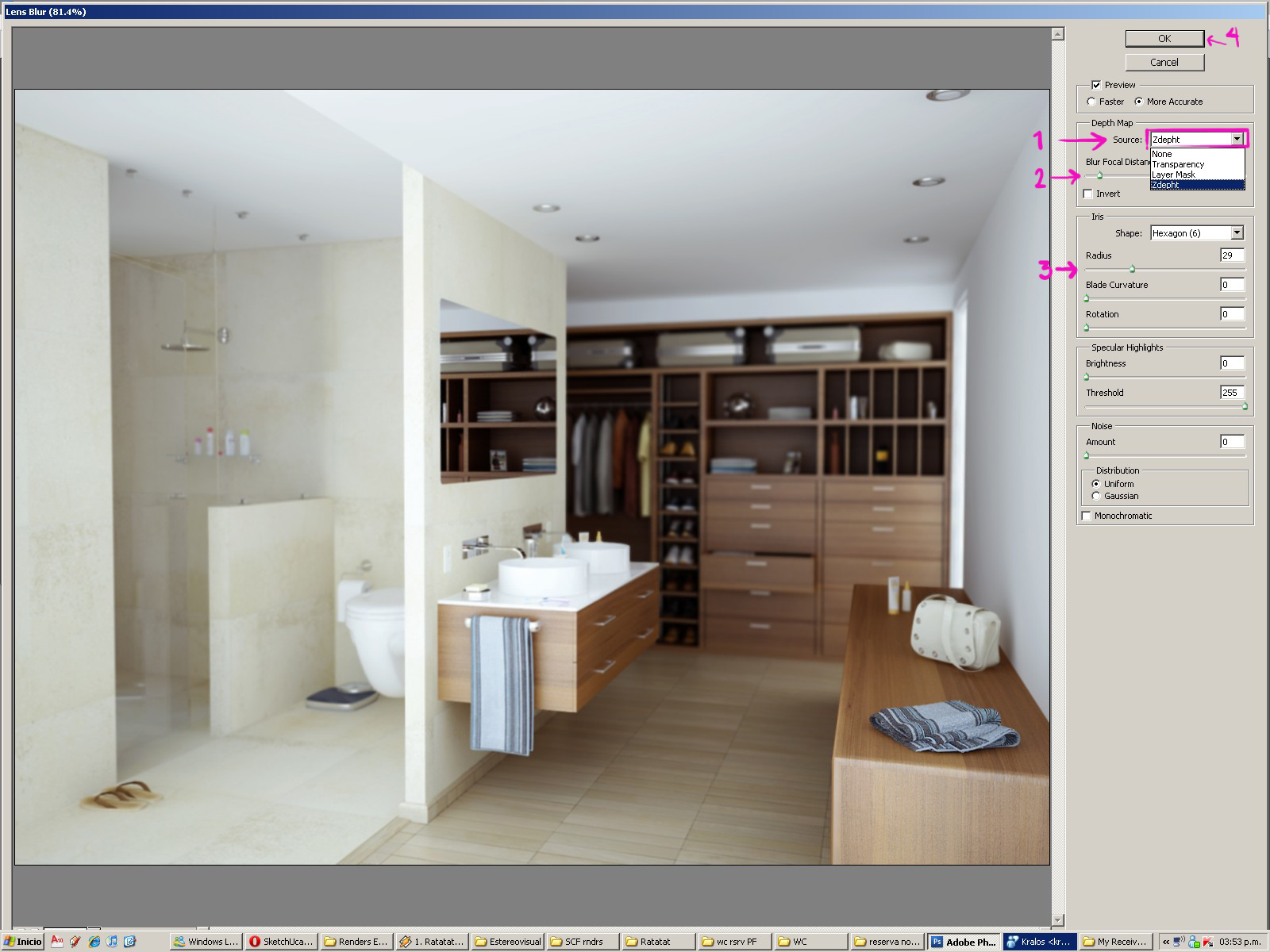
                      tut2

                      1 Reply Last reply
                      Reply Quote 0
                      • R
                        robert111
                        last edited by

                        excuse me nektares but how do Zdepht map in Chanal in photoshop , i dont know that.

                        1 Reply Last reply
                        Reply Quote 0
                        • N
                          nektares
                          last edited by

                          Go to channels section, on the right side of the layers section, and with both of the images open, drag any of the RGB channels and drag from the zdepht to the render file In pshop. 😄

                          1 Reply Last reply
                          Reply Quote 0
                          • R
                            robert111
                            last edited by

                            nektars , 1000 excuses but i dont say that , can you make some picture for thats plzzzzz

                            1 Reply Last reply
                            Reply Quote 0
                            • N
                              nektares
                              last edited by

                              I'm very sorry robert, I can't understand what you mean, I can't send you a picture because i don't know what you want to know u_u please be more specific and hopefully I will be able to help you. Cheers!

                              1 Reply Last reply
                              Reply Quote 0
                              • C
                                Cyberdactyl
                                last edited by

                                Simply Awsome.

                                SketchUcation has really cranked up the frequency of sweet work lately.

                                1 Reply Last reply
                                Reply Quote 0
                                • R
                                  robert111
                                  last edited by

                                  nektares but how do Zdepht map in Chanal in photoshop , i dont know that
                                  can you make picture to explain how do add zdepht map in chanal in photoshop
                                  thanks nektares

                                  1 Reply Last reply
                                  Reply Quote 0
                                  • S
                                    Speaker
                                    last edited by

                                    @robert111 said:

                                    nektares but how do Zdepht map in Chanal in photoshop , i dont know that
                                    can you make picture to explain how do add zdepht map in chanal in photoshop
                                    thanks nektares

                                    There is a great video from asgvis on youtube comparing Depth of Field vs. D-Depth. There you will find how to use the zdepht map.


                                    http://www.youtube.com/user/latvietis1234

                                    1 Reply Last reply
                                    Reply Quote 0

                                    Hello! It looks like you're interested in this conversation, but you don't have an account yet.

                                    Getting fed up of having to scroll through the same posts each visit? When you register for an account, you'll always come back to exactly where you were before, and choose to be notified of new replies (either via email, or push notification). You'll also be able to save bookmarks and upvote posts to show your appreciation to other community members.

                                    With your input, this post could be even better 💗

                                    Register Login
                                    • 1
                                    • 2
                                    • 3
                                    • 3 / 3
                                    • First post
                                      Last post
                                    Buy SketchPlus
                                    Buy SUbD
                                    Buy WrapR
                                    Buy eBook
                                    Buy Modelur
                                    Buy Vertex Tools
                                    Buy SketchCuisine
                                    Buy FormFonts

                                    Advertisement