Trouble with .position_material method
-
I asked this at the beta forum - the best answer that what I quoted earlier. I'm not sure what to make of it. I'll try to prod again. But you can try as well - just to make some more noise about this matter from multiple sources. SU UV mapping is a bit of a mystery and a black art to master.
-
Well, I changed the scale of the texture to be a width of 40' and a height of 8.5'
I then remapped the texture by hand using the pins. When I then looked at the UV values, I got the same geometry positions but the uv coordinates had changed to unit values:
[479", 0", 95.5"],
[1",1",1"],
[0", 0", 95.5"],
[0",1",1"],
[0",0",0"],
[-0", -0", 1"],
[479", 0", 0"],
[1", -0", 1"]I made a script that uses these values and the script does work. Not sure why as I tend to think you're right: the UV coordinate mappings should overide size and width - otherwise, why have more than one pair of coordinates?
Me still confused.
-
Also thinking out loud again. Even though the UVhelper script returns uv values as whatever unit the model is in (in my case, inches), it really is a unit-less value.
Say the value is 0.5....
I wonder if that refers to have the size of the picture dimension or half the size of the geometry that's being applied to.
-
XYZ: 0,0,0 - UV: 0,0
XYZ: 0,10,0 - UV: 0,0.5
XYZ: 10,0,0 - UV: 0.5,0
XYZ: 10,10,0 - UV: 0.5,0.5That would scale the texture one half time across the face.
XYZ: 0,0,0 - UV: 0,0
XYZ: 0,10,0 - UV: 0,2
XYZ: 10,0,0 - UV: 2,0
XYZ: 10,10,0 - UV: 2,2That would scale the texture two times across the face.
-
Understood. Thanks for the tip.
I'm not sure, knowing that, why the uv values changed when I changed the size and fit of the texture and repositioned it so it had the same look.
-
Keep in mind that that q value is not used. This does not mean that it will always be 0.
-
@sangahn said:
Keep in mind that that q value is not used. This does not mean that it will always be 0.
I completely don't get it. It looks SU developers have no clue what SU actually is doing!!!
I have recently discovered that Q value indicates precisely if a texture is distorted or not!I have asked at least twice: 'How can I recognize if the texture is photo-matched or not?'. I haven't received an answer. I have had to stay with my slow method of writing to a TextureWriter and checking the handle it returns.
My recent discovery was so simple: Q VALUE IS BEING USED! It defaults to 1.0 inch. If it has other value texture is photo-matched. So fast and simple method and is valid both for uv_at(index) and UVHelper solution. It can take values close to 1.000000 (say 0.99999995) which still means the texture is not distorted.
I doesn't exactly understand how UVQ projection works, but I hope it will cast some light on your problem.
-
Doesn't have to be photomatched. Only be a skewed/distorted texture - that also changes the Q value.
See screenshot. (I've also attached the sample model. I used my Probes plugin to check the UVQ values: http://forums.sketchucation.com/viewtopic.php?f=180&t=21472)
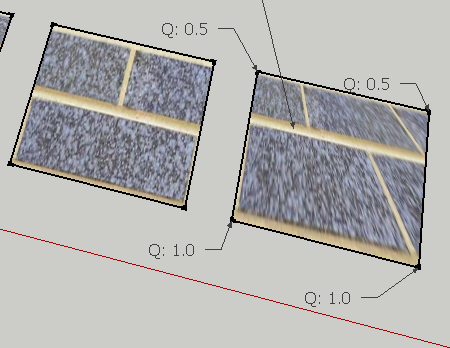
-
When I use my UV mirror plugin to copy the UV mapping from the front side to the back side - it fails to do so correctly for the distorted texture. I think this is the source of the problem for the original poster of the linked thread.
-
Making some progress with this. Talking with some Google heads and "jeff99" it seems that the UVQ data returned by the UVHelper is the UV data transformed in as 3x3 matrix. Jeff said it seemed like Homogeneous coordinates - where the Q value is Height. The UV values should be divided by the H(Q) value - but it appears that SU multiplies instead.
We have some some testing for each of our projects and this seem to be working. I use this code to get UV values which I can use with
position_material.def self.flattenUVQ(uvq) uvq.x = uvq.x / uvq.z uvq.y = uvq.y / uvq.z uvq.z = 1.0 return uvq end -
More feedback. I wasn't fully correct in my previous summary:
@unknownuser said:
Well, mostly. They did not multiply by H, they just did nothing. If they had multiplied by H, you would have had to divide by H twice to get the right answer. Once to undo their multiply, and once more to do the required division.
Your code is correct, but the description that they multiplied instead of dividing is not correct.
-
Hey Tom.
This is "jeff99" from the Beta forums. I followed your link to this thread and was reviewing the discussions here. I wish I had seen this a few days ago!
Thanks again for your observations regarding this. You are very tenacious at attacking a problem!
By the way, the "H" is for "Homogeneous", not "Height". Although it can be thought of as a scale factor.
-
Thanks for that Jeff.
Got any pointers to where I can read up more on Homogeneous coordinates and related topic? When I read on Wikipeadia I find that it always makes assumption of other knowledge and I find myself clicking through article after article of stuff I struggle to comprehend. -
It should be in most Computer Graphics books, and some online. I'm an old guy, the book I use was published in 1976 and is now out of print.
-
Thanks for carrying this on ThomThom. I think you're on to something here and I'm experimenting further.
One of the complicating factors for me is that the face I want to apply texture to is often in a group which is in turn in a group (the wall file I posted earlier was a simplified version of what I'm doing).
I notice that when I run the UVhelper script modified per your homogenous tip earlier, I get better UV values. I also notice that the real-world vertex positions are in global coordinates (returned from the face.outer_loop.vertices.each method). Conversely, when applying a texture, you need to use coordinates that are based on the local coordinate system that the face belongs to.
I'm going to play around further. I've attached my modified uvhelper script. If what I said above is confirmed about local and global coordinates then I'll modify the uvhelper script further to report in local coordinates.



Advertisement