Space Navigator Center of Rotation Problem
-
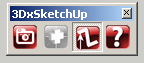
I am having a problem with the toolbar for my 3D Space Navigator. I can't figure out why the
Center of Rotation button seems to be in a permanent state of grayed out. Does anyone have
an idea as to what is wrong. I am running SU 7 and have confirmed I have the latest drivers loaded for the Navigator
-
I believe all you have to do is click the button to the left(Camera Mode).
Then you will be moving the object as opposed to moving the camera.
-
Hi John,
i noticed the same after i read your post. I made a post in the 3dconnexion forum. If i get an answer i will post it here
Karlheinz
-
The problem is the button is grayed out so when I click it nothing happens. I tried to set
the center of rotation in the pull down menu in the plugins menu and didn't have any luck there either.Karl - Thanks for posting on the 3D Connexion Forum. Let me know if you hear anything back.
JP
-
Hallo John,
the problem seems to be a small bug in the ruby script. To solve the problem, first remove all check marks in the plugins --> 3DxSketchup menu. Then activate "toggle toolbar" and it will work. And for further works use only the toolbar and not the menu.
Karlheinz
-
Thanks Karl, that did the trick. I appreciate your help tremendously.
Do you have a specific configuration you use for the Navigator? I sure
could use some help with any suggestions on the best way to configure it
for a Navigator newbie.Regards,
John
-
At present i use the standard configuration in Sketchup i adjusted only the speed. Maybe if you use different 3D applications it could be necessary to create a configuration for a specific application which differs from the standard controls.
Karlheinz

Hello! It looks like you're interested in this conversation, but you don't have an account yet.
Getting fed up of having to scroll through the same posts each visit? When you register for an account, you'll always come back to exactly where you were before, and choose to be notified of new replies (either via email, or push notification). You'll also be able to save bookmarks and upvote posts to show your appreciation to other community members.
With your input, this post could be even better 💗
Register Login


Advertisement