sketchucation logo sketchucation
    • Login
    Oops, your profile's looking a bit empty! To help us tailor your experience, please fill in key details like your SketchUp version, skill level, operating system, and more. Update and save your info on your profile page today!
    Mac User? | Join the Rayscaper Beta for Mac Learn More

    SketchyPhysics 3x June 27 version.

    Scheduled Pinned Locked Moved SketchyPhysics
    95 Posts 12 Posters 32.1k Views 12 Watching
    Loading More Posts
    • Oldest to Newest
    • Newest to Oldest
    • Most Votes
    Reply
    • Reply as topic
    Log in to reply
    This topic has been deleted. Only users with topic management privileges can see it.
    • P
      Physicsguy1
      last edited by

      Now we can create multi-roll games!

      1 Reply Last reply
      Reply Quote 0
      • J
        JaViXP
        last edited by

        @cphillips said:

        JaViXP it will work better if you change the onend to this:

        onend{
        >    group.erase!
        > }
        

        Thanks, now it's much better (After a few times playing the animation it becomes kinda slow).

        PhysicsGuy, well done I like your boxes creator, but there are too much boxes and it'll make the simulation laggy.

        "Giving up is way harder than trying"
        JaViXP's Rendering

        1 Reply Last reply
        Reply Quote 0
        • P
          phy
          last edited by

          MAN! That camera is unbelievablly good. ๐Ÿ˜ ๐Ÿ˜

          Tableau de comparaison de Staxyn s'agit d'un mะ“ยฉdicament uniquement sur ordonnance.

          1 Reply Last reply
          Reply Quote 0
          • J
            JaViXP
            last edited by

            It does not work for me ๐Ÿ˜ž


            SPd.jpg

            "Giving up is way harder than trying"
            JaViXP's Rendering

            1 Reply Last reply
            Reply Quote 0
            • W
              Wacov
              last edited by

              It's only half-SP related, but how do you move the ends of a script-created line using script? I've given up trying to replace existing lines on-the-fly, I figure it'd be easier to make them at the beginning of the simulation (or, if possible, before it), then move them every frame. They'd just be there to hold the faces for cloth, and something else I've got planned ๐Ÿ˜„

              EDIT: Figured it out! Took alot of searching around, the API documentation isn't all that helpful ๐Ÿ˜†
              I'm SURE this one's overcomplicated, but it's the only way I could find.

              EDIT: Hopefully, I've fixed the problem ๐Ÿ˜„


              Should work now

              http://sketchup.google.com/3dwarehouse/cldetails?mid=3096a836877fb9af6cd8ad826e9017b8&prevstart=0

              1 Reply Last reply
              Reply Quote 0
              • W
                Wacov
                last edited by

                That's wierd, but it should be fixed now.

                http://sketchup.google.com/3dwarehouse/cldetails?mid=3096a836877fb9af6cd8ad826e9017b8&prevstart=0

                1 Reply Last reply
                Reply Quote 0
                • P
                  phy
                  last edited by

                  Awesome ๐Ÿ˜

                  Tableau de comparaison de Staxyn s'agit d'un mะ“ยฉdicament uniquement sur ordonnance.

                  1 Reply Last reply
                  Reply Quote 0
                  • J
                    JaViXP
                    last edited by

                    Thanks it worked now. I have to agree with Phy, AWESOME!!

                    "Giving up is way harder than trying"
                    JaViXP's Rendering

                    1 Reply Last reply
                    Reply Quote 0
                    • C
                      CPhillips
                      last edited by

                      Here is a script that makes a simple to use auto connecting joint. In the first frame. The "pin" object automatically connects to any "door"'s it is touching with a hinge and anything else with a fixed joint. What makes it really useful is it copyable. ๐Ÿ˜„

                      Note I made the "pin" object very dense and no collide. It didn't work very well otherwise.


                      doorandpin5.skp

                      1 Reply Last reply
                      Reply Quote 0
                      • W
                        Wacov
                        last edited by

                        Thanks for the tips Chris. Here's some movable, breakable objects (Kinda laggy, but fun ๐Ÿ˜„ )


                        Breakables.skp


                        Breakable wall.skp

                        http://sketchup.google.com/3dwarehouse/cldetails?mid=3096a836877fb9af6cd8ad826e9017b8&prevstart=0

                        1 Reply Last reply
                        Reply Quote 0
                        • J
                          JaViXP
                          last edited by

                          Well done I like it! ๐Ÿ‘

                          So, Chris, any new features we missed? ๐Ÿ˜„

                          "Giving up is way harder than trying"
                          JaViXP's Rendering

                          1 Reply Last reply
                          Reply Quote 0
                          • W
                            Wacov
                            last edited by

                            Took quite a while to code this right, and I can't get the faces to smooth, but here it is! Seamless cloth!!


                            (Although it's not copyable)

                            http://sketchup.google.com/3dwarehouse/cldetails?mid=3096a836877fb9af6cd8ad826e9017b8&prevstart=0

                            1 Reply Last reply
                            Reply Quote 0
                            • P
                              phy
                              last edited by

                              Um, CPillips how do you use the breakit command or is it a command. I don't mean the split command by the way. Wacov that's fantastic. ๐Ÿ‘

                              Tableau de comparaison de Staxyn s'agit d'un mะ“ยฉdicament uniquement sur ordonnance.

                              1 Reply Last reply
                              Reply Quote 0
                              • W
                                Wacov
                                last edited by

                                I'm on a roll...

                                Turns out you CAN reset the simulation from within the script. Use this little chunk of code:

                                @@bPause=true
                                SketchyPhysicsClient;;physicsReset()
                                MSketchyPhysics3;;closeControlPanel()
                                freeDirectInput()
                                

                                In the scripted field.

                                I found this near the bottom of SketchyPhysicsTool.rb, it seems to work totally normally for me, but if there's a problem, there's not much I can do about it ๐Ÿ˜„

                                http://sketchup.google.com/3dwarehouse/cldetails?mid=3096a836877fb9af6cd8ad826e9017b8&prevstart=0

                                1 Reply Last reply
                                Reply Quote 0
                                • J
                                  JaViXP
                                  last edited by

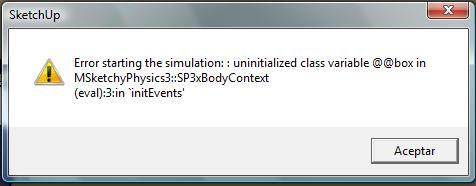
                                  That sounds cool! I can't try this though, it displays an error ๐Ÿ˜ž

                                  By the way, is there a way to stop the simulation and save it as the model? I mean, you are running the simulation with a breakable box, the box is broken, can you copy the model and paste into other model? (Sorry, my English is hard to understand ๐Ÿ˜ณ )

                                  "Giving up is way harder than trying"
                                  JaViXP's Rendering

                                  1 Reply Last reply
                                  Reply Quote 0
                                  • P
                                    phy
                                    last edited by

                                    It doesn't work for me ether wacov I get this error, taken from the ruby console:

                                    String doesn't compile; Error in Script:
                                    @@bPause=true
                                    
                                    SketchyPhysicsClient;;physicsReset()
                                    
                                    MSketchyPhysics3;;closeControlPanel()
                                    
                                    freeDirectInput()
                                    (eval);4;in `initEvents'; undefined method `freeDirectInput' for #<MSketchyPhysics3;;SP3xBodyContext;0x5dd6378>#<RuntimeError; Error in Script&#058;
                                    @@bPause=true
                                    
                                    SketchyPhysicsClient;;physicsReset()
                                    
                                    MSketchyPhysics3;;closeControlPanel()
                                    
                                    freeDirectInput()
                                    (eval);4;in `initEvents'; undefined method `freeDirectInput' for #<MSketchyPhysics3;;SP3xBodyContext;0x5dd6378>>
                                    C;/Program Files/Google/Google SketchUp/Plugins/SketchyPhysics3/ControllerCommands.rb;966;in `initEvents'
                                    

                                    and Javi just pause the simulation and save the model.

                                    Tableau de comparaison de Staxyn s'agit d'un mะ“ยฉdicament uniquement sur ordonnance.

                                    1 Reply Last reply
                                    Reply Quote 0
                                    • C
                                      CPhillips
                                      last edited by

                                      @javixp said:

                                      Well done I like it! ๐Ÿ‘

                                      So, Chris, any new features we missed? ๐Ÿ˜„

                                      Well, there is a lot that is still possible. I haven't seen anyone using teleport yet. Nor getVelocity/setVelocity, getTorque/setTourque or setLinearDamping/setAngularDamping. Any script connected joint can also be disconnected but I dont know a good example for that. Also the scripted code area will take tabs now. That makes it easier to write readable script.

                                      1 Reply Last reply
                                      Reply Quote 0
                                      • C
                                        CPhillips
                                        last edited by

                                        @wacov said:

                                        I'm on a roll...

                                        Turns out you CAN reset the simulation from within the script. Use this little chunk of code:

                                        @@bPause=true
                                        > SketchyPhysicsClient;;physicsReset()
                                        > MSketchyPhysics3;;closeControlPanel()
                                        > freeDirectInput()
                                        

                                        In the scripted field.

                                        I found this near the bottom of SketchyPhysicsTool.rb, it seems to work totally normally for me, but if there's a problem, there's not much I can do about it ๐Ÿ˜„

                                        I am not sure that will work correctly in all cases. Ill try to add something official.

                                        1 Reply Last reply
                                        Reply Quote 0
                                        • C
                                          CPhillips
                                          last edited by

                                          @wacov said:

                                          Took quite a while to code this right, and I can't get the faces to smooth, but here it is! Seamless cloth!!

                                          Very impressive Wacov!

                                          1 Reply Last reply
                                          Reply Quote 0
                                          • C
                                            CPhillips
                                            last edited by

                                            @phy said:

                                            Um, CPillips how do you use the breakit command or is it a command. I don't mean the split command by the way. Wacov that's fantastic. ๐Ÿ‘

                                            "breakit" is an internal command called by "split". If you want to break an object into more than 2 pieces use this:

                                            
                                            split(self,2)


                                            The "2" means split twice, so you'll get 4 pieces. If you use 3 you will get 16 pieces. 4=256. So dont go nuts. Also remember Sketchup will sometimes crash when you split. The more splits the more likely this is to happen.

                                            1 Reply Last reply
                                            Reply Quote 0

                                            Hello! It looks like you're interested in this conversation, but you don't have an account yet.

                                            Getting fed up of having to scroll through the same posts each visit? When you register for an account, you'll always come back to exactly where you were before, and choose to be notified of new replies (either via email, or push notification). You'll also be able to save bookmarks and upvote posts to show your appreciation to other community members.

                                            With your input, this post could be even better ๐Ÿ’—

                                            Register Login
                                            • 1
                                            • 2
                                            • 3
                                            • 4
                                            • 5
                                            • 4 / 5
                                            • First post
                                              Last post
                                            Buy SketchPlus
                                            Buy SUbD
                                            Buy WrapR
                                            Buy eBook
                                            Buy Modelur
                                            Buy Vertex Tools
                                            Buy SketchCuisine
                                            Buy FormFonts

                                            Advertisement