sketchucation logo sketchucation
    • 登入
    Oops, your profile's looking a bit empty! To help us tailor your experience, please fill in key details like your SketchUp version, skill level, operating system, and more. Update and save your info on your profile page today!
    ⚠️ Important | Libfredo 15.6b introduces important bugfixes for Fredo's Extensions Update

    Magnets question

    已排程 已置頂 已鎖定 已移動 SketchyPhysics
    22 貼文 5 Posters 2.1k 瀏覽 5 Watching
    正在載入更多貼文
    • 從舊到新
    • 從新到舊
    • 最多點贊
    回覆
    • 在新貼文中回覆
    登入後回覆
    此主題已被刪除。只有擁有主題管理權限的使用者可以查看。
    • T 離線
      Thrundar
      最後由 編輯

      Can someone point me in the direction (tutorial) of how to program an object to behave as a magnet, such as a square box cube. + and - ?

      1 條回覆 最後回覆 回覆 引用 0
      • M 離線
        MrPlanet
        最後由 編輯

        5000*key("space")
        

        That will activate the magnet at a strength of 500 if the space bar is pressed

        -5000*key("space")
        

        That will repel objects away.
        For objects that you want to be affected by a magnet, open the UI and mark them as magnetic.
        Hope this helps. 😄

        I reject your reality and substitute my own.

        1 條回覆 最後回覆 回覆 引用 0
        • T 離線
          Thrundar
          最後由 編輯

          I have SU 7 free version and SP3RC1
          Can you post a screenshot of where that code would go in which boxes in the UI inspector?

          Also, is there a way the magnets will just stay on without pressing any keys or spacebar? I'm very much a SP newby. Only been messing with it for not even a week yet.
          Thanks!

          1 條回覆 最後回覆 回覆 引用 0
          • M 離線
            MrPlanet
            最後由 編輯

            Well, i cannot take screenshots on my computer (Even with PRTSCRN) But, put that code into the box beside the magnet check box. Then check the check box.

            I reject your reality and substitute my own.

            1 條回覆 最後回覆 回覆 引用 0
            • M 離線
              MrPlanet
              最後由 編輯

              Also,

              if key("space")==1 then setVar("mgnt",1000);getVar("mgnt");end;
              

              Put that into the magnet box to keep it on.

              I reject your reality and substitute my own.

              1 條回覆 最後回覆 回覆 引用 0
              • T 離線
                Thrundar
                最後由 編輯

                When I try to put any of that coding in the light blue box areas, the UI crashes
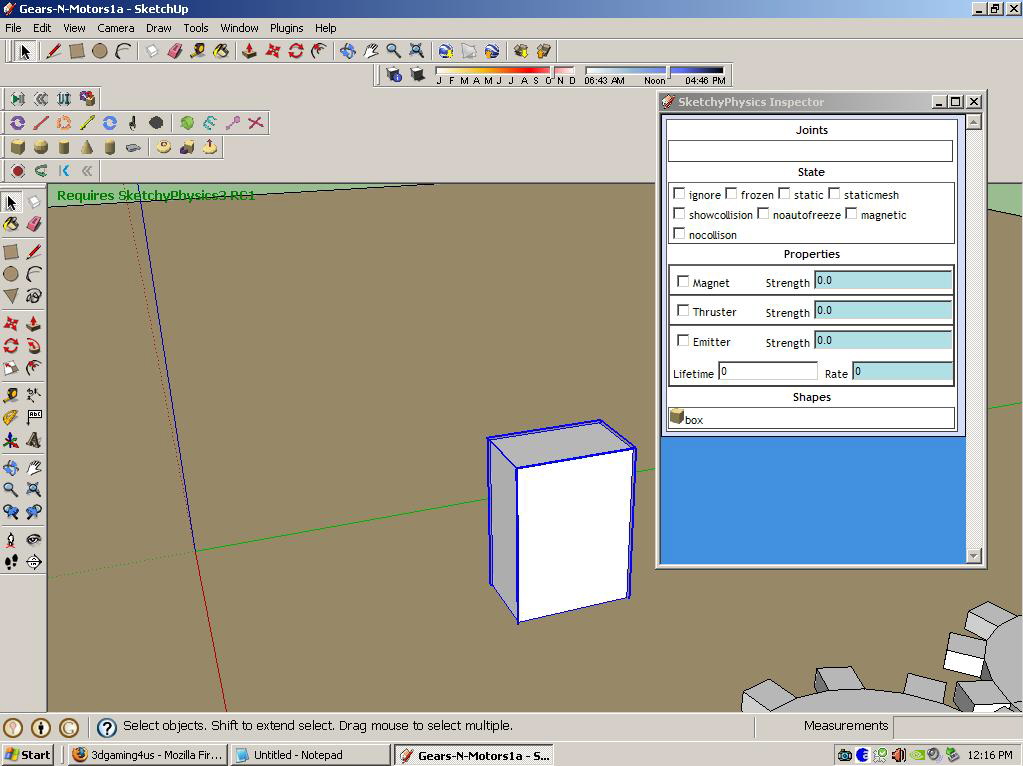

                Image of my inspector box where programming goes...

                1 條回覆 最後回覆 回覆 引用 0
                • M 離線
                  MrPlanet
                  最後由 編輯

                  @thrundar said:

                  When I try to put any of that coding in the light blue box areas, the UI crashes

                  That is Weird

                  [

                  Are you sure you don't have an old computer? On my old Windows 98, my UI and SU always crashed. 😲

                  I reject your reality and substitute my own.

                  1 條回覆 最後回覆 回覆 引用 0
                  • T 離線
                    Thrundar
                    最後由 編輯

                    Not an OLD pc. 3.07 ghz cpu. 2 gigs ram, 512 mb nvidea video card. Windows XP

                    I'm wondering if I need the paid for version of SU, with ruby and all that? SU stays running, it's that if I put in something wrong (blueish text area?), the UI doesn't fully open properly again.

                    1 條回覆 最後回覆 回覆 引用 0
                    • M 離線
                      MrPlanet
                      最後由 編輯

                      Ask Chris Phillips. He is the creator of SP and should know.

                      I reject your reality and substitute my own.

                      1 條回覆 最後回覆 回覆 引用 0
                      • M 離線
                        MrPlanet
                        最後由 編輯

                        @thrundar said:

                        I'm wondering if I need the paid for version of SU, with ruby and all that? SU stays running, it's that if I put in something wrong (blueish text area?), the UI doesn't fully open properly again.

                        I have Pro, but you don't need Pro, ruby is included in free. Window>Ruby console.

                        I reject your reality and substitute my own.

                        1 條回覆 最後回覆 回覆 引用 0
                        • P 離線
                          phy
                          最後由 編輯

                          @thrundar said:

                          Not an OLD pc. 3.07 ghz cpu. 2 gigs ram, 512 mb nvidea video card. Windows XP

                          I'm wondering if I need the paid for version of SU, with ruby and all that? SU stays running, it's that if I put in something wrong (blueish text area?), the UI doesn't fully open properly again.

                          I've had that problem to. if you save the file and go back into it is the script still there. Did you click on the group you put the script in again. Also i have free I don't see why you would need pro.

                          Tableau de comparaison de Staxyn s'agit d'un mГ©dicament uniquement sur ordonnance.

                          1 條回覆 最後回覆 回覆 引用 0
                          • T 離線
                            Thrundar
                            最後由 編輯

                            @unknownuser said:

                            I've had that problem to. if you save the file and go back into it is the script still there. Did you click on the group you put the script in again. Also i have free I don't see why you would need pro.

                            No idea as I have not saved when UI isn't taking the input or working. I know I'm putting the code or whatever in the wrong area, or checking the wrong thing....Just need a screenshot or two of successful magnets of the inspector so can compare

                            1 條回覆 最後回覆 回覆 引用 0
                            • P 離線
                              Physicsguy1
                              最後由 編輯

                              I will help. I'm downloading printscreen at the moment

                              1 條回覆 最後回覆 回覆 引用 0
                              • T 離線
                                Thrundar
                                最後由 編輯

                                My hero....lol! Awesome.

                                I'm wondering if I am missing a plug in for the tool bar? I just reposted the question, rephrased it, new thread. I have no idea what is missing. I have downloaded and tried to mimic examples off 3d warehouse with no luck

                                1 條回覆 最後回覆 回覆 引用 0
                                • P 離線
                                  Physicsguy1
                                  最後由 編輯

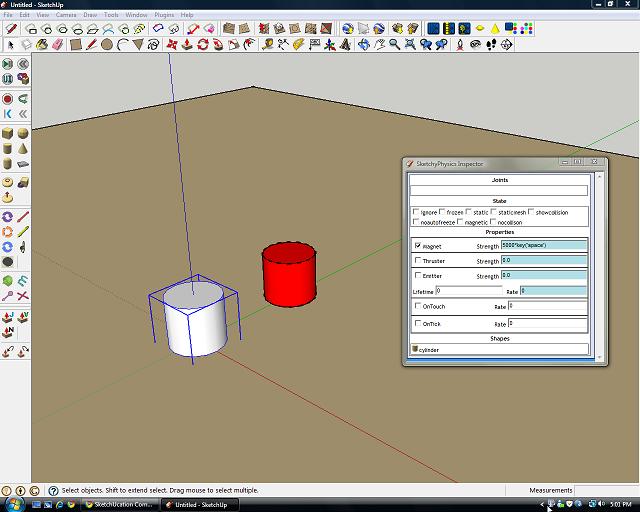
                                  Here it is. The red box is magnetic, and the selected has the code in the correct field

                                  tar.jpg

                                  1 條回覆 最後回覆 回覆 引用 0
                                  • T 離線
                                    Thrundar
                                    最後由 編輯

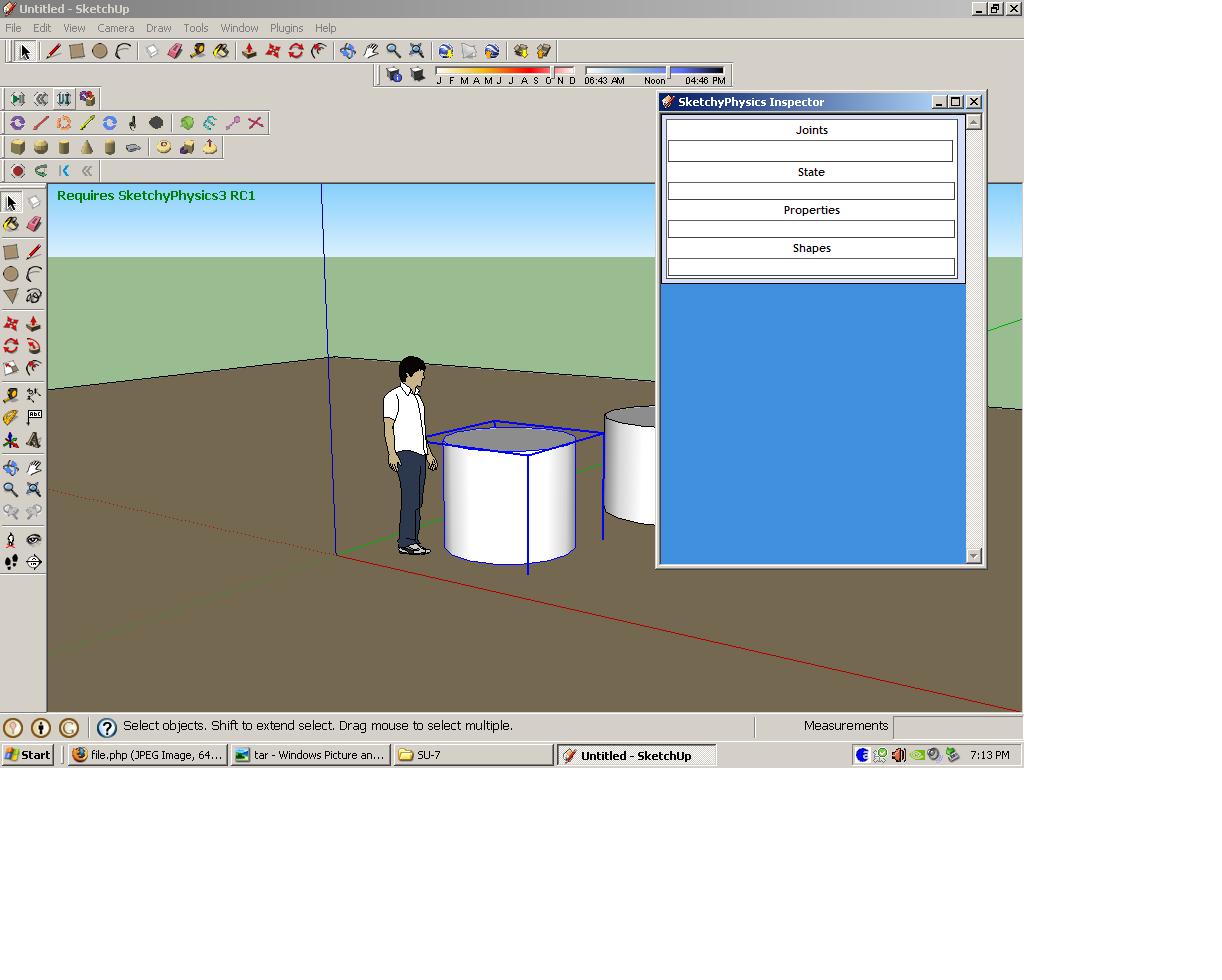
                                    I duplicated what you showed physicsguy...nothing worked. When I tried to go back into the UI, this is what I got

                                    UI messed up...

                                    1 條回覆 最後回覆 回覆 引用 0
                                    • P 離線
                                      Physicsguy1
                                      最後由 編輯

                                      I think that has happened to me before. I usually had to quit sketchup and reopen it

                                      1 條回覆 最後回覆 回覆 引用 0
                                      • T 離線
                                        Thrundar
                                        最後由 編輯

                                        Well it happens every time when I try to put anything in the UI. I've restarted SU so many times today. If I had a dollar for each time,..well you get the idea. I'm closing it out, retrying over and over. Getting frustrated.

                                        1 條回覆 最後回覆 回覆 引用 0
                                        • P 離線
                                          Physicsguy1
                                          最後由 編輯

                                          I think the problem is you don't have a file for the UI. re-download sketchyphysics. If that doesn't work then you will have to contact Chris Phillips for help.

                                          1 條回覆 最後回覆 回覆 引用 0
                                          • T 離線
                                            Thrundar
                                            最後由 編輯

                                            I have been able to copy and paste a couple examples from the 3d warehouse into my project, and that has given me a starting point for now. Thank you for all your help physicsguy, and everyone else! I wrote to C Phillips earlier and awaiting to hear back from them.

                                            1 條回覆 最後回覆 回覆 引用 0
                                            • 1
                                            • 2
                                            • 2 / 2
                                            • 第一個貼文
                                              最後的貼文
                                            Buy SketchPlus
                                            Buy SUbD
                                            Buy WrapR
                                            Buy eBook
                                            Buy Modelur
                                            Buy Vertex Tools
                                            Buy SketchCuisine
                                            Buy FormFonts

                                            Advertisement