Evaluating LightUp / IDX / Podium
-
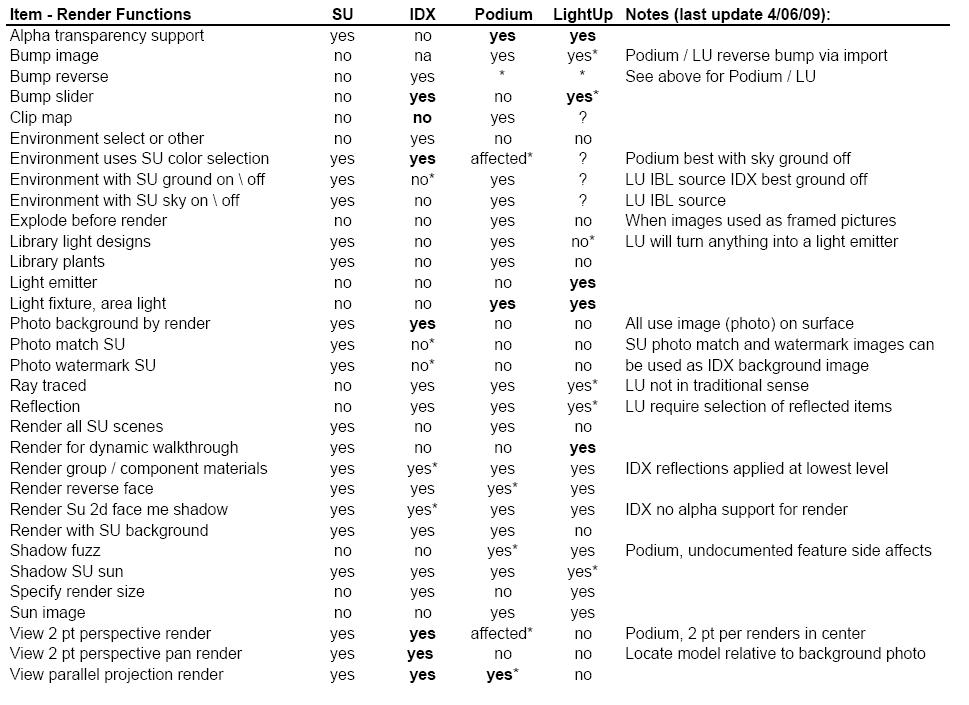
The attached table is probably biased by the way I use render software: We currently use SU to visualize, and present. While not highly skilled in computer rendering as folks like Solo, we have good presentation skills. Render software is primarily used to enhance "just in time" presentations.
-
There are incorrect statements in this at least as far as Podium is concerned.
-
The purpose of this post is to find out what each render software can do, so can you correct the incorrectly identified functions? Also open to suggestions as to functions.
-
Hello.
I think it would be good to first know what is your goal. What do you want to achieve with the software? Perhaps you could post images you have found on the Web, videos you have found on Youtube, etc.
-
Hi Honoluludesktop
I'm not specialist, but the aim of IDX Rendering, PODIUM and LightUP is to render
what's drawn with SU. I use the 3 programs, they have different features. For instance, PODIUM and IDX are focused on static accurate rendering, whereas LightUp allows light dynamic rendering, I mean no further calculations when moving into the model. (very useful for heavy project ).Hope it's helpful.
MALAISE
-
Miguel, The goal is to complete, correct as necessary, and add to the posted table.
Malaise, I am looking for more specific information, but thanks.
-
Bump reverse is supported. You need reversed bumpmap.
Explode before rendering…Not sure what does that refer to? If you bring image as image it needs to be expoded, but also IDX needs to do that. See Tomsdesk trees tread.
Light fixture can be invisible to camera if you make it transparent.
Podium renders groups.
Podium renders reverse faces.
Podium renders with SU ground….but it is always better to use plane.
SU view with final render …is this viewport rendering. If it is than Podium does render viewport resolution.
Podium renders true parallel projection (elevations) -
@honoluludesktop said:
How about some help with this. I know little about Podium, and next to nothing about LightUp. The programs selected cost more then nothing, but less then half of SU Pro. While they have many other render functions, the following items were selected to distinguish between them. In other words if all of the programs have a given function, that function was not included.
Please suggest functions, and indicate which programs have it. Also evaluate, and correct attached items. The list will be updated from time to time.
I think its a bit of an Apples 'n' Oranges comparison, however for LightUp:
Bump Image: Yes
Bump Slider: Yes
Explode before render: No
Light fixture invisible: Yes
Area Light: Yes
Multi processor: Yes
Render group / component materials: Yes
Render with SU sky: Yes (used as IBL source)
Render with SU ground: Yes (used as IBL source)
Specify render size: Yes
SU textures: Yes
SU view as final render scene: Yes
Sun image: Yes -
Sepo and Adam, Thanks for the info. I am working on making the table more understandable. Adam, I added "render for dynamic walk through" as a item. Can someone tell me how a sky box functions?
Miguel, thanks for the heads up, I will look into all of them. Keep in mind that this is a review of software that cost less then half of SU. While others would consider it, I do not think it elegant to spend more on render software, then the modeler.
-
Honoluludesktop, don't forget to add these other basic features to your list:
- "Fuzzy" (blurred) reflections. This is a must for all metallic materials.
- "Fuzzy" transparencies. Without them, there is no way to have frosted glass in your renders.
- Translucency. Without it, vegetation leaves look fake, and shoji paper screens ever faker.
- Caustics: http://en.wikipedia.org/wiki/Caustic_(optics)
- Projector lights.
- Volumetric light, for rendering god rays: http://en.wikipedia.org/wiki/God_rays
- Integrated fog rendering.
- Soft shadows for omni lights
- Ability to use a spherical sky image and rotate it freely
- Exposure controls
- Ability to change the color of the sun
All these are standard features in major rendering programs now.
-
Well, I did more work with Podium, and IDX in their default settings. The results are posted in the table above. Most of the current clarifications have to deal with the way SU environment selections, and settings are utilized. I did not look at LightUp in this regards.
Comments and corrections welcomed.
-
@honoluludesktop said:
Keep in mind that this is a review of software that cost less then half of SU. While others would consider it, I do not think it elegant to spend more on render software, then the modeler.
That is a matter of taste... some sell raw diamonds, some cut diamonds and some ideally cut diamonds. "Same stuff" in different package, production cost do vary, so do render programs and the value they give to your work.
I think there is a flaw in your logic, sorry. If some render program do have a crucial feature that you need in your work and there is no work around for that - would you still care the cost, knowing that with investing to a proper tool, the value of your work is higher. I am not suggesting that expensive render package is necessary any better than a low cost or a free one, but it might be, if it has a feature in need or in some cases you might pay from nothing. -
@notareal said:
@honoluludesktop said:
Keep in mind that this is a review of software that cost less then half of SU. While others would consider it, I do not think it elegant to spend more on render software, then the modeler.
That is a matter of taste... some sell raw diamonds, some cut diamonds and some ideally cut diamonds. "Same stuff" in different package, production cost do vary, so do render programs and the value they give to your work.
I think there is a flaw in your logic, sorry. If some render program do have a crucial feature that you need in your work and there is no work around for that - would you still care the cost, knowing that with investing to a proper tool, the value of your work is higher. I am not suggesting that expensive render package is necessary any better than a low cost or a free one, but it might be, if it has a feature in need or in some cases you might pay from nothing.I'd have to agree with this. It all depends on what your doing. It would be silly for a photographer to have a rule that he won't spend more on the set design, lighting, and camera than for the model he's shooting. However, if you don't need a refined photograph of the model or you're willing to put in a lot of time in photoshop, then maybe a $29.99 Sponge Bob camera from Walmart would be fine.
-Brodie
-
I don't disagree. It is a matter of personal taste, preference, emphasis, budget, etc.
-
Sorry I missed this earlier. A few clarifications on IDX Renditioner...
Imported images render fine without being exploded, as long as you don't have alpha channel transparency (our big missing link at the moment).
Materials applied to groups or components, included nested groups/components render accurately without exploding. Therefore it supports dynamic components. That's one of our big workflow plusses.
Another + is supporting all material changes made in the SketchUp material browser.
And the good news: all three apps are making it easy for architects to start rendering without having to learn much of anything!
Thanks,
William -
@wmanning said:
And the good news: all three apps are making it easy for architects to start rendering without having to learn much of anything!
That's definitely a great plus of all these apps. Although I wouldn't count myself to be a total beginner and idiot at rendering (have tried a couple of them and getting to know all those little tricks with clipping, bumping, reflections, refractions and whatnot), often you don't want to make a meticulously elaborate render and a fast setup for (pre?)visualization is very important and useful.
(And yes, William, a support for alpha maps - as there's no separate "slot" for clipmaps - would be very cool,indeed!)
-
OK Gaieus. Added a slot for clipmap. Have seen references to it, and examples, but am not sure how it is used, or if LightUp uses it.
-
I meant IDX Renditioner.
-
I have never seen reference to clip map in the IDX documentation, please correct me if I am wrong. What is a clip map?
-
Clipmap is same as alpha. Used for cliping. Podium can use clipmaps but easier way is just to use transparent .png. Also SU supports transparent .png.
Honolulu can you explain what is SU View as final render scene. Not sure what does it mean.






Advertisement