sketchucation logo sketchucation
    • Login
    Oops, your profile's looking a bit empty! To help us tailor your experience, please fill in key details like your SketchUp version, skill level, operating system, and more. Update and save your info on your profile page today!
    Mac User? | Join the Rayscaper Beta for Mac Learn More

    [Plugin] Scale and Rotate Multiple (UPDATED Dec 22, 09)

    Scheduled Pinned Locked Moved Plugins
    123 Posts 51 Posters 223.6k Views 51 Watching
    Loading More Posts
    • Oldest to Newest
    • Newest to Oldest
    • Most Votes
    Reply
    • Reply as topic
    Log in to reply
    This topic has been deleted. Only users with topic management privileges can see it.
    • D
      dylan
      last edited by

      I missed this one, thanks Chris.

      I agree a random rotate in with it would be excellent, but it is easy to request these things when you are not the one creating them!

      http://dmdarchitecture.co.uk/

      1 Reply Last reply
      Reply Quote 0
      • Chris FullmerC
        Chris Fullmer
        last edited by

        All right, wishes granted! I just updated this script and it now has the "Component Base" scale point option as suggested by Jan. Sorry it took so long to implement. I kept hitting little speedbumps along the road with that feature. I think it is working quite well now.

        I've also added rotation. It rotates on the same base point as the scaling.

        I also updated the video in the first post to explain the new features. Here's a full feature list for the version 2.0 update:

        • Fixed a bug where it didn't let you scale items more than once using Axis. Should work over and over now.
        • Added "Component Base" support for those of us who don't set our component axes. This uses the bottom center of the component.
        • Added much more reliable FaceMe component support (I hope).
        • Added Rotation capability. Uniform and random with user specified min/max values.

        I tried to test it thoroughly, but its possible there are still bugs. Let me know (as I'm sure you will) if you find something,

        Chris

        Lately you've been tan, suspicious for the winter.
        All my Plugins I've written

        1 Reply Last reply
        Reply Quote 0
        • Chris FullmerC
          Chris Fullmer
          last edited by

          I forgot to mention that I changed the filename (sorry). It was clf_scale_multiple.rb. That should be deleted. And then install the new one which is clf_scale_rotate_multiple.rb

          Chris

          Lately you've been tan, suspicious for the winter.
          All my Plugins I've written

          1 Reply Last reply
          Reply Quote 0
          • X
            xrok1
            last edited by

            KUDOs, we are all very fortunate to have you here. πŸ‘

            β€œThere are three classes of people: those who see. Those who see when they are shown. Those who do not see.”

            http://www.Twilightrender.com try it!

            1 Reply Last reply
            Reply Quote 0
            • PixeroP
              Pixero
              last edited by

              Thank you SOOO much!

              1 Reply Last reply
              Reply Quote 0
              • D
                dylan
                last edited by

                Thanks Chris, your hard work is appreciated πŸ‘

                http://dmdarchitecture.co.uk/

                1 Reply Last reply
                Reply Quote 0
                • pilouP
                  pilou
                  last edited by

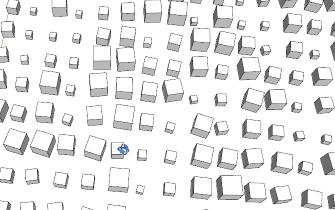
                  Multiple & rotate πŸ‘


                  scalemul.jpg

                  Frenchy Pilou
                  Is beautiful that please without concept!
                  My Little site :)

                  1 Reply Last reply
                  Reply Quote 0
                  • E
                    Ecuadorian
                    last edited by

                    Thank you, Christopher!
                    You already have free scripts that are better than some commercial ones.

                    -Miguel Lescano
                    Subscribe to my house plans YouTube channel! (30K+ subs)

                    1 Reply Last reply
                    Reply Quote 0
                    • pilouP
                      pilou
                      last edited by

                      Does it possible to have the scale and the rotation not randomized but "growing" one by one?

                      Frenchy Pilou
                      Is beautiful that please without concept!
                      My Little site :)

                      1 Reply Last reply
                      Reply Quote 0
                      • Chris FullmerC
                        Chris Fullmer
                        last edited by

                        The problem with implementing that functionality is that SketchUp does not order the components you select the way you select them. So even if you select them one by one and hit the "grow" command, it might jump around in the process, and scale them out of order, rendering it useless.

                        Its possible to do for sure, but you have to make an assumption of growing them in the order they lie on the x axis or something. Then it would be possible to get them to grow in order. Or if the script placed them, it could keep track of them in order easily too. But I already know some of the math here starts getting me into trouble. I can see some of the shrinking spirals and sin waves you produce. That stuff just hurts my head πŸ˜„

                        Chris

                        Lately you've been tan, suspicious for the winter.
                        All my Plugins I've written

                        1 Reply Last reply
                        Reply Quote 0
                        • pilouP
                          pilou
                          last edited by

                          When you have shown a video with a line of trees we are waiting the line of the tree growing in order! πŸ˜‰
                          But alas there was not πŸ’š

                          Frenchy Pilou
                          Is beautiful that please without concept!
                          My Little site :)

                          1 Reply Last reply
                          Reply Quote 0
                          • troyhomeT
                            troyhome
                            last edited by

                            amazing stuff! thanks so much!

                            IOviz.com
                            SU Pro 2024 PC

                            1 Reply Last reply
                            Reply Quote 0
                            • Chris FullmerC
                              Chris Fullmer
                              last edited by

                              Thanks Troy, glad you like it!

                              Chris

                              Lately you've been tan, suspicious for the winter.
                              All my Plugins I've written

                              1 Reply Last reply
                              Reply Quote 0
                              • I
                                ideas_arte
                                last edited by

                                Thank you very much, in fact your plugin is very useful tools..!

                                1 Reply Last reply
                                Reply Quote 0
                                • plot-parisP
                                  plot-paris
                                  last edited by

                                  fantastic tool, Chris. I like it a lot! 😍
                                  (how about an additional 'move' function? for offsetting each group/component...)

                                  1 Reply Last reply
                                  Reply Quote 0
                                  • N
                                    numerobis
                                    last edited by

                                    WOW! Very cool! Thank You!

                                    3ds max feeling in sketchup...

                                    1 Reply Last reply
                                    Reply Quote 0
                                    • PixeroP
                                      Pixero
                                      last edited by

                                      Great script, but may I suggest a few enhancements:

                                      I'd like to be able to rotate and/or scale randomly within a min to max value, a selection of components by a chooseable local axis. (I.E. each components axis.)
                                      This script only works on the global/world Z axis, right?
                                      Preferably the user should be able to choose X, Y or Z or any combination of them. And choose between Local or World axis.

                                      "Why would you want that?" you may ask.
                                      Well I've spent some time making trees and this would speed it up considerably.
                                      I can think of other uses as well... πŸ˜„
                                      Let me know if I need to explain better what I want.

                                      1 Reply Last reply
                                      Reply Quote 0
                                      • Chris FullmerC
                                        Chris Fullmer
                                        last edited by

                                        I think it might exist already, so correct me if you are thinking something more. If you select "axis" it will scale and rotate on each component's local axis.

                                        Does that do the trick?

                                        Chris

                                        Lately you've been tan, suspicious for the winter.
                                        All my Plugins I've written

                                        1 Reply Last reply
                                        Reply Quote 0
                                        • PixeroP
                                          Pixero
                                          last edited by

                                          @chris fullmer said:

                                          I think it might exist already, so correct me if you are thinking something more.

                                          Do you have the name of that plugin? Or do you mean you think its already in your script?

                                          @chris fullmer said:

                                          If you select "axis" it will scale and rotate on each component's local axis.
                                          Chris

                                          Thats right but your script only rotates around the Z axis?

                                          I would like to be able to select x, y, z axis or any combination of them. Like three checkboxes one for each axis. Or a drop down menu.
                                          (It should still have Z axis as default.)
                                          And a checkbox for scale and one for rotation so you can have the script do just one of them or both in a easy to use way.
                                          If you want I could make a image explaining what I want.

                                          1 Reply Last reply
                                          Reply Quote 0
                                          • Chris FullmerC
                                            Chris Fullmer
                                            last edited by

                                            Ahh, yes. That makes sense now. Correct. the script only rotates on the z axis.

                                            Part of the problem with the checkboxes is that I would need to use web dialogs to make that work, and at this point, I have no clue how to do that. I could probably get all the options implemented using the default SU inputbox (expanding the current one), but that inputbox is very clunky and I don't love it. But I'll think about it and see if I can think of an easy way to get it all into the inputbox and not make it too overcrowded and difficult to understand.

                                            If you'd like to mock up an image, that would be fine with me too! Thanks Jan, you've been a great help on this script,

                                            Chris

                                            Lately you've been tan, suspicious for the winter.
                                            All my Plugins I've written

                                            1 Reply Last reply
                                            Reply Quote 0

                                            Hello! It looks like you're interested in this conversation, but you don't have an account yet.

                                            Getting fed up of having to scroll through the same posts each visit? When you register for an account, you'll always come back to exactly where you were before, and choose to be notified of new replies (either via email, or push notification). You'll also be able to save bookmarks and upvote posts to show your appreciation to other community members.

                                            With your input, this post could be even better πŸ’—

                                            Register Login
                                            • 1
                                            • 2
                                            • 3
                                            • 4
                                            • 5
                                            • 6
                                            • 7
                                            • 7 / 7
                                            • First post
                                              Last post
                                            Buy SketchPlus
                                            Buy SUbD
                                            Buy WrapR
                                            Buy eBook
                                            Buy Modelur
                                            Buy Vertex Tools
                                            Buy SketchCuisine
                                            Buy FormFonts

                                            Advertisement