sketchucation logo sketchucation
    • 登入
    Oops, your profile's looking a bit empty! To help us tailor your experience, please fill in key details like your SketchUp version, skill level, operating system, and more. Update and save your info on your profile page today!
    🔌 Smart Spline | Fluid way to handle splines for furniture design and complex structures. Download

    [Plugin] Perpendicular Face Tools (UPDATED 26-03-09)

    已排程 已置頂 已鎖定 已移動 Plugins
    201 貼文 64 Posters 181.6k 瀏覽 65 Watching
    正在載入更多貼文
    • 從舊到新
    • 從新到舊
    • 最多點贊
    回覆
    • 在新貼文中回覆
    登入後回覆
    此主題已被刪除。只有擁有主題管理權限的使用者可以查看。
    • C 離線
      choppir
      最後由 編輯

      amazing! thanks!

      1 條回覆 最後回覆 回覆 引用 0
      • V 離線
        Vicspa
        最後由 編輯

        Another great tool, Thanks Chris,...keep'em coming. 👍

        1 條回覆 最後回覆 回覆 引用 0
        • Chris FullmerC 離線
          Chris Fullmer
          最後由 編輯

          Thanks again for all the great comments. Devloping these scripts is a lot of fun, but it is sure helpful when there is also people letting you know they appreciate the work and time that has been put into these scripts - THANKS!

          Chris

          Lately you've been tan, suspicious for the winter.
          All my Plugins I've written

          1 條回覆 最後回覆 回覆 引用 0
          • S 離線
            skkor9y
            最後由 編輯

            BIG Thanx...

            1 條回覆 最後回覆 回覆 引用 0
            • A 離線
              AcesHigh
              最後由 編輯

              Chris, does it only works with FACES?? Why not with 3d objects too?

              I then tried to create SINGLE faces, and make them into a component, so I would place them with your plugin and then replace ONE component with a more complex 3D object... but it also didnt accept using the component... the face must be exploded 😞

              Cant you change that?

              1 條回覆 最後回覆 回覆 引用 0
              • Chris FullmerC 離線
                Chris Fullmer
                最後由 編輯

                I don't have time right now to fix it how you would like, but as a work around, you could also install my components to faces plugin. That will apply your component to all selected faces, which would probably do what your looking for, for now.

                Chris

                Lately you've been tan, suspicious for the winter.
                All my Plugins I've written

                1 條回覆 最後回覆 回覆 引用 0
                • A 離線
                  AcesHigh
                  最後由 編輯

                  Thanks for the suggestion... in fact, I already had your two plugins installed, I guess I just hadnt used them yet! 😄

                  1 條回覆 最後回覆 回覆 引用 0
                  • B 離線
                    Ben Ritter
                    最後由 編輯

                    Hi Chris,

                    I installed v1.2 and the script doesn't show up anywhere, not under the Plugins pull-down, or your separate sub-list under Plugins.

                    I'd appreciate your help.

                    Thank you. Ben

                    1 條回覆 最後回覆 回覆 引用 0
                    • Chris FullmerC 離線
                      Chris Fullmer
                      最後由 編輯

                      Hi Ben, sounds like it is not getting put in the correct place somehow. There should be a single file called clf_perpendicular_face_tools_loader.rb in the main plugins folder. And a folder called clf_perpendicular_face_tools that has all the other files it in (clf_perpendicular_face_tools.rb, circle_xx.png(2), square_xx.png(2), and star_xx.png(2)). So make sure everything is in the right spot and let me know if that helps. If not, we'll keep trying,

                      Chris

                      Lately you've been tan, suspicious for the winter.
                      All my Plugins I've written

                      1 條回覆 最後回覆 回覆 引用 0
                      • B 離線
                        Ben Ritter
                        最後由 編輯

                        Chris,

                        My folders are configured just as you say and no-go. I even deleted all the files and reinstalled the zip file.

                        I'm puzzled too, because on another computer it works just fine. ❓

                        I appreciate your help and love your script (on the other computer 😉 )

                        1 條回覆 最後回覆 回覆 引用 0
                        • Chris FullmerC 離線
                          Chris Fullmer
                          最後由 編輯

                          OK, one last thing to try before we dive into deep troublshoot mode.

                          This is one of the few scripts that I wrote where I toyed around with the idea of disabling it by default. So just go try to enable it in the preferences menu - Window > Prefences > Extensions and make sure it is turned on. If that does not do it, then I'll PM you a new tweaked script that will output errors for me to look at.

                          Chris

                          Lately you've been tan, suspicious for the winter.
                          All my Plugins I've written

                          1 條回覆 最後回覆 回覆 引用 0
                          • B 離線
                            Ben Ritter
                            最後由 編輯

                            Chris, well there it is.

                            Thank you. I forgot to check the preferences all the while thinking there we one place like that to check. I'll have to remember that for future problems.

                            Ben

                            1 條回覆 最後回覆 回覆 引用 0
                            • T 離線
                              taurus195
                              最後由 編輯

                              Amazing plug-in! I've been looking for something like this for quite some time. It really is a time saver, thank you.

                              1 條回覆 最後回覆 回覆 引用 0
                              • S 離線
                                snowflake
                                最後由 編輯

                                Hi Chris, I've had some trouble with your tool.
                                Using a millimeter template i was not able to get under 25,4mm radius for the circle tool
                                for your information, here is the code from the console.
                                Error: #<TypeError: reference to deleted Entity> (eval):895:inget_attribute'
                                (eval):895:in onActivePathChanged' C:/Program Files (x86)/Google/Google SketchUp 7/Plugins/clf_perpendicular_face_tools/clf_perpendicular_face_tools.rb:396 Error: #<ArgumentError: Not enough edges - at least 3 required> C:/Program Files (x86)/Google/Google SketchUp 7/Plugins/clf_perpendicular_face_tools/clf_perpendicular_face_tools.rb:396:in add_face'
                                C:/Program Files (x86)/Google/Google SketchUp 7/Plugins/clf_perpendicular_face_tools/clf_perpendicular_face_tools.rb:396:in make_face' C:/Program Files (x86)/Google/Google SketchUp 7/Plugins/clf_perpendicular_face_tools/clf_perpendicular_face_tools.rb:306:in onUserText'
                                (eval):895
                                Error: #<ArgumentError: Not enough edges - at least 3 required>
                                C:/Program Files (x86)/Google/Google SketchUp 7/Plugins/clf_perpendicular_face_tools/clf_perpendicular_face_tools.rb:396:in add_face' C:/Program Files (x86)/Google/Google SketchUp 7/Plugins/clf_perpendicular_face_tools/clf_perpendicular_face_tools.rb:396:in make_face'
                                C:/Program Files (x86)/Google/Google SketchUp 7/Plugins/clf_perpendicular_face_tools/clf_perpendicular_face_tools.rb:306:in onUserText' C:/Program Files (x86)/Google/Google SketchUp 7/Plugins/clf_perpendicular_face_tools/clf_perpendicular_face_tools.rb:396
                                Not sure what it means, but when i draw a circle (even bellow 25mm) on the ground plane and then use the star tool there is no problem. It works.

                                1 條回覆 最後回覆 回覆 引用 0
                                • Chris FullmerC 離線
                                  Chris Fullmer
                                  最後由 編輯

                                  hmm, interesting. I'll set up to a mm template and try it to se if I get the same error.

                                  Lately you've been tan, suspicious for the winter.
                                  All my Plugins I've written

                                  1 條回覆 最後回覆 回覆 引用 0
                                  • charly2008C 離線
                                    charly2008
                                    最後由 編輯

                                    Dear Chris,

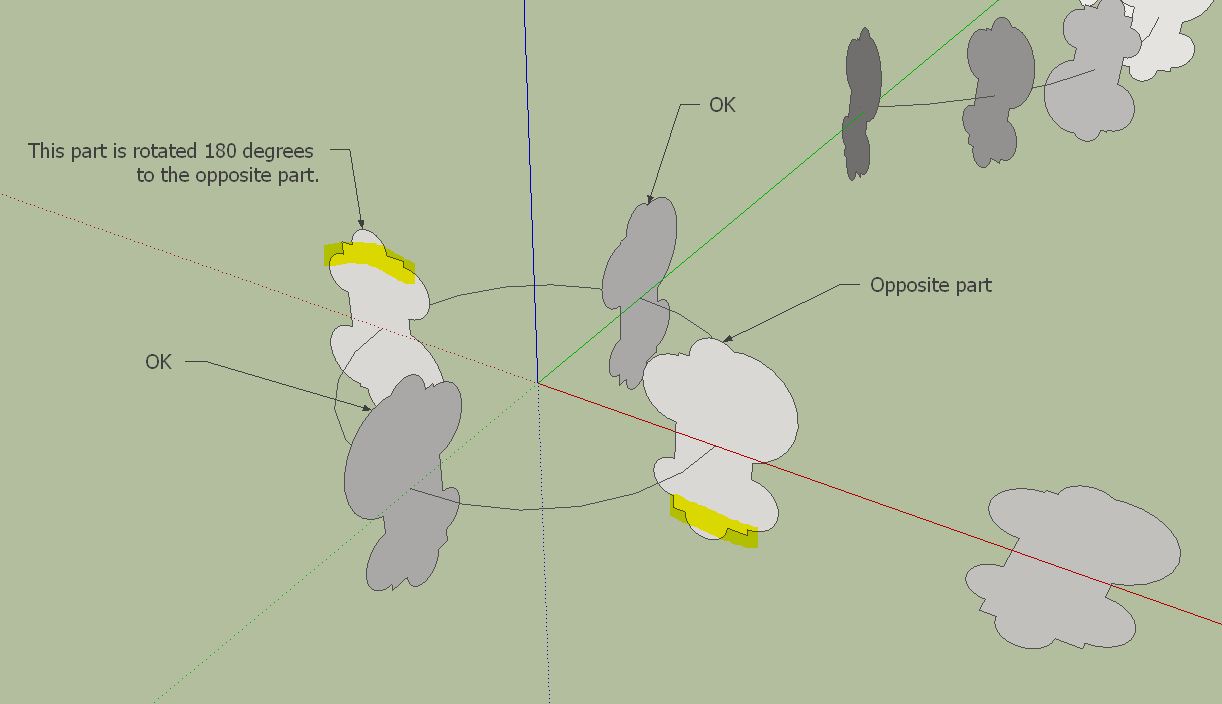
                                    I used your tool extensively in the beta test of fredos Curviloft. It's a great combination. but at times appears a little error. Some objects are rotated to 180 degrees. At two or three objects, this is not a problem to turn the objects by hand.

                                    Charly

                                    Perpendicular1.JPG


                                    Perpendicular.JPG

                                    He who makes no mistakes, makes nothing

                                    1 條回覆 最後回覆 回覆 引用 0
                                    • Chris FullmerC 離線
                                      Chris Fullmer
                                      最後由 編輯

                                      Hi Charly, I never did quite get some of that stuff worked out. When I wrote this I knew very little about vectors/ But, I was aware of the possibility of it adding unwanted rotation to faces. So I built in the ability to rotate a face immediatly after placing it by using the up arrow key.

                                      So if a face is rotated wrong, hit the up arrow key to rotate it 90 degrees. Hope that helps,

                                      Chris

                                      Lately you've been tan, suspicious for the winter.
                                      All my Plugins I've written

                                      1 條回覆 最後回覆 回覆 引用 0
                                      • charly2008C 離線
                                        charly2008
                                        最後由 編輯

                                        Thanks Chris for your quick response. Your tip is a good help.

                                        Charly

                                        He who makes no mistakes, makes nothing

                                        1 條回覆 最後回覆 回覆 引用 0
                                        • D 離線
                                          DIEGO-RODRIGUEZ
                                          最後由 編輯

                                          hi chris
                                          long use this tool and I would like to ask you some suggestions.

                                          square perperdicular:
                                          if I enter a single value (for ejemmplo 20) = draws a square of 20 (as it works now)
                                          but if I enter two values (eg 20,30) draws a rectangle of 20x30
                                          circle perperdicular:
                                          add opcion of oval
                                          if I enter two values (eg 20,30) draws a oval of 20x30
                                          custom face:
                                          add opción for scale
                                          if I enter /2 draws face , half the size of the original face
                                          if I enter *2 draws face , twice the size of the face of origin

                                          is it possible?

                                          1 條回覆 最後回覆 回覆 引用 0
                                          • Chris FullmerC 離線
                                            Chris Fullmer
                                            最後由 編輯

                                            That would be possible to add. I"m not sure how to handle the fact that different places use . and , differntly in numbers. Is there a way to determine what the decimal delimeter is for a user's location or something?


                                            Lately you've been tan, suspicious for the winter.
                                            All my Plugins I've written

                                            1 條回覆 最後回覆 回覆 引用 0
                                            • 1
                                            • 2
                                            • 3
                                            • 4
                                            • 5
                                            • 10
                                            • 11
                                            • 1 / 11
                                            • 第一個貼文
                                              最後的貼文
                                            Buy SketchPlus
                                            Buy SUbD
                                            Buy WrapR
                                            Buy eBook
                                            Buy Modelur
                                            Buy Vertex Tools
                                            Buy SketchCuisine
                                            Buy FormFonts

                                            Advertisement