sketchucation logo sketchucation
    • 登入
    Oops, your profile's looking a bit empty! To help us tailor your experience, please fill in key details like your SketchUp version, skill level, operating system, and more. Update and save your info on your profile page today!
    ⚠️ Important | Libfredo 15.6b introduces important bugfixes for Fredo's Extensions Update

    [Plugin] Components onto Faces v1.2.0 UPDATE May 23, 2013

    已排程 已置頂 已鎖定 已移動 Plugins
    61 貼文 16 Posters 68.6k 瀏覽 16 Watching
    正在載入更多貼文
    • 從舊到新
    • 從新到舊
    • 最多點贊
    回覆
    • 在新貼文中回覆
    登入後回覆
    此主題已被刪除。只有擁有主題管理權限的使用者可以查看。
    • R 離線
      rv1974
      最後由 編輯

      Chris could add 'scale component to match the face area' feature?
      Example: I'd select the glass faces in windows made by windowizer and run your script to insert
      the 'curtain' component. Everything works fine already except matching the component to the glazing
      opening.
      What do you think?

      1 條回覆 最後回覆 回覆 引用 0
      • Chris FullmerC 離線
        Chris Fullmer
        最後由 編輯

        Its on my list to do, but it gets very complex when the shapes are not 3 sided objects fitting onto 3 sided faces, or 4 sided to 4 sided, etc. Even 4 sided is hard, because most people don't realize that their 4 sided face is often actually 2 non-planar triangles.

        So its a functionality I would like to implement, but every time I've tried, I remember how much work it really is.

        Lately you've been tan, suspicious for the winter.
        All my Plugins I've written

        1 條回覆 最後回覆 回覆 引用 0
        • ely862meE 離線
          ely862me
          最後由 編輯

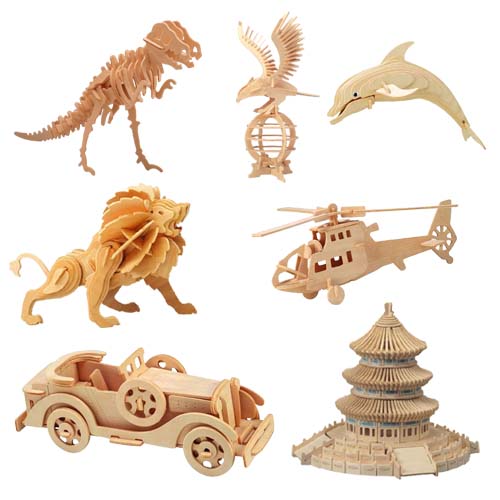
          Any idea if there is a plugin that would place parts onto a face with some added distance between the parts? Or simply put all the components at once onto a face, not just one component. I have some 3d puzzles and I would like to select all the pieces then select a face and the plugin should move all the pieces one near another onto that face, or even one over another(I would do the placing later).

          Thanks !

          Elisei (sketchupper)


          Before no life was done on Earth it was THE LIFE ITSELF...GOD
          Come and See EliseiDesign

          1 條回覆 最後回覆 回覆 引用 0
          • pilouP 離線
            pilou
            最後由 編輯

            Try this one in developpment by CPlassais! 😉

            @unknownuser said:

            After clicking on the receiving side as long as you did not select another face you can adjust the rotation or translation on the plane defined by the receiving side.

            You use the keypad Director or numeric keypad on your keyboard Arrow

            5 key reverses the normal of the receiving side (you avoid contortions to get the underside
            The + or - button to increase or decrease the increment of which is the launch of the operation of 1 or 1 unit of measurement model
            The home and end keys or 7 and 1 used to change the rotation
            The guidelines allow the 8,4,2,6 keys or translations. (not perfect at axis level shift / key)

            If there is not z just draw on your component a little box of the measure wanted! 😉
            And kill it at the end!

            Tab = Multiple Copy mode

            http://s6.postimg.org/st2yjegy9/faces_faces7.jpg

            http://s6.postimg.org/czk6481ch/faces_faces4.jpg

            http://s6.postimg.org/cvqcnyvv5/faces_faces1.jpg

            Frenchy Pilou
            Is beautiful that please without concept!
            My Little site :)

            1 條回覆 最後回覆 回覆 引用 0
            • ely862meE 離線
              ely862me
              最後由 編輯

              Thank you Pilou, but this is not exactly what I want. I will create another thread in order to let this one alone. The operation should work exactly as Components onto faces, but instead of pasting one component onto many faces, I want to place more components onto one face(one near another). Like when you have a cabinet and you want the pieces to be placed one near another in order to be cut with a cnc machine.

              Elisei (sketchupper)


              Before no life was done on Earth it was THE LIFE ITSELF...GOD
              Come and See EliseiDesign

              1 條回覆 最後回覆 回覆 引用 0
              • ely862meE 離線
                ely862me
                最後由 編輯

                I have puzzles with many pieces, like 70, 100 or more. It will be a tedious job to do it with this plugin, I would rather rotate them in bulk, when possible, and move/place them with the move tool. I expected a plugin that works like this: Select all the components, select a face and then all the components will be automatically placed onto that face(would be awesome with some space between them) ...

                Elisei (sketchupper)


                Before no life was done on Earth it was THE LIFE ITSELF...GOD
                Come and See EliseiDesign

                1 條回覆 最後回覆 回覆 引用 0
                • pilouP 離線
                  pilou
                  最後由 編輯

                  @unknownuser said:

                  I want to place more components onto one face(one near another)

                  The plug that I posted above make also this as you can move at any place, rotate it on the surface inside the plug! 😉
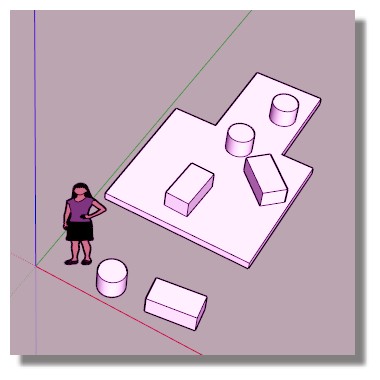
                  copy.jpg

                  Frenchy Pilou
                  Is beautiful that please without concept!
                  My Little site :)

                  1 條回覆 最後回覆 回覆 引用 0
                  • pilouP 離線
                    pilou
                    最後由 編輯

                    So you want a puzzle helper! 😄

                    PS
                    How is your Puzzle ?

                    Frenchy Pilou
                    Is beautiful that please without concept!
                    My Little site :)

                    1 條回覆 最後回覆 回覆 引用 0
                    • ely862meE 離線
                      ely862me
                      最後由 編輯

                      This kind of puzzle

                      http://www.asia.ru/images/target/img/product/11/13/18/11131889.jpg

                      Elisei (sketchupper)


                      Before no life was done on Earth it was THE LIFE ITSELF...GOD
                      Come and See EliseiDesign

                      1 條回覆 最後回覆 回覆 引用 0
                      • pilouP 離線
                        pilou
                        最後由 編輯

                        2D or 3D Puzzle?
                        Same form of piece?

                        Frenchy Pilou
                        Is beautiful that please without concept!
                        My Little site :)

                        1 條回覆 最後回覆 回覆 引用 0
                        • 1
                        • 2
                        • 3
                        • 4
                        • 4 / 4
                        • 第一個貼文
                          最後的貼文
                        Buy SketchPlus
                        Buy SUbD
                        Buy WrapR
                        Buy eBook
                        Buy Modelur
                        Buy Vertex Tools
                        Buy SketchCuisine
                        Buy FormFonts

                        Advertisement