sketchucation logo sketchucation
    • 登入
    Oops, your profile's looking a bit empty! To help us tailor your experience, please fill in key details like your SketchUp version, skill level, operating system, and more. Update and save your info on your profile page today!
    ⚠️ Important | Libfredo 15.6b introduces important bugfixes for Fredo's Extensions Update

    Batch Convert .eps images

    已排程 已置頂 已鎖定 已移動 Corner Bar
    28 貼文 6 Posters 1.2k 瀏覽 6 Watching
    正在載入更多貼文
    • 從舊到新
    • 從新到舊
    • 最多點贊
    回覆
    • 在新貼文中回覆
    登入後回覆
    此主題已被刪除。只有擁有主題管理權限的使用者可以查看。
    • Roguer1R 離線
      Roguer1
      最後由 編輯

      Hello

      I have recently acquired a whole lot of images, 1500+, in .eps format. I am wanting to convert them all to .jpg while resizing them all by 300% and keeping the quality. I tried Photoshop CS2 but it only resizes the first image properly and the rest end up pixelated. All the images can be resized fine individually but that would take days of straight manual converting 😢

      I was looking for a program to convert and resize .eps images that is free but couldn’t find anything that worked. What can I do or is there a way to get around that problem in Photoshop?

      The method I was using is at the following url

      favicon

      (www.innoshare.com)

      Find all my models on the [3D Warehouse](https://3dwarehouse.sketchup.com/user/d8bb4d13-3b01-44a0-a007-4a77a32b6433/Ben-B?tab)

      1 條回覆 最後回覆 回覆 引用 0
      • I 離線
        idraft
        最後由 編輯

        I have been putting together some of my helpful links into a blog and came across this batch convertor called Picture Resizer available at http://www.rw-designer.com. It looks very handy but havent given it a wizz yet.

        Link Preview Image
        Picture Resizer

        Picture Resizer 3.0 An easy-to-use and free tool for batch resizing of JPG pictures and photos. Link here for Picture Resizer http://www.rw...

        favicon

        (sketchuplinks.blogspot.com)

        You can thank me later. 😄 👍

        PS If you do give it a "wizz" can you please let us know what you thought of it thanks.

        Cheers Jeff

        1 條回覆 最後回覆 回覆 引用 0
        • pilouP 離線
          pilou
          最後由 編輯

          http://www.irfanview.com/
          http://www.irfanview.com/main_formats.htm
          it's free, works very fine! 😉

          Frenchy Pilou
          Is beautiful that please without concept!
          My Little site :)

          1 條回覆 最後回覆 回覆 引用 0
          • Roguer1R 離線
            Roguer1
            最後由 編輯

            @idraft said:

            I have been putting together some of my helpful links into a blog and came across this batch convertor called Picture Resizer available at http://www.rw-designer.com. It looks very handy but havent given it a wizz yet.

            Link Preview Image
            Picture Resizer

            Picture Resizer 3.0 An easy-to-use and free tool for batch resizing of JPG pictures and photos. Link here for Picture Resizer http://www.rw...

            favicon

            (sketchuplinks.blogspot.com)

            You can thank me later. 😄 👍

            PS If you do give it a "wizz" can you please let us know what you thought of it thanks.

            Cheers Jeff

            I downloaded and tried it. It is just an app for re-sizing .jpg images. Thanks for the help though. I had a play around with it to see if it was good at what it was made for. It was a bit confusing and needed a bit of reading to understand how it worked but it seemed to do its job.

            It wasn’t quite what I was looking for but thanks anyway

            @unknownuser said:

            http://www.irfanview.com/
            http://www.irfanview.com/main_formats.htm
            it's free, works very fine! 😉

            I had a look and I had actually used this program before for a different reason with no result. I had a crack at it with the .eps files. I had to download the ghostscript but I just get an error message every time i try to convert. It just says "Error! Can't load" and "Can't load PlugIn: POSTSCRIPT.DLL"

            Oh well...Thanks for the help

            Find all my models on the [3D Warehouse](https://3dwarehouse.sketchup.com/user/d8bb4d13-3b01-44a0-a007-4a77a32b6433/Ben-B?tab)

            1 條回覆 最後回覆 回覆 引用 0
            • Chris FullmerC 離線
              Chris Fullmer
              最後由 編輯

              Could you upload a group of 10 or something for us to play with? I'm cofused why the fist one works and then it breaks after that. I've never encountered that and I run a lot of batches. But I've also NEVER worked with .eps files.

              Chris

              Lately you've been tan, suspicious for the winter.
              All my Plugins I've written

              1 條回覆 最後回覆 回覆 引用 0
              • pilouP 離線
                pilou
                最後由 編輯

                Go there and load the Post Script DLL !

                @unknownuser said:

                Plugins updated after the version 4.20:
                Postscript - improved AFPL Ghostscript registry check.

                Unzip and past it in the Root Folder Plugins of Irfranview!

                Story continue : use the line command of Goshtscript is a mess! 😮
                You must have GhostView 😒
                (but seems you don't need to use it if you have yet your eps images!
                Now all is cool 😉
                Irfranview can read the EPS file and make anything you want in Batch mode! ☀
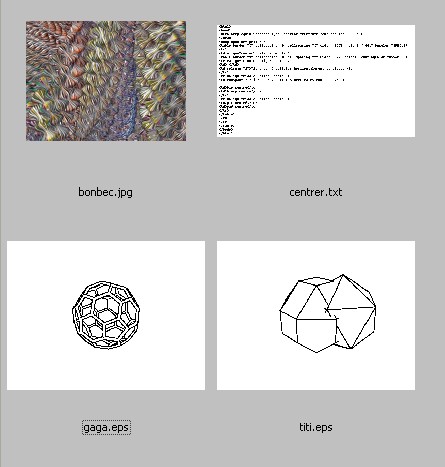
                Here the view of the directory of the computer inside Ifranview where you choose any file eps
                (here the 2 bottom page files eps) for Batch processing for
                convert, resize, colorize ...etc as you want from 1 image to 1500 images if you want in one pass 😎
                Et voilà 💚 eps.jpg

                Frenchy Pilou
                Is beautiful that please without concept!
                My Little site :)

                1 條回覆 最後回覆 回覆 引用 0
                • Roguer1R 離線
                  Roguer1
                  最後由 編輯

                  Thanks Pilou

                  But the conversion isnt very good. It converts all to the correct size and eventhough the files are made in coreldraw and can be resized without quality loss they still have quality problems. The lines turn out rough and the colours turn into weird patterns....

                  I guess its the best I'll get, thanks for the help.

                  Find all my models on the [3D Warehouse](https://3dwarehouse.sketchup.com/user/d8bb4d13-3b01-44a0-a007-4a77a32b6433/Ben-B?tab)

                  1 條回覆 最後回覆 回覆 引用 0
                  • Roguer1R 離線
                    Roguer1
                    最後由 編輯

                    @chris fullmer said:

                    Could you upload a group of 10 or something for us to play with? I'm cofused why the fist one works and then it breaks after that. I've never encountered that and I run a lot of batches. But I've also NEVER worked with .eps files.

                    Chris

                    Here is a zip file of 10 mazda images in .eps format.

                    OneDrive - Error

                    favicon

                    (cid-4a6ec86d99895c84.skydrive.live.com)

                    If you manage to convert these files to a high quality and to 300% size would you be willing to batch convert the rest?

                    The original .eps files are of infanitely resizeable quality but this is a sample of what happens when i convert them (I had to decrease the size of the image, eventhough, it is still really bad quality
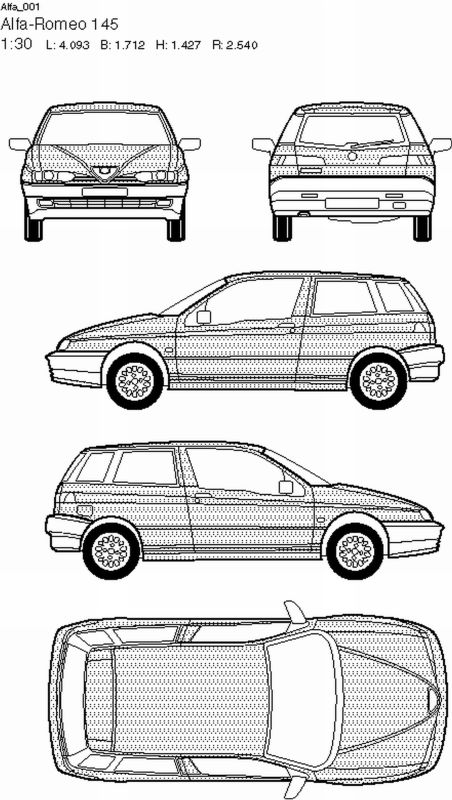
                    Alfa_001.jpg
                    The lines should be smooth and sharp and that strange pattern should be grey.

                    Find all my models on the [3D Warehouse](https://3dwarehouse.sketchup.com/user/d8bb4d13-3b01-44a0-a007-4a77a32b6433/Ben-B?tab)

                    1 條回覆 最後回覆 回覆 引用 0
                    • pilouP 離線
                      pilou
                      最後由 編輯

                      Is that you want?
                      Seems there is absolutely no problem! 😉
                      Irfanview: Loading file as any graphic format ---> save in PNG format (but you can take anything)

                      And here the JPG Folder where you will find for example in Batch processing work the all files in JPG format!
                      All takes me 5 seconds! so for 1500 images = 7 500 seconds = 2 hours
                      (but I have a very old comput more than 5 years old! 💚
                      Absolutely no problem! 😎

                      Sorry I don't see the 300% wished so here an example of PNG format in 300% 😳
                      You must have no problem for make the same! 😉


                      Mazd_001.zip


                      Mazd_001_300.zip

                      Frenchy Pilou
                      Is beautiful that please without concept!
                      My Little site :)

                      1 條回覆 最後回覆 回覆 引用 0
                      • Chris FullmerC 離線
                        Chris Fullmer
                        最後由 編輯

                        It also worked in photoshop for me. Do you have someplace that you can upload them all to?

                        Chris

                        Lately you've been tan, suspicious for the winter.
                        All my Plugins I've written

                        1 條回覆 最後回覆 回覆 引用 0
                        • honoluludesktopH 離線
                          honoluludesktop
                          最後由 編輯

                          The post were too numerous for me to read, but as a last resort you may be able to use a batch file in an command window to do the following:

                          Open the conversion program with parameters (for %%x in (*.eps) do program.exe %%x < commands.dat) where "<" redirect a command.dat file with the necessary program key strokes. Will not work (to the limit my knowledge) if the program is pure windows and has no execute file.

                          Not sure of the exact commands, you can look them up in MS command documantation. Batch file are capable of loops via goto. Sorry but I haven't done this lately.

                          1 條回覆 最後回覆 回覆 引用 0
                          • Roguer1R 離線
                            Roguer1
                            最後由 編輯

                            @unknownuser said:

                            You must have no problem for make the same! 😉

                            I have tried in many diffent ways but I cant get it to convert well.

                            Here is the full archive of files(both parts needed):
                            Part 1: http://xmdolg.bay.livefilestore.com/y1p4rfa-CPRoRHPVNciBXQto3aDzv6fpQ4Pzq8DFSYpsrGWX9xF9kvtFYuJvm-FemB7eG0oI3TzfbpR3NXP4MsfqQ/EPS.part1.rar?download

                            Part 2: http://xmdolg.bay.livefilestore.com/y1pSIZ37qWtOrr785lzvXj9J5metkAIEmz1OUnech-VPlrQ_CUNri9Sh_lP6eU7MlPwlWStpFoPUV7rUld6i2zxJg/EPS.part2.rar?download

                            Find all my models on the [3D Warehouse](https://3dwarehouse.sketchup.com/user/d8bb4d13-3b01-44a0-a007-4a77a32b6433/Ben-B?tab)

                            1 條回覆 最後回覆 回覆 引用 0
                            • pilouP 離線
                              pilou
                              最後由 編輯

                              So tell me if you can make from a JPG or PNG format with a batch process 300% ?
                              so I can transform eps on any format you prefer
                              make also 300% will be not practical because file will be too big for uploading
                              300 % = 500 kb * 1953 = 1 giga!
                              100% = 75 KB * 1953 = 150 megas!

                              Ps Seems you have send twice the sames files! 💚
                              What format do you want?
                              And I don't understand very well advantage to have thousand of files * 300%
                              Any modeler can make a background image * 300 % directly
                              And you can't modelize 2000 models in the same time!

                              Frenchy Pilou
                              Is beautiful that please without concept!
                              My Little site :)

                              1 條回覆 最後回覆 回覆 引用 0
                              • Roguer1R 離線
                                Roguer1
                                最後由 編輯

                                @unknownuser said:

                                So tell me if you can make from a JPG or PNG format a batch process 300% ?
                                so I can transform eps on any format you prefer
                                make also 300% will be not practical because file will be too big for uploading
                                300 % = 500 kb * 1953 = 1 giga!
                                100% = 75 KB * 1953 = 150 megas!

                                Ps Seems you have send twice the sames files! 💚
                                What format do you want?

                                I dont quite understand what you are trying to say...

                                I am wanting to batch convert the .eps images from the .rar archives from the links above.

                                So, the images will be converted from the default .eps, size: 700x400 into .jpg, size 1750x1000 and I want them to still be the same high quality.

                                That means an increase in resolution by about 3x

                                Find all my models on the [3D Warehouse](https://3dwarehouse.sketchup.com/user/d8bb4d13-3b01-44a0-a007-4a77a32b6433/Ben-B?tab)

                                1 條回覆 最後回覆 回覆 引用 0
                                • pilouP 離線
                                  pilou
                                  最後由 編輯

                                  You never has the same quality when you increase "Pixel image" format!!!

                                  If format EPS is a vectorial format yes you will have same quality in 300%
                                  but in this case you must use another prog than Irfranview!
                                  it's why I don't understand necessity to convert!

                                  What do you want in last?
                                  An image or a vectorial file?
                                  And what is the nature of your priginal EPS FILE? (a scan or a a CAD drawings )
                                  And for what is all that? 😄

                                  Frenchy Pilou
                                  Is beautiful that please without concept!
                                  My Little site :)

                                  1 條回覆 最後回覆 回覆 引用 0
                                  • Roguer1R 離線
                                    Roguer1
                                    最後由 編輯

                                    I want to turn the vectorial .eps file into a high-res .jpg image so I can use it in SketchUp for 3D modeling. A .eps file is useless to me otherwise.
                                    If IrfanView can't do that then I'll need another program to batch convert the images.

                                    Chris Fullmer, if you are able and willing to convert the images fine to how I need them can you convert the ones from the following file: http://xmdolg.bay.livefilestore.com/y1p2gygMqsEnKuNiI4ooxWLEo0vyx96jBw8fAs58ECdnbtZzsndLVpNnWeOaNhTjLITvIhk846GaOde48JGJljQZA/eps.zip?download

                                    Find all my models on the [3D Warehouse](https://3dwarehouse.sketchup.com/user/d8bb4d13-3b01-44a0-a007-4a77a32b6433/Ben-B?tab)

                                    1 條回覆 最後回覆 回覆 引用 0
                                    • pilouP 離線
                                      pilou
                                      最後由 編輯

                                      Seems your orignal file are not "vectorial" but just pixels!
                                      A format EPS can mix Pixels and vectors but seems in this case your cars are not vectorial!

                                      Frenchy Pilou
                                      Is beautiful that please without concept!
                                      My Little site :)

                                      1 條回覆 最後回覆 回覆 引用 0
                                      • Roguer1R 離線
                                        Roguer1
                                        最後由 編輯

                                        I have opend them in photoshop and resized them perfectly. They are made in coreldraw so they can be resized and keep perfect quality. I just need a way of batch converting them. IrfraView cant do it so i need something else.

                                        Find all my models on the [3D Warehouse](https://3dwarehouse.sketchup.com/user/d8bb4d13-3b01-44a0-a007-4a77a32b6433/Ben-B?tab)

                                        1 條回覆 最後回覆 回覆 引用 0
                                        • pilouP 離線
                                          pilou
                                          最後由 編輯

                                          I can't believe that toshop CS2 can't make that for a lot of images if it's works for one image!

                                          Frenchy Pilou
                                          Is beautiful that please without concept!
                                          My Little site :)

                                          1 條回覆 最後回覆 回覆 引用 0
                                          • Roguer1R 離線
                                            Roguer1
                                            最後由 編輯

                                            Photoshop CS2 just has a problem batch converting files. It isnt a well made plug-in. I dont currently ahve CS2 installed on my cmputer because it craped out a couple of days ago but when i gt it re-installed I will give you an example of what is happening.

                                            Find all my models on the [3D Warehouse](https://3dwarehouse.sketchup.com/user/d8bb4d13-3b01-44a0-a007-4a77a32b6433/Ben-B?tab)

                                            1 條回覆 最後回覆 回覆 引用 0
                                            • 1
                                            • 2
                                            • 1 / 2
                                            • 第一個貼文
                                              最後的貼文
                                            Buy SketchPlus
                                            Buy SUbD
                                            Buy WrapR
                                            Buy eBook
                                            Buy Modelur
                                            Buy Vertex Tools
                                            Buy SketchCuisine
                                            Buy FormFonts

                                            Advertisement