sketchucation logo sketchucation
    • 登入
    Oops, your profile's looking a bit empty! To help us tailor your experience, please fill in key details like your SketchUp version, skill level, operating system, and more. Update and save your info on your profile page today!
    🔌 Smart Spline | Fluid way to handle splines for furniture design and complex structures. Download

    Simple 2D spiral

    已排程 已置頂 已鎖定 已移動 Newbie Forum
    sketchup
    24 貼文 7 Posters 4.5k 瀏覽 7 Watching
    正在載入更多貼文
    • 從舊到新
    • 從新到舊
    • 最多點贊
    回覆
    • 在新貼文中回覆
    登入後回覆
    此主題已被刪除。只有擁有主題管理權限的使用者可以查看。
    • T 離線
      ticoloco
      最後由 編輯

      I do not want a 3D helix, I want a simple 2D spiral (with the aim to push).
      Are there any possibilities within SU? It should be much simplier to program than a helix!

      1 條回覆 最後回覆 回覆 引用 0
      • G 離線
        GreyHead
        最後由 編輯

        Try Draw helix 13 and set the pitch to 0 to keep the helix 2d.

        Or K tools will allow you to define your own equation for the spiral.

        Bob

        1 條回覆 最後回覆 回覆 引用 0
        • T 離線
          ticoloco
          最後由 編輯

          Thank you Greyhead,
          the K-tools helped. But I still have the problem, that the resulting object seems not to be joinable into an area.
          What I want to do are scrolls (rolled rectangles). Any ideas?
          Thank you for your time

          1 條回覆 最後回覆 回覆 引用 0
          • R 離線
            remus
            最後由 編輯

            You could use didiers projection tools to turn it in to an extruded face (http://www.crai.archi.fr/RubyLibraryDepot/Ruby/em_geo_page.htm name: projection_v6.rb) or you could start with a bir rectangle, slice it up in to lots of small rectangles and then incrementaly rotate them. See tut for more details.


            Add more seqments to the starting rectangle to increase smothness of the scroll.

            http://remusrendering.wordpress.com/

            1 條回覆 最後回覆 回覆 引用 0
            • G 離線
              GreyHead
              最後由 編輯

              For scrolled rectangles see this post - you'd need to delete some unwanted stuff.

              Bob

              PS No time to test it now - I'll try later.

              1 條回覆 最後回覆 回覆 引用 0
              • TaffGochT 離線
                TaffGoch
                最後由 編輯

                @ticoloco said:

                What I want to do are scrolls (rolled rectangles). Any ideas?

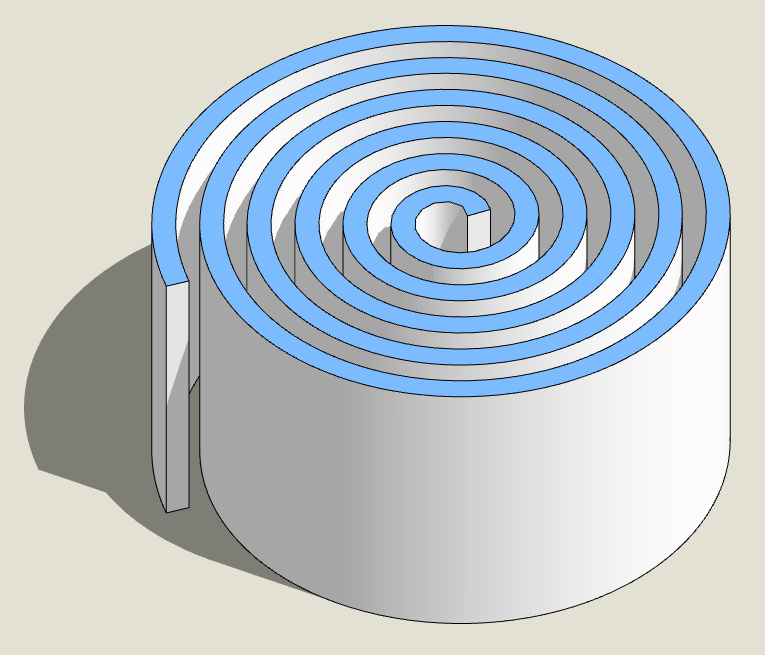
                Something like these?

                If not, do you have a photo of what you're trying to achieve?

                Taff
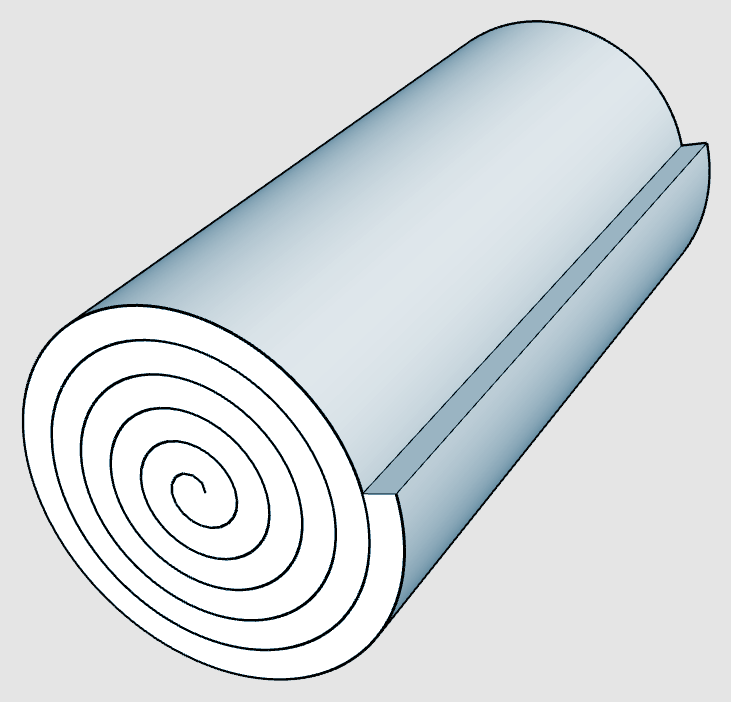

                RolledUp1.png


                RolledUp2.png

                "Information is not knowledge." -- Albert Einstein

                1 條回覆 最後回覆 回覆 引用 0
                • B 離線
                  bbwolf
                  最後由 編輯

                  Hello there

                  @TaffGoch

                  That´s exactly what I want to do. How´d you create this?
                  Looking for how to do a spiral in SU for hours now, but can´t
                  seem to find an answer.

                  What´s KTools btw, anyone?

                  Thanks

                  1 條回覆 最後回覆 回覆 引用 0
                  • GaieusG 離線
                    Gaieus
                    最後由 編輯

                    Hi Wolf,

                    kt_tools##.rb (for different mathematical shapes) and drawhelix##.rb (for spirals) are ruby scripts used as plugins in SU.
                    You can download them here.

                    Gai...

                    1 條回覆 最後回覆 回覆 引用 0
                    • B 離線
                      bbwolf
                      最後由 編輯

                      Hey Gaieus

                      I really hate to sound like a total noob but when I try to download the stuff I get a website with ALL the code. What am I ´sposed to do with that?
                      I tried to put in a text file but my mac flatly refuses to change the suffix to rb.

                      wth? Any ideas? Would be great. Clock is ticking for me and that sucks.

                      Thanks everybody

                      1 條回覆 最後回覆 回覆 引用 0
                      • GaieusG 離線
                        Gaieus
                        最後由 編輯

                        Don't worry about sounding like a noob - after all we are in the Newbie Forum (and we all had to start somewhere).

                        Anyway, I'm not a Mac user so I'm not sure everything will work the same way;

                        If you click on the script and it returns the code, you can select all and copy > Paste it into a simple text editor (not a word processor!) then save it under the Macintosh HD/Library/Application Support/Google Sketchup 6/SketchUp/Plugins folder with the exact name it has on the site.

                        You can (on PC) also just right click on the link and save it to the same place but with rb extension.

                        Gai...

                        1 條回覆 最後回覆 回覆 引用 0
                        • GaieusG 離線
                          Gaieus
                          最後由 編輯

                          For the easy spirals, download the drawhelix.rb as well (it also has several versions).

                          Gai...

                          1 條回覆 最後回覆 回覆 引用 0
                          • B 離線
                            bbwolf
                            最後由 編輯

                            okay I managed to get k_tools_50.rb to run in my SU

                            just read yer answers - found it before 😎 <

                            Now, how do I get the spiral done, please? If I´d known math I wouldn´t
                            have become a designer in the first place.

                            See attached pic for what this stupid muppet sees and tell what to do, please
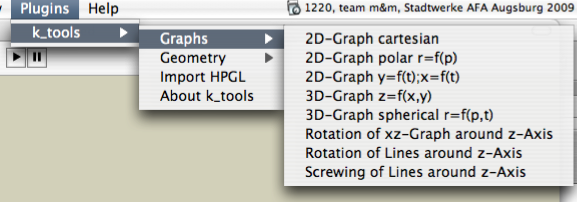

                            Bild 2.png

                            1 條回覆 最後回覆 回覆 引用 0
                            • B 離線
                              bbwolf
                              最後由 編輯

                              whelp

                              I´ll do that right now. Keep ya posted on the process.

                              Thanks so much

                              1 條回覆 最後回覆 回覆 引用 0
                              • B 離線
                                bbwolf
                                最後由 編輯

                                😍

                                It works! Saved by Gaieus! Thangk yew. Thangk yew verry mudch. 😎

                                1 條回覆 最後回覆 回覆 引用 0
                                • GaieusG 離線
                                  Gaieus
                                  最後由 編輯

                                  No, these are just the first steps in discovering the wonderful and exciting world of pluins! 😉

                                  Gai...

                                  1 條回覆 最後回覆 回覆 引用 0
                                  • B 離線
                                    bbwolf
                                    最後由 編輯

                                    you are 100% totally right. I just discoverd that one solution just leads one to the next problem/challenge. Should I continue my quest for help and knowledge in this thread or open up a new one?

                                    Here´s the "handdrawn" sketch of what I want to/have to create today.

                                    I now got the spiral thing down, but how to get the thing to extrude the
                                    way I want it?
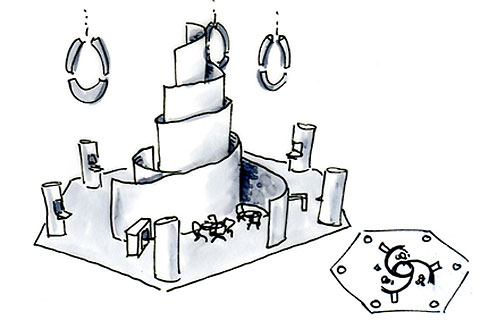

                                    081105_AFA_04.jpg

                                    1 條回覆 最後回覆 回覆 引用 0
                                    • GaieusG 離線
                                      Gaieus
                                      最後由 編輯

                                      OK, before we proceed, download skin22.zip as well and unzip its content to the same folder.


                                      Edit: I will split this part of the topic off the original one.

                                      Gai...

                                      1 條回覆 最後回覆 回覆 引用 0
                                      • B 離線
                                        bbwolf
                                        最後由 編輯

                                        I´ll go looking for the .zip

                                        I allready started a new thread.

                                        301 Moved Permanently

                                        favicon

                                        (www.sketchucation.com)

                                        1 條回覆 最後回覆 回覆 引用 0
                                        • B 離線
                                          bbwolf
                                          最後由 編輯

                                          Okay. I got the skin22.zip and put it in the plugin folder.

                                          Now what? 🤓

                                          1 條回覆 最後回覆 回覆 引用 0
                                          • 1
                                          • 2
                                          • 1 / 2
                                          • 第一個貼文
                                            最後的貼文
                                          Buy SketchPlus
                                          Buy SUbD
                                          Buy WrapR
                                          Buy eBook
                                          Buy Modelur
                                          Buy Vertex Tools
                                          Buy SketchCuisine
                                          Buy FormFonts

                                          Advertisement