sketchucation logo sketchucation
    • 登入
    Oops, your profile's looking a bit empty! To help us tailor your experience, please fill in key details like your SketchUp version, skill level, operating system, and more. Update and save your info on your profile page today!
    🔌 Easy Offset | Offset selected faces in SketchUp in positive and negative offsets. Download

    Proper_animation.rb ,some questions

    已排程 已置頂 已鎖定 已移動 Developers' Forum
    45 貼文 14 Posters 8.3k 瀏覽 14 Watching
    正在載入更多貼文
    • 從舊到新
    • 從新到舊
    • 最多點贊
    回覆
    • 在新貼文中回覆
    登入後回覆
    此主題已被刪除。只有擁有主題管理權限的使用者可以查看。
    • S 離線
      Shotster
      最後由 編輯

      @dave r said:

      what if you make the rotating part a component instead of a group and place its axis so the origin is at the center of rotation.

      Interesting you should mention this. A couple days ago I did just that in an effort to get my paper folding animation to work. (Right click and choose play.)

      [flash=200,193:21jtvhjy]http://www.adeptool.com/anim/PaperFold.swf[/flash:21jtvhjy]

      -Steve

      1 條回覆 最後回覆 回覆 引用 0
      • N 離線
        N Lindenthal
        最後由 編輯

        @unknownuser said:

        …
        maybe your plug is not installed?

        If I write in ruby console:

        load "proper_animation.rb"
        

        I get »true«, so the plug is installed.

        But is there anyone on mac, who can show, that the plug is running?

        1 條回覆 最後回覆 回覆 引用 0
        • pilouP 離線
          pilou
          最後由 編輯

          @ N Lindenthal so maybe your plug is not installed?
          That you must see on the Right Click (on Transformations) 😉
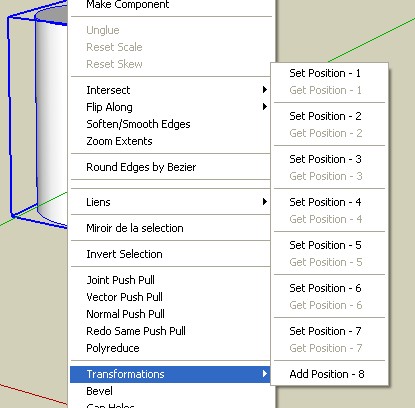

          transfo.jpg

          Frenchy Pilou
          Is beautiful that please without concept!
          My Little site :)

          1 條回覆 最後回覆 回覆 引用 0
          • MALAISEM 離線
            MALAISE
            最後由 編輯

            N Lidenthal , Unfortunaly, I left Mac technology for a long while.
            Can you read animated files ( one of mine for instance )? then try to modify it
            just in order to see if it's not Mac-dependant ❓ ❓

            Hi Shotster
            What kind of software do you use to display this small picture?

            MALAISE 😄 😄

            La Connaissance n'a de valeur que partagée

            1 條回覆 最後回覆 回覆 引用 0
            • N 離線
              N Lindenthal
              最後由 編輯

              @Malaise
              I can watch animated files on mac, and I tried to modify them. But to give them a new transformation, was unsucessfull, because in right mouse click there is no transformation.

              In context menu (right mouse click on marked objects) there are several textlines and several bounding lines. If I take the proper_animation.rb-script away from plugins folder and start SU again, the context menu has one bounding line less. Under the textlines there are 2 bounding lines. If proper_animation is installed, there are 3 bounding lines.

              It seems, that between the bounding lines should exist a text line from one ruby script. So what ruby script also does not apear there?

              1 條回覆 最後回覆 回覆 引用 0
              • MALAISEM 離線
                MALAISE
                最後由 編輯

                Hallo N Lindenthal

                 There is probably something wrong written in the rb.file. Please send it me
                and I'll test it on my PC ( not Mac tut mir Leit ). Then we may ask his author some improvement. 
                

                Tschüss
                MALAISE

                La Connaissance n'a de valeur que partagée

                1 條回覆 最後回覆 回覆 引用 0
                • N 離線
                  N Lindenthal
                  最後由 編輯

                  Malaise, you got my .rb-file over PM?

                  1 條回覆 最後回覆 回覆 引用 0
                  • S 離線
                    Shotster
                    最後由 編輯

                    @malaise said:

                    What kind of software do you use to display this small picture?

                    It's actually an embedded Flash animation. You should get a contextual menu when you right click on it. Select "Play" to view the animation.

                    -Steve

                    1 條回覆 最後回覆 回覆 引用 0
                    • pilouP 離線
                      pilou
                      最後由 編輯

                      @unknownuser said:

                      What kind of software do you use to display this small picture?

                      and when you right click on the image you can see the name of the prog 😉

                      Frenchy Pilou
                      Is beautiful that please without concept!
                      My Little site :)

                      1 條回覆 最後回覆 回覆 引用 0
                      • MALAISEM 離線
                        MALAISE
                        最後由 編輯

                        Hello Gents

                         The transformation option will appear only if a group or component is selected
                        

                        whatever the observer view is ON or OFF. I mean you click on group to reach positions ( set or get ..)
                        The use of stop animation observer stores the new view after all changes.
                        Start animation observer enables the show (scenes 1 then 2 .....)

                        It seems to be simple but not so obvious.

                        You have to select all the groups or components activated involved in the scene, after any modification of one or more groups, before setting a new position. If you jump this stage you may get strange results.

                        I have one question : ( Mainly for the plugin's father 😉 )

                        All movements are done within the same time. I mean a long displacement or a
                        short rotation require 1 second..( for instance )

                        Could it be possible later to modify this "time" parameter ?

                        Thanks for attention

                        MALAISE 😄 😄

                        La Connaissance n'a de valeur que partagée

                        1 條回覆 最後回覆 回覆 引用 0
                        • M 離線
                          morisdov
                          最後由 編輯

                          Hello Guys,

                          1. When rotating an object, Setting the axis so the origin is at the center of rotation - as suggested by DaveR - is probably the eaysiest way to control the "center" of the object you are animating/rotating.
                          2. I dont have access to a mac machine so all my ruby programming and tests are done on windows only.
                          3. I read some post by RickW that Each scene/page can get its own "transition" time - so i can probably do it - but, we will never compete with true "timeline" based animations like 3DSMax and Maya, you can use few scenes to simulate a single long leg of an animation part.
                          4. When an object is selected for "animation" - in "Windows->Preferences->Shortcuts" you may define "Position X" shortcut keys if you want.
                          5. I am traying to keep this plugin "simple" by adding only "must" features if we have to, maybe later we will add more "nice to have" settings.

                          Keep on the good work, Moris

                          1 條回覆 最後回覆 回覆 引用 0
                          • MALAISEM 離線
                            MALAISE
                            最後由 編輯

                            Hallo Morisdov

                            Nice to read you again.
                            Hereby I send another file using the plugin you've made.

                            Just see how fast is the boat crossing the gate ( what 's the name in English ?)
                            ( even if I modify animation setting ) but I will survive 😆
                            Thanks you once more time.

                            MALAISE 😄


                            boat and water gates ?

                            La Connaissance n'a de valeur que partagée

                            1 條回覆 最後回覆 回覆 引用 0
                            • M 離線
                              me3mar
                              最後由 編輯

                              is it possible to render such an animation using proper_animation.rb and vray ?

                              1 條回覆 最後回覆 回覆 引用 0
                              • MALAISEM 離線
                                MALAISE
                                最後由 編輯

                                Hello Guys

                                I see, you've downloaded the file. About Vray, i'm not experienced.
                                Maybe one of us have already opened the way ??

                                MALAISE 👍

                                La Connaissance n'a de valeur que partagée

                                1 條回覆 最後回覆 回覆 引用 0
                                • S 離線
                                  Shotster
                                  最後由 編輯

                                  I've been trying some paper folding animations using nested components. The animation of a nested component works as expected when in the context of (i.e. editing) the parent component. However, when not in component edit mode, the nested component does not animate properly. It does move - but typically way out of view, off in left field. It appears that when you're editing the parent component, the nested component's motion is relative to its parent, but when not editing the parent component, the motion is relative to something else.

                                  Any chance this could be "fixed" so that nested components always move relative to their parent?

                                  -Steve

                                  1 條回覆 最後回覆 回覆 引用 0
                                  • GaieusG 離線
                                    Gaieus
                                    最後由 編輯

                                    Hi Malaise,

                                    Could you add one more scene "in between" when moving your ship? (Of course it should be added within the transformation script itself - it wouldn't work "from outside").

                                    @__Steve__- I haven't played around with this but what if you set the origin of both your parent and child component to the original world axis? I can imagine it has something to do with active axes somehow.

                                    Gai...

                                    1 條回覆 最後回覆 回覆 引用 0
                                    • MALAISEM 離線
                                      MALAISE
                                      最後由 編輯

                                      Hi Gaieus

                                      Interesting suggestion, let me try.. 👍 ( stepping motorized boat maybe ?)
                                      Thanks

                                      MALAISE

                                      La Connaissance n'a de valeur que partagée

                                      1 條回覆 最後回覆 回覆 引用 0
                                      • GaieusG 離線
                                        Gaieus
                                        最後由 編輯

                                        But then also turn off (set to 0) the animation delayin the Model info > Animation settings (there will be a very short delay anyway I'm afraid).

                                        Gai...

                                        1 條回覆 最後回覆 回覆 引用 0
                                        • S 離線
                                          Shotster
                                          最後由 編輯

                                          @gaieus said:

                                          Steve- I haven't played around with this but what if you set the origin of both your parent and child component to the original world axis?

                                          Unless I'm misunderstanding something, I don't see how that will help, as I need the components to rotate about different axes. ❓

                                          1 條回覆 最後回覆 回覆 引用 0
                                          • R 離線
                                            roberta
                                            最後由 編輯

                                            Hello there,

                                            I'm using a MAC and downloaded proper-animation.rb but everytime I right klick the component and try to "get position" in order to record it for the animation sketch-up crashes.
                                            Is there anything I can do about that?
                                            Could anyone help?

                                            Thanks Roberta

                                            1 條回覆 最後回覆 回覆 引用 0
                                            • 1
                                            • 2
                                            • 3
                                            • 1 / 3
                                            • 第一個貼文
                                              最後的貼文
                                            Buy SketchPlus
                                            Buy SUbD
                                            Buy WrapR
                                            Buy eBook
                                            Buy Modelur
                                            Buy Vertex Tools
                                            Buy SketchCuisine
                                            Buy FormFonts

                                            Advertisement
