sketchucation logo sketchucation
    • Login
    Oops, your profile's looking a bit empty! To help us tailor your experience, please fill in key details like your SketchUp version, skill level, operating system, and more. Update and save your info on your profile page today!
    Mac User? | Join the Rayscaper Beta for Mac Learn More

    [Plugin] SketchyBevel 0.1(Updated May 11)

    Scheduled Pinned Locked Moved Plugins
    143 Posts 85 Posters 150.1k Views 85 Watching
    Loading More Posts
    • Oldest to Newest
    • Newest to Oldest
    • Most Votes
    Reply
    • Reply as topic
    Log in to reply
    This topic has been deleted. Only users with topic management privileges can see it.
    • C
      CPhillips
      last edited by

      @majid said:

      i tried this tool several times but it seems there is something wrong whit me ( or a bug ) that it doesn't works!!!!

      Remus is right, you need to select the whole mesh.

      There are really several different types of beveling. Mesh, face and edge. This plug-in just does mesh at the moment.

      1 Reply Last reply
      Reply Quote 0
      • majidM
        majid
        last edited by

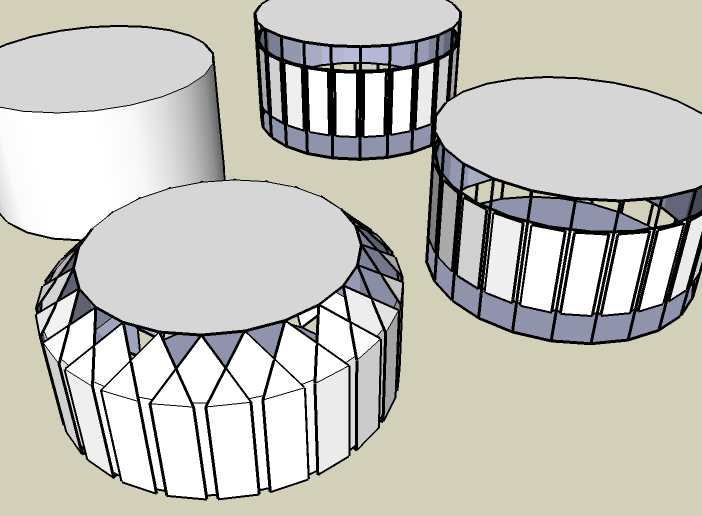
        ok here is some tests over one shape... strange results!!! i guess it's bkz of rubies interfere

        bev.jpg

        My inspiring A, B, Sketches book: https://sketchucation.com/shop/books/intermediate/2612-alphabet-inspired-sketches--inspiring-drills-for-architects--3d-artists-and-designers-

        1 Reply Last reply
        Reply Quote 0
        • C
          CPhillips
          last edited by

          Looks like you are not selecting the whole mesh and/or using too large values for the amount of inset.

          I have beveled cylinders and it works ok if you keep the values small.

          1 Reply Last reply
          Reply Quote 0
          • S
            sintra
            last edited by

            Thanks for your time and efforts on this it looks great 😎

            Kind regards

            Darren

            1 Reply Last reply
            Reply Quote 0
            • D
              Dan
              last edited by

              Thanks a lot, Chris!
              Very useful and longtime missing tool.
              Can't wait to put it to work.

              1 Reply Last reply
              Reply Quote 0
              • K
                kwistenbiebel
                last edited by

                The ruby works very well. 😄
                I love it that one can use it by simply right clicking the selected geometry.
                Very speedy.

                One little remark:
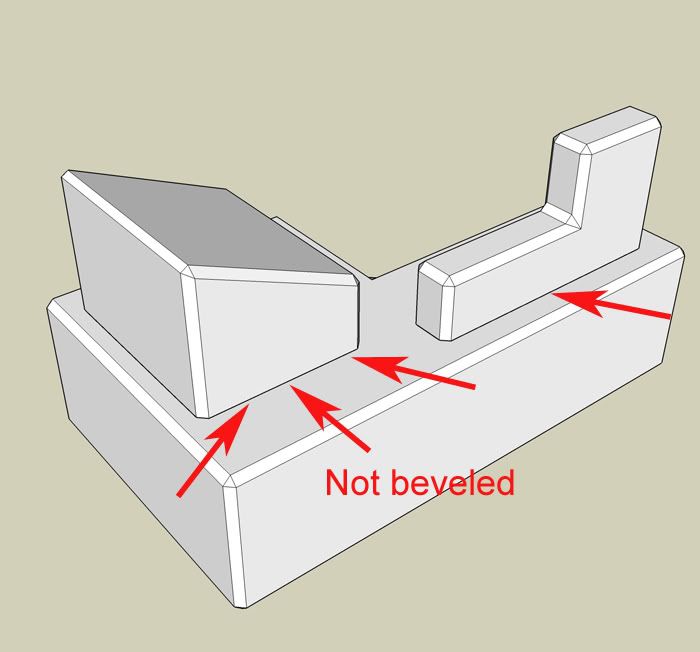
                The ruby seems to only bevel concave corners and not the convex ones.
                see image:
                http://i140.photobucket.com/albums/r3/kwistenbiebel1/SU/bevel2.jpg

                Besides the small hickups, this is a very fine ruby.
                Thank you Chris. 👍

                @Majid,
                I believe the issue you experience indeed has to do with the bevel value set too high.

                1 Reply Last reply
                Reply Quote 0
                • StinkieS
                  Stinkie
                  last edited by

                  Hm. Weird ...


                  untitled.jpg

                  1 Reply Last reply
                  Reply Quote 0
                  • D
                    Daniel S
                    last edited by

                    It dosen´t work in all the cases... but still is very useful 😍


                    bevel.jpg

                    1 Reply Last reply
                    Reply Quote 0
                    • StinkieS
                      Stinkie
                      last edited by

                      Yup, and it certainly is a step in the right direction. 😄

                      1 Reply Last reply
                      Reply Quote 0
                      • M
                        marcociacci
                        last edited by

                        where is the file to download your plugin???
                        ...i don't find it!!! please i need SketchyBevel!!!

                        1 Reply Last reply
                        Reply Quote 0
                        • soloS
                          solo
                          last edited by

                          Look at first post on 1st page one of this thread.

                          http://www.solos-art.com

                          If you see a toilet in your dreams do not use it.

                          1 Reply Last reply
                          Reply Quote 0
                          • M
                            marcociacci
                            last edited by

                            @solo said:

                            Look at first post on 1st page one of this thread.

                            i click on [Plugin] SketchyBevel 0.1 but this is a link to another page!
                            ...i'm going crazy. please HELP ME!!!

                            1 Reply Last reply
                            Reply Quote 0
                            • StinkieS
                              Stinkie
                              last edited by

                              Right-click (Windows) or press command and click (Mac), then download.

                              1 Reply Last reply
                              Reply Quote 0
                              • soloS
                                solo
                                last edited by

                                Stinkie you have been using your mac too long that you forgot the Windoze system.

                                Left click and save in your SU plugins folder.

                                http://www.solos-art.com

                                If you see a toilet in your dreams do not use it.

                                1 Reply Last reply
                                Reply Quote 0
                                • StinkieS
                                  Stinkie
                                  last edited by

                                  lol! You're right. My humblest apologies! 💚 Also: CTRL + click, not command + click ...

                                  I'm gonna trade in my 8 cores for an abacus, I think.

                                  1 Reply Last reply
                                  Reply Quote 0
                                  • M
                                    marcociacci
                                    last edited by

                                    i feel stupid! but i'm clicking on it ( [Plugin] SketchyBevel 0.1 )
                                    ...if there is another way to download it...SHOW ME PLEASE!

                                    1 Reply Last reply
                                    Reply Quote 0
                                    • chippwaltersC
                                      chippwalters
                                      last edited by

                                      Look at the very bottom of the first post-- under the animating demo. There's an attachment called:
                                      SketchyBevel.rb

                                      That's what you click on. If that doesn't work for you, then tell us what browser and OS you are using.

                                      Currently working with Cross-Reality technologies

                                      1 Reply Last reply
                                      Reply Quote 0
                                      • M
                                        marcociacci
                                        last edited by

                                        THANK YOU!!!! THANK YOU!!! THANK YOU!!!
                                        but before under the animating demo there wasn't this file, but the was a sentence on a yellow backgrond that i don't remember! maybe a stay a lot in front of the pc...
                                        Howerer THANK YOU!!!

                                        1 Reply Last reply
                                        Reply Quote 0
                                        • C
                                          CPhillips
                                          last edited by

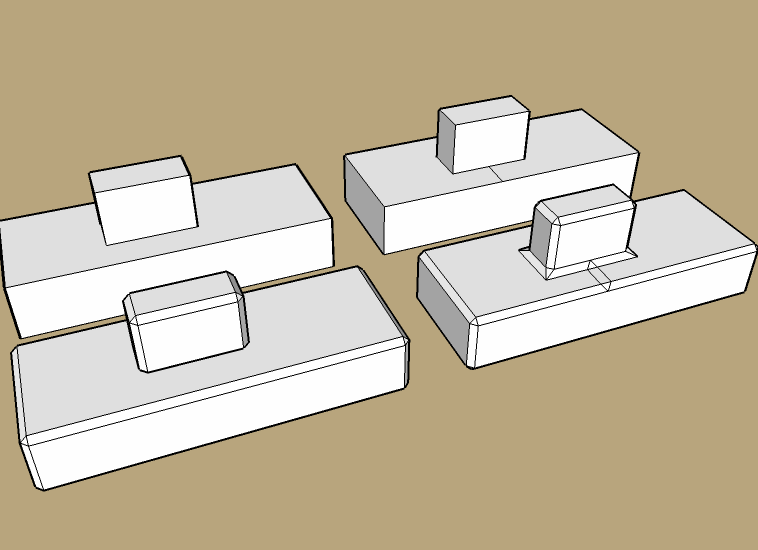
                                          Like the built in Outliner tool Bevel doesnt work with "holes" in faces. You can usually work around those problems by subdividing the face with a hole.

                                          Here is an example. The mesh on the left doesn't Bevel right. But add a line to break up the hole and it works. Then you can just erase the extra edges.
                                          bevel-holes.png

                                          1 Reply Last reply
                                          Reply Quote 0
                                          • StinkieS
                                            Stinkie
                                            last edited by

                                            Thanks for the explanation, it clarifies a lot.

                                            @chippwalters said:

                                            Look at the very bottom of the first post-- under the animating demo. There's an attachment called:
                                            SketchyBevel.rb

                                            That's what you click on. If that doesn't work for you, then tell us what browser and OS you are using.

                                            Good call. Didn't realise he hadn't found the attachment.

                                            1 Reply Last reply
                                            Reply Quote 0

                                            Hello! It looks like you're interested in this conversation, but you don't have an account yet.

                                            Getting fed up of having to scroll through the same posts each visit? When you register for an account, you'll always come back to exactly where you were before, and choose to be notified of new replies (either via email, or push notification). You'll also be able to save bookmarks and upvote posts to show your appreciation to other community members.

                                            With your input, this post could be even better 💗

                                            Register Login
                                            • 1
                                            • 2
                                            • 3
                                            • 4
                                            • 5
                                            • 6
                                            • 7
                                            • 8
                                            • 1 / 8
                                            • First post
                                              Last post
                                            Buy SketchPlus
                                            Buy SUbD
                                            Buy WrapR
                                            Buy eBook
                                            Buy Modelur
                                            Buy Vertex Tools
                                            Buy SketchCuisine
                                            Buy FormFonts

                                            Advertisement