sketchucation logo sketchucation
    • 登入
    Oops, your profile's looking a bit empty! To help us tailor your experience, please fill in key details like your SketchUp version, skill level, operating system, and more. Update and save your info on your profile page today!
    🔌 Easy Offset | Offset selected faces in SketchUp in positive and negative offsets. Download

    Problems with the new computer.

    已排程 已置頂 已鎖定 已移動 Hardware, Software & Gadgets
    46 貼文 9 Posters 4.2k 瀏覽 9 Watching
    正在載入更多貼文
    • 從舊到新
    • 從新到舊
    • 最多點贊
    回覆
    • 在新貼文中回覆
    登入後回覆
    此主題已被刪除。只有擁有主題管理權限的使用者可以查看。
    • boofredlayB 離線
      boofredlay
      最後由 編輯

      Well here is to the new computer... 👊
      I can't say it has been fun. The only thing nice about it so far has been the monitor.

      The list is long so I will try to make this short.

      When I picked up the computer the first thing wrong was the mouse... they put the wrong one in the box. Then the monitor had a regular vga cable, not a DVI.
      Well I went back and got the mouse I ordered and they gave me a DVI cable.
      All is well I thought... 😐

      I have spent the last 3 days, countless hours on the phone, a trip from my ISP tech support, a trip from the guy who built my machine and I now have a new modem and a different (not new) router.

      Finally today, actually late this evening, both computers are on the internet and working. I can get back to business, or so I thought.

      I loaded photoshop and anytime I have a picture open it flickers, whenever it wants to. What the hell is that about?

      SketchUp is completely un-usable.
      First off when I zoom in and out with the wheel I have to click the wheel button twice before it will orbit.
      Try using any commands and forget it...
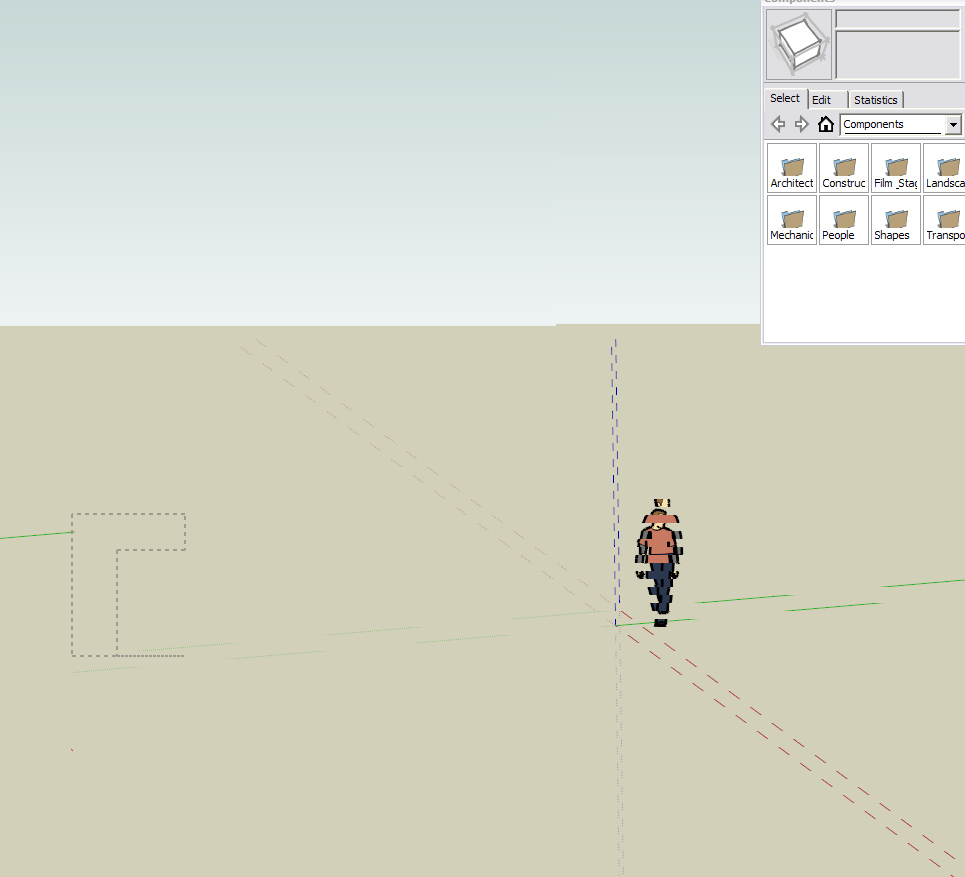
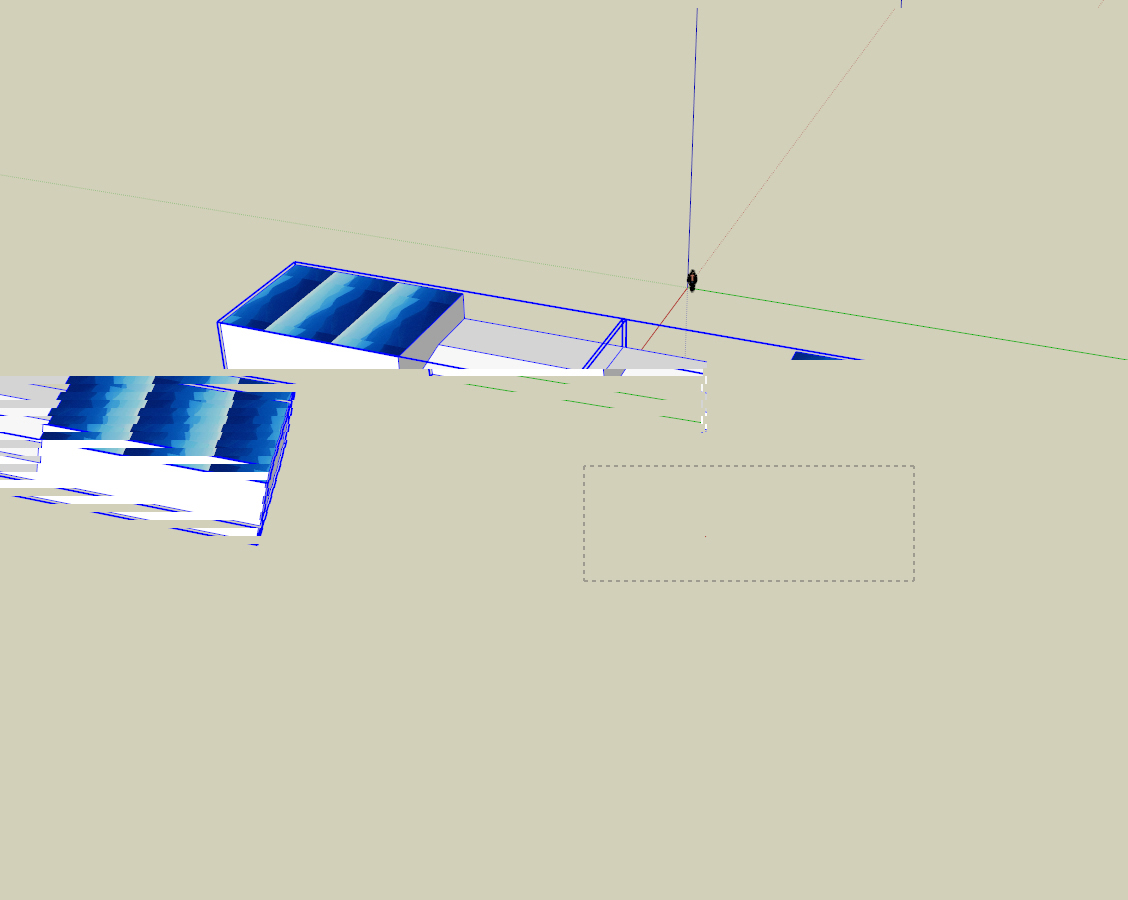
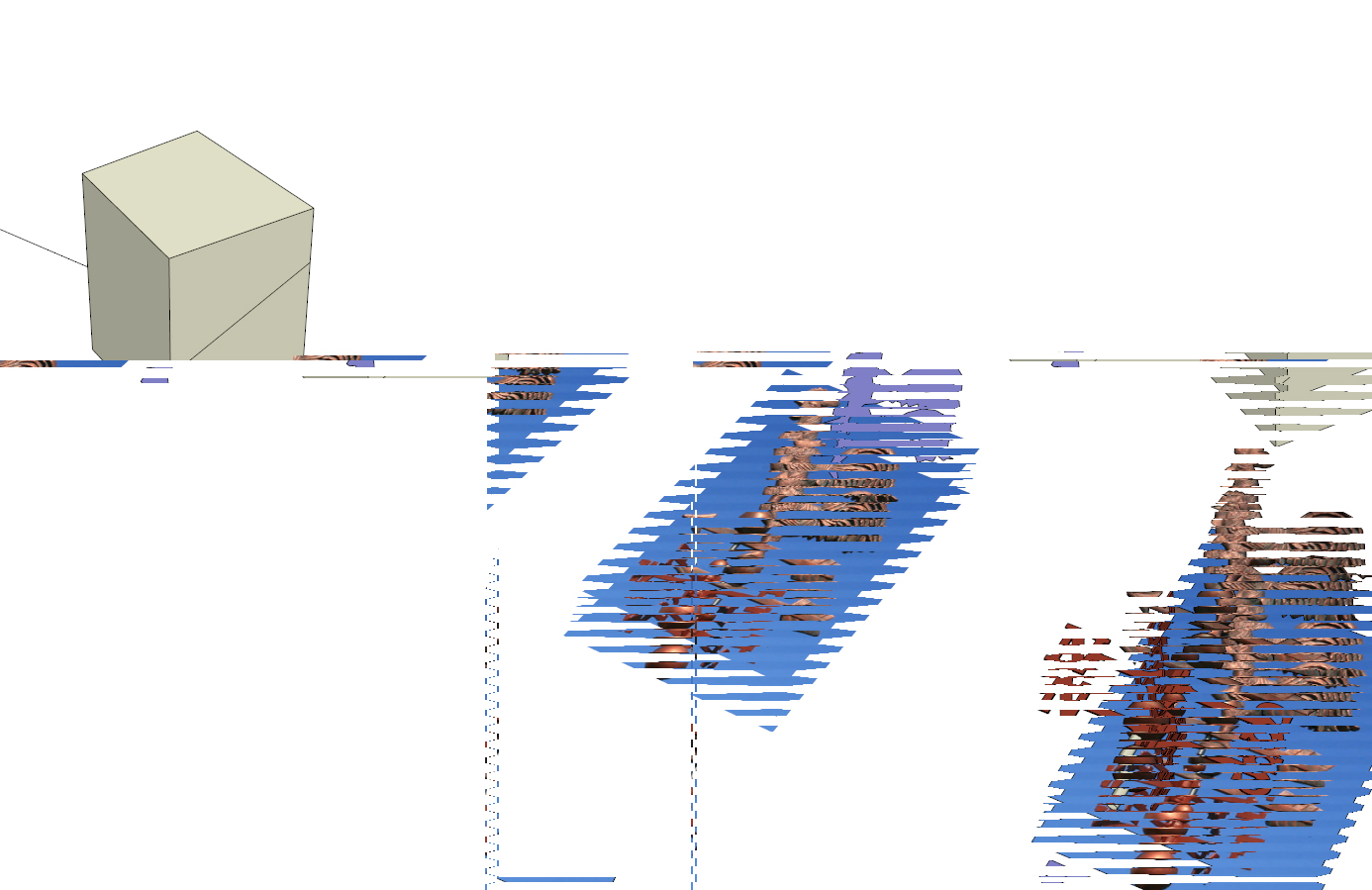
      This is trying to window a selection
      Again, trying to window a selection
      Here I opened a file I had worked on last week and again...

      Any command I try to use locks up the screen as you can see above. Then it will flicker and let me move the pointer about a half inch before it locks up again.

      The mouse that came with the computer was a Logitech. The wheel button is too stiff so I opted for the Microsoft optical wheel mouse, the baseline mouse, not the intellipoint. This is the exact same mouse I use on the machine sitting right next to the new one and the exact same mouse I use at work... no problems with SketchUp.
      I had to install the software to run this mouse when I got it home and I am wondering if this is the same problem Tom and Scott were having.

      This is the most frustrating few days I have had in years. I am so upset I feel like I have a $2300 paperweight sitting on my desk at home. After all the crap getting the computer to talk to the internet I thought; "What a relief, I can just draw now".. 😡
      I am so upset now I could scream, and have a number of times.

      Mike, I just may take you up on that MAC offer...

      Specs...
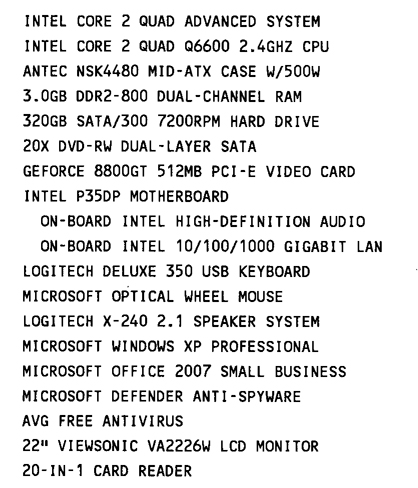
      Here are the specs.

      http://www.coroflot.com/boofredlay

      1 條回覆 最後回覆 回覆 引用 0
      • soloS 離線
        solo
        最後由 編輯

        This is caused by the Nvidia card, get the latest update, in your openGL settings lower the AA levels.
        I feel kinda shitty having spec'd out your rig, The setup you have works...I have a similar setup.

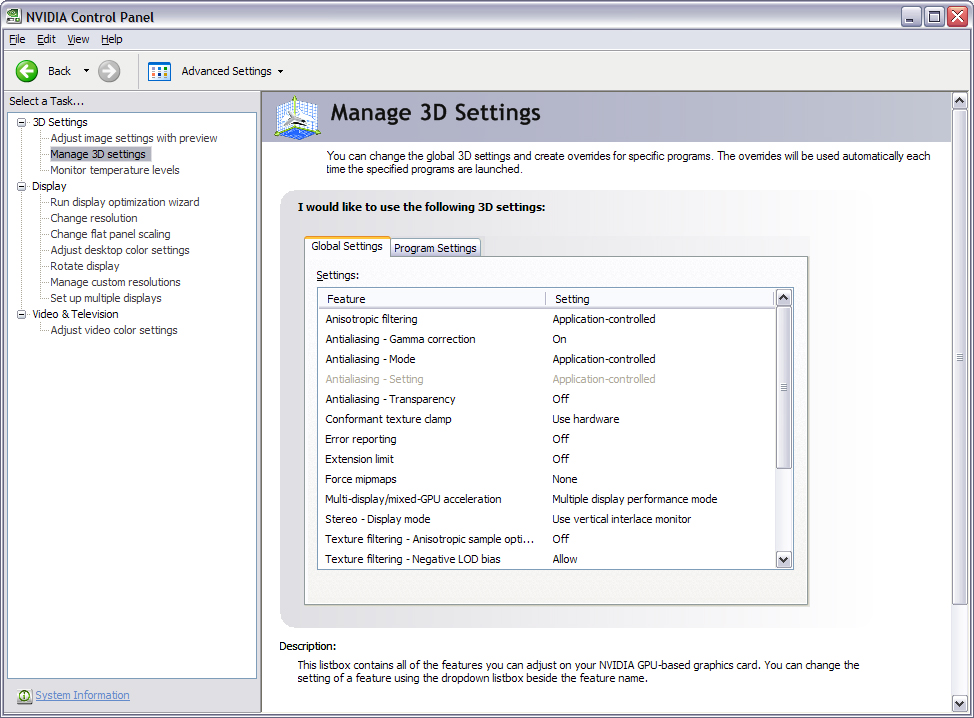
        Make sure on your Nvidia 3D Graphics setup you select AA as application determined, not forced.

        Try that and let me know what happens.

        http://www.solos-art.com

        If you see a toilet in your dreams do not use it.

        1 條回覆 最後回覆 回覆 引用 0
        • boofredlayB 離線
          boofredlay
          最後由 編輯

          Thanks for the reply Pete. I am deathly afraid of changing any settings right now so I will attach a couple screenshots from the Nvidia control panel, please direct me if you can.
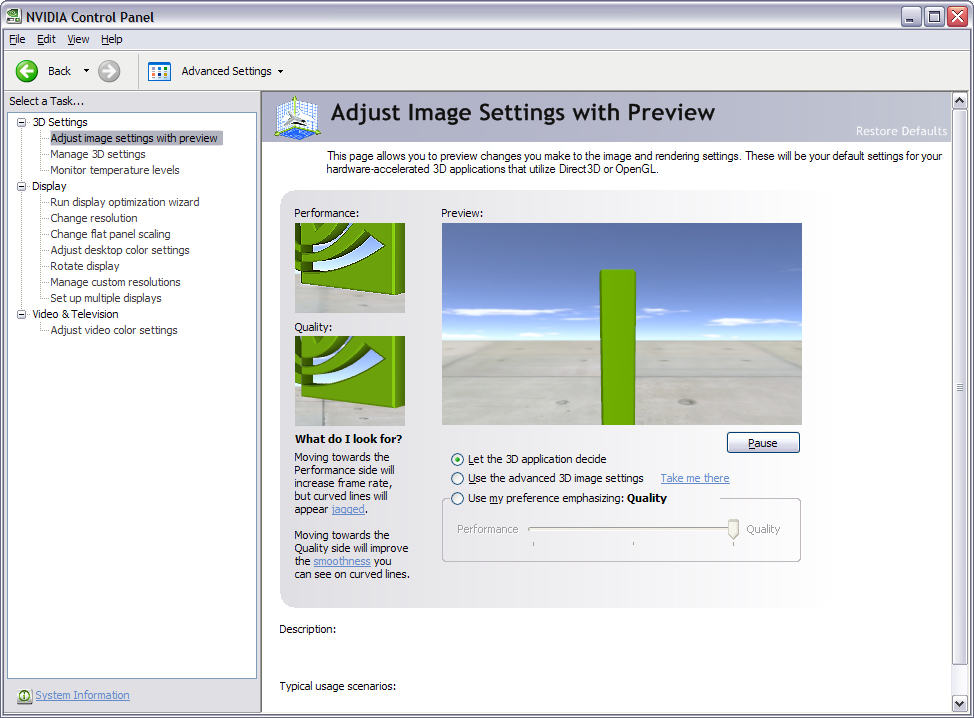
          Nvidia.jpg
          Nvidia2.jpg

          @unknownuser said:

          in your openGL settings lower the AA levels

          I can't find this setting.

          Will these changes help the Photoshop Flickering as well?

          Sorry for seeming so dull about this but I got no sleep last night and I am not thinking too straight rigit now.

          Also, I have to take my daughter to school soon, I will probably go into work a bit late if I can get this sorted out.

          Thanks Pete.

          http://www.coroflot.com/boofredlay

          1 條回覆 最後回覆 回覆 引用 0
          • GaieusG 離線
            Gaieus
            最後由 編輯

            I think Pete meant the AA settings in SU preferences. With a good video card you should have more options like 2x, 4x, 8x or something like that.
            also make sure to set within the nVidia settings to allow the applications control AA. But I think it's better if you wait till some more experts chime in (being a "human sciences" brain I'm not the most reliable resource of computering tricks).

            Gai...

            1 條回覆 最後回覆 回覆 引用 0
            • boofredlayB 離線
              boofredlay
              最後由 編輯

              Thanks Gai. Here are the current AA settings.
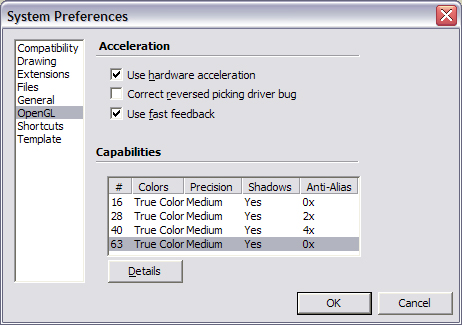

              aa settings.jpg

              http://www.coroflot.com/boofredlay

              1 條回覆 最後回覆 回覆 引用 0
              • soloS 離線
                solo
                最後由 編輯

                Eric

                Try putting AA on 0 and uncheck fast feedback.

                Let me know how that works.

                http://www.solos-art.com

                If you see a toilet in your dreams do not use it.

                1 條回覆 最後回覆 回覆 引用 0
                • boofredlayB 離線
                  boofredlay
                  最後由 編輯

                  Turning off fast feedback seems to have helped with SketchUp. It seems to be working fine now. I don't however have the ability to change the AA to 0. At least clicking on it I cannot seem to change it. I may not need it however.

                  Now how do I fix the flickering in Photoshop.

                  How does the fast feedback become that much of a problem for this machine when my old machine needs it checked to work properly?

                  Edit: Added screenshot.
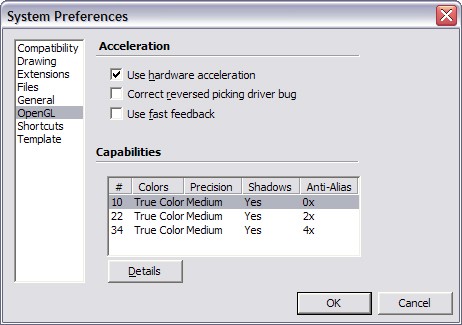

                  AA Settings 2.jpg

                  http://www.coroflot.com/boofredlay

                  1 條回覆 最後回覆 回覆 引用 0
                  • soloS 離線
                    solo
                    最後由 編輯

                    Do you have the latest nvidia drivers from their site?

                    http://www.solos-art.com

                    If you see a toilet in your dreams do not use it.

                    1 條回覆 最後回覆 回覆 引用 0
                    • soloS 離線
                      solo
                      最後由 編輯

                      What brand of GPU do you have?

                      EVGA, BFG etc?

                      http://www.solos-art.com

                      If you see a toilet in your dreams do not use it.

                      1 條回覆 最後回覆 回覆 引用 0
                      • boofredlayB 離線
                        boofredlay
                        最後由 編輯

                        @solo said:

                        Do you have the latest nvidia drivers from their site?

                        Yes, the Forceware 169.21

                        http://www.coroflot.com/boofredlay

                        1 條回覆 最後回覆 回覆 引用 0
                        • soloS 離線
                          solo
                          最後由 編輯

                          In PS have you set up the performance settings in preferences?

                          http://www.solos-art.com

                          If you see a toilet in your dreams do not use it.

                          1 條回覆 最後回覆 回覆 引用 0
                          • boofredlayB 離線
                            boofredlay
                            最後由 編輯

                            @solo said:

                            What brand of GPU do you have?

                            EVGA, BFG etc?

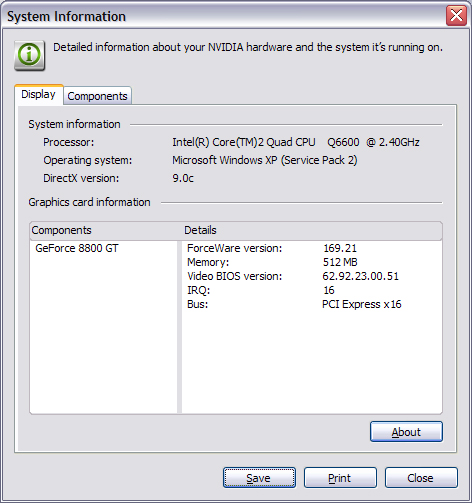
                            I am not sure what that is. Does this help? I feel so dumb.
                            NVIDIA System Info.jpg

                            @solo said:

                            In PS have you set up the performance settings in preferences?

                            Nope. I never had to on my old machine or my work machine so I would not know where to begin.
                            I have Photoshop 7.

                            http://www.coroflot.com/boofredlay

                            1 條回覆 最後回覆 回覆 引用 0
                            • soloS 離線
                              solo
                              最後由 編輯

                              I see you have one GPU, are you certain that the SLI option is NOT selected in the bios setup? and on Motherboard you have a chip that you flip when you have two GPU's to enable SLI, make sure it's not on the dual GPU side.

                              http://www.solos-art.com

                              If you see a toilet in your dreams do not use it.

                              1 條回覆 最後回覆 回覆 引用 0
                              • boofredlayB 離線
                                boofredlay
                                最後由 編輯

                                Honestly I feel like I am reading another language... how do I check this?

                                http://www.coroflot.com/boofredlay

                                1 條回覆 最後回覆 回覆 引用 0
                                • soloS 離線
                                  solo
                                  最後由 編輯

                                  If all else fails, try this: http://downloads.guru3d.com/download.php?det=1852

                                  171.23 forceware drivers.

                                  http://www.solos-art.com

                                  If you see a toilet in your dreams do not use it.

                                  1 條回覆 最後回覆 回覆 引用 0
                                  • boofredlayB 離線
                                    boofredlay
                                    最後由 編輯

                                    That driver is newer than the one listed on NVIDIA's site. Is it safe to install? Why would NVIDIA not have it on their site but have it on the one you listed?
                                    Curious.

                                    @solo said:

                                    I see you have one GPU, are you certain that the SLI option is NOT selected in the bios setup? and on Motherboard you have a chip that you flip when you have two GPU's to enable SLI, make sure it's not on the dual GPU side.

                                    Again, I have no idea how to check this.

                                    http://www.coroflot.com/boofredlay

                                    1 條回覆 最後回覆 回覆 引用 0
                                    • soloS 離線
                                      solo
                                      最後由 編輯

                                      Without knowing your Bios navigation it's hard to explain, I hunted for a screenshot for your Bios without luck.

                                      Lets try this:

                                      When you navigate your bios you get many options, there is one that you can select first mode of graphics which should have PCI-e selected, then there should be a selection for the GPU in dual or single mode, make sure single is selected.

                                      As far as Forceware drivers are concerned, they are as they say Forceware and not official drivers (thats why they have disclaimers, it's a gamers tool to squeeze our as much juice they can get by using breakneck drivers), they also use the new DirectX 10 (not sure there will be any advantage for you as DX 9 is all you require for openGL requirements, more of a gamers thing for the latest game support)

                                      http://www.solos-art.com

                                      If you see a toilet in your dreams do not use it.

                                      1 條回覆 最後回覆 回覆 引用 0
                                      • boofredlayB 離線
                                        boofredlay
                                        最後由 編輯

                                        Thanks, where do I look for the Bios? 😳

                                        @solo said:

                                        In PS have you set up the performance settings in preferences?

                                        I cannot find the performance settings in Photoshop. When i go into preferences I get the following:

                                        @unknownuser said:

                                        File Handling
                                        Display & Cursors
                                        Transparency & Gamut
                                        Units & Rulers
                                        Guides, Grids, & Slices
                                        Plug In's & Scratch Discs
                                        Memory & Image cache

                                        I looked through them all and could not find anything resembling performance settings.

                                        Again Photoshop 7.

                                        Pete, I really appreciate your help.

                                        http://www.coroflot.com/boofredlay

                                        1 條回覆 最後回覆 回覆 引用 0
                                        • soloS 離線
                                          solo
                                          最後由 編輯

                                          http://img165.imageshack.us/my.php?image=pssd8.jpg

                                          This is all I could find, I do NOT use Photoshop (do not even have it loaded ) I am a Paintshop pro user.

                                          Maybe a PS user can jump in at this point.

                                          The bios...If you have never fiddled with it, then rather not touch it as you can screw your rig up if you have no idea (like playing with Reg edit)

                                          http://www.solos-art.com

                                          If you see a toilet in your dreams do not use it.

                                          1 條回覆 最後回覆 回覆 引用 0
                                          • boofredlayB 離線
                                            boofredlay
                                            最後由 編輯

                                            Thanks Pete, this must be from a newer version of Photoshop. There have been 3 or 4 since version 7.
                                            And I will definately not touch the BIOS. I fear screwing something like that up.

                                            Well as it stands now the only problems I seem to have are the flickering in Photoshop (only on color images) and the wheel mouse button... I can orbit just fine until I wheel out or in more than once. Then I have to click the wheel button twice before I can orbit. Then it will orbit fine again. Hmmm.

                                            http://www.coroflot.com/boofredlay

                                            1 條回覆 最後回覆 回覆 引用 0
                                            • 1
                                            • 2
                                            • 3
                                            • 1 / 3
                                            • 第一個貼文
                                              最後的貼文
                                            Buy SketchPlus
                                            Buy SUbD
                                            Buy WrapR
                                            Buy eBook
                                            Buy Modelur
                                            Buy Vertex Tools
                                            Buy SketchCuisine
                                            Buy FormFonts

                                            Advertisement