[Plugin] SUTool: a new way to manager your RB script
-
ok, Wikii, thx!
got a screenshot of the exact place/way I would do this? (I'm no programmer! )
) -
@fletch said:
ok, Wikii, thx!
got a screenshot of the exact place/way I would do this? (I'm no programmer! )Edit CSS file.
Replace 'width:89px;' with 'width:150px;',4 places
Replace 'width:110px;' with 'width:170px;',2 placesRefresh SUTool window.
-
If I put a ruby in the SUtool... then move the ruby to a folder in my plugins folder called 'backup' in order to shorten my list of rubies in the pulldown menu... I lose my ability to use my ruby with the shortcut I had set up for that ruby... any advice? (for now, I just put those rubies with shortcuts back into the plugins folder.
-
wellcome to http://www.sketchupbbs.com
Look this page:
http://www.sketchupbbs.com/viewthread.php?tid=3486&extra=page%3D1简介:
SUTool是一个以类似CAD屏幕菜单方式组织SU插件的工具,用户可以通过自定义INI文件,增加或者减少项目。让大家能够方便的管理自己喜欢的插件!只支持SU6版本,使用SU5的朋友请不要下载~
SUTool不是一个插件工具集,它是一个插件管理器,使用者可以用它添加、删除、调整组织方式。
安装:
将SUTool.rbs和SUTool文件夹复制到SU的Plugins文件夹下,重启SU,点击Plugins菜单下的SUTool即可。更新记录
20080310 发布 v0.25版
1 支持在ini文件中直接为插件定义快捷键
2 增强了编辑插件的功能
3 支持直接双击分组标签打开ini文件
4 修正0.24版的几个BUG
5 安装方法:由于更新幅度较大,需要删除plugins目录下所有SUT开头的文件及文件夹,将下载的压缩包中的文件和文件夹直接复制到plugins目录下,重启SU。
20080304 发布 v0.19版
1 可以直接将一组工具生成工具条,前提是为每个工具定制相应的图标文件。
2 顶端增加SketchupBBS的logo
3 支持RBS文件
4 几乎包含了目前常用的插件。
20080226 发布 v0.12版
1 修复了几个bug;
2 可以显示插件收集人自定义的信息;
3 以后只更新主程序,希望大家能够自己管理组织自己的SU插件。
鉴于部分坛友态度,下载售价设定为10U币
20080211 发布 v0.08版
1 修正了2个BUG,感谢sfancys和zyc7877两位坛友!
2 不再强制SUTool窗口出现在固定位置,SUTool每次会出现在上次你关闭它时所在的位置。
3 0.07版内部测试,未公开发布。
4 请大家多反馈使用信息,只有大家多提建议,SUTool才能越来越好~
20080204.2321 发布 v0.06版
1 重新调整文件夹设置;
2 自动添加新的插件到SUT:直接对RB文件进行分析,并将其中的命令自动添加到用户指定的ini文件中,只需Reload SUT一下,即可使用新的插件。 注意,被分析的RB文件不要放在含有中文字符的路径下,比如桌面。
3 RO文件夹放置程序运行所需要的支持文件。
4 其中 convert.rb文件中定义了编码转换函数,默认是将UTF8转换为GB2312,港澳台地区可能需要改写此函数,我这里没有条件测试,有需要的朋友请自行测试或者和我联系。20080204 发布 v0.05版
1 按照ruby特点重写了所有结构;
2 增加了RB文件分析功能,可以分析出部分RB文件(包括部分加密的)中的命令,可以比较方便的为SUTool增加新的插件,具体看演示,这个功能有待大家测试。
20080126 发布 v0.04版
1可以为一组工具建立单独的按钮窗口,具体看演示。
20080123 发布 v0.03版
1 支持按钮鼠标掠过时变换样式,可以更加醒目
2 修改了CSS样式20080122 发布 v0.02版
1 支持图标显示,具体方法看说明文件;
2 支持显示分隔条,方法看ini文件夹中的说明;
3 支持ini注释语句;
4 重名了CSS中的样式名,并为每种样式增加了说明,方便大家修改;
5 修改Rebuild Html为Reload SUT,这个按钮可以直接生成html并自动加载,不必手动按F5更新。
2008 01 20 发布 v0.01版
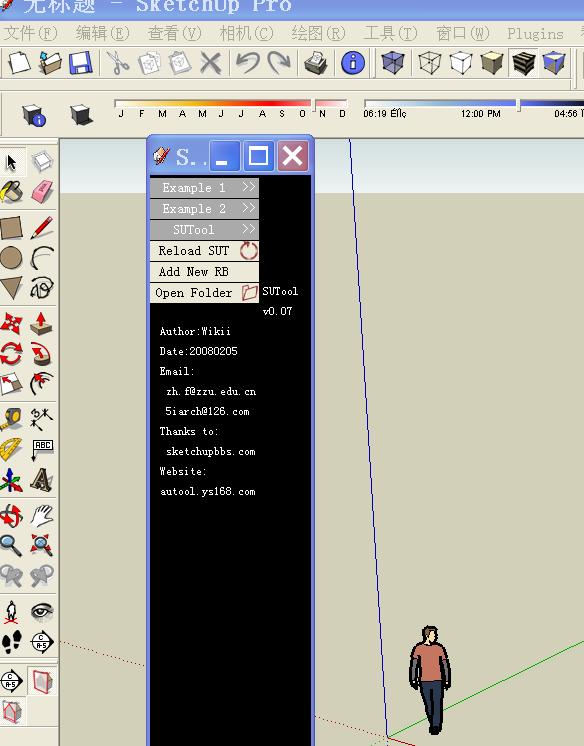
-
@jim said:
I'm working on a tutorial now... and here it is. I hope it's good.
[attachment=0:2363623y]<!-- ia0 -->SUTool_Tutorial.zip<!-- ia0 -->[/attachment:2363623y]
I followed this Tut. to the letter, and everything worked out great. My compliments to the author a fantastic easy to follow tutorial.
And maybe a small respectful suggestion that more Tuts like this be posted to help us "apprentices" , and then we can do the same when we are as skilled.
 -
I followed the SU Tut to the letter, I think. Mine will not recognize the new .ini files to the menu. Any idea what I did wrong?
I also noticed that the new text document is creating just that, a text document; not a config settings document. I got to be doing something wrong.
-
The tutorial is of great help! So also resizing the SUTool window help wikii gave.
From what I can tell the SUTool is up to version 0.25 or something (from bianhai's post) while the one we have available here is 0.08 - would it be possible to host the latest version here on SCF?
-
I figured out the answer to my own problem. There was one step left out of the tut.
Once you have created the ini file, you have to open it and save it again in Notepad with the .ini extension added to the file name. I didnt know that.
-
Since the object of this script is to shorten menu by moving to the SU Tool, what do you do with the rubies still in the plugin menu?
-
I'm really excited about this plugin but I've had problems. I originally downloaded the most recent version v.38. It didn't work well for me and had a lot of differences from the tutorial. I eventually used the v.08. However the "example" menus are still there even after I have completely removed the ini files. What is up with that? I noticed in the SU_Tools.html file there is code calling for the Example labels.
Any one have an answer for this?
-
went back to v.38. Here is my error regarding finding the path to the folders. Even though they appear to be in the correct path.
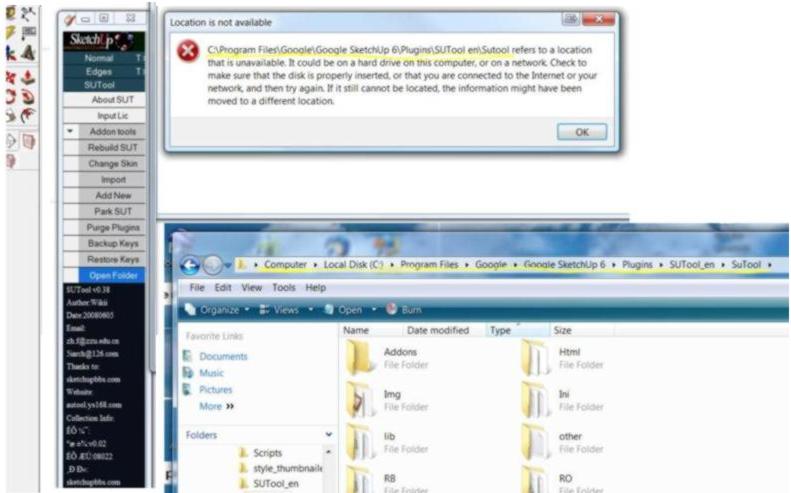
-
wow!!!
it's great!!!
I have sutool3.8 now
哈哈哈哈!
-
-
Can someone please post version 3.8 here?
-
-
Looks like they're up to version 1.12. It'll just cost you a dollar and your soul.
-
@jdagen said:
Can someone please post version 3.8 here?
SUTool_v0.08En.rar
http://sketchucation.com/forums/viewtopic.php?t=5946#p35237Tutorial
sketchucation.com/forums/download/file.php?id=4728Usefulness
http://blog.sina.com.cn/s/blog_5381716f010140y2.html




Hello! It looks like you're interested in this conversation, but you don't have an account yet.
Getting fed up of having to scroll through the same posts each visit? When you register for an account, you'll always come back to exactly where you were before, and choose to be notified of new replies (either via email, or push notification). You'll also be able to save bookmarks and upvote posts to show your appreciation to other community members.
With your input, this post could be even better 💗
Register Login


Advertisement