Installed new graphics card - display problem
-
Hello everybody!
I just installed a Nvidia Geforce 8600 GT 512 MB card - specifically for SketchUP.
While I am very happy with the speed of panning, orbiting and moving,
etc. I am a bit disappointed regarding the display. The sky (if turned on)
goes off or becomes black and again comes back when orbitting, panning,
etc. It does not happen when the sky is turned off and a color is used
instead. Again when a drop down menu from a toolbar is open and if I
want to select objects with window selection, the display of the objects
are wierd - they look sliced and shifted - but when no drop down menu
is open it behaves okay.Is it probably because the card is a Geforce and not a Quadro? My vendor
was kind enough to give me a demo 8800 GTS card for testing -
same thing happened with that also.Even with Quicktime movies there is a big problem. Audio is okay but the
screen display is - you only see some jagged surface jittering.Is this normal for this card - any body else experiencing this problem?
Thanks in advance
PRSS -
have you got the latest drivers and stuff?
-
Veeeeeeeeeerrrrrry In...ter....es.....tiiiiiing!!!
Do you have Intellipoint mouseware installed too?
-
Thanks,
I installed the driver that came in the CD with the card.
No I do not have intellimouse nor its drivers.
I just googled about this problem and found out that lot of people are
having the same problems with this card. The solution seems to turn off the sky
and have a colour instead. Then for the selection window, antialiasing has to be
turned off - then the weird display does not happen - or do not have open
toolbars when doing a selection. There does not seem to be any real solution.With best regards
PRSS -
probably wont help with the SU problem, but its worth installing the latest drivers, they cna make a big difference in the performance of your card and are usually less buggy.
heres the link to download the drivers: http://www.nvidia.com/Download/index.aspx?lang=en-us
-
Unfortunately, the latest drivers may not help. I recently got a new 8800gt and have been having similar problems (ie. selection window issues when AA is turned on). In my search for a solution (which is still on-going) I have found that the current nvidia drivers, while fixing some issues that people had with certain games, seems to have messed something up with opengl applications and some games. I have rolled back to a previous nvidia driver version (163.xx) after reading somewhere that it might help. Unfortunately it didn't solve the problems I was having, so I guess I'll wait until the next nvidia release and see if it improves. Honestly I'm a little disappointed in the performance upgrade in sketchup with this new card, but I was aware going in that it wouldn't be, maybe one day I'll pony up for a quadro.
Remus, definitely post back if you come across something that works.
-
well i havent actually got a problem with my curren setup, and i use a different card all together, so probably wont be posting back with a solution

-
Have you opened the NVIDIA control panel and looked at the settings? I got a new desktop at work with GeForce 8800 card, and it performed poorly at first. Turned out the settings were off.
Also, what is your operating system? Processor? I've got the GeForce 8600 256MB card at home (Windows XP), and it works great. But I've noticed some people with the 512MB card seem to have problems. Makes me think there is some kind of compatability issue, especially with Windows XP (Dell did not offer the 512MB card with any laptops running XP).
-
Daniel, what are your working settings?
-
Remus, sorry I meant that last comment for PRSS just looked at the wrong name.
Daniel, I would also like to know your working settings.
-
Thank you all so much for the replies and help.
My working settings (which I prefer to have) are: Antialiasing at 4x,
Sky turned on. I like to see the model with smooth edges even when I
work. That is one of the reasons that I bought the card for.My operating system is Windows XP - SP2. My card is Geforce 8600 GT 512 MB
DDR2, supporting Direct X 10.My computer is a Desktop Pentium Core2 Duo - 1.8 GHZ, with 2 GB DDR2 RAM
and with a 17 inches (4:3) Flat panel LCD monitor.In fact I am now becoming contended with the work-around. I have disabled
floating toolbars - have only docked toolbars. Turn the sky off and have a blue
background instead. With these SU is working quite fine. I find SU quite
fast with this card (I have been without any add-on graphics card for so long- so the difference I see is quite amazing).
I did not and still do not want to put money in expensive graphics cards like
Quadro FX series. This card is working fine with AutoCAD and 3ds Max also.
But I am really not bothered about with AutoCAD and 3ds Max. I primarily prefer
to work with SketchUP for conceptual 3d.Thanks again
With best regards
PRSSP.S.
By the way, the problem with the Quicktime movie was accidentally solved
by me. If I open 2 Quicktime movie windows simultaneously, it works. If
I close the first window both windows close. Funny behaviour - but it
is atleast working! -
Thanks for the update PRSS, I'll have to try those settings and see if it helps with my problems as well. Ultimately though, I'm hoping Nvidia will come through with a fix in their next driver release.
-
Here's a screen capture of my settings. Most of these were off when I got the computer (????!!!!). I'm still not sure if the settings are optimal, just haven't had time to work on it. What I have now was trial-and-error. Another thing I did was change the computer from 64-bit to 32-bit. I'll try to remember to look at my laptop at home and see what settings it has (that machine is SWEET! - sorry if I sound like I am bragging).
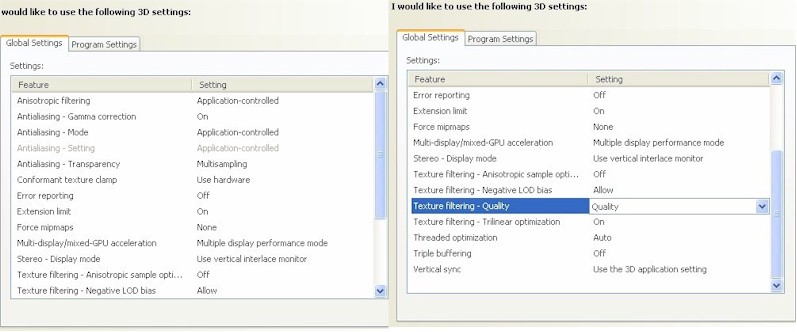
-
Thanks Daniel, I'll look at my settings when I get home and compare. We'll see if this helps.
-
Hi everybody !
If you download this latest driver for 8600 or 8800 series cards (for Windows XP),
the problem with the sky is eliminated.But the Quicktime movie will not play okay whatever you do. It was working with the
previous driver with the work-around I had mentioned already.This just for updating the information.
With best regards
PRSS. -
Have you installed the latest version of QuickTime? A problem they had with the ensharpen codec the SU team uses in its videos has been fixed - although that was an audio problem.
-
No, I do not have the latest Quicktime. I have Quicktime 7 - the version that out a
year back or so.I do not have problems with the ensharpen codec. Those tutorials are running fine.
It is with the movies (real cinema movies - trailers downloaded)that the problem
exists.Anyway I shall try out with the latest version of Quicktime.
With best regards
PRSS

Hello! It looks like you're interested in this conversation, but you don't have an account yet.
Getting fed up of having to scroll through the same posts each visit? When you register for an account, you'll always come back to exactly where you were before, and choose to be notified of new replies (either via email, or push notification). You'll also be able to save bookmarks and upvote posts to show your appreciation to other community members.
With your input, this post could be even better 💗
Register Login


Advertisement