sketchucation logo sketchucation
    • Login
    Oops, your profile's looking a bit empty! To help us tailor your experience, please fill in key details like your SketchUp version, skill level, operating system, and more. Update and save your info on your profile page today!
    Mac User? | Join the Rayscaper Beta for Mac Learn More

    [REQ] Groove maker

    Scheduled Pinned Locked Moved Plugins
    15 Posts 5 Posters 2.5k Views 5 Watching
    Loading More Posts
    • Oldest to Newest
    • Newest to Oldest
    • Most Votes
    Reply
    • Reply as topic
    Log in to reply
    This topic has been deleted. Only users with topic management privileges can see it.
    • R
      rv1974
      last edited by

      There's free and stable windowizer script for a decade already. The main problem is filtering off those bounding edges, which none of scripts does, unfortunately.

      1 Reply Last reply
      Reply Quote 0
      • pilouP
        pilou
        last edited by

        Windowizer don't works fine with this figure! πŸ˜‰

        Another method(s)
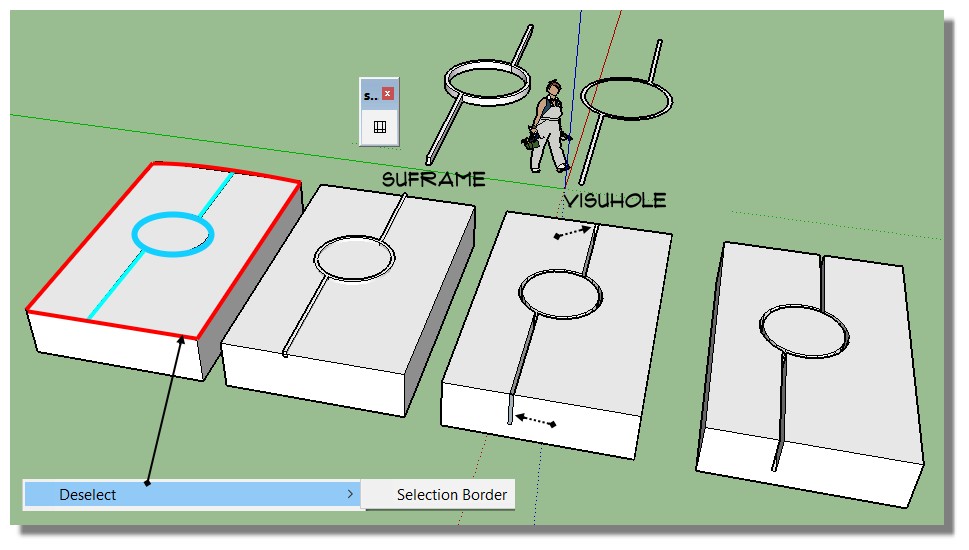
        Select your Upper face
        Deselect "Border Selection" (i don't remember from what plugin it is! 😞 (Selection Toys ? )
        Select "Only Edges"
        Use SU Frame by Suforyou (maybe another plugin can make the uper stripe surface)
        (with a Pro version of SU just a PushPull + Boolean Diff can makes the trick and better than Vishole because you can "extend" the stripe so no need to erase the end faces border! )
        Explode
        Extract the Upper Face
        Use VisuHole
        Erase the end border faces (not a big deal! πŸ˜‰
        Et voilΓ ! πŸ˜„

        su_frame.jpg

        Frenchy Pilou
        Is beautiful that please without concept!
        My Little site :)

        1 Reply Last reply
        Reply Quote 0
        • R
          rv1974
          last edited by

          it's indeed not a big deal for a single forum doodle. But if you fabricate some 30 floor tower (especially with non-ortho geometry) it turns to lots of pain.
          P.S. try to groove attached


          Untitled.skp

          1 Reply Last reply
          Reply Quote 0
          • sdmitchS
            sdmitch
            last edited by

            @nguyentuyen1986 said:

            Hi,

            I'm working on something that requires lots of groves within a surface. I hope you guys can help write a plug-in that will get this done quickly. The image blow shows what I'm talking about.

            First, we have lines, arcs on a surface.

            Then, we select lines, arcs that we want to make grooves from.

            Next, we put in depth and width of the grooves.

            Most importantly, I don't want the outter edge to be offset (just like the lines and arcs inside it).

            Has anybody done it? Or is this something you can help me with.

            Very much appreciated!

            http://sv1.upsieutoc.com/2017/07/08/Untitled0015e.jpg

            Nothing is worthless, it can always be used as a bad example.

            http://sdmitch.blogspot.com/

            1 Reply Last reply
            Reply Quote 0
            • sdmitchS
              sdmitch
              last edited by

              Fixed the bug but you need to avoid edges/arcs that meet at a small angle.

              Rounded groove. Something to think about.

              Nothing is worthless, it can always be used as a bad example.

              http://sdmitch.blogspot.com/

              1 Reply Last reply
              Reply Quote 0
              • sdmitchS
                sdmitch
                last edited by

                This plugin was provided for a single request and is not or was ever meant to be a universal solution to all the possibilities imaginable. Sorry it it doesn't work for you but I have no intention to pursue this further!

                Nothing is worthless, it can always be used as a bad example.

                http://sdmitch.blogspot.com/

                1 Reply Last reply
                Reply Quote 0
                • R
                  rv1974
                  last edited by

                  no problem. just tried to illustrate for Monsieur Pilou the real complexity of the subject.

                  1 Reply Last reply
                  Reply Quote 0
                  • N
                    nguyentuyen1986
                    last edited by

                    Hi SDMITCH.

                    Thanks so much! It works perfectly now.

                    Thanks.

                    1 Reply Last reply
                    Reply Quote 0
                    • pilouP
                      pilou
                      last edited by

                      I will ask to Fredo maybe to make a little modification
                      for have this erasing side face in Visuhole! πŸ˜„

                      Frenchy Pilou
                      Is beautiful that please without concept!
                      My Little site :)

                      1 Reply Last reply
                      Reply Quote 0
                      • R
                        rv1974
                        last edited by

                        no Pilou, I guess it'd lead the things to the wrong direction. It should be treated as edge extrusion, not pseudo-boolean imprinfing. But I agree, only almighty Fredo is capable to sort it out.

                        1 Reply Last reply
                        Reply Quote 0
                        • pilouP
                          pilou
                          last edited by

                          A little tricky! πŸ˜„
                          As Visuhole makes a perfect Drill, Carve, Emboss..
                          Scale your object, scale your Stencil
                          Apply Visuhole for the groove
                          And Slice! (With Su_Slice by Suforyou)
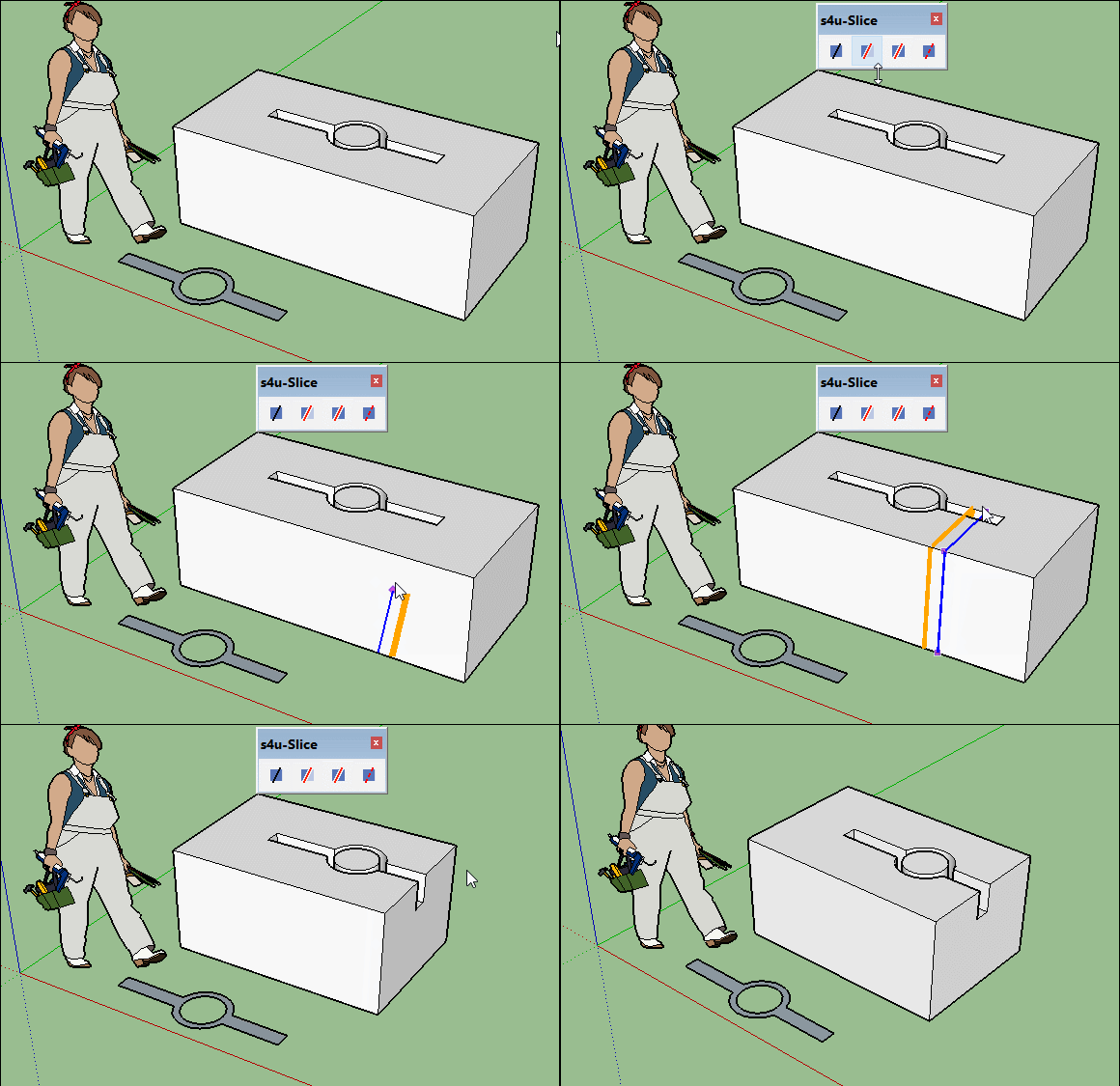
                          GIF_visu_slice.gif

                          Maybe some Guide lines will be necessary...
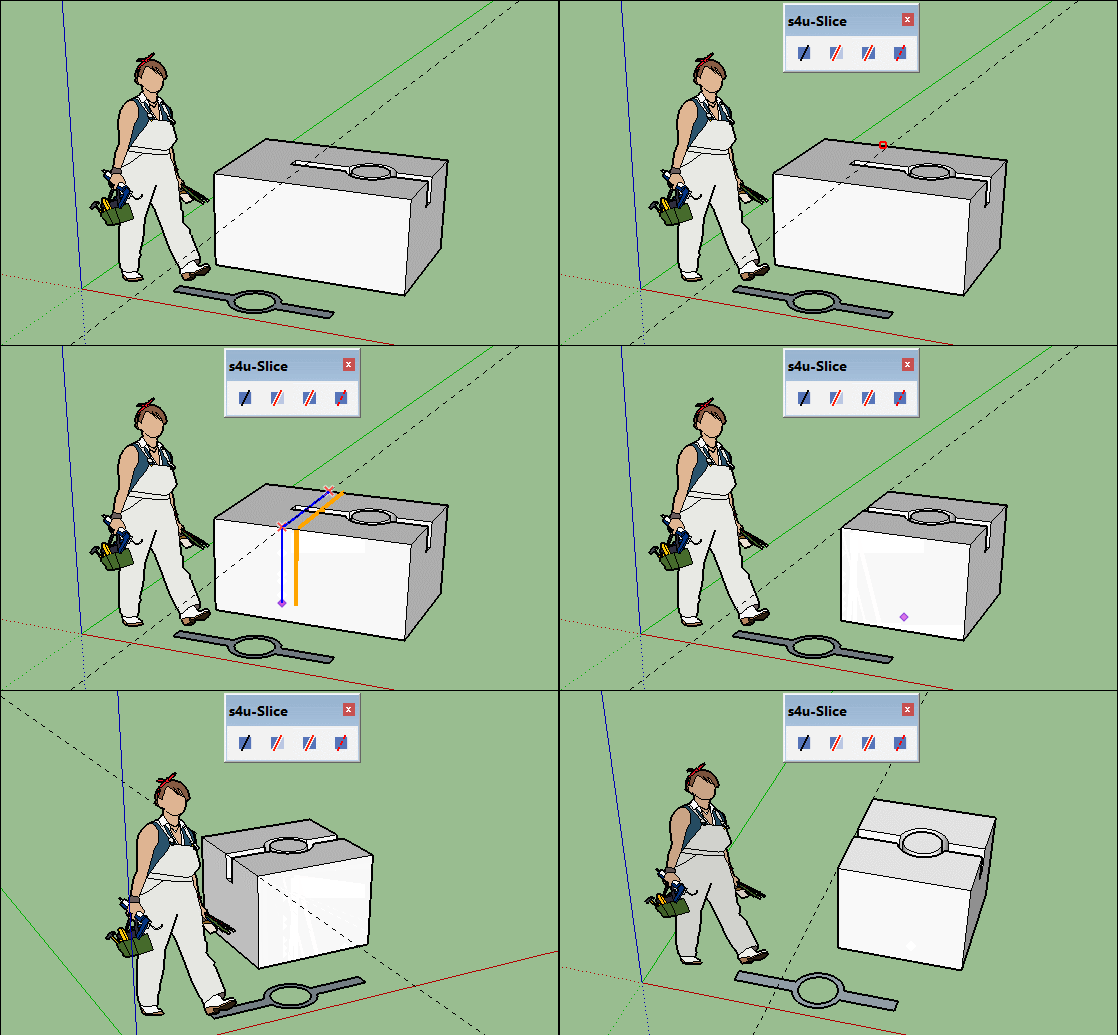
                          GIF_visu_slice02.gif

                          Will be the same for your mountain surface! πŸ˜„
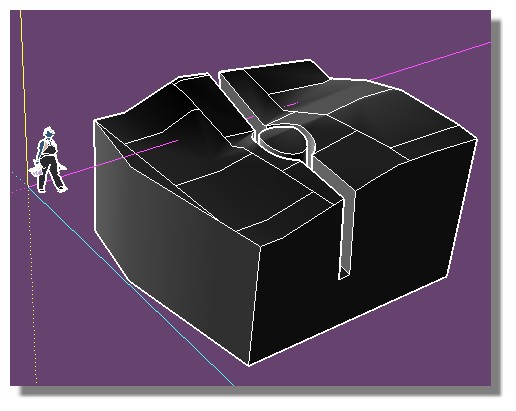
                          bloc.jpg

                          Frenchy Pilou
                          Is beautiful that please without concept!
                          My Little site :)

                          1 Reply Last reply
                          Reply Quote 0

                          Hello! It looks like you're interested in this conversation, but you don't have an account yet.

                          Getting fed up of having to scroll through the same posts each visit? When you register for an account, you'll always come back to exactly where you were before, and choose to be notified of new replies (either via email, or push notification). You'll also be able to save bookmarks and upvote posts to show your appreciation to other community members.

                          With your input, this post could be even better πŸ’—

                          Register Login
                          • 1 / 1
                          • First post
                            Last post
                          Buy SketchPlus
                          Buy SUbD
                          Buy WrapR
                          Buy eBook
                          Buy Modelur
                          Buy Vertex Tools
                          Buy SketchCuisine
                          Buy FormFonts

                          Advertisement