sketchucation logo sketchucation
    • Login
    Oops, your profile's looking a bit empty! To help us tailor your experience, please fill in key details like your SketchUp version, skill level, operating system, and more. Update and save your info on your profile page today!
    πŸ”Œ Smart Spline | Fluid way to handle splines for furniture design and complex structures. Download

    [REQ] Random Profiles

    Scheduled Pinned Locked Moved Plugins
    12 Posts 2 Posters 535 Views 2 Watching
    Loading More Posts
    • Oldest to Newest
    • Newest to Oldest
    • Most Votes
    Reply
    • Reply as topic
    Log in to reply
    This topic has been deleted. Only users with topic management privileges can see it.
    • sdmitchS Offline
      sdmitch
      last edited by

      @unknownuser said:

      If not yet existing

      Drawn in Y, in first time without constaint in Y so just "raws"

      In second time (if courageaous) with same constaint than in X so columns + raws

      Here the possibilities drawn in X
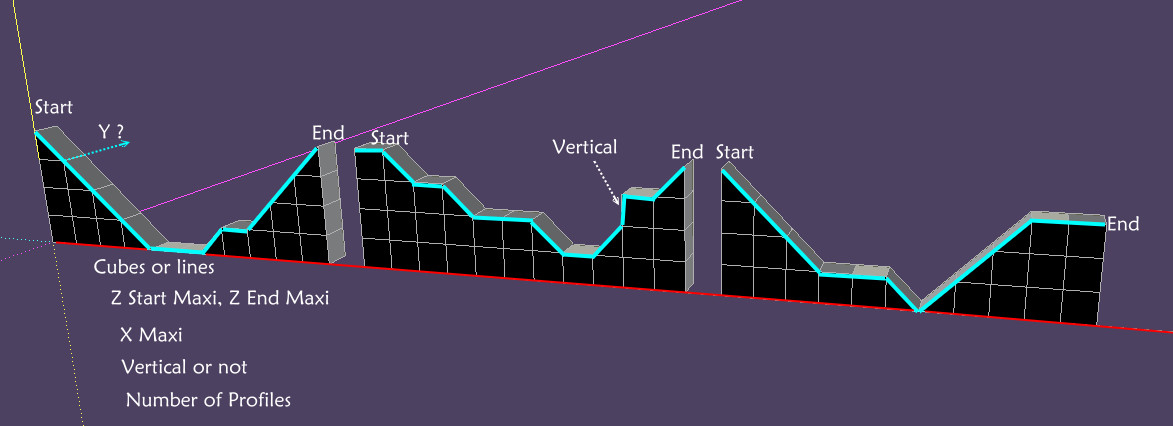
      [attachment=0:2m70jbmg]<!-- ia0 -->Random_profiles.jpg<!-- ia0 -->[/attachment:2m70jbmg]

      Your example profiles don't appear to be very "random". "raws"? Perhaps you mean "rows".

      The following code will generate a 10 X 10 X 10 random set of profiles.

      for y in 0..10
       p=[]
       for x in 0..10
        p<<Geom;;Point3d.new(x,y,rand(10))
       end
       for i in 1..10
        ent.add_line(p[i-1],p[i])
       end
      end


      Nothing is worthless, it can always be used as a bad example.

      http://sdmitch.blogspot.com/

      1 Reply Last reply Reply Quote 0
      • pilouP Offline
        pilou
        last edited by

        Yes Row πŸ˜„

        And yes not very randomly : just 45Β°, -45Β°, 0Β° and yes or not 90Β° permit from the start
        For have curves like section's rivers, quiet valley πŸ˜„ ...

        Frenchy Pilou
        Is beautiful that please without concept!
        My Little site :)

        1 Reply Last reply Reply Quote 0
        • pilouP Offline
          pilou
          last edited by

          Hum
          I have indroduced your code in the Webconsole by Jim Foltz
          but seems nothing is made πŸ˜‰

          Just an
          @unknownuser said:

          (eval):7:in β€˜initialize’: undefined local variable or method β€˜ent’ for #WebConsole:0x1d8be9d8

          I have tried to use Ruby language in the past but it's not a language fluent for me alas! 😳

          Frenchy Pilou
          Is beautiful that please without concept!
          My Little site :)

          1 Reply Last reply Reply Quote 0
          • sdmitchS Offline
            sdmitch
            last edited by

            I use Web Console also but I didn't include the first three lines where mod, ent, and sel are defined. Try this

            mod = Sketchup.active_model
            ent = mod.entities
            sel = mod.selection
            
            for y in 0..10
             p=[];z=5
             for x in 0..10
              case rand(3)
               when 0; z -= 1 if z > 0
               when 2; z += 1 if z < 10
              end
              p<<Geom;;Point3d.new(x,y,z)
             end
             for i in 1..10
              ent.add_line(p[i-1],p[i])
             end
            end


            Nothing is worthless, it can always be used as a bad example.

            http://sdmitch.blogspot.com/

            1 Reply Last reply Reply Quote 0
            • pilouP Offline
              pilou
              last edited by

              Sure better πŸ˜‰

              Problem : Start and End must be the same πŸ˜‰

              Or better between each Start (on the Y) just the 3 possibilities 45Β°, -45Β°, 0Β°, (or 90Β° if enable)
              Same for the Ends(on the Y)
              Same for each segment(on the Y)

              Frenchy Pilou
              Is beautiful that please without concept!
              My Little site :)

              1 Reply Last reply Reply Quote 0
              • sdmitchS Offline
                sdmitch
                last edited by

                Added statement to make start=end

                mod = Sketchup.active_model
                ent = mod.entities
                sel = mod.selection
                
                for y in 0..10
                 p=[];z=5
                 for x in 0..10
                  case rand(3)
                   when 0; z -= 1 if z > 0
                   when 2; z += 1 if z < 10
                  end
                  z = 5 if x==10#<<< to make start=end
                  p<<Geom;;Point3d.new(x,y,z)
                 end
                 for i in 1..10
                  ent.add_line(p[i-1],p[i])
                 end
                end


                Nothing is worthless, it can always be used as a bad example.

                http://sdmitch.blogspot.com/

                1 Reply Last reply Reply Quote 0
                • pilouP Offline
                  pilou
                  last edited by

                  Cool πŸ˜„ but as I said in last post

                  that will great if from the first profile
                  Next Start, next vertex, next End on Y will take the 3 possibilities πŸ˜„
                  for more smoothing forms

                  Here I have just take the first profile and rotate by 90Β° so too symmetric

                  smooth_mountain.jpg

                  Frenchy Pilou
                  Is beautiful that please without concept!
                  My Little site :)

                  1 Reply Last reply Reply Quote 0
                  • sdmitchS Offline
                    sdmitch
                    last edited by

                    Code added to vary start/end z

                    mod = Sketchup.active_model
                    ent = mod.entities
                    sel = mod.selection
                    start_z=5
                    for y in 0..10
                     p=[];z=start_z
                     for x in 0..10
                      case rand(3)
                       when 0; z -= 1 if z > 0
                       when 2; z += 1 if z < 10
                      end
                      z = start_z if x==10
                      p<<Geom;;Point3d.new(x,y,z)
                     end
                     for i in 1..10
                      ent.add_line(p[i-1],p[i])
                     end
                      case rand(3)
                       when 0; start_z -= 1 if start_z > 0
                       when 2; start_z += 1 if start_z < 10
                      end
                    end


                    Nothing is worthless, it can always be used as a bad example.

                    http://sdmitch.blogspot.com/

                    1 Reply Last reply Reply Quote 0
                    • pilouP Offline
                      pilou
                      last edited by

                      This can't be exist on Y: too big πŸ˜‰
                      false_Y.jpg

                      In fact the first profile gives a curve
                      then second will be made on the Y from this first result from each vertex
                      then third from the second etc...

                      Frenchy Pilou
                      Is beautiful that please without concept!
                      My Little site :)

                      1 Reply Last reply Reply Quote 0
                      • pilouP Offline
                        pilou
                        last edited by

                        Perfect! πŸ‘
                        and if the first random profile don't please just relaunch the script! β˜€
                        Bravo! 😎
                        mountain.jpg

                        Frenchy Pilou
                        Is beautiful that please without concept!
                        My Little site :)

                        1 Reply Last reply Reply Quote 0
                        • sdmitchS Offline
                          sdmitch
                          last edited by

                          So each point on subsequent profiles should be determined like the starting Z.

                          mod = Sketchup.active_model
                          ent = mod.entities
                          sel = mod.selection
                           p=[];z=5;y=0
                           for x in 0..10
                            p<<Geom;;Point3d.new(x,y,z)
                            case rand(3)
                             when 0; z -= 1 if z > 0
                             when 2; z += 1 if z < 10
                            end
                            z=5 if x==9
                           end
                          for y in 1..10
                           for i in 1..10
                            ent.add_line(p[i-1],p[i])
                           end
                           for i in 0..10
                            p[i].y=y
                            case rand(3)
                             when 0; p[i].z -= 1 if p[i].z > 0
                             when 2; p[i].z += 1 if p[i].z < 10
                            end
                           end
                           p[10].z=p[0].z
                          end


                          Nothing is worthless, it can always be used as a bad example.

                          http://sdmitch.blogspot.com/

                          1 Reply Last reply Reply Quote 0
                          • 1 / 1
                          • First post
                            Last post
                          Buy SketchPlus
                          Buy SUbD
                          Buy WrapR
                          Buy eBook
                          Buy Modelur
                          Buy Vertex Tools
                          Buy SketchCuisine
                          Buy FormFonts

                          Advertisement