sketchucation logo sketchucation
    • Login
    Oops, your profile's looking a bit empty! To help us tailor your experience, please fill in key details like your SketchUp version, skill level, operating system, and more. Update and save your info on your profile page today!
    ⚠️ Important | Libfredo 15.6b introduces important bugfixes for Fredo's Extensions Update

    Not really GE related, but...

    Scheduled Pinned Locked Moved Google Earth
    sketchup
    10 Posts 2 Posters 9.2k Views 2 Watching
    Loading More Posts
    • Oldest to Newest
    • Newest to Oldest
    • Most Votes
    Reply
    • Reply as topic
    Log in to reply
    This topic has been deleted. Only users with topic management privileges can see it.
    • T Offline
      tspco
      last edited by

      I have done several terrains, that were imported as DEMs. My issue is the best color, or type of color/material, to show the best relief.
      I imported a few of my SP models and while I am "driving" around, I have beed surprised more than once by an unseen elevation change, one time I even rolled the vehicle.
      Something with higher contrast would be best, and something with better shade color changes.
      TIA Ryan

      SU make 2017, /Twilight Render Hobby
      Windows 10,64 bit,16GB ram, quad core Athlon 3.6 gHz proc. Anything else you want to know, ask me.

      1 Reply Last reply Reply Quote 0
      • GaieusG Offline
        Gaieus
        last edited by

        Have you tried projecting a colour transition onto the terrain from the side? Just like in those printed elevation maps: hills are brown, plains are green etc.

        Gai...

        1 Reply Last reply Reply Quote 0
        • T Offline
          tspco
          last edited by

          That is a thought, I just need to figure how to pull it off, short of painting it myself. I will check into it.

          SU make 2017, /Twilight Render Hobby
          Windows 10,64 bit,16GB ram, quad core Athlon 3.6 gHz proc. Anything else you want to know, ask me.

          1 Reply Last reply Reply Quote 0
          • GaieusG Offline
            Gaieus
            last edited by

            Set up a vertical rectangle that is the exact height as your terrain from the lowest point to the highest (you can make it a little bigger both directions).

            Paint it with a material with this transition (or you can use any striped image). Position carefully from top to bottom.

            Then right click > Texture > Projected.

            Now sample this projected texture from the face and apply it straight on your terrain (not a group but on the geometry inside).

            Gai...

            1 Reply Last reply Reply Quote 0
            • T Offline
              tspco
              last edited by

              I have the two color rectangle, but no right click option for texture>projected, now what?

              SU make 2017, /Twilight Render Hobby
              Windows 10,64 bit,16GB ram, quad core Athlon 3.6 gHz proc. Anything else you want to know, ask me.

              1 Reply Last reply Reply Quote 0
              • GaieusG Offline
                Gaieus
                last edited by

                Did you import as an image? If so, first right click > Explode. Then no need to project it as it is projected anyway. If not an image, there must be another reason. If a group, explode too.

                Gai...

                1 Reply Last reply Reply Quote 0
                • T Offline
                  tspco
                  last edited by

                  So I need to import a material, right?, I just painted the rectangle from the stock colors. I think I can figure it out...tomorrow.

                  SU make 2017, /Twilight Render Hobby
                  Windows 10,64 bit,16GB ram, quad core Athlon 3.6 gHz proc. Anything else you want to know, ask me.

                  1 Reply Last reply Reply Quote 0
                  • GaieusG Offline
                    Gaieus
                    last edited by

                    Well, if you have some good gradient from the SU materials, that will also do it.

                    Gai...

                    1 Reply Last reply Reply Quote 0
                    • T Offline
                      tspco
                      last edited by

                      I made a custom gradient in GIMP, worked great, now just some color tweaking. Thanks Gai! The blue(ish)areas are low, the tan(ish)areas are high. Now all I need is a quick way to determine the range between the highs and the lows. I just grouped the model and guestimated from the blue group bounding box.
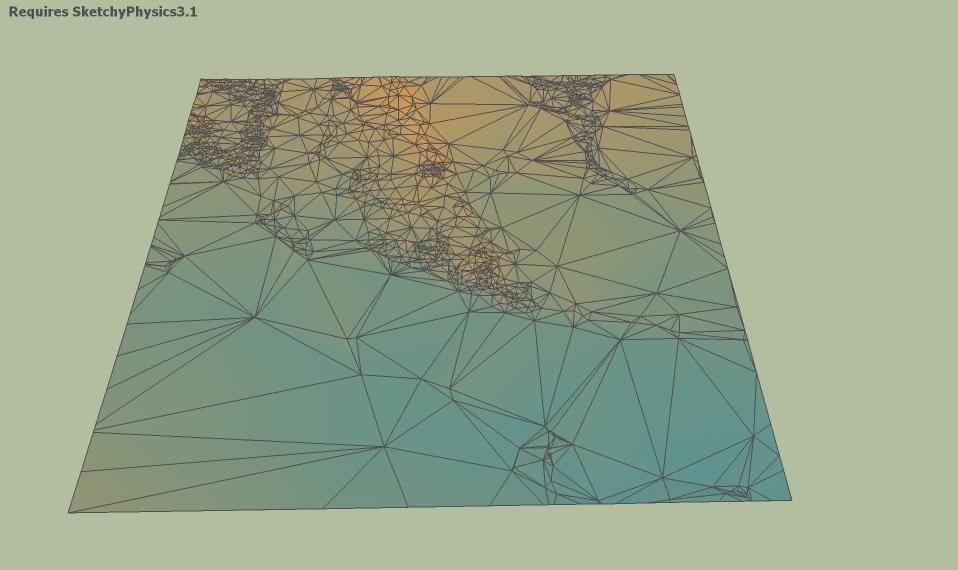

                      gothusbg.jpg

                      SU make 2017, /Twilight Render Hobby
                      Windows 10,64 bit,16GB ram, quad core Athlon 3.6 gHz proc. Anything else you want to know, ask me.

                      1 Reply Last reply Reply Quote 0
                      • GaieusG Offline
                        Gaieus
                        last edited by

                        You can also make the two far values a bit wider and play around positioning the whole rectangle up/down a bit.

                        Gai...

                        1 Reply Last reply Reply Quote 0
                        • 1 / 1
                        • First post
                          Last post
                        Buy SketchPlus
                        Buy SUbD
                        Buy WrapR
                        Buy eBook
                        Buy Modelur
                        Buy Vertex Tools
                        Buy SketchCuisine
                        Buy FormFonts

                        Advertisement