Sunset
-
Regardless of technical brilliance, I think David's greatest rendering asset is his power of observation.
-
@roger said:
Regardless of technical brilliance, I think David's greatest rendering asset is his power of observation.
And his PS skills.
-
-
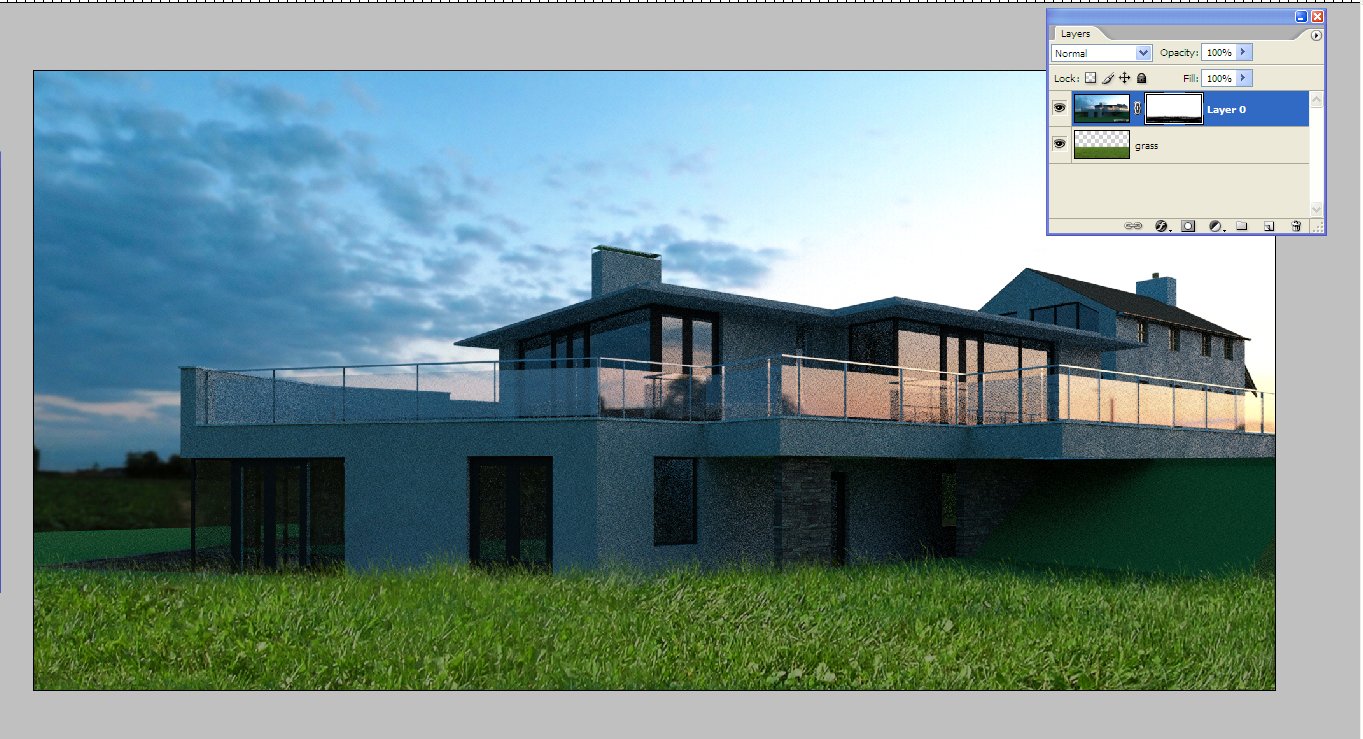
The grass is really easily done.I saw a tutorial on here showing how to do it a while back but all you do is load a selection of grass under the main image,add a layer mask to the main image and paint in the grass on the layer mask using the grass brush(available here, http://qbrushes.net/plants/photoshop-grass-brushes/),changing the size of the brush as you go.Usually I would then add a few additional plants over the grass with gaussian blur,just to add depth of field.Ive attached a screensnap showing quickly what it looks like in photoshop.
-
@davidh said:
The grass is really easily done.I saw a tutorial on here showing how to do it a while back but all you do is load a selection of grass under the main image,add a layer mask to the main image and paint in the grass on the layer mask using the grass brush(available here, http://qbrushes.net/plants/photoshop-grass-brushes/),changing the size of the brush as you go.
Thanks for the link!

-
Very usefull info. Thanks.
I'm beginning to see the value of custom brushes
I use Paintshop Pro in stead of PS. Anyone know nice brushes for that? -
here's a website that you can download some grass brushes for paintshop pro:
http://www.brushouse.com/plant-brushes/download-greeny-grass-brushes-for-psp/
-
Nothing much to add apart from 'fantastic!'. Your post pro skills are very impressive, hoping for a tutorial soon, even if you dont want to give away all your secrets!
-
A tutorial for the sunset is forthcoming,although this is probably one of the least post processed images I have uploaded.There will be a tutorial for the "Storm" and "Moonlight" images also uploaded.
Its really all about composition and light,particularly light, where you can use shadows to really accentuate and alter an image.
From my own experience,the best images are not harshly lit,i.e noon light, but low evening/early morning.The light is diffused,the building is warmer and the colours are accentuated.Maybe there is room for a subsection on tutorials where we concentrate on light .
On a side note,I have seen some amazing images but my idol is Alex Roman(http://www.thirdseventh.com/)This man is so far ahead,so able to create atmosphere and basically makes you feel so,so inadequate.
-
I think Alex Roman is everyones hero, but there are so many people who simply try to copy his style rather than develop their own. Thats why I love this forum gallery, as every piece I see on here is unique.
-
@davidh said:
The grass is really easily done.I saw a tutorial on here showing how to do it a while back but all you do is load a selection of grass under the main image,add a layer mask to the main image and paint in the grass on the layer mask using the grass brush(available here, http://qbrushes.net/plants/photoshop-grass-brushes/),changing the size of the brush as you go.Usually I would then add a few additional plants over the grass with gaussian blur,just to add depth of field.Ive attached a screensnap showing quickly what it looks like in photoshop.
I've been struggling to do the "grass work" ever since I start rendering. Many thanks for the tips and link.
-
Alex Romax does model a lot in his scene, he also does a lot of post-pro-ing to set a extraordinary mood



Hello! It looks like you're interested in this conversation, but you don't have an account yet.
Getting fed up of having to scroll through the same posts each visit? When you register for an account, you'll always come back to exactly where you were before, and choose to be notified of new replies (either via email, or push notification). You'll also be able to save bookmarks and upvote posts to show your appreciation to other community members.
With your input, this post could be even better 💗
Register Login


Advertisement