sketchucation logo sketchucation
    • Login
    Oops, your profile's looking a bit empty! To help us tailor your experience, please fill in key details like your SketchUp version, skill level, operating system, and more. Update and save your info on your profile page today!
    ⚠️ Update | Sketchucation Tools 5.0.8 released with licensing improvements and bugfixes Download

    Double bounding box

    Scheduled Pinned Locked Moved Developers' Forum
    11 Posts 3 Posters 859 Views 3 Watching
    Loading More Posts
    • Oldest to Newest
    • Newest to Oldest
    • Most Votes
    Reply
    • Reply as topic
    Log in to reply
    This topic has been deleted. Only users with topic management privileges can see it.
    • voljankoV
      voljanko
      last edited by

      Hello.
      I have a problem to get the coordinates of the rotated bonding box corner.
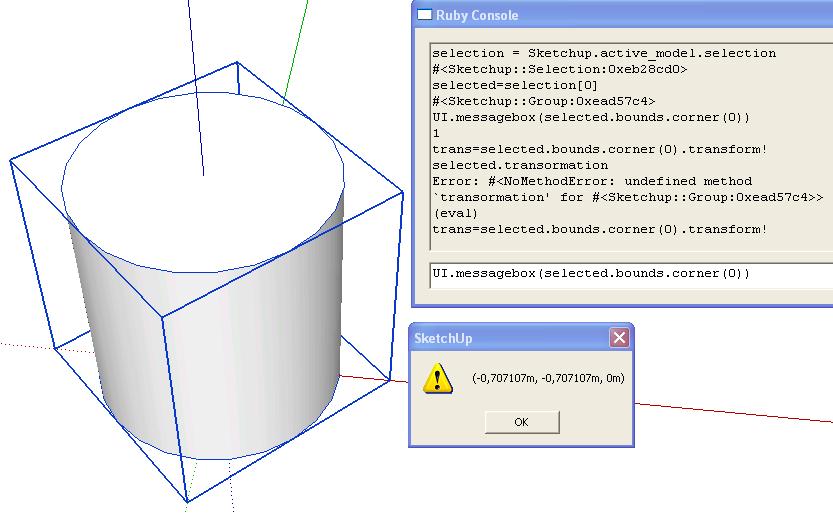
      On the screen is different bounding box than what I get with group.bounds.corner[0] (this is why "double bounding box" tittle). You can see it on the picture.
      I have tried to apply the transformation of the group to the corner point,but the result is not right.

      I want to have the coordinates of the corner of the bounding box that is on the screen,so x or y should be 0.

      doublebbox.JPG

      SuSolid.com - solid check - solid repair- solid intersection check - weight plugin

      1 Reply Last reply
      Reply Quote 0
      • thomthomT
        thomthom
        last edited by

        Have a snoop around in my plugin that converts the bounding box into edges: http://forums.sketchucation.com/viewtopic.php?t=29377

        Thomas Thomassen — SketchUp Monkey & Coding addict
        List of my plugins and link to the CookieWare fund

        1 Reply Last reply
        Reply Quote 0
        • voljankoV
          voljanko
          last edited by

          Thanks,but I don't need the real bbox.I just need to retrieve the coordinate of one of the corners of the bbox on the picture.
          It should be (-0.707 , 0 , 0) or (0 , -0.707 , 0) .

          SuSolid.com - solid check - solid repair- solid intersection check - weight plugin

          1 Reply Last reply
          Reply Quote 0
          • thomthomT
            thomthom
            last edited by

            So you have the point - but want to move the group so that the point is located at 0,0,0?

            <span class="syntaxdefault"><br />tr </span><span class="syntaxkeyword">=</span><span class="syntaxdefault"> Geom</span><span class="syntaxkeyword">;;</span><span class="syntaxdefault">Transformation</span><span class="syntaxkeyword">.new(</span><span class="syntaxdefault"> point</span><span class="syntaxkeyword">.</span><span class="syntaxdefault">vector_to</span><span class="syntaxkeyword">(</span><span class="syntaxdefault"> ORIGIN </span><span class="syntaxkeyword">)</span><span class="syntaxdefault"> </span><span class="syntaxkeyword">)<br /></span><span class="syntaxdefault">group</span><span class="syntaxkeyword">.</span><span class="syntaxdefault">transform</span><span class="syntaxkeyword">!(</span><span class="syntaxdefault"> tr </span><span class="syntaxkeyword">)<br /></span><span class="syntaxdefault"> </span>
            

            Thomas Thomassen — SketchUp Monkey & Coding addict
            List of my plugins and link to the CookieWare fund

            1 Reply Last reply
            Reply Quote 0
            • voljankoV
              voljanko
              last edited by

              No,I will explain more:
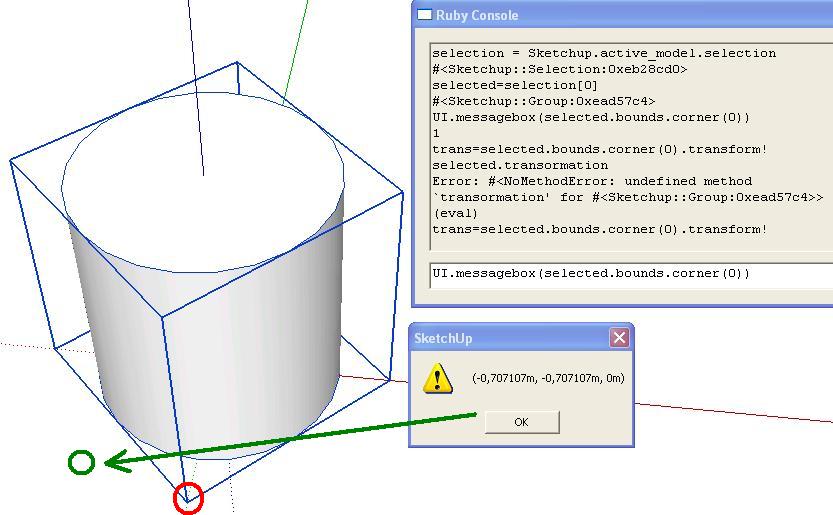
              I have rotated the group for 45 degrees.
              If I call the group.bounds.corner(0) ,I get the point of the axis aligned bbox (green circle on the picture).
              Instead,I want to have the coordinates of the bbox on the screen ,witch is NOT axis aligned(red circle on the picture).

              doublebbox.JPG

              SuSolid.com - solid check - solid repair- solid intersection check - weight plugin

              1 Reply Last reply
              Reply Quote 0
              • thomthomT
                thomthom
                last edited by

                Right - this is where you can look at the plugin I linked to where you can see how I obtain the co-ordinates of the boundingbox.

                Thomas Thomassen — SketchUp Monkey & Coding addict
                List of my plugins and link to the CookieWare fund

                1 Reply Last reply
                Reply Quote 0
                • voljankoV
                  voljanko
                  last edited by

                  Ok,I have check your plugin and find the line

                         pts = self.bound_points(bb).map { |pt| pt.transform( entity.transformation ) }
                  

                  interesting.But I have already try to put the transformation to my point,but the result is wrong:

                  cube=Sketchup.active_model.selection[0]
                  point=cube.bounds.corner(0)
                  point.transform!(cube.transformation)
                  UI.messagebox point.to_s
                  

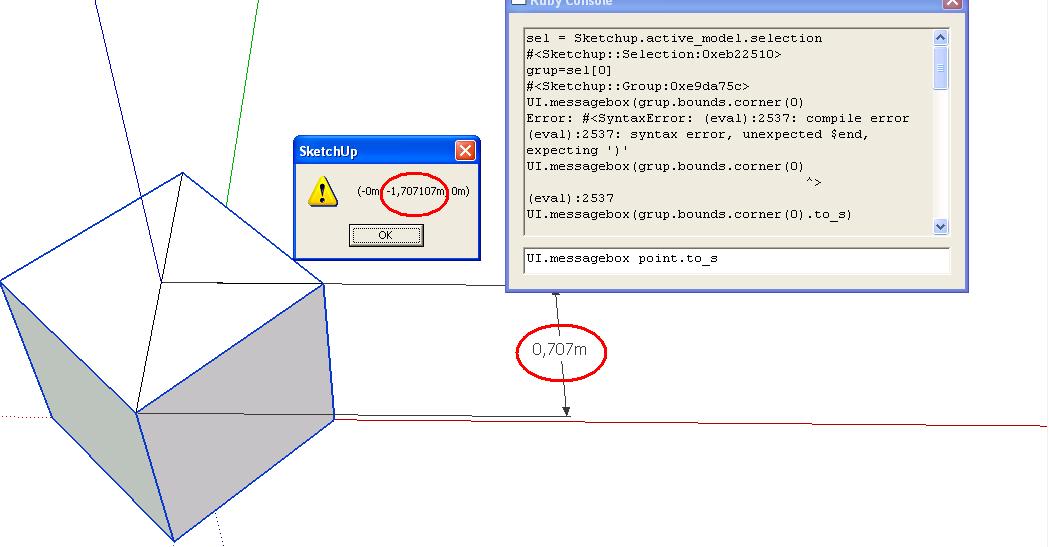
                  The result that I get is wrong (-0,-1.707,0).
                  As you can see on the picture it should be (-0,-0.707,0).
                  What em I doing wrong?

                  bbox.JPG

                  SuSolid.com - solid check - solid repair- solid intersection check - weight plugin

                  1 Reply Last reply
                  Reply Quote 0
                  • voljankoV
                    voljanko
                    last edited by

                    Ok,I got it.
                    The mistake was that I was taking the bbox of the group,but should take a bbox of the definition of the group,like in your plugin.
                    But why didn't you told me to look in your plugin? 😄

                    SuSolid.com - solid check - solid repair- solid intersection check - weight plugin

                    1 Reply Last reply
                    Reply Quote 0
                    • Dan RathbunD
                      Dan Rathbun
                      last edited by

                      @voljanko said:

                      I have rotated the group for 45 degrees.
                      If I call the group.bounds.corner(0), I get the point of the axis aligned bbox (green circle on the picture).

                      Instead, I want to have the coordinates of the bbox on the screen, which is NOT axis aligned (red circle on the picture).

                      group.local_bounds()

                      I'm not here much anymore.

                      1 Reply Last reply
                      Reply Quote 0
                      • voljankoV
                        voljanko
                        last edited by

                        @dan rathbun said:

                        group.local_bounds()

                        Yes,it is working,I have test it....BUT,it is only available for groups,not components. 😞

                        SuSolid.com - solid check - solid repair- solid intersection check - weight plugin

                        1 Reply Last reply
                        Reply Quote 0
                        • Dan RathbunD
                          Dan Rathbun
                          last edited by

                          @voljanko said:

                          @dan rathbun said:

                          group.local_bounds()

                          Yes,it is working,I have test it....BUT,it is only available for groups,not components. 😞

                          This is because .definition() is exposed to ComponentInstance objects, so:

                          def get_local_bounds(obj)
                            case obj
                            when Sketchup;;Group
                              obj.local_bounds()
                            when Sketchup;;ComponentInstance
                              obj.definition.bounds()
                            else
                              obj.bounds()
                            end
                          end

                          

                          I'm not here much anymore.

                          1 Reply Last reply
                          Reply Quote 0

                          Hello! It looks like you're interested in this conversation, but you don't have an account yet.

                          Getting fed up of having to scroll through the same posts each visit? When you register for an account, you'll always come back to exactly where you were before, and choose to be notified of new replies (either via email, or push notification). You'll also be able to save bookmarks and upvote posts to show your appreciation to other community members.

                          With your input, this post could be even better 💗

                          Register Login
                          • 1 / 1
                          • First post
                            Last post
                          Buy SketchPlus
                          Buy SUbD
                          Buy WrapR
                          Buy eBook
                          Buy Modelur
                          Buy Vertex Tools
                          Buy SketchCuisine
                          Buy FormFonts

                          Advertisement

