Rotating bbox
-
I have been working on the appearance of rotating a bounding box while keeping its component in place. I have succeeded in doing so one axis at a time, but am having problems doing it properly with all three axis at once. Attached is a portion of the code that results in appearing to transform a component's bbox, without rotating the component. I originally thought that I could rotate the component 3 times, once in each axis, but I later realized for obvious reasons was wrong. Any ideas?
model = Sketchup.active_model
entities = model.entities
selection = model.selection
if selection[0].is_a? Sketchup;;ComponentInstance
  selection[0].make_unique
  #save original origin
  trans_start=selection[0].transformation.origin
  #move model, by comp origin to world origin
  entities.transform_entities(Geom;;Transformation.new([-trans_start.x,-trans_start.y,-trans_start.z]),entities.to_a)
  #save the new origin
  origin_comp=selection[0].transformation.origin
  #save the new component transformation
  trans_original=selection[0].transformation
Following is portion that rotates the component z axis around y.
  #rotate the component zaxis around its yaxis
  yaxis_comp=selection[0].transformation.yaxis
  zaxis_comp=selection[0].transformation.zaxis
  zaxis_world=Sketchup.active_model.edit_transform.zaxis
  if (Geom;;Point3d.new(zaxis_comp.to_a)).x>=0
    selection[0].transform! Geom;;Transformation.new(origin_comp,yaxis_comp,-(zaxis_comp.angle_between zaxis_world))
  else
    selection[0].transform! Geom;;Transformation.new(origin_comp,yaxis_comp,(zaxis_comp.angle_between zaxis_world))
  end
#transform component back to original position without changing the bbox selection[0].definition.entities.transform_entities(trans_original,selection[0].definition.entities.to_a) #move component back to original location entities.transform_entities(Geom;;Transformation.new(trans_start),entities.to_a) end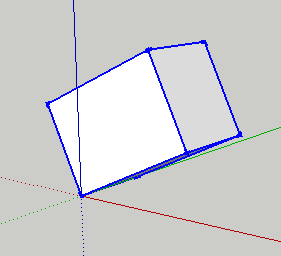
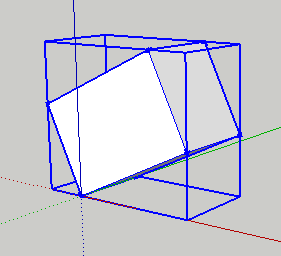
I first tried this in "point component", and although it functions, it not because I did it properly, but because the particular sequence of commands I used, works within a limited situation.One of the problems with posting snippets, is that without enclosing stuff in "[code]", one can not indent. But when using "[code]", the box is too narrow.
-
To change the orientation is the same as changing the component axis. To do that you make a transformation to transform the component definition, then apply the inverse of that transformation to the instances.
-
Except for applying the inverse, Isn't that what my code does?
I first made the selected component unique, saved its transformation array (is that what its called?), then transformed (rotated) the component to align with the the world axis. I then
my_comp.definition.entities.transform_entities(original_transformation,my_comp.definition.entities.to_a)to apply the original transformation to its entities. The result being the appearance that the bbox rotated.Don't know how to ask my question. I used
my_comp.transform! Geom::Transformation.new(comp_origin,yaxis_comp,-(zaxis_comp.angle_between zaxis_world))to transform the component from its original position (rotated in one axis) to align with the world axis. But what do I do for a component that is rotated on all three axis.Guess I am as clear as mud>_<
-
I went from here:
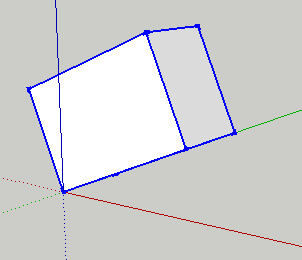
to here byGeom::Transformation.new(pt, axis, angle):
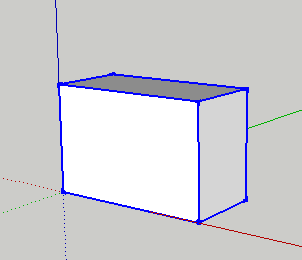
then to here byent.transform_entities(transform,ent1,ent2,ent3):
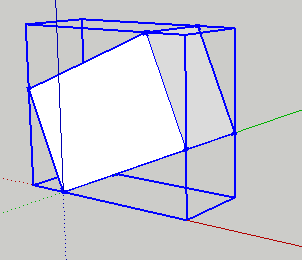
But how do I do step 2 for a component rotated on all three axis?


Hello! It looks like you're interested in this conversation, but you don't have an account yet.
Getting fed up of having to scroll through the same posts each visit? When you register for an account, you'll always come back to exactly where you were before, and choose to be notified of new replies (either via email, or push notification). You'll also be able to save bookmarks and upvote posts to show your appreciation to other community members.
With your input, this post could be even better 💗
Register Login


Advertisement