NPR - Digital Painting
-
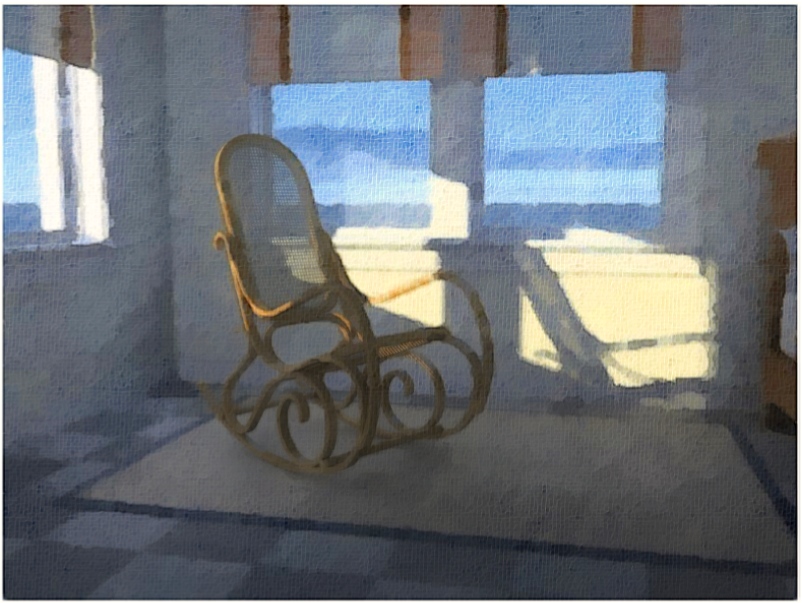
Earlier I posted an image rendered with the Render[It] plugin. I've since modified the original image using multiple FotoSketcher processed images, overlayed with the original, to build up a painted effect. I spent about 45 minutes on the rendering.
Regards, Ross
-
I would be very proud of that Ross - something very relaxing about it! Nice image!
-
A very nice image indeed! Some more crispness maybe is needed.

-
Very nice Ross, as is the wooden clock thread....
I haven't played with fotosketcher yet; can you mask out edges as say the output of the Dennis Technique displays?
-
Andrew - Fotosketcher applies adjustable filter-type effects to whatever image you bring in. It processes the image and allows you to save it. It is a simple application. Where it excels is the effects can be more realistic than the typical photoshop plugin intended to produce similar results.
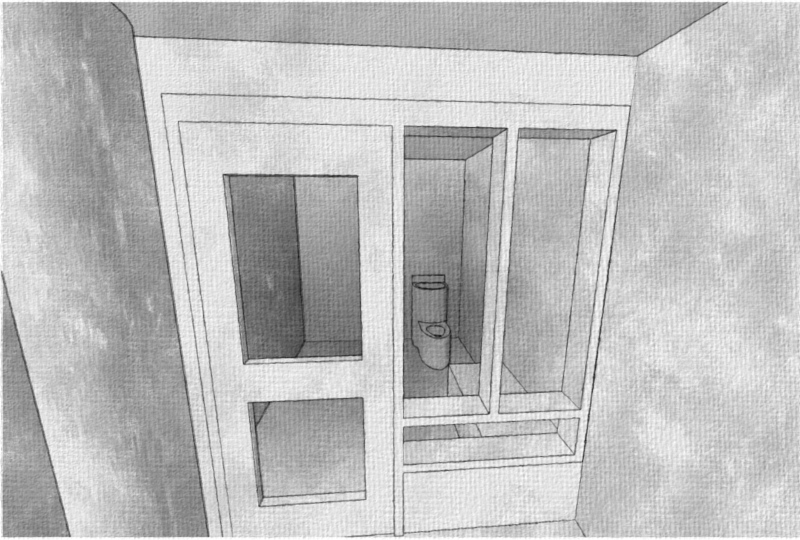
What you get out of fotosketcher relates to what you put in. It won't for instance remove the lines from your typical sketchup output. It can definitely be used as part of a 'Dennis' type method where individual images are overlaid. I attach a simple example featuring a holding cell. A sketchup 'colours-only' export was processed in fotosketcher. A 'line-only' export was processed with a photoshop filter (EyeCandy 'Jiggles') and they were overlaid with transparency.
Regards, Ross


Hello! It looks like you're interested in this conversation, but you don't have an account yet.
Getting fed up of having to scroll through the same posts each visit? When you register for an account, you'll always come back to exactly where you were before, and choose to be notified of new replies (either via email, or push notification). You'll also be able to save bookmarks and upvote posts to show your appreciation to other community members.
With your input, this post could be even better 💗
Register Login


Advertisement