Looking for a plugin to automate material colors
-
Hello fellow, SketchUp users! I'm new so please forgive me if I'm asking this in the wrong forum.
Q. Does anyone know of a plugin that would take ALL of my materials and set the saturation to zero, and the brightness to 100?
I do some projects that are greatly aided by an image that is black and white (not grayscale). Going into each color manually and adjusting the sliders gets to be a pain, especially when I need to revert back to color. Note: the hidden line viewing option isn't quite what I'm looking for as it doesn't show the textures (but it's close!)
Thank you!
~Greg
-
One way you can do it without needing ruby is to create a new style that uses black as the default front and back face colors. THen set it so that it displays default material color, instead of materials (it is a setting similr to line mode).
Anyhow, does that make any sense? Then you have it saved as a nice little style that you can reuse for all your models.
Chris
-
@chris fullmer said:
One way you can do it without needing ruby is to create a new style that uses black as the default front and back face colors. THen set it so that it displays default material color, instead of materials (it is a setting similr to line mode).
Anyhow, does that make any sense? Then you have it saved as a nice little style that you can reuse for all your models.
Chris
Hi, Chris. Thanks for the quick reply.
I was able to follow you all the way until you said "set it so that it displays default material color, instead of materials" which I can't quite figure out how to do.
I opened the Styles window and went to the Face Settings and changed the front/back colors to black, but I didn't notice any change in my model. I'm sure it's something obvious, but how do I do the "display default material" thing you mentioned?
Thanks again!
-
The button is called color all the same or something like that. Here's a screen grab that shows it. Hope it helps, let me know if it does not do quite what you were hoping for.
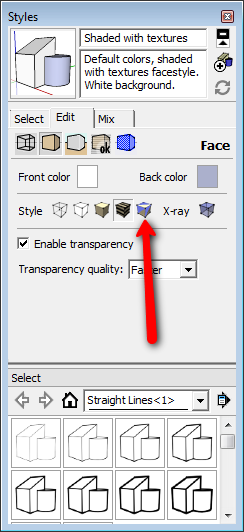
Chris
-
@chris fullmer said:
The button is called color all the same or something like that. Here's a screen grab that shows it. Hope it helps, let me know if it does not do quite what you were hoping for.
[attachment=0:3e6t77oc]<!-- ia0 -->all_same.png<!-- ia0 -->[/attachment:3e6t77oc]
Chris
Ahh, ok, now I see what you're talking about! I followed your instructions and the model did indeed turn all white, but it's lacking its textures, unfortunately.
Let me show you an example of what I'm looking to do:
I model with color data and presentation purposes:

For certain rendering effects and photoshop post-processing, it's VERY handy to keep the textures, but have them have no saturation and full brightness:

There may be no easy way to do this other than old-fashioned elbow grease. It just gets very redundant, very quick to manually adjust each material


Hello! It looks like you're interested in this conversation, but you don't have an account yet.
Getting fed up of having to scroll through the same posts each visit? When you register for an account, you'll always come back to exactly where you were before, and choose to be notified of new replies (either via email, or push notification). You'll also be able to save bookmarks and upvote posts to show your appreciation to other community members.
With your input, this post could be even better 💗
Register Login


Advertisement