Alternatives to Bloatware
-
As I'm having a fresh start with Windows 7, I'm re-considering my software options.
Adobe Reader takes forever to open when you accidentally click on a pdf link on the web. Is there a faster alternative?Some time ago I replaced MSN Messenger with Pidgin and MS Office with OpenOffice. The replacements are lighter and work faster. I'm open to other suggestions for other light software for common tasks.
-
http://blog.kowalczyk.info/software/sumatrapdf/download.html
its the biz as far as lightweight PDF viewers go.
-
Foxit Reader http://www.foxitsoftware.com/pdf/reader/, but it doesn't show thumbnails (yet), unless you have Adobe Reader installed and do some tweaks (search google for that)
-
The best for me so far with very good Firefox integration
http://www.docu-track.com/home/prod_user/PDF-XChange_Tools/pdfx_viewer
I prefer portable software - see this place for alternatives -
A very good list of freeware alternatives http://www.techsupportalert.com/ including non-Adobe PDF readers.
Foxit Reader is what I use. -
Is Adobe the only one that supports 3D pdfs?
-
@jim said:
Is Adobe the only one that supports 3D pdfs?
seems to be so far... tis why I still have it installed..
-
Does anyone actually use 3D PDFs to communicate with clients? A simple video seems a lot more foolproof to me. Even Quicktime VR stuff (VR panoramas and VR objects) has not seen wide adoption; I pushed them for years and no one paid attention, so I now focus on stills and video only.
Back to topic, any more "lightware" suggestions for software you use everyday?
-
Initially in the modeling phase I will use it for single components, however once the whole scene is accumulated and textures mapped it becomes impractical as the pdf size is normally larger than the SU size.
-
Thanks for all your suggestions. After doing some research on each option I decided for the open source one Remus suggested, Sumatra PDF viewer. All I want is to be able to read user manuals and to open the PDFs I "print" with PDF Creator. Sumatra does this nicely and at less than 2MB in size, it's completely bloat-free.
-
I'll share another piece of bloat-free software I re-discovered today thanks to Fletch: The XviD codec. I tried it today in Windows 7 instead of what I usually install (DivX) and I must say that it's a LOT smoother than DivX when you are editing video, and it reads DivX-encoded content without any problem. With DivX, fast-forwarding and jumping to a specific point while cutting videos together or while synchronizing subtitles was a pain in the neck, but XviD runs smooth as a hot knife in butter. (And I recently wasted $ in upgrading my DivX license...
 )
)Here's the link to download XviD for Windows: (Sorry, OSX, there's no XviD build for you)
http://www.xvid.org/Downloads.15.0.htmlTip: if you plan to save your sequences for further edit in Windows Live Movie Maker or any other editor, it's best to set an i-frame (or keyframe) every 30 frames. This will make seeking to a point and rewinding even smoother. To do this, Click the "more" button next to the General Purpose quality preset,
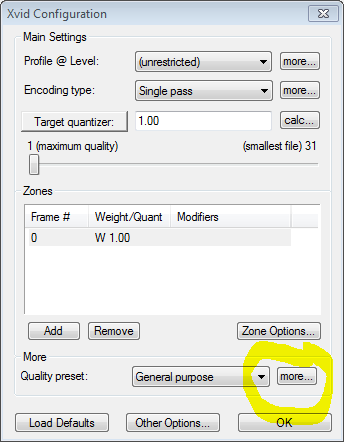
Say yes in the next dialog, and enter a maximum i-frame interval of 30.
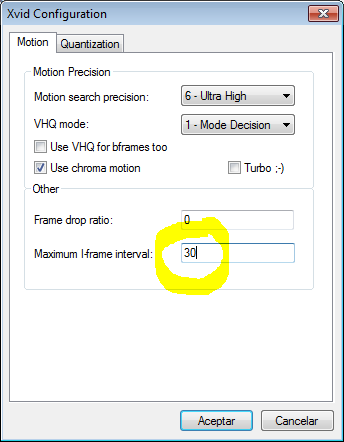
As I said, do this if you plan to further edit your video, as this way it will be faster when seeking.


Hello! It looks like you're interested in this conversation, but you don't have an account yet.
Getting fed up of having to scroll through the same posts each visit? When you register for an account, you'll always come back to exactly where you were before, and choose to be notified of new replies (either via email, or push notification). You'll also be able to save bookmarks and upvote posts to show your appreciation to other community members.
With your input, this post could be even better 💗
Register Login


Advertisement