New plugin to extrude multiple selected surfaces at once using your custom value
-
New plugin to extrude multiple selected surfaces at once using your custom value
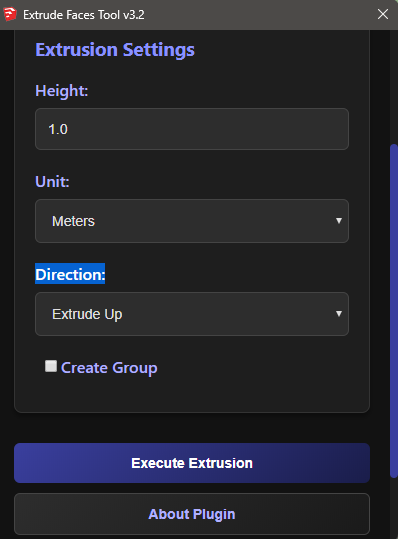
-
Please reorganize your extension as a TRUE SketchUp extension.
See: https://ruby.sketchup.com/file.extension_requirements.htmlAlso, take note of the various numeric conversion methods that the SketchUp API has added to the Numeric class. (You do not need to write your own conversion formulae.) Here is an example that will default to model units, if the
unitargument is blank:def convert_to_inches(value, unit = nil) units = Sketchup.active_model.options["UnitsOptions"] if unit.nil? # use model units case units["LengthFormat"] when Length::Architectural, Length::Fractional return value.inch when Length::Engineering return value.feet else # Length::Decimal unit = units["LengthUnit"] end end case unit when :in, Length::Inches then value.inch when :m, Length::Meter then value.m when :cm, Length::Centimeter then value.cm when :mm, Length::Millimeter then value.mm when :ft, Length::Feet then value.feet when :yd, 5 # NOTE: constant Length::Yard (5) was added for SU2020, # use 5 to avoid NameError exception in older versions. value.yard # yards to inches else value.inch # if inches or unknown end endAlso, this is a good read for dealing with units in SketchUp:

Dealing with Units in SketchUp
There are extensions to the base classes in SketchUp’s Ruby API which often new SketchUp plugin developers overlook. If you aren’t aware of them you might find yourself reinventing many…
Procrastinators Revolt! (www.thomthom.net)
-
thnx i will do

Hello! It looks like you're interested in this conversation, but you don't have an account yet.
Getting fed up of having to scroll through the same posts each visit? When you register for an account, you'll always come back to exactly where you were before, and choose to be notified of new replies (either via email, or push notification). You'll also be able to save bookmarks and upvote posts to show your appreciation to other community members.
With your input, this post could be even better 💗
Register Login


Advertisement