Width problems with select option in WebDialog
-
Thanks Thom,
I'll try to send them bug info, maybe they'll do something this time.
Any idea how to overcome the problem, maybe to use some custom combo box control or so?
-
<select> elements can appear differently in various browsers (especially if you would want to use CSS on the option elements). There is probably nothing wrong in your implementation, but in the specific browser used.
Usually the operating system's native controls look native and have besides mouse support also good accessibility for keyboard navigation, screen readers, scroll wheel. They have the behavior that the user expects to work.
I don't think it is worth the effort to "imitate" a <select> using <div>s for cosmetic reasons that only appear in a minority of browsers. Of course it's another case if you need to do something that is not possible with the native control (including images and small paragraphs in options, etc.). -
Hi Aerilius,
My code works correctly, selection and everything related to it, only the appearance is not good.
I tried changing default browser, but if I understood Thom well problem is in embedded IE which is used for WebDialogs internal implementation.Anyway, I'll keep it as it is now, since no better solution found.
Thanks again.
-
Yes, the user's default browser has no connection to SketchUp's WebDialog. Currently we use the OS's built in framework which is IE under Windows and WebKit under OSX.
I'd recommend you look at the WebDialog Wiki I compiled if you haven't read it yet:
https://github.com/thomthom/sketchup-webdialogs-the-lost-manual/wiki/Doctype---Quirks-vs-Standard-vs-SuperstandardBtw, I just checked on my Win8 machine with IE11 and it's fixed:
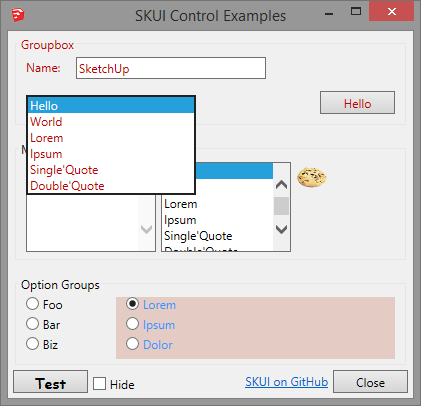
This might just be an IE10 glitch. Annoying visually, but at least it's still fully functional.
-
<option value='' disabled selected style='display;none;'>................Choose season.............</option>Placeholder HACK

You will have to do some testing in JS to eliminate this selected. -
That's a very fragile hack... and one that adds a different visual noise - and extra code.
Since it's working as it is I would just leave it. Padding with dummy characters with a dummy list item won't ever be able to accurately adjust the length. -
Let's better not use pixel sizes to dimension anything that will contain text.
Every box that contains text is better dimensioned with em. -
Ok.... you liked that hack dident you....How bout this one..
<!DOCTYPE html> <html xmlns="http://www.w3.org/1999/xhtml"> <head> <style> .DL_selection select { width;250px; } .op;after { content;" ";} </style> <meta http-equiv="MSThemeCompatible" content="Yes"> <meta http-equiv="Content-Type" content="text/html; charset=UTF-8" /> </head> <body> <div class="DL_selection"> <select name="season_select" id="season_select"> <option class="op" value="year" id="year_season_select" >year</option> <option class="op" value="summer" id="summer_season_select">summer</option> <option class="op" value="autumn" id="autumn_season_select">autumn</option> <option class="op" value="winter" id="winter_season_select">winter</option> <option class="op" value="spring" id="spring_season_select">spring</option> </select> </div> </body> </html>@unknownuser said:
Padding with dummy characters with a dummy list item won't ever be able to accurately adjust the length.
Now since he is using style 250 px for the select element I naturally assumed he wanted that size. Spaces are acurate enough for that.. Wont work dynamically, has to be tested and nudged to liking, so in that sence not accurate..
Don't know the output from the select though. Pseudo element should not affect the value... -
Even SVG text element ?
-
hmm.... does an explicit 100% width also work?
-
FYI using an inline STYLE attribute, kills the META "MSThemeCompatible" feature that is set in the HEAD section.
IE:
<select ***style="width:250px"*** name="season_select" id="season_select">
causes the select control to render like it is in old Windows 3.x.The example above that shows using an inline stylesheet with a class to control width, is a much better way to go.
I think that inline STYLE attributes are considered obsolete now.
-
@unknownuser said:
FYI using an inline STYLE attribute, kills the META "MSThemeCompatible" feature that is set in the HEAD section.
Really ?
 Did not know that. Yet another reason to avoid inline styling.
Dumb question: Do you know if it kills the META just for that particular element or just by using inline style once in the document everything is ruined, if you understand my question.I mainly use classes because it's easier to switch styling just by toggling class on/off..
It's difficult to overide that if using inline style or ID selectors. -
I would avoid any spaces based alignment, because GUI is translated in few languages, and with spaces I can't predict how long it will be in each language.
For styling classes are much better solution, but in example I just wanted to point out that I need some predefined width.
Thanks Dan, I didn't know that inline styles render controls differently than is style is defined in CSS class.
I'm also interested if it kills META for the whole document or just that one control.Thom, I've just read your link Doctype---Quirks-vs-Standard-vs-Superstandard and it made me completely puzzled. When I include:
<meta http-equiv="X-UA-Compatible" content="IE=8"/>
it renders my GUI completely different then before, and all dialog alignments look crazy.
Must look little bit more into this rendering mode thing.Is it conflicting in any way with meta tag Dan proposed in one post?
<meta http-equiv="MSThemeCompatible" content="Yes"> -
@unknownuser said:
I would avoid any spaces based alignment, because GUI is translated in few languages
Fine, then.
I would stick to IE=edge in the META. Or set specific version of IE.
I use D3.js and it wont launch otherwise since using CSS3 selectors/HTML5.. If you don't. Then you will have to include Sizzle or Html5 Shiv since any library dependent of CSS3 selectors need IE9(?) and up. For Mac don't know.. -
@maricanis said:
Thom, I've just read your link Doctype---Quirks-vs-Standard-vs-Superstandard and it made me completely puzzled. When I include:
<meta http-equiv="X-UA-Compatible" content="IE=8"/>
it renders my GUI completely different then before, and all dialog alignments look crazy.
Must look little bit more into this rendering mode thing.Are you familiar with the different document modes rendering engines use depending whether the HTML is valid or not? That specific section describes that the IE engine, when embedded is much more conservative and will keep on using an older document mode even if you have a newer IE engine installed. This differ from how the browser version of IE picks the render mode.
-
@tt_su said:
Are you familiar with the different document modes rendering engines use depending whether the HTML is valid or not? That specific section describes that the IE engine, when embedded is much more conservative and will keep on using an older document mode even if you have a newer IE engine installed. This differ from how the browser version of IE picks the render mode.
Frankly, no experience and knowledge about document modes, I've just used the default ones till now.
Any suggested readings on this?
Especially related to embedded vs. browser mode?Thanks again!
-
@maricanis said:
I'm also interested if it kills META for the whole document or just that one control.
You guys might have to search the Microsoft websites for details.
I think changing certain style attributes of control elements will cancel the OS theme styling for that particular element. And then changing other attributes is OK.
You'll just need to experiment.
Some 3rd party wiki blogs seem to indicate that changing background and border at the document level might cancel the theme styling for the entire document, but I have never had a problem setting the WebDialog background color to match the system dialog background color, and still having controls rendered in the OS theme.
-
Another solution would be to stop using IE and use a real web browser for dialogs for a future SU version. Perhaps pack Gecko or something similar. This would also solve some of the the problems with web dialogs being platform dependent.
-
Yes I agree, and have already "pushed" adding a
GeckoDialogclass to the API. -
@eneroth3 said:
Another solution would be to stop using IE and use a real web browser for dialogs for a future SU version. Perhaps pack Gecko or something similar. This would also solve some of the the problems with web dialogs being platform dependent.
Oh yes! We really want that. Unfortunately it's not that easy. Bloat is a big problem with these embedded browser frameworks. Then there is the technical support.






Advertisement