sketchucation logo sketchucation
    • Login
    Oops, your profile's looking a bit empty! To help us tailor your experience, please fill in key details like your SketchUp version, skill level, operating system, and more. Update and save your info on your profile page today!
    Mac User? | Join the Rayscaper Beta for Mac Learn More

    Magnets question

    Scheduled Pinned Locked Moved SketchyPhysics
    22 Posts 5 Posters 3.4k Views 5 Watching
    Loading More Posts
    • Oldest to Newest
    • Newest to Oldest
    • Most Votes
    Reply
    • Reply as topic
    Log in to reply
    This topic has been deleted. Only users with topic management privileges can see it.
    • M
      MrPlanet
      last edited by

      5000*key("space")
      

      That will activate the magnet at a strength of 500 if the space bar is pressed

      -5000*key("space")
      

      That will repel objects away.
      For objects that you want to be affected by a magnet, open the UI and mark them as magnetic.
      Hope this helps. 😄

      I reject your reality and substitute my own.

      1 Reply Last reply
      Reply Quote 0
      • T
        Thrundar
        last edited by

        I have SU 7 free version and SP3RC1
        Can you post a screenshot of where that code would go in which boxes in the UI inspector?

        Also, is there a way the magnets will just stay on without pressing any keys or spacebar? I'm very much a SP newby. Only been messing with it for not even a week yet.
        Thanks!

        1 Reply Last reply
        Reply Quote 0
        • M
          MrPlanet
          last edited by

          Well, i cannot take screenshots on my computer (Even with PRTSCRN) But, put that code into the box beside the magnet check box. Then check the check box.

          I reject your reality and substitute my own.

          1 Reply Last reply
          Reply Quote 0
          • M
            MrPlanet
            last edited by

            Also,

            if key("space")==1 then setVar("mgnt",1000);getVar("mgnt");end;
            

            Put that into the magnet box to keep it on.

            I reject your reality and substitute my own.

            1 Reply Last reply
            Reply Quote 0
            • T
              Thrundar
              last edited by

              When I try to put any of that coding in the light blue box areas, the UI crashes
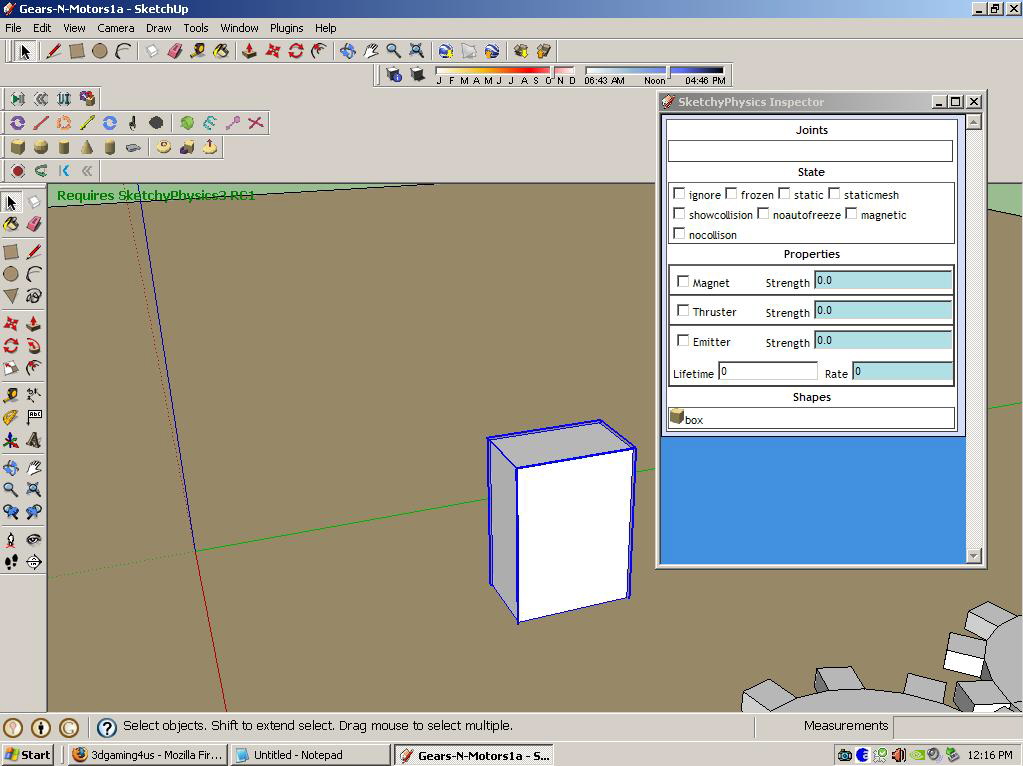

              Image of my inspector box where programming goes...

              1 Reply Last reply
              Reply Quote 0
              • M
                MrPlanet
                last edited by

                @thrundar said:

                When I try to put any of that coding in the light blue box areas, the UI crashes

                That is Weird

                [

                Are you sure you don't have an old computer? On my old Windows 98, my UI and SU always crashed. 😲

                I reject your reality and substitute my own.

                1 Reply Last reply
                Reply Quote 0
                • T
                  Thrundar
                  last edited by

                  Not an OLD pc. 3.07 ghz cpu. 2 gigs ram, 512 mb nvidea video card. Windows XP

                  I'm wondering if I need the paid for version of SU, with ruby and all that? SU stays running, it's that if I put in something wrong (blueish text area?), the UI doesn't fully open properly again.

                  1 Reply Last reply
                  Reply Quote 0
                  • M
                    MrPlanet
                    last edited by

                    Ask Chris Phillips. He is the creator of SP and should know.

                    I reject your reality and substitute my own.

                    1 Reply Last reply
                    Reply Quote 0
                    • M
                      MrPlanet
                      last edited by

                      @thrundar said:

                      I'm wondering if I need the paid for version of SU, with ruby and all that? SU stays running, it's that if I put in something wrong (blueish text area?), the UI doesn't fully open properly again.

                      I have Pro, but you don't need Pro, ruby is included in free. Window>Ruby console.

                      I reject your reality and substitute my own.

                      1 Reply Last reply
                      Reply Quote 0
                      • P
                        phy
                        last edited by

                        @thrundar said:

                        Not an OLD pc. 3.07 ghz cpu. 2 gigs ram, 512 mb nvidea video card. Windows XP

                        I'm wondering if I need the paid for version of SU, with ruby and all that? SU stays running, it's that if I put in something wrong (blueish text area?), the UI doesn't fully open properly again.

                        I've had that problem to. if you save the file and go back into it is the script still there. Did you click on the group you put the script in again. Also i have free I don't see why you would need pro.

                        Tableau de comparaison de Staxyn s'agit d'un mГ©dicament uniquement sur ordonnance.

                        1 Reply Last reply
                        Reply Quote 0
                        • T
                          Thrundar
                          last edited by

                          @unknownuser said:

                          I've had that problem to. if you save the file and go back into it is the script still there. Did you click on the group you put the script in again. Also i have free I don't see why you would need pro.

                          No idea as I have not saved when UI isn't taking the input or working. I know I'm putting the code or whatever in the wrong area, or checking the wrong thing....Just need a screenshot or two of successful magnets of the inspector so can compare

                          1 Reply Last reply
                          Reply Quote 0
                          • P
                            Physicsguy1
                            last edited by

                            I will help. I'm downloading printscreen at the moment

                            1 Reply Last reply
                            Reply Quote 0
                            • T
                              Thrundar
                              last edited by

                              My hero....lol! Awesome.

                              I'm wondering if I am missing a plug in for the tool bar? I just reposted the question, rephrased it, new thread. I have no idea what is missing. I have downloaded and tried to mimic examples off 3d warehouse with no luck

                              1 Reply Last reply
                              Reply Quote 0
                              • P
                                Physicsguy1
                                last edited by

                                Here it is. The red box is magnetic, and the selected has the code in the correct field
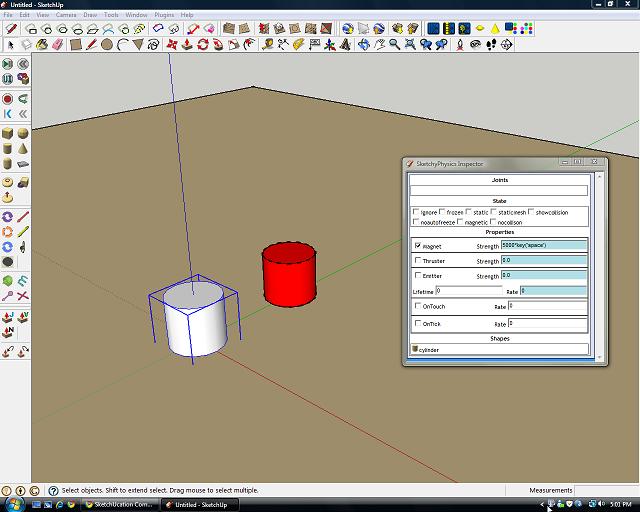

                                tar.jpg

                                1 Reply Last reply
                                Reply Quote 0
                                • T
                                  Thrundar
                                  last edited by

                                  I duplicated what you showed physicsguy...nothing worked. When I tried to go back into the UI, this is what I got
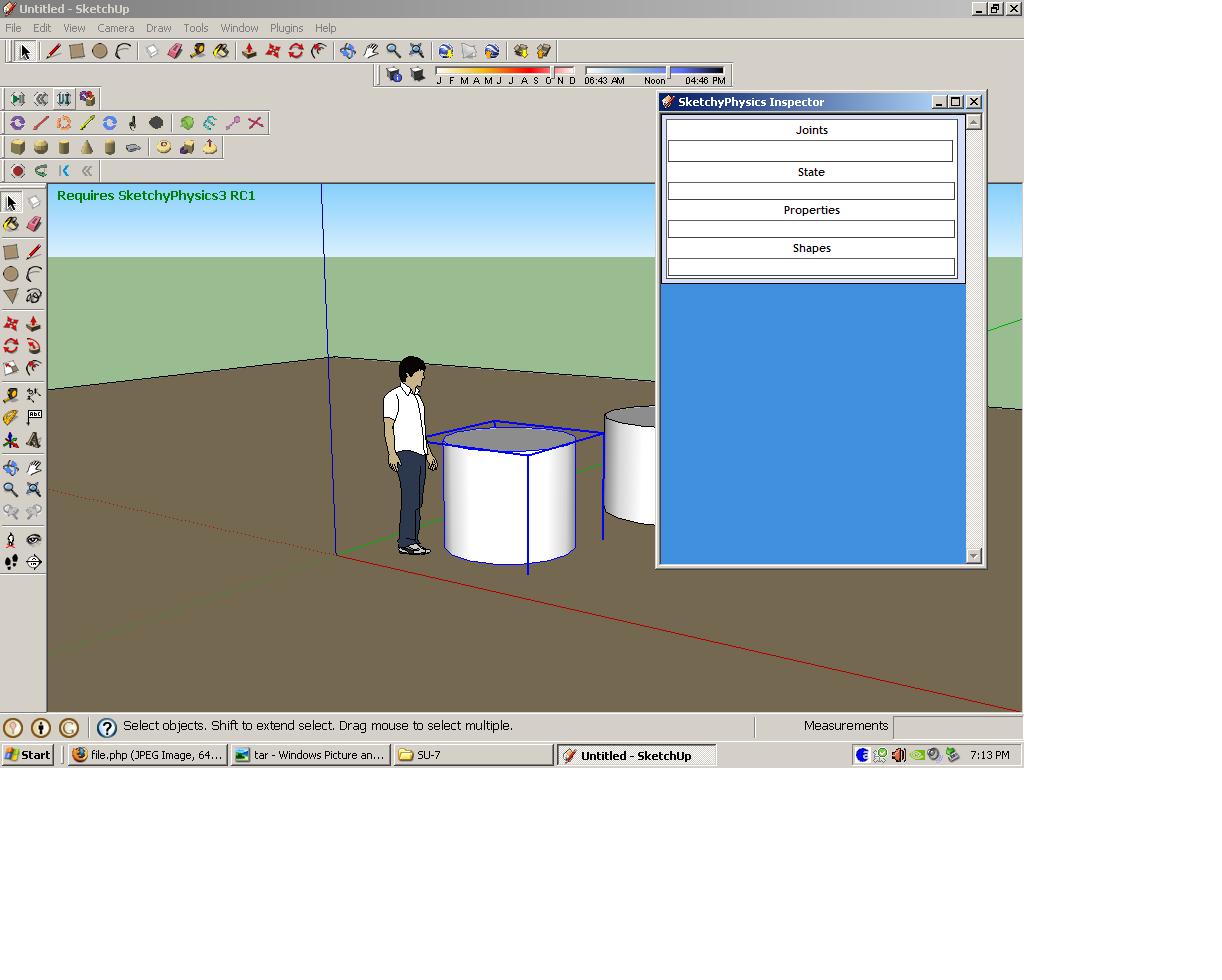

                                  UI messed up...

                                  1 Reply Last reply
                                  Reply Quote 0
                                  • P
                                    Physicsguy1
                                    last edited by

                                    I think that has happened to me before. I usually had to quit sketchup and reopen it

                                    1 Reply Last reply
                                    Reply Quote 0
                                    • T
                                      Thrundar
                                      last edited by

                                      Well it happens every time when I try to put anything in the UI. I've restarted SU so many times today. If I had a dollar for each time,..well you get the idea. I'm closing it out, retrying over and over. Getting frustrated.

                                      1 Reply Last reply
                                      Reply Quote 0
                                      • P
                                        Physicsguy1
                                        last edited by

                                        I think the problem is you don't have a file for the UI. re-download sketchyphysics. If that doesn't work then you will have to contact Chris Phillips for help.

                                        1 Reply Last reply
                                        Reply Quote 0
                                        • T
                                          Thrundar
                                          last edited by

                                          I have been able to copy and paste a couple examples from the 3d warehouse into my project, and that has given me a starting point for now. Thank you for all your help physicsguy, and everyone else! I wrote to C Phillips earlier and awaiting to hear back from them.

                                          1 Reply Last reply
                                          Reply Quote 0
                                          • C
                                            CPhillips
                                            last edited by

                                            What do you mean by "UI crashed"? Give the exact steps you use to make that happen.

                                            It sounds like you might have a hosed install or something. Try reinstalling. If that doesnt work to the menu Window->Ruby console. Once you see the console reproduce the bug then cut and paste the contents and send them to me and I will see if I can see what is happening.

                                            1 Reply Last reply
                                            Reply Quote 0

                                            Hello! It looks like you're interested in this conversation, but you don't have an account yet.

                                            Getting fed up of having to scroll through the same posts each visit? When you register for an account, you'll always come back to exactly where you were before, and choose to be notified of new replies (either via email, or push notification). You'll also be able to save bookmarks and upvote posts to show your appreciation to other community members.

                                            With your input, this post could be even better 💗

                                            Register Login
                                            • 1
                                            • 2
                                            • 1 / 2
                                            • First post
                                              Last post
                                            Buy SketchPlus
                                            Buy SUbD
                                            Buy WrapR
                                            Buy eBook
                                            Buy Modelur
                                            Buy Vertex Tools
                                            Buy SketchCuisine
                                            Buy FormFonts

                                            Advertisement