sketchucation logo sketchucation
    • Login
    Oops, your profile's looking a bit empty! To help us tailor your experience, please fill in key details like your SketchUp version, skill level, operating system, and more. Update and save your info on your profile page today!
    Mac User? | Join the Rayscaper Beta for Mac Learn More

    [Plugin] Perpendicular Face Tools (UPDATED 26-03-09)

    Scheduled Pinned Locked Moved Plugins
    201 Posts 64 Posters 216.4k Views 65 Watching
    Loading More Posts
    • Oldest to Newest
    • Newest to Oldest
    • Most Votes
    Reply
    • Reply as topic
    Log in to reply
    This topic has been deleted. Only users with topic management privileges can see it.
    • V
      Vicspa
      last edited by

      Another great tool, Thanks Chris,...keep'em coming. 👍

      1 Reply Last reply
      Reply Quote 0
      • Chris FullmerC
        Chris Fullmer
        last edited by

        Thanks again for all the great comments. Devloping these scripts is a lot of fun, but it is sure helpful when there is also people letting you know they appreciate the work and time that has been put into these scripts - THANKS!

        Chris

        Lately you've been tan, suspicious for the winter.
        All my Plugins I've written

        1 Reply Last reply
        Reply Quote 0
        • S
          skkor9y
          last edited by

          BIG Thanx...

          1 Reply Last reply
          Reply Quote 0
          • A
            AcesHigh
            last edited by

            Chris, does it only works with FACES?? Why not with 3d objects too?

            I then tried to create SINGLE faces, and make them into a component, so I would place them with your plugin and then replace ONE component with a more complex 3D object... but it also didnt accept using the component... the face must be exploded 😞

            Cant you change that?

            1 Reply Last reply
            Reply Quote 0
            • Chris FullmerC
              Chris Fullmer
              last edited by

              I don't have time right now to fix it how you would like, but as a work around, you could also install my components to faces plugin. That will apply your component to all selected faces, which would probably do what your looking for, for now.

              Chris

              Lately you've been tan, suspicious for the winter.
              All my Plugins I've written

              1 Reply Last reply
              Reply Quote 0
              • A
                AcesHigh
                last edited by

                Thanks for the suggestion... in fact, I already had your two plugins installed, I guess I just hadnt used them yet! 😄

                1 Reply Last reply
                Reply Quote 0
                • B
                  Ben Ritter
                  last edited by

                  Hi Chris,

                  I installed v1.2 and the script doesn't show up anywhere, not under the Plugins pull-down, or your separate sub-list under Plugins.

                  I'd appreciate your help.

                  Thank you. Ben

                  1 Reply Last reply
                  Reply Quote 0
                  • Chris FullmerC
                    Chris Fullmer
                    last edited by

                    Hi Ben, sounds like it is not getting put in the correct place somehow. There should be a single file called clf_perpendicular_face_tools_loader.rb in the main plugins folder. And a folder called clf_perpendicular_face_tools that has all the other files it in (clf_perpendicular_face_tools.rb, circle_xx.png(2), square_xx.png(2), and star_xx.png(2)). So make sure everything is in the right spot and let me know if that helps. If not, we'll keep trying,

                    Chris

                    Lately you've been tan, suspicious for the winter.
                    All my Plugins I've written

                    1 Reply Last reply
                    Reply Quote 0
                    • B
                      Ben Ritter
                      last edited by

                      Chris,

                      My folders are configured just as you say and no-go. I even deleted all the files and reinstalled the zip file.

                      I'm puzzled too, because on another computer it works just fine. ❓

                      I appreciate your help and love your script (on the other computer 😉 )

                      1 Reply Last reply
                      Reply Quote 0
                      • Chris FullmerC
                        Chris Fullmer
                        last edited by

                        OK, one last thing to try before we dive into deep troublshoot mode.

                        This is one of the few scripts that I wrote where I toyed around with the idea of disabling it by default. So just go try to enable it in the preferences menu - Window > Prefences > Extensions and make sure it is turned on. If that does not do it, then I'll PM you a new tweaked script that will output errors for me to look at.

                        Chris

                        Lately you've been tan, suspicious for the winter.
                        All my Plugins I've written

                        1 Reply Last reply
                        Reply Quote 0
                        • B
                          Ben Ritter
                          last edited by

                          Chris, well there it is.

                          Thank you. I forgot to check the preferences all the while thinking there we one place like that to check. I'll have to remember that for future problems.

                          Ben

                          1 Reply Last reply
                          Reply Quote 0
                          • T
                            taurus195
                            last edited by

                            Amazing plug-in! I've been looking for something like this for quite some time. It really is a time saver, thank you.

                            1 Reply Last reply
                            Reply Quote 0
                            • S
                              snowflake
                              last edited by

                              Hi Chris, I've had some trouble with your tool.
                              Using a millimeter template i was not able to get under 25,4mm radius for the circle tool
                              for your information, here is the code from the console.
                              Error: #<TypeError: reference to deleted Entity> (eval):895:inget_attribute'
                              (eval):895:in onActivePathChanged' C:/Program Files (x86)/Google/Google SketchUp 7/Plugins/clf_perpendicular_face_tools/clf_perpendicular_face_tools.rb:396 Error: #<ArgumentError: Not enough edges - at least 3 required> C:/Program Files (x86)/Google/Google SketchUp 7/Plugins/clf_perpendicular_face_tools/clf_perpendicular_face_tools.rb:396:in add_face'
                              C:/Program Files (x86)/Google/Google SketchUp 7/Plugins/clf_perpendicular_face_tools/clf_perpendicular_face_tools.rb:396:in make_face' C:/Program Files (x86)/Google/Google SketchUp 7/Plugins/clf_perpendicular_face_tools/clf_perpendicular_face_tools.rb:306:in onUserText'
                              (eval):895
                              Error: #<ArgumentError: Not enough edges - at least 3 required>
                              C:/Program Files (x86)/Google/Google SketchUp 7/Plugins/clf_perpendicular_face_tools/clf_perpendicular_face_tools.rb:396:in add_face' C:/Program Files (x86)/Google/Google SketchUp 7/Plugins/clf_perpendicular_face_tools/clf_perpendicular_face_tools.rb:396:in make_face'
                              C:/Program Files (x86)/Google/Google SketchUp 7/Plugins/clf_perpendicular_face_tools/clf_perpendicular_face_tools.rb:306:in onUserText' C:/Program Files (x86)/Google/Google SketchUp 7/Plugins/clf_perpendicular_face_tools/clf_perpendicular_face_tools.rb:396
                              Not sure what it means, but when i draw a circle (even bellow 25mm) on the ground plane and then use the star tool there is no problem. It works.

                              1 Reply Last reply
                              Reply Quote 0
                              • Chris FullmerC
                                Chris Fullmer
                                last edited by

                                hmm, interesting. I'll set up to a mm template and try it to se if I get the same error.

                                Lately you've been tan, suspicious for the winter.
                                All my Plugins I've written

                                1 Reply Last reply
                                Reply Quote 0
                                • charly2008C
                                  charly2008
                                  last edited by

                                  Dear Chris,

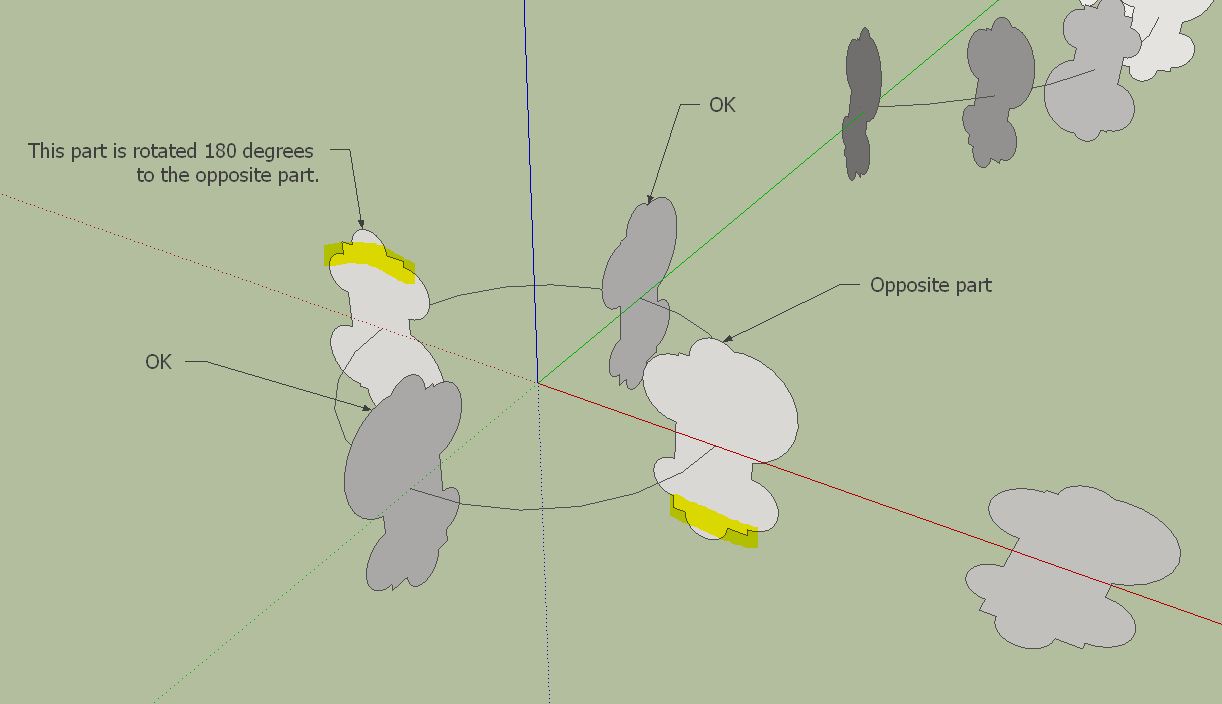
                                  I used your tool extensively in the beta test of fredos Curviloft. It's a great combination. but at times appears a little error. Some objects are rotated to 180 degrees. At two or three objects, this is not a problem to turn the objects by hand.

                                  Charly

                                  Perpendicular1.JPG


                                  Perpendicular.JPG

                                  He who makes no mistakes, makes nothing

                                  1 Reply Last reply
                                  Reply Quote 0
                                  • Chris FullmerC
                                    Chris Fullmer
                                    last edited by

                                    Hi Charly, I never did quite get some of that stuff worked out. When I wrote this I knew very little about vectors/ But, I was aware of the possibility of it adding unwanted rotation to faces. So I built in the ability to rotate a face immediatly after placing it by using the up arrow key.

                                    So if a face is rotated wrong, hit the up arrow key to rotate it 90 degrees. Hope that helps,

                                    Chris

                                    Lately you've been tan, suspicious for the winter.
                                    All my Plugins I've written

                                    1 Reply Last reply
                                    Reply Quote 0
                                    • charly2008C
                                      charly2008
                                      last edited by

                                      Thanks Chris for your quick response. Your tip is a good help.

                                      Charly

                                      He who makes no mistakes, makes nothing

                                      1 Reply Last reply
                                      Reply Quote 0
                                      • D
                                        DIEGO-RODRIGUEZ
                                        last edited by

                                        hi chris
                                        long use this tool and I would like to ask you some suggestions.

                                        square perperdicular:
                                        if I enter a single value (for ejemmplo 20) = draws a square of 20 (as it works now)
                                        but if I enter two values (eg 20,30) draws a rectangle of 20x30
                                        circle perperdicular:
                                        add opcion of oval
                                        if I enter two values (eg 20,30) draws a oval of 20x30
                                        custom face:
                                        add opción for scale
                                        if I enter /2 draws face , half the size of the original face
                                        if I enter *2 draws face , twice the size of the face of origin

                                        is it possible?

                                        1 Reply Last reply
                                        Reply Quote 0
                                        • Chris FullmerC
                                          Chris Fullmer
                                          last edited by

                                          That would be possible to add. I"m not sure how to handle the fact that different places use . and , differntly in numbers. Is there a way to determine what the decimal delimeter is for a user's location or something?

                                          Lately you've been tan, suspicious for the winter.
                                          All my Plugins I've written

                                          1 Reply Last reply
                                          Reply Quote 0
                                          • D
                                            DIEGO-RODRIGUEZ
                                            last edited by

                                            using the (,) between numbers. is a performance equal to that of native sketchup.
                                            just for that reason I put as an example (30,20 in visor vcv) for a 30cmx20cm rectangle

                                            1 Reply Last reply
                                            Reply Quote 0

                                            Hello! It looks like you're interested in this conversation, but you don't have an account yet.

                                            Getting fed up of having to scroll through the same posts each visit? When you register for an account, you'll always come back to exactly where you were before, and choose to be notified of new replies (either via email, or push notification). You'll also be able to save bookmarks and upvote posts to show your appreciation to other community members.

                                            With your input, this post could be even better 💗

                                            Register Login
                                            • 1
                                            • 2
                                            • 7
                                            • 8
                                            • 9
                                            • 10
                                            • 11
                                            • 11 / 11
                                            • First post
                                              Last post
                                            Buy SketchPlus
                                            Buy SUbD
                                            Buy WrapR
                                            Buy eBook
                                            Buy Modelur
                                            Buy Vertex Tools
                                            Buy SketchCuisine
                                            Buy FormFonts

                                            Advertisement