Simple Glazing Frame & Exterior Trim tool
-
As with the WindowGlass.rb (aka simple gazing tool)
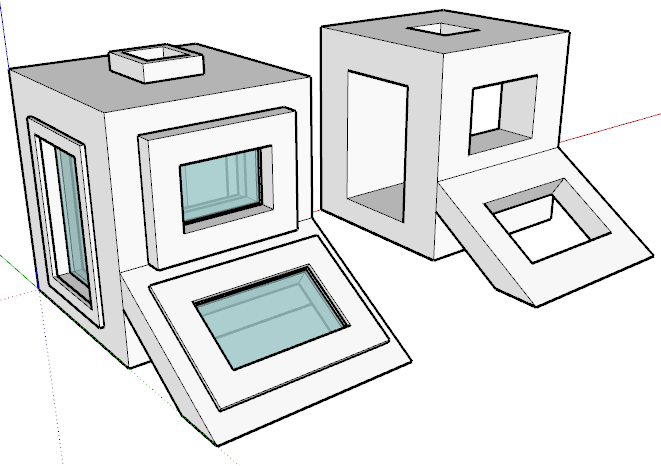
I used the "pick 3 points rectangle" approach to install glazing, frame,and exterior trim into any opening
However once again I need some coding help!
This particular ruby works correctly only if I want all 3 elements; glazing, frame and exterior trim. However, should I decide to "zero out" the exterior Trim values in the dialog box. I get an extra plane on the surface
of the wall opening which then obscures the window.The following code draws the exterior trim,
#------Draw the exterior Trim
group=entities.add_group
entities=group.entities
base=entities.add_face($pt0t, $pt1t, $pt2t, $pt3t)
base.pushpull -$etthick
base=entities.add_face($pt0jj, $pt1jj, $pt2jj, $pt3jj)
base.pushpull -$etthickIs there a way that those code lines will not be evaluated when $etthick & $etwidth are set to Zero?
TIA
-
Here's one test..
if( ($etthick != 0) and ($etwidth != 0) ) # Both are not zero # Your code here end -
@jim said:
Here's one test..
> if( ($etthick != 0) and ($etwidth != 0) )
>   # Both are not zero
>   #  Your code here
> end
>
Thanks: Jim for jumping to the rescue!
I will re post this Ruby with your added code,
since some members may not know how to cut and paste
code snippets into Ruby files.
Hello! It looks like you're interested in this conversation, but you don't have an account yet.
Getting fed up of having to scroll through the same posts each visit? When you register for an account, you'll always come back to exactly where you were before, and choose to be notified of new replies (either via email, or push notification). You'll also be able to save bookmarks and upvote posts to show your appreciation to other community members.
With your input, this post could be even better 💗
Register Login


Advertisement