How to subtract Point3D.Z value with a variable
-
seems simple but i can't make this thing work

this is form Robin Hills HeightTool.rb
def onLButtonUp(flags, x, y, view) #called when left mouse button released
txt='Height: '+@pt[2].to_s
model=Sketchup.active_model
e=model.entities
t=e.add_text txt,@pt,@vec
endwhat i want to do is make this tool work relative to a set zero level... not the files axis zero. i get the user set level with the same method as in the drop ruby script so now i have a @@level=The user set value
but performing
txt='Height: '+(@pt[2]-@@level).to_sdoesn't show the right value
@@level.to_s alone works well but the subtraction doesn'twhat am i doing wrong here
-
@bakbek said:
txt='Height: '+(@pt[2]-@@level).to_s
doesn't show the right value
@@level.to_s alone works well but the subtraction doesn't
what am i doing wrong here
What value is displayed?
What is @@level prior to the subtract? What is its class?
What is @pt[2] prior to the subtract? What is its class?
What is the class after you do the subtract? -
-
I think that all is far simpler...
txt='Height; '+(@pt[2].z - @@level.to_l).to_s ... or For example; @@level = 100.mm txt='Height; '+(@pt[2].z - @@level).to_s -
Hi Todd & Alex, thanks for your assistance.
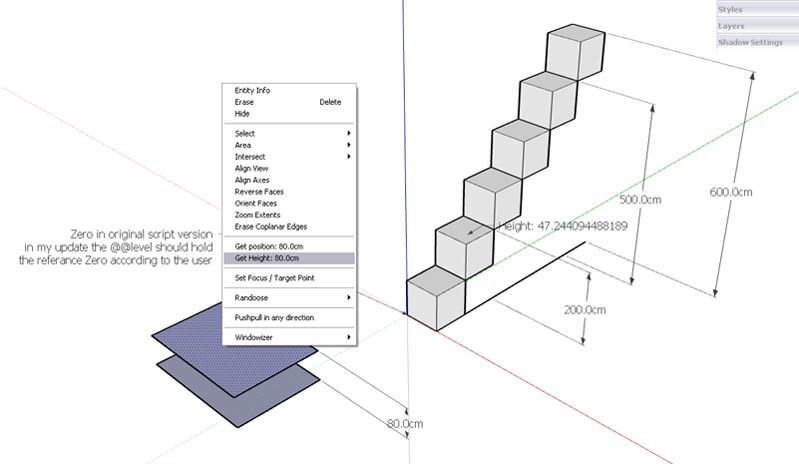
I've attached a screen capture for you to see what I'm trying to achieve here... it's not working yet.
using the context menu when clicking on a surface i can assign the surface height to the @@level variable, it is suppose to be a number or length class as far as i can say. when i assign it directly to txt i get proper values... it is the math with the @pt (point3d class) that gets odd values as you can see in the image
the proper height should have been 120cm at the note but it is 47.244094488189
i guess i either mix up classes or units or something else i don't know about
-
try converting your results to the metric system, you are probably getting sketchup internal imperial units.
-
how to? this is what i can't seem to get right
-
Google says 120 centimeters = 47.2440945 inches
Bob
Hello! It looks like you're interested in this conversation, but you don't have an account yet.
Getting fed up of having to scroll through the same posts each visit? When you register for an account, you'll always come back to exactly where you were before, and choose to be notified of new replies (either via email, or push notification). You'll also be able to save bookmarks and upvote posts to show your appreciation to other community members.
With your input, this post could be even better 💗
Register Login


Advertisement