Hidden2Layer v1.2 > Thank you TIG
-
TIG: I wanted to say, "thanks".
I've have a very useful application for your script, one which was probably unintended.
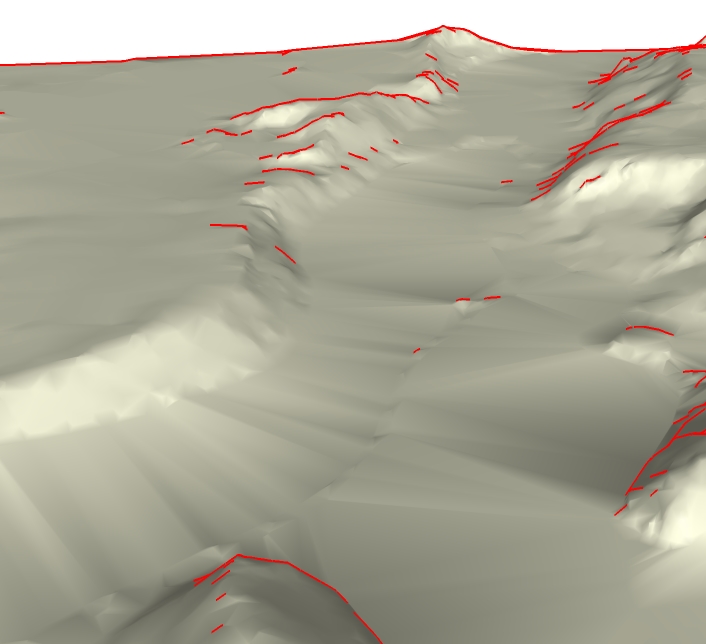
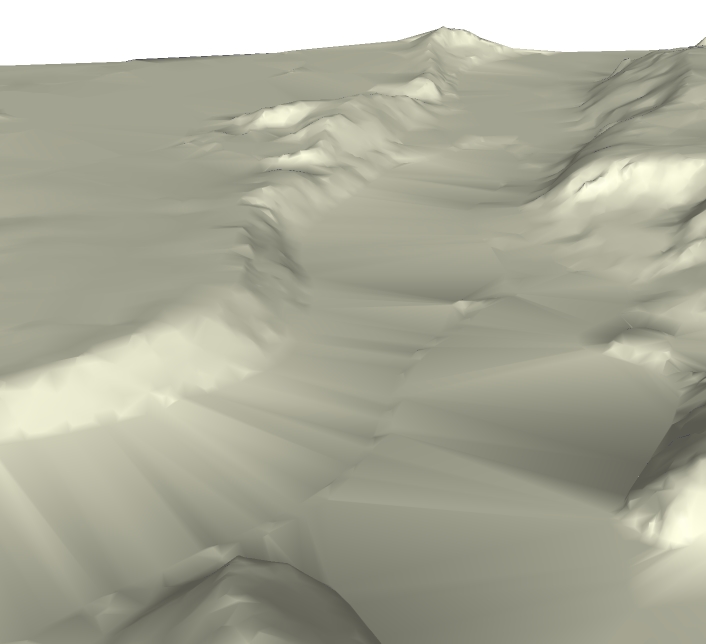
The attached is a close-up of a terrain map produced by applying Sandbox to imported Autocad contour lines. The area is approximately 5,220' x 5,900' and the SketchUp file was 8.5 Meg.
As the Before example demostrates with the red edges, SU will display edges of the terrain map depending upon the camera angle. Once you project an aerial photo and place geometry such as lot boundaries and buildings upon it, those edges interfer significantly with the display of the overall scene.
I adjusted your script so that smooth and soft edges were maintained when moved to a hidden layer. The result is shown in the After example.
Your script automates a process which, when I originally did it manual method, was very slow and frustrating at times.
From the standpoint of what I use SketchUp for, about the only thing that I can think of to make your script more flexible would be to have options to allow the user to: 1) choose to keep the edges smooth and soft or not and 2) whether to hide all hidden edges , **just non-**soft/smooth edges, or just soft/smooth edges.
Regards, John
-
It has also been helpful when using the 3DS export filter (been experimenting with using it for passing my files to a Lightwave user as it will do somethings better than the Lightwave Plugin version 006).

Hello! It looks like you're interested in this conversation, but you don't have an account yet.
Getting fed up of having to scroll through the same posts each visit? When you register for an account, you'll always come back to exactly where you were before, and choose to be notified of new replies (either via email, or push notification). You'll also be able to save bookmarks and upvote posts to show your appreciation to other community members.
With your input, this post could be even better 💗
Register Login


Advertisement