sketchucation logo sketchucation
    • Login
    Oops, your profile's looking a bit empty! To help us tailor your experience, please fill in key details like your SketchUp version, skill level, operating system, and more. Update and save your info on your profile page today!
    FredoBend | Powerful new bending tool for SketchUp Download

    Schnitt auf nur ein Objekt legen

    Scheduled Pinned Locked Moved Deutsch
    5 Posts 3 Posters 1.1k Views 3 Watching
    Loading More Posts
    • Oldest to Newest
    • Newest to Oldest
    • Most Votes
    Reply
    • Reply as topic
    Log in to reply
    This topic has been deleted. Only users with topic management privileges can see it.
    • K Offline
      kaba
      last edited by

      Hallo zusammen,

      wenn ich diverse Objekte arangiere, jedoch nur bei einem dieser einen Schnitt legen möchte, habe ich ein Problem.

      Konkretes Beispiel hier:
      http://tinyurl.com/2sssgl

      Ich möchte NUR beim großen stehenden Zylinder einen Körperschnitt zeigen, jedoch nicht beim kleinen Gerät. Optimal wäre, wenn die Schittebene welche vom Programm kommt, skalierbar wäre.
      Habe das aber nicht bwerkstelligen können. Gibts eine Idee dazu?

      Danke im voraus.

      Gruss, kaba

      1 Reply Last reply Reply Quote 0
      • eevaE Offline
        eeva
        last edited by

        tach auch,

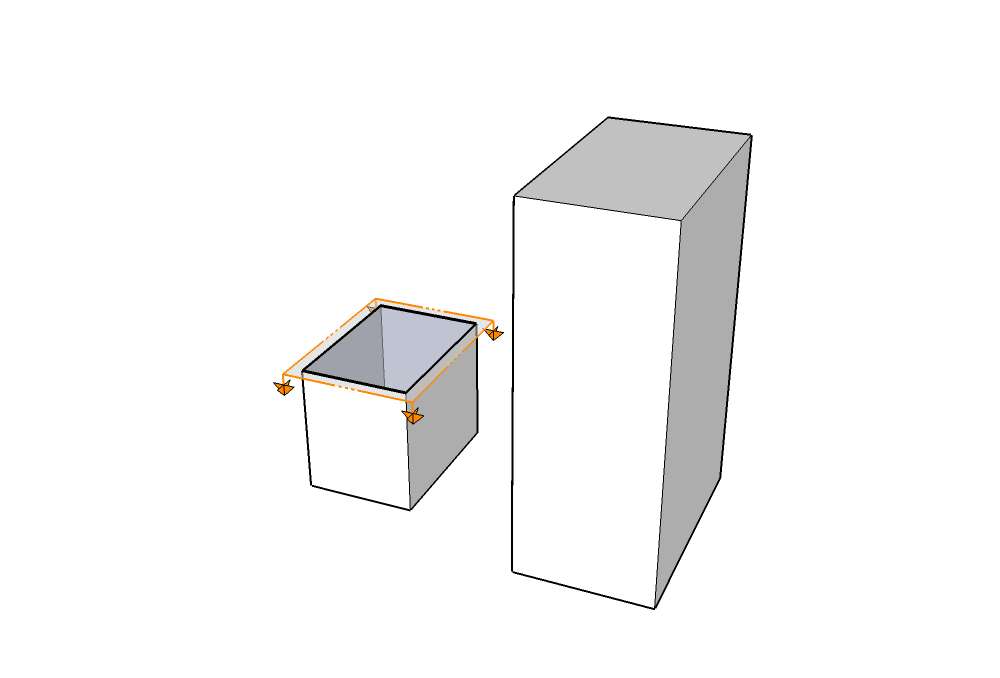
        setz den schnitt in der gruppe, die du schneiden möchtest, siehe bild.
        schnitt.jpg

        1 Reply Last reply Reply Quote 0
        • K Offline
          kaba
          last edited by

          Hi eeva,
          das ging ja flux und noch so einfach ! 😄 Vielen Dank!

          Noch eine Frage hinterher:
          wenn ich den Schnitt nun in der Gruppe gelegt habe, aber z.B. meine zwei Richtungspfeile dennoch angezeigt lassen möchte, welche aber unweigerlich im Schnitt verschinden, gibts da die Möglichkeit, diese wieder explizit einzublenden?

          Danke und Gruss, kaba

          1 Reply Last reply Reply Quote 0
          • FormalyKnownAsMartinF Offline
            FormalyKnownAsMartin
            last edited by

            Du meinst den roten und blauen Pfeil? Nimm sie doch aus der geschnittenen Gruppe raus, dann werden sie auch nicht in den Schnitt einbezogen.

            Martin Habes

            1 Reply Last reply Reply Quote 0
            • K Offline
              kaba
              last edited by

              Perfekt! Vielen herzlichen Dank!

              Gruss, kaba

              1 Reply Last reply Reply Quote 0

              Hello! It looks like you're interested in this conversation, but you don't have an account yet.

              Getting fed up of having to scroll through the same posts each visit? When you register for an account, you'll always come back to exactly where you were before, and choose to be notified of new replies (either via email, or push notification). You'll also be able to save bookmarks and upvote posts to show your appreciation to other community members.

              With your input, this post could be even better 💗

              Register Login
              • 1 / 1
              • First post
                Last post
              Buy SketchPlus
              Buy SUbD
              Buy WrapR
              Buy eBook
              Buy Modelur
              Buy Vertex Tools
              Buy SketchCuisine
              Buy FormFonts

              Advertisement