Quarter or Multi-Plane Sections?
-
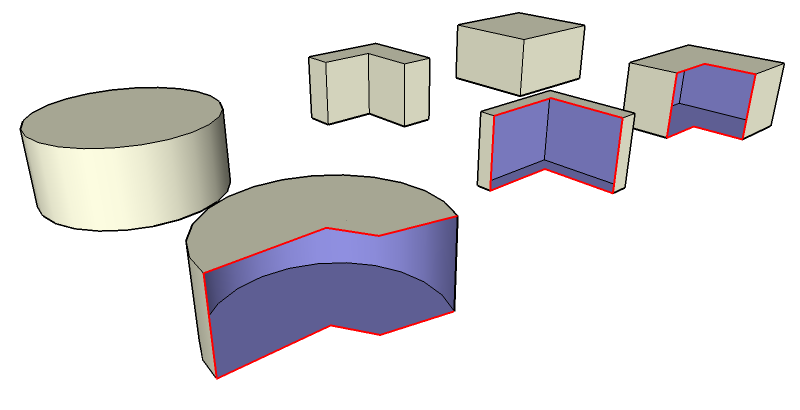
I don't think SU's Section Plane tool can do the following without grouping and duplicating groups.
Is there a way to create non-destructive quarter or multi-plane sections with Ruby?
Perhaps manually drawn planes, which represent the desired section and then somehow have them converted into a continuous "section plane" where their normal defines what is hidden?
-
Dear John,
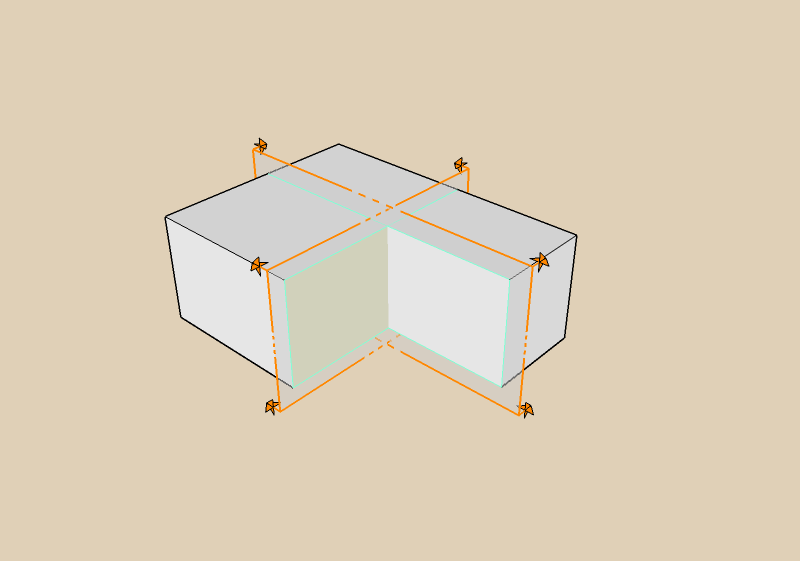
Is this what you had in mind?
Recipe:
-
Make a cube and then group it
-
While the group is still highlighted, copy the geometry (Ctrl C).
-
Use "Paste in place" to overlay a cube on the cube.
-
With the pasted in place geometry still highlighted, make it a group.
-
Finally, select all and make a group of the two groups.
-
Edit down to the inner group and add your section plane
-
Edit down to the outer group and add a section plane at right angles.
I also used TIGs script for making a section plane. I think some playing around with the settings in Styles and the use of the Eraser+Ctrl to hide edges might be needed.
I will have a go at three cutting planes.
Regards,
Bob
-
-
Dear John,
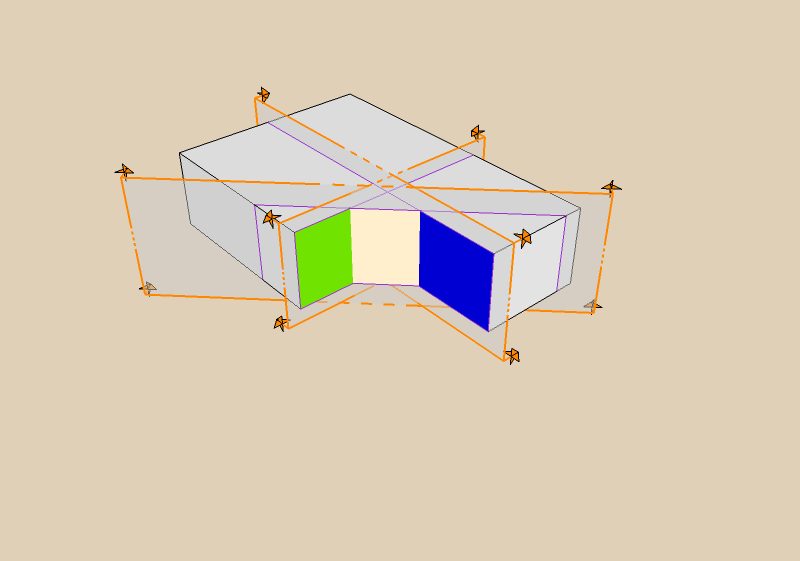
Here are three cutting planes.
I have also revised my recipe too:
- Make a cube and group the geometry.
- Edit the cube and triple click to select all.
- Copy and then close the group.
- Hide the group and then use paste in place to paste back the geometry.
- Make a group of the pasted back geometry.
- Repeat steps 2 to 5 as many times as you want cutting planes.
- Use unhide all to bring back the many groups.
- Finally, select all and make a group.
Then edit down to the various cubes to make the planes.
Regards,
Bob
-
I think John doesn't want to keep on duplicating geometry to do the section cuts he wants. Sure, for simple geometry and low detail models it shouldn't be a problem, but when you've got a big detailed model it is no longer an option to duplicate geometry seeing that SU doesn't handle high poly.
-
Thanks, Watkins. I appreciate the tutorial. It illustrates well what I was trying to avoid, hoping there could be Ruby solution.
Julian, You've got it.
And even with the method shown above with a "simple" model, it is still a chore hiding the extraneous edges. And then of course, 15 minutes after you finish, someone wants to change the geometry.

-
Dear John,
You wrote, "I don't think SU's Section Plane tool can do the following without grouping and duplicating groups."
In my enthusiasm to give/find a solution, I failed to read the question.
Hopefully, the described technique will be useful to someone, and informative to those who are new to SU.
Kind regards,
Bob


Hello! It looks like you're interested in this conversation, but you don't have an account yet.
Getting fed up of having to scroll through the same posts each visit? When you register for an account, you'll always come back to exactly where you were before, and choose to be notified of new replies (either via email, or push notification). You'll also be able to save bookmarks and upvote posts to show your appreciation to other community members.
With your input, this post could be even better 💗
Register Login


Advertisement