<?xml version="1.0" encoding="UTF-8"?><rss xmlns:dc="http://purl.org/dc/elements/1.1/" xmlns:content="http://purl.org/rss/1.0/modules/content/" xmlns:atom="http://www.w3.org/2005/Atom" version="2.0"><channel><title><![CDATA[How to draw a plane not coplanar]]></title><description><![CDATA[<p dir="auto">First of all, let me say that I'm not an expert and I use SU only for my personal hobby, since years. I'm Italian and I use the localized versione so please forgive me if I use wrong terms or terminologies.</p>
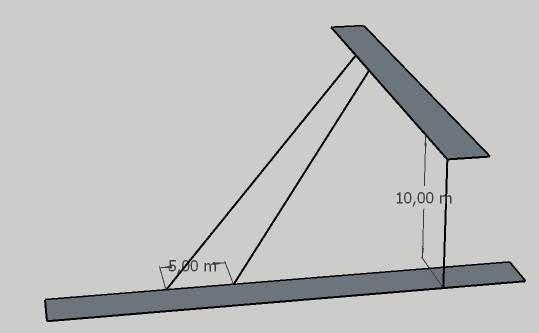
<p dir="auto">I wish to draw a surface to connect two perpendicular plane at different heights. It should be a ramp between to roads with an angles of, in example, of 45°. I include an image of a simple test.<br />
I can not find a solution; I presume that is because the two connecting lines are not planar, but how to do it, if possible?</p>
<p dir="auto">I tried the <em>FollowMeAndKeep</em> plugin, but it does not return an acceptable result due that the two closing lines are perpendicular.</p>
<p dir="auto">I also draw the shape on the XY planes and the I rotated the Y (green axe) up to the desired height, but, a part the the lengh correction (cosine of angle) I should take in account, the big problem is that the ramp surface is also rotated giving a funny result (I image a car that will drive onto an inclined plane !)</p>
<p dir="auto">I assume that this is not doable in SU  or, better, I'm too stupid.<br />
This is the image:<br />
<img src="/assets/uploads/files/1748718297572-simple_ramp.jpg" alt="simple_ramp.jpg" class=" img-fluid img-markdown" /></p>
<p dir="auto"><strong>Final note:</strong> please consider that the road surface should be quite worked (rails, depth, middle lines...) later.</p>
]]></description><link>https://community.sketchucation.com/topic/164419/how-to-draw-a-plane-not-coplanar</link><generator>RSS for Node</generator><lastBuildDate>Tue, 19 May 2026 03:35:34 GMT</lastBuildDate><atom:link href="https://community.sketchucation.com/topic/164419.rss" rel="self" type="application/rss+xml"/><pubDate>Sat, 31 May 2025 19:08:53 GMT</pubDate><ttl>60</ttl><item><title><![CDATA[Reply to How to draw a plane not coplanar on Mon, 09 Jun 2025 20:04:59 GMT]]></title><description><![CDATA[<p dir="auto">Here they are in 2017 format.</p>
<p dir="auto"><a href="/assets/uploads/files/1749499469709-ramp-between-2-roads-at-90-degrees-2.skp">ramp-between-2-roads-at-90-degrees 2.skp</a></p>
<p dir="auto"><a href="/assets/uploads/files/1749499488122-ramp-between-2-roads-at-90-degrees-3.skp">ramp-between-2-roads-at-90-degrees 3.skp</a></p>
]]></description><link>https://community.sketchucation.com/post/1615296</link><guid isPermaLink="true">https://community.sketchucation.com/post/1615296</guid><dc:creator><![CDATA[Jean Lemire]]></dc:creator><pubDate>Mon, 09 Jun 2025 20:04:59 GMT</pubDate></item><item><title><![CDATA[Reply to How to draw a plane not coplanar on Wed, 04 Jun 2025 07:12:01 GMT]]></title><description><![CDATA[<p dir="auto"><a class="plugin-mentions-user plugin-mentions-a" href="/user/jean-lemire" aria-label="Profile: Jean-Lemire">@<bdi>Jean-Lemire</bdi></a><br />
Unfortunately I can not open your file; I'm using SU2020 and your scene requires the SU2022. Could you pls repost it downgraded?<br />
Thanks</p>
]]></description><link>https://community.sketchucation.com/post/1615193</link><guid isPermaLink="true">https://community.sketchucation.com/post/1615193</guid><dc:creator><![CDATA[Orionis98]]></dc:creator><pubDate>Wed, 04 Jun 2025 07:12:01 GMT</pubDate></item><item><title><![CDATA[Reply to How to draw a plane not coplanar on Mon, 02 Jun 2025 18:13:36 GMT]]></title><description><![CDATA[<p dir="auto">Click in sequence on the scenes tabs of this SU file for more ideas.</p>
<p dir="auto">Notice that Orionis98 shows a better start and finish. The real profile shall have a smooth curves at both ends of this junction road.</p>
<p dir="auto"><a href="/assets/uploads/files/1748886483580-ramp-between-2-roads-at-90-degrees-2.skp">ramp-between-2-roads-at-90-degrees 2.skp</a></p>
<p dir="auto">A better approach might be as in this file.</p>
<p dir="auto"><a href="/assets/uploads/files/1748887948372-ramp-between-2-roads-at-90-degrees-3.skp">ramp-between-2-roads-at-90-degrees 3.skp</a></p>
<p dir="auto">And the, the junction road could also have an horizontal curve so that the transitions between it and both roads are smoother than with a sharp angle.</p>
]]></description><link>https://community.sketchucation.com/post/1615178</link><guid isPermaLink="true">https://community.sketchucation.com/post/1615178</guid><dc:creator><![CDATA[Jean Lemire]]></dc:creator><pubDate>Mon, 02 Jun 2025 18:13:36 GMT</pubDate></item><item><title><![CDATA[Reply to How to draw a plane not coplanar on Mon, 02 Jun 2025 09:03:24 GMT]]></title><description><![CDATA[<p dir="auto"><a class="plugin-mentions-user plugin-mentions-a" href="/user/orionis98" aria-label="Profile: Orionis98">@<bdi>Orionis98</bdi></a> said in <a href="/post/1615164">How to draw a plane not coplanar</a>:</p>
<blockquote>
<p dir="auto"><a class="plugin-mentions-user plugin-mentions-a" href="/user/jean-lemire" aria-label="Profile: Jean-Lemire">@<bdi>Jean-Lemire</bdi></a><br />
I would post the result of my attempt, but possibly tomorrow since it is almost midnight now and here.</p>
</blockquote>
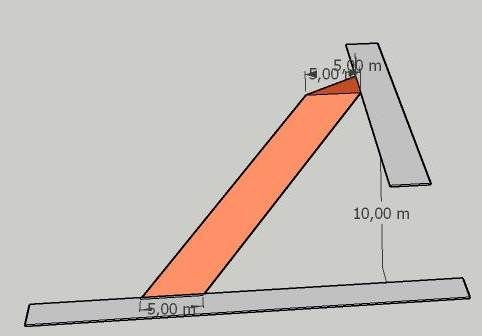
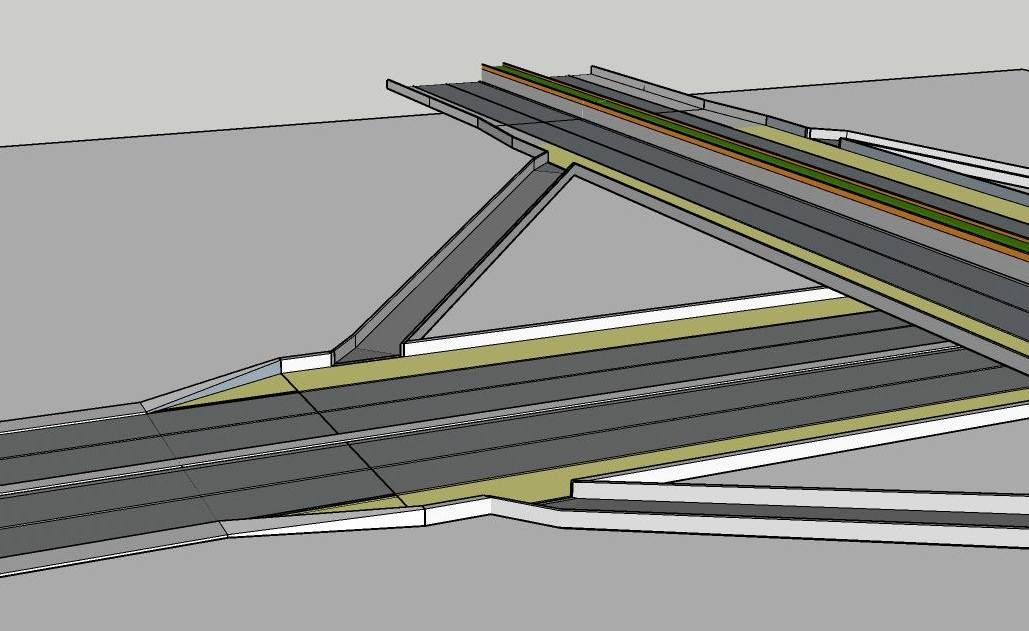
<p dir="auto">Here are the images of my solution: the building one and the final one added to world scene.<br />
Not the maximum, but anyway.</p>
<p dir="auto"><img src="/assets/uploads/files/1748854991007-simple_ramp_ok.jpg" alt="simple_ramp_OK.jpg" class=" img-fluid img-markdown" /></p>
<p dir="auto"><img src="/assets/uploads/files/1748854603539-railway_overpass.jpg" alt="Railway_overpass.jpg" class=" img-fluid img-markdown" /></p>
]]></description><link>https://community.sketchucation.com/post/1615165</link><guid isPermaLink="true">https://community.sketchucation.com/post/1615165</guid><dc:creator><![CDATA[Orionis98]]></dc:creator><pubDate>Mon, 02 Jun 2025 09:03:24 GMT</pubDate></item><item><title><![CDATA[Reply to How to draw a plane not coplanar on Sun, 01 Jun 2025 22:12:17 GMT]]></title><description><![CDATA[<p dir="auto"><a class="plugin-mentions-user plugin-mentions-a" href="/user/jean-lemire" aria-label="Profile: Jean-Lemire">@<bdi>Jean-Lemire</bdi></a><br />
Thank you Jean, I saw your drawing. It is something already tried, unfortunately the resulting ramp is not really a surface but the sum of two surfaces smoothed so it can not be reworked further (I can not push it).<br />
I found a possible (ugly and unnatural) solution adding a triangle at the top ramp end so to have the two connecting lines at the same level.<br />
With some aesthetic additions it could be used, but I can not say to be fully satisfied.<br />
I would post the result of my attempt, but possibly tomorrow since it is almost midnight now and here.<br />
I wonder how many users have had the same probles and how they fix it.<br />
Anyway, thanks again.</p>
]]></description><link>https://community.sketchucation.com/post/1615164</link><guid isPermaLink="true">https://community.sketchucation.com/post/1615164</guid><dc:creator><![CDATA[Orionis98]]></dc:creator><pubDate>Sun, 01 Jun 2025 22:12:17 GMT</pubDate></item><item><title><![CDATA[Reply to How to draw a plane not coplanar on Sun, 01 Jun 2025 14:40:20 GMT]]></title><description><![CDATA[<p dir="auto">Click in sequence on the Scenes tabs of this SU file for ideas.</p>
<p dir="auto"><a href="/assets/uploads/files/1748788803251-ramp-between-2-roads-at-90-degrees.skp">Ramp between 2 roads at 90 degrees.skp</a></p>
]]></description><link>https://community.sketchucation.com/post/1615147</link><guid isPermaLink="true">https://community.sketchucation.com/post/1615147</guid><dc:creator><![CDATA[Jean Lemire]]></dc:creator><pubDate>Sun, 01 Jun 2025 14:40:20 GMT</pubDate></item></channel></rss>