[Plugin] SketchUcation Tools 2.6.1
-
@tig said:
We might be able to save you

More diagnosis needed...Can you open Internet Explorer, ensure its version is up to date, then empty its cache.
Now restart SketchUp and retry the SketchUcation PluginStore dialog - any luck AutoInstalling something ?Can you use the item under the menu Plugins [now renamed Extensions in v2015] > SketchUcation submenu item to 'Open Plugins Folder'.
It should open something like:
C:\Users\YOUR_USER_NAME\AppData\Roaming\SketchUp\SketchUp 2015\SketchUp\Plugins
Are there any files in it ?If you go up one folder to .../SketchUp and use Properties > Security > Edit does every entry listed have FULL read/write/modify permissions setup?
Change them if necessary, apply/OK...Try AutoInstalling again...
Also open the SketchUcation > Plugins Manager dialog.
Is the folder listed in the top-bar ?
Are there any contents ?Report back

- Cache emptied. Not working.
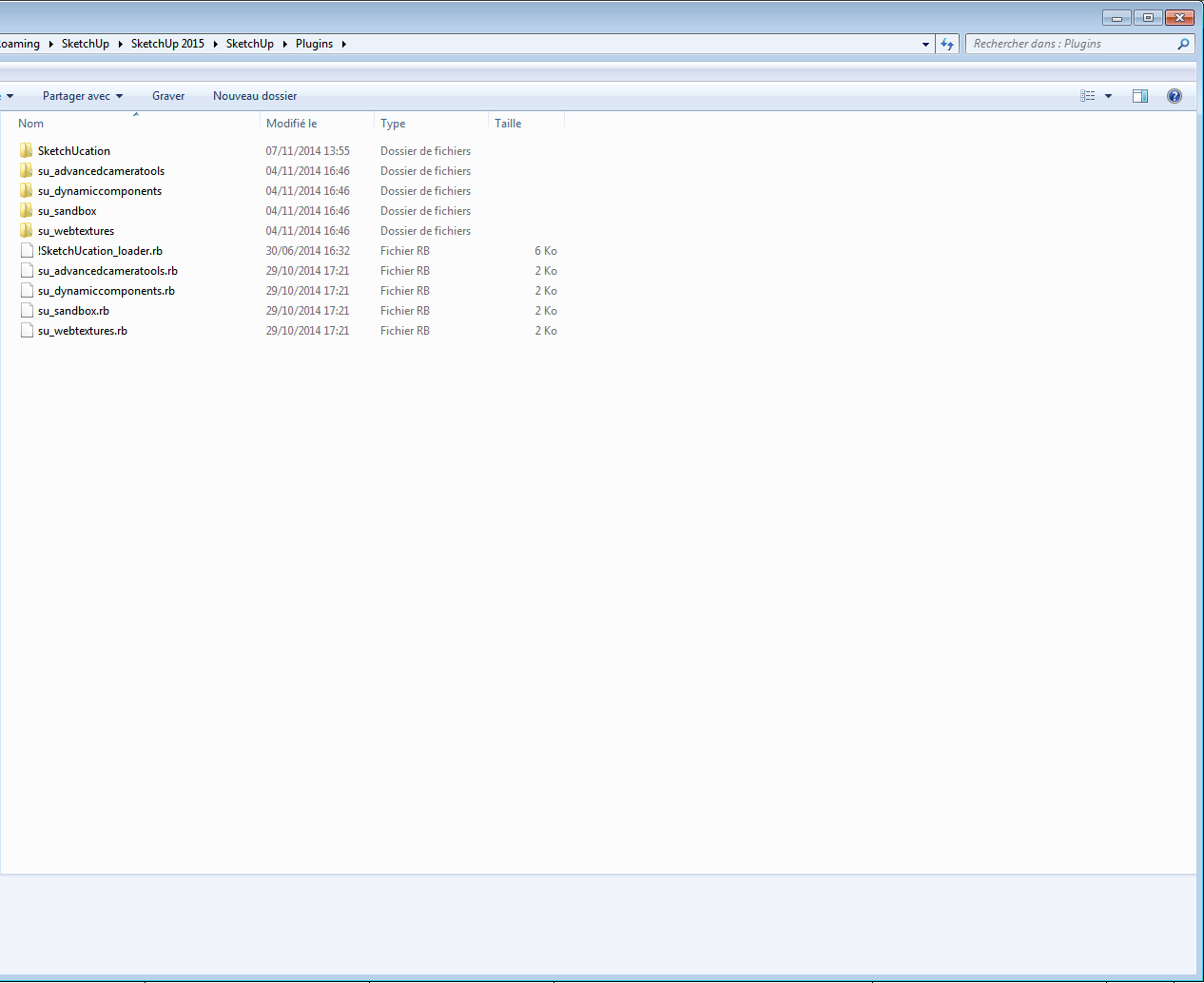
- All permissions granted. Not working.
- I can't open the Plugins Manager.
-

Can you tell us what your Users user-name is ?Next...
Find the SketchUp.exe icon in the 2015 Programs folder.
Change its Properties > Compatibility > Run As Administrator... to ON [tick]... OK.Try again...
-
@tig said:
:?
Can you tell us what your Users user-name is ?Next...
Find the SketchUp.exe icon in the 2015 Programs folder.
Change its Properties > Compatibility > Run As Administrator... to ON [tick]... OK.Try again...
-
My user name is leminilab:

-
Changed compatibility to run as Admin.
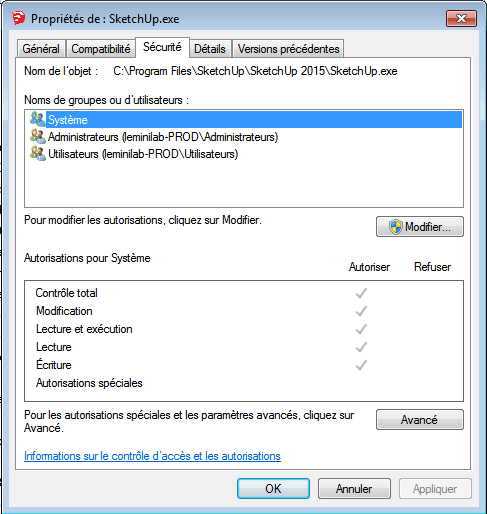
I now get a message from Windows when I launch Make 2015 ("Do you want the following program to allow changes to this computer?").
But it's still not working.
-
-
That last part sounds like a Filewall issue.
Make sure SketchUp 2015 is set to allow it to make changes and access the Internet...Can you download an RBZ from the PluginStore page - linked above.
Then install it using the Preferences > Extensions > Install button in v2015.
Does its file[s] appear in the Users Plugins folder.
Does it then appear in the Plugins Manager and My-Installs ?This is weird...
-
@tig said:
That last part sounds like a Filewall issue.
Make sure SketchUp 2015 is set to allow it to make changes and access the Internet...Can you download an RBZ from the PluginStore page - linked above.
Then install it using the Preferences > Extensions > Install button in v2015.
Does its file[s] appear in the Users Plugins folder.
Does it then appear in the Plugins Manager and My-Installs ?This is weird...
I enabled Sketchup in Windows Firewall.
The "More infoé and "Donate" buttons work. But Autoinstall doesn't.
The install tab is blank. -
@leminilab said:
The "More infoé and "Donate" buttons work. But Autoinstall doesn't.
The install tab is blank.Donate a little and see if that fixes it...

-
You have a 'Download' button in the page - I did NOT mean the dialog [which has the AutoInstall button]...
Or is something blocking your browser and its ability to access the Internet and 'Download' files too - are you using Internet Explorer to access sketchUcation.com ?
It's also affecting the PluginStore downloads and the related download and AutoInstall via the dialog within SketchUp, which uses Internet Explorer [incidentally, what version do you use?].
Try and reset your IE Internet Options to use the default settings, perhaps they are too strict ?
Have you also emptied the IE cache as I suggested previously...
-
@frederik said:
@leminilab said:
The "More infoé and "Donate" buttons work. But Autoinstall doesn't.
The install tab is blank.Donate a little and see if that fixes it...
@tig said:
You have a 'Download' button in the page - I did NOT mean the dialog [which has the AutoInstall button]...
Or is something blocking your browser and its ability to access the Internet and 'Download' files too - are you using Internet Explorer to access sketchUcation.com ?
It's also affecting the PluginStore downloads and the related download and AutoInstall via the dialog within SketchUp, which uses Internet Explorer [incidentally, what version do you use?].
Try and reset your IE Internet Options to use the default settings, perhaps they are too strict ?
Have you also emptied the IE cache as I suggested previously...
I did download the .rbz and installed it from the Window/Preferences/Extensions Menu.
I'm using Firefox but the plugin seems to be able to connect to internet because I can see the list of plugins when I click the Sketchucation Plugin Store button.
IE version is 11.0.9600.17358. I did empty the cache.
I really don't think it's a browser-related issue: it works fine with my SU 8 version.I really don't want this to take too much energy from anyone: I can still install my plugins manually!

-
The dialog can receive data from the server, but downloading the file seems to be the issue [which then fails to AutoLoad through the dialog].
If you try the AutoLoad download with the Ruby Console open are there any error messages.
You ought to get some useful error-dialogs but maybe the unforeseen peculiar set of circumstances is not calling those...Can you also try this in the Ruby Console [copy/paste+<enter>] - it will open the temporary destination folder for the downloaded RBZ file...
UI.openURL("file:///#{SCF::TEMPDIR}")
It should open the temp folder, pathed something like:
C:/Users/Leminlab/AppData/Local/Temp/SCFTry to AutoInstall a Plugin from the dialog.
If that folder shows no RBZ being added to it [perhaps very briefly], then the download is failing.
But if it shows an RBZ arriving [even fleetingly] then the installer is failing to process the RBZ.
If it leaves an RBZ in that folder... then can you rename it with a .ZIP suffix and try opening it - are its contents OK, or is it 'corrupted' ? -
@tig said:
The dialog can receive data from the server, but downloading the file seems to be the issue [which then fails to AutoLoad through the dialog].
If you try the AutoLoad download with the Ruby Console open are there any error messages.
You ought to get some useful error-dialogs but maybe the unforeseen peculiar set of circumstances is not calling those...Can you also try this in the Ruby Console [copy/paste+<enter>] - it will open the temporary destination folder for the downloaded RBZ file...
UI.openURL("file:///#{SCF::TEMPDIR}")
It should open the temp folder, pathed something like:
C:/Users/Leminlab/AppData/Local/Temp/SCFTry to AutoInstall a Plugin from the dialog.
If that folder shows no RBZ being added to it [perhaps very briefly], then the download is failing.
But if it shows an RBZ arriving [even fleetingly] then the installer is failing to process the RBZ.
If it leaves an RBZ in that folder... then can you rename it with a .ZIP suffix and try opening it - are its contents OK, or is it 'corrupted' ?Here's the Ruby Console message when I try an Autoinstall:
Error: #<NoMethodError: undefined methoddowncase' for nil:NilClass> c:/users/leminilab/appdata/roaming/sketchup/sketchup 2015/sketchup/plugins/sketchucation/scf_dialog.rbs:442:inblock in custom_plugins'
c:/users/leminilab/appdata/roaming/sketchup/sketchup 2015/sketchup/plugins/sketchucation/scf_dialog.rbs:439:ineach' c:/users/leminilab/appdata/roaming/sketchup/sketchup 2015/sketchup/plugins/sketchucation/scf_dialog.rbs:439:incustom_plugins'
c:/users/leminilab/appdata/roaming/sketchup/sketchup 2015/sketchup/plugins/sketchucation/scf_dialog.rbs:461:inautoinstall_dlg' c:/users/leminilab/appdata/roaming/sketchup/sketchup 2015/sketchup/plugins/sketchucation/scf_dialog.rbs:405:inset_autoinstall_choice'
c:/users/leminilab/appdata/roaming/sketchup/sketchup 2015/sketchup/plugins/sketchucation/scf_dialog.rbs:73:inblock in new' SketchUp:1:incall'No rbz downloaded in the C:\Users\leminilab\AppData\Local\Temp\SCF folder.
-
That error report is very helpful.
It is failing on this:
pd = Sketchup.find_support_file("Plugins")
Can you then try this:
pd.downcase
Can you try it in the Ruby Console a report back...It seems strange that your SketchUp cannot find your Plugins folder ?
-
@tig said:
That error report is very helpful.
It is failing on this:
pd = Sketchup.find_support_file("Plugins")
Can you then try this:
pd.downcase
Can you try it in the Ruby Console a report back...It seems strange that your SketchUp cannot find your Plugins folder ?
pd = Sketchup.find_support_file("Plugins")
C:/Users/leminilab/AppData/Roaming/SketchUp/SketchUp 2015/SketchUp/Plugins
pd.downcase
c:/users/leminilab/appdata/roaming/sketchup/sketchup 2015/sketchup/pluginsI should have mentioned I have created a symbolic link for C:\Program Files\SketchUp\SketchUp 2015\Tools pointing to a folder on another hard drive. I thougt this Tools folder was containing the rubies. Could this be the cause of all this?
-
Yep, the symbolic link was the cause! I deleted it, repaired the installation and it's working now!
Sorry for the trouble...But making a symbolic link from C:\Users\leminilab\AppData\Roaming\SketchUp\SketchUp 2015\SketchUp\Plugins to another location doesn't work anymore though...
Thanks a lot TIG!
-
Aaargh!
The SketchUp/Tools folder just comes with a few files that SketchUp needs by default.
It should never contain your own files.
It also has limited permissions by default.
Your User's Plugins folder [in the AppData path] is where all Plugin files are installed by default.
Your symbolic link messing on might have messed up something...
If you have messed around with the folders, then little wonder that SketchUp can't find it in the SCF dialog code...
Although weirdly using the snippet in the Console seemed to work as expected.
In the rbs code it's 'Nil' so it fails...
Is your User's Plugins folder an ordinary folder or a 'link' ? -
@tig said:
Aaargh!
The SketchUp/Tools folder just comes with a few files that SketchUp needs by default.
It should never contain your own files.
It also has limited permissions by default.
Your User's Plugins folder [in the AppData path] is where all Plugin files are installed by default.
Your symbolic link messing on might have messed up something...
If you have messed around with the folders, then little wonder that SketchUp can't find it in the SCF dialog code...
Although weirdly using the snippet in the Console seemed to work as expected.
In the rbs code it's 'Nil' so it fails...
Is your User's Plugins folder an ordinary folder or a 'link' ?I tried both: ordinary folder works, symbolic link doesn't.
-
You can try making a Plugins folder somewhere else [linked à la Dropbox?]... and use Fredo's AdditionalPluginsFolder script [in default Plugins] to link it into the
$:, so its files are loaded as SketchUp starts.With a 'custom' folder you CANNOT use the Extensions Warehouse OR the Preferences > Extensions > Install... auto-installer methods on RBZs. BUT you can use either the SCF PluginStore dialog's AutoInstall OR the SketchUcation submenu's Archive Installer, which will process an RBZ [or ZIP] and when it spots the 'custom' plugins folder it asks you if you want to install into that instead of the default User's Plugins location.
Not sure how it fares with the 'linked' folder option... but it ought to work... -
I am having an issue with this new version.
I am logged in and it recognizes me on the profile tab. However when I go to installs, downloads or bundles all I get are blank windows.This is in v2014 as I was going to try the bundles to migrate over to 2015
Thoughts?
-
Did you install your plugins using the pluginstore plugin? It displays your installs only if they were installed by the tool.
-
I believe I did. when I go to the profile tab it has my login and statistics listed there.
-
Hi Rich,
is 2.6.1 is done to working with SKP8?
i'm on skp8 and with 2.6.1 "updates" dont work?
regards




Advertisement