sketchucation logo sketchucation
    • Login
    Oops, your profile's looking a bit empty! To help us tailor your experience, please fill in key details like your SketchUp version, skill level, operating system, and more. Update and save your info on your profile page today!
    ⚠️ Update | Sketchucation Tools 5.0.8 released with licensing improvements and bugfixes Download

    SketchyPhysics 3.5.6 (26 January 2015)

    Scheduled Pinned Locked Moved SketchyPhysics
    213 Posts 53 Posters 334.8k Views 53 Watching
    Loading More Posts
    • Oldest to Newest
    • Newest to Oldest
    • Most Votes
    Reply
    • Reply as topic
    Log in to reply
    This topic has been deleted. Only users with topic management privileges can see it.
    • A
      Anton_S
      last edited by

      Pilou, I re uploaded the cut2 file.

      One thing to remember is that after you save as, unhide all bodies and delete all the temporary hidden split bodies that were part of the original body. I already did this in the new cut2 file.


      cut2.skp

      1 Reply Last reply
      Reply Quote 0
      • A
        Anton_S
        last edited by

        --

        1 Reply Last reply
        Reply Quote 0
        • V
          vlkster
          last edited by

          Ok, i'm having a problem with the control panel/sp inspector. when i name a hinge, using " or ' i don't get a slider bar in the control panel. If i leave off the " or ' than i get a error"script error: undefined local variable or method..."

          any help?

          thanks
          john

          1 Reply Last reply
          Reply Quote 0
          • A
            Anton_S
            last edited by

            @vlkster, are you saying that you wrote slider("or') in the controller?
            If so, then you got it wrong! The quotation marks surrounding the string must be the same!
            You may eigher use a double quote (") or a single quote ('), but you cant use a combination of both.
            This is what it should look like, slider("or") or slider('or').

            1 Reply Last reply
            Reply Quote 0
            • V
              vlkster
              last edited by

              @anton_s said:

              @vlkster, are you saying that you wrote slider("or') in the controller?
              If so, then you got it wrong! The quotation marks surrounding the string must be the same!
              You may eigher use a double quote (") or a single quote ('), but you cant use a combination of both.
              This is what it should look like, slider("or") or slider('or').

              No i did the way that you have shown.
              slider("or") or slider('or')

              so i don't know

              1 Reply Last reply
              Reply Quote 0
              • A
                Anton_S
                last edited by

                @vlkster said:

                so i don't know

                Is your hinge connected to the object ? Can you upload the model so I could investigate?

                1 Reply Last reply
                Reply Quote 0
                • A
                  Anton_S
                  last edited by

                  @trobius said:

                  Oh, actually I did think of something else that I would like to see:

                  Could you create a function which would allow you to retrieve the "parent" of an emitted object? (eg, toucher.getEmitter?)

                  I added $sketchyPhysicsToolInstnace.getEmitter(grp). This will return the group from which the body group was emitted, or nil if grp wasn't emitted.

                  Once I post an update, use this technique to get body emitter:

                  onTouch { |toucher, speed, pos|
                    emit_grp = sp_tool_instance.getEmitter(toucher.group)
                    emit_body = simulation.findBody(emit_grp)
                  }
                  
                  1 Reply Last reply
                  Reply Quote 0
                  • V
                    vlkster
                    last edited by

                    [/quote][quote="Anton_S":1owgtx3w]
                    Is your hinge connected to the object ? Can you upload the model so I could investigate?[/quote:1owgtx3w]
                    https://drive.google.com/file/d/0B3sm21-D2kf1VnJkUnFqZGFjaDQ/view?usp=sharing
                    Don't make to much fun of my model, just messing around to get a feel for SketchyPhysics.

                    john

                    1 Reply Last reply
                    Reply Quote 0
                    • F
                      faust07
                      last edited by

                      Hi Anton, thanks for resolving the significant errors in Sketchy Physics! A dream has come true. I tested an older large Model (was running but regularly crashed in version 3.2) with animated vehicles and animated camera and it runs almost flawlessly. To change I had only connected mirrored groups or components, whose collision geometry the new Physics (3.5) misinterpreted. The import of Replay Data into Twilight 1.5 and 2.0 seems to be working very well too. My goal is to simulate a futuristic urban space (WIP) with animated vehicles, aircraft, ships, people and cameras, which seems possible now. There is only the problem of time (leisure and rendering speed) ... Once again Thank you! πŸ‘

                      1 Reply Last reply
                      Reply Quote 0
                      • A
                        Anton_S
                        last edited by

                        @vlkster said:

                        Don't make to much fun of my model, just messing around to get a feel for SketchyPhysics.

                        Nice rail car! πŸ‘ There are few things need to be done though.

                        • Your controllers are set to hinge in the rear wheels. The command hinge doesn't exist. In the controller section, you don't write the name of of the joint, but rather the command -- what joint is supposed to do, when is the wheel supposed to spin. In the controller section, the basic command is slider. Replace hinge in both controllers with slider("hinge"). There you will have some sort of a vehicle πŸ˜„
                        • Hinges are not good for motor purposes. I'd suggest using motor joints.
                        • Your rail needs to be covered with faces on both sides, and set to staticmesh, and needs to be smoother.
                        • Your car needs to be set to convexhull or convexhull2 collision.
                          I uploaded your model with such improvements! FYI, I purged unused definitions and materials. The model size is much smaller now.

                        fun.skp

                        1 Reply Last reply
                        Reply Quote 0
                        • A
                          Anton_S
                          last edited by

                          @faust07 said:

                          Hi Anton, thanks for resolving the significant errors in Sketchy Physics! A dream has come true. I tested an older large Model (was running but regularly crashed in version 3.2) with animated vehicles and animated camera and it runs almost flawlessly. To change I had only connected mirrored groups or components, whose collision geometry the new Physics (3.5) misinterpreted. The import of Replay Data into Twilight 1.5 and 2.0 seems to be working very well too. My goal is to simulate a futuristic urban space (WIP) with animated vehicles, aircraft, ships, people and cameras, which seems possible now. There is only the problem of time (leisure and rendering speed) ... Once again Thank you! πŸ‘

                          Thanks for feedback faust07! Since SP3.5, mirrored bodies no longer unflip when simulation starts. I tested this improvement in quite a few cases, but never found where collision was improper. Could you share a piece of model where the collision geometry is misinterpreted? I will see what I could do to fix it.

                          And GL with urban space 😎

                          1 Reply Last reply
                          Reply Quote 0
                          • pilouP
                            pilou
                            last edited by

                            Except the case of the "save as" that is not yet resolved for me for mysterious reason
                            how works the "explode volume" ?
                            It's just scripting or there is a Menu / Button for apply this function to a selection of Groups / Components ?

                            Frenchy Pilou
                            Is beautiful that please without concept!
                            My Little site :)

                            1 Reply Last reply
                            Reply Quote 0
                            • V
                              vlkster
                              last edited by

                              @anton_s said:

                              @vlkster said:

                              Don't make to much fun of my model, just messing around to get a feel for SketchyPhysics.

                              Nice rail car! πŸ‘ There are few things need to be done though.

                              • Your controllers are set to hinge in the rear wheels. The command hinge doesn't exist. In the controller section, you don't write the name of of the joint, but rather the command -- what joint is supposed to do, when is the wheel supposed to spin. In the controller section, the basic command is slider. Replace hinge in both controllers with slider("hinge"). There you will have some sort of a vehicle πŸ˜„
                              • Hinges are not good for motor purposes. I'd suggest using motor joints.
                              • Your rail needs to be covered with faces on both sides, and set to staticmesh, and needs to be smoother.
                              • Your car needs to be set to convexhull or convexhull2 collision.
                                I uploaded your model with such improvements! FYI, I purged unused definitions and materials. The model size is much smaller now.

                              Thats awesome!!! thank you for your help!! that solves the mystery for me.

                              thanks again

                              John

                              1 Reply Last reply
                              Reply Quote 0
                              • A
                                Anton_S
                                last edited by

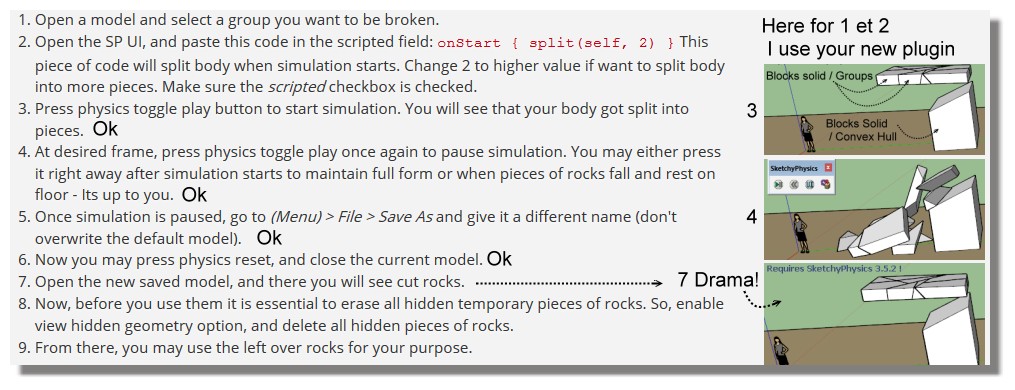
                                Ok, here is split to pieces plugin.

                                Usage: Select group/component to split and apply the menu option.
                                Access: (Menu) Plugins > Split to Pieces

                                Place into Plugins folder!

                                1 Reply Last reply
                                Reply Quote 0
                                • pilouP
                                  pilou
                                  last edited by

                                  The plugin works fine! 😎
                                  I will now study your very detailed explanation! πŸ˜‰

                                  http://s6.postimg.org/c9i6n6afl/blocks.jpg

                                  Frenchy Pilou
                                  Is beautiful that please without concept!
                                  My Little site :)

                                  1 Reply Last reply
                                  Reply Quote 0
                                  • pilouP
                                    pilou
                                    last edited by

                                    Alas again! 😲

                                    drama.jpg

                                    Frenchy Pilou
                                    Is beautiful that please without concept!
                                    My Little site :)

                                    1 Reply Last reply
                                    Reply Quote 0
                                    • A
                                      Anton_S
                                      last edited by

                                      @unknownuser said:

                                      The plugin works fine! 😎
                                      I will now study your very detailed explanation! πŸ˜‰

                                      Very well. No need to study the detailed explanation if you plan to use the plugin. One thing to remember, when you use the plugin, set all pieces to convexhull2 for proper collision generation. By default, all collisions are boxes, derived from the groups' bounding box.

                                      1 Reply Last reply
                                      Reply Quote 0
                                      • A
                                        Anton_S
                                        last edited by

                                        @unknownuser said:

                                        Alas again! 😲

                                        [attachment=0:2rsm73ts]<!-- ia0 -->drama.jpg<!-- ia0 -->[/attachment:2rsm73ts]

                                        So you are saying that whenever you 'save as' the model with original positions is saved, but not with the current positions, right?

                                        1 Reply Last reply
                                        Reply Quote 0
                                        • A
                                          Anton_S
                                          last edited by

                                          @unknownuser said:

                                          @unknownuser said:

                                          ...right ?

                                          Exactly! πŸ˜„

                                          I can't seem to reproduce this. It works on myne, Win7, SU2014.

                                          What SU version are you using? I can see you're using Win8.

                                          1 Reply Last reply
                                          Reply Quote 0
                                          • pilouP
                                            pilou
                                            last edited by

                                            @unknownuser said:

                                            ...right ?

                                            I save like you said before when i had press again the Toggle Play Button so the blocks on the ground exploded visible!
                                            Exactly! πŸ˜„

                                            Frenchy Pilou
                                            Is beautiful that please without concept!
                                            My Little site :)

                                            1 Reply Last reply
                                            Reply Quote 0

                                            Hello! It looks like you're interested in this conversation, but you don't have an account yet.

                                            Getting fed up of having to scroll through the same posts each visit? When you register for an account, you'll always come back to exactly where you were before, and choose to be notified of new replies (either via email, or push notification). You'll also be able to save bookmarks and upvote posts to show your appreciation to other community members.

                                            With your input, this post could be even better πŸ’—

                                            Register Login
                                            • 1
                                            • 2
                                            • 3
                                            • 4
                                            • 5
                                            • 10
                                            • 11
                                            • 3 / 11
                                            • First post
                                              Last post
                                            Buy SketchPlus
                                            Buy SUbD
                                            Buy WrapR
                                            Buy eBook
                                            Buy Modelur
                                            Buy Vertex Tools
                                            Buy SketchCuisine
                                            Buy FormFonts

                                            Advertisement