Co planar test
-
Is there a test that I can do on 4 points to determine if they are coplanar or not?
What I want to do is fill in faces where 4 points may or may not be coplanar.
If coplanar then just add_face
If not coplanar then add_line between the points separating the area into 2 triangles.
Then I can call add_face for each new triangle ( or maybe just call find_faces for the edge that is common between the 2 triangles).Are there any other ways to do this?
-
maybe fit plane from 3 Points and check if Points are on plane ?
http://www.sketchup.com/intl/en/developer/docs/ourdoc/geom.php?hl=sv-SE
-
Thanks - this is exactly what I was looking for.
-
That code works well. I can now create the proper face polygons - either triangle or quad.
My next challenge is that some faces are reversed. I haven't found anything to add into the script to orient faces.
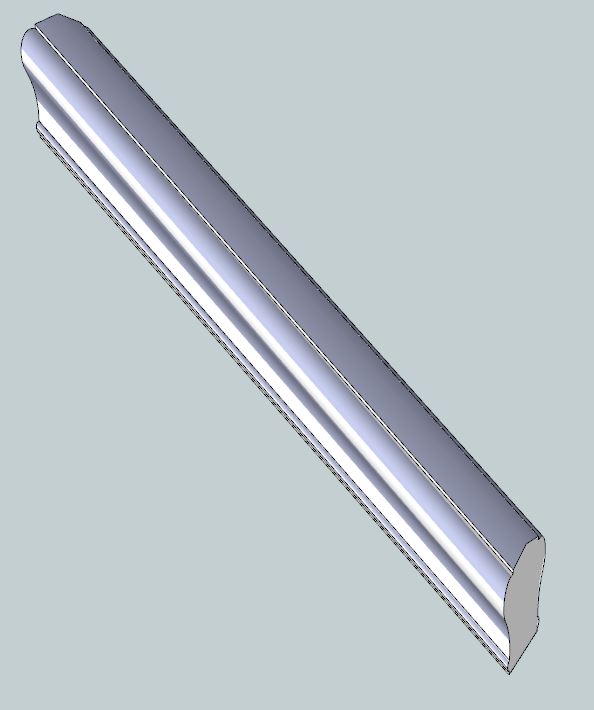
Here's a picture of the handrail segment thus far. Note that the 2 end's of the handrail are at different heights and at different angles.
-
Glad it worked!
About reversed faces. Always difficult to decide what to reverse or not. Especially when dealing with that complicated type of geometry.
If aligned to axes one could Always use something like: face.reverse! if face.normal.z <= 0 (for ground flat faces)
But it doesent look like that would work in your case..
Are you doing a pushpull ?
One sketchy idea is that if you know that an operation will lead to reversed faces . Collect faces Before operation and reverse all but Collection..
You would have to collect all faces after operation and minus Array..I Think there is an "Orient-faces" script from TIG there somewhere you could look at.
-
Unless you create a face flat on the ground then the direction of the face normal depends on the order of the point you use to create the face. you might want to check the order of these points when you create your mesh - getting then ordered correctly from the start would mean less post processing and faster script.
-
Jolran, I am not going to do a push pull on the handrail. The reason is the handrail is going to be curving and twisting and may change pitch. Then there would be way too much cleanup.
It might be possible to create a section of handrail, copy it, move it, rotate it and try to scale it - but me poor brain gets stretched just thinking about it.
Thomas, when you say "direction of the face normal depends on the order", are you talking about clockwise / counter clockwise for the faces outer loop? We use to refer to this as the "winding". This goes back to GIS rendering using Windows GDI etc.
I am curious about using a mesh. So far I haven't got that to work. I have searched the internet but haven't found any real good information explaining the do's, don'ts and why's. I'd love a simple example explaining what to do.
As far as managing normal's of each face. If you have 2 faces that have a common edge - is there some relationship between the 2 faces that one could use to determine reverse or not reverse? Perhaps I need to understand what exactly is a normal. is it a vector that is perpendicular to the plane of the face?
-
Ahh, my misstake. The handrail looked like pushpulled geometry with some boolean operation done on it. Nicely done creating that from code

I Believe Thomas is right(as usual) on the money about ordering Points.
And yeah, I think he means clockwise / counter clockwise for the faces outer loop.
That determines the face normal direction.If you do a pushpull in Sketchup you are moving in the "normal direction. Does that explain?
Maybe he should continue further the explaination..
Meanwhile, here's some code that creates mesh from Points. Ripped out
some code I'm using for some tests..I believe fill from mesh is faster, but this is what I have for now..
Wont work with faces with holes..model.start_operation("create_mesh", true) #polygns is array with arrays of Polygonal Points. poly_mesh = Geom;;PolygonMesh.new for plg in polygns do poly_mesh.add_polygon(plg.to_a) end mesh_group = Sketchup.active_model.active_entities.add_group mesh_group.entities.add_faces_from_mesh(poly_mesh) #Some smoothing.. for e in mesh_group.entities if e.class==Sketchup;;Edge and e.faces.length==2 ###*** ang=e.faces[0].normal.angle_between(e.faces[1].normal) e.soft=false if ang > 20.degrees e.smooth=false if ang > 20.degrees end end model.commit_operation -
Thanks Jolran,
Believe it or not I have it working. But it is slower than I would like.
The times includes coding the softening edges.What is interesting is that if I use this it takes 24 seconds
model.start_operation "curved rail"
...
model.commit_operationIf I omit the start_operation and commit_operation then it takes 8 seconds.
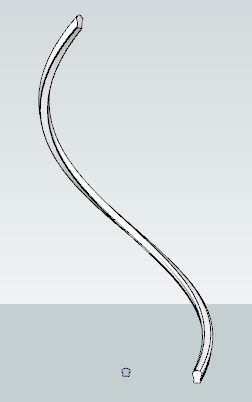
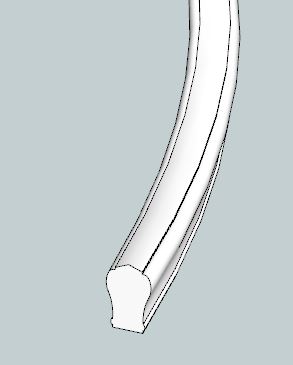
This handrail has 39 sections through 270 degrees and a total rise of 2660 mm
BTW - I changed my approach and the reversed face issue went away. I was happily surprised
I will start playing around with the mesh stuff
-
oops - I didn't mean to upload the same image twice.
-
@garry k said:
What is interesting is that if I use this it takes 24 seconds
model.start_operation "curved rail"
...
model.commit_operationIf I omit the start_operation and commit_operation then it takes 8 seconds.
What times do you get when you set the
disable_uiargument ofmodel.start_operationto true? -
Thanks Jolran,
I've got the fill_from_mesh code working and I can now generate the handrail in 0.326 seconds and this is using commit with the disable UI argument.
Thanks Thomas,
I'm sort of beyond that now. Everything is working like a dream. I'm going to go back to my stair code and move to meshes. There should be a significant improvement here as well.
-
@unknownuser said:
I've got the fill_from_mesh code working and I can now generate the handrail in 0.326 seconds and this is using commit with the disable UI argument.

Fill_from_mesh, huh ? I'll try to switch to that.
-
I think I've read that fill_from_mesh bypasses a bunch of checking. In my case I am totally confident that the faces the mesh generates are good to go.
I believe that the add_faces_from_mesh will handle duplicate points etc.
-
Cheers!
Will definately try fill_from_mesh later. I'm experiencing same thing as you, poly_mesh.add_polygon works fine for a while but times adds up exponentially when geometry gets denser.
In my case I'm storing Points in nested arrays. Might not be optimal to do so.
Saw some benchmark at StackOFLW from Array VS Hash lookups, and there where quite some difference in speed there. -
@garry k said:
I believe that the add_faces_from_mesh will handle duplicate points etc.
The polygonmesh handles duplicate points.
The fastest way I found to create PolygonMesh is to feed all the 3d points you are going to use to the PolygonMesh and then use the index that mesh.add_point returns to build a set of indicies which you use to make the polygons (add_polygon). Also, if you have an idea of roughly how many points and polygons the mesh will consist of, specify then when you create the PolygonMesh instance.
-
@unknownuser said:
The fastest way I found to create PolygonMesh is to feed all the 3d points you are going to use to the PolygonMesh and then use the index that mesh.add_point returns to build a set of indicies which you use to make the polygons (add_polygon).
This sounds great.
I was relying on building nested arrays/Hashes for storing hiearchies of polygonial-Points to build geometry, but PolygonMesh.class seams more suitable to the task.
Completely overlooked.
Wasent such a big deal in the beggining dealing with only 1 "mesh-points object", but multiple objects starting to make the array lookups nastier.
See there are som nice API methods in there as well for looking up polygons, quickly. No digging..I persume Calling methods (polygons & Points) to Polygonmesh.class is a Little faster than using Ruby Array/Hash lookups as well ? Since I gather they are dealt in C ?
-
The polygon mesh structure sounds very similar to ESRI's TIN structure (Triangular Irregular Network). I've used these strategies very successfully with huge data sets such as map topology containing more than 10 million points polygons. TIN stores unique points. Poly's can share points via common indexes. The neat thing about this is you can edit 1 point and all poly's that have that point in common automatically adjust themselves.
This data is stored in far memory which may or may not be fragmented. Memory fragmentation depends on other applications that are running concurrently. Borland implemented their own memory management which insulated our applications from external fragmentation. Of course as programmers we often created our own memory fragmentation issues.
Thus memory preallocation for the mesh may be more or less helpful. When a data structure grows beyond its memory capacity - it requests more memory. I will assume that most of these data structures require contiguous memory. If there is available free memory then the C realloc grabs more memory ensuring that the memory is still contiguous. If however there is no free memory immediately preceeding its own memory then a new block is aquired and all the data must be moved over to the new block and finally the old block is freed.
The TList that I have mentioned before aquires memory at the beginning in blocks that can contain 16 pointers (4 or 8 bytes depending on 32 or 64 bit OS). As you keep adding items into the list (contiguous array) and it grows and grows the algorithm changes and grabs bigger blocks. 16 to 32 to 64 ... up to 256 element blocks.
With my handrail - I ended up with 2067 points and 3420 polygons (lots of point sharing).
There was a huge difference moving from individual add_face to add_faces_from_mesh 24 seconds to 1 second. Changing to fill_from_mesh dropped it down to 1/3 of a second.Playing around with preallocation did not make any noticeable difference at all. I did not play around adding with mesh.add_point - this would have required a rewrite.
-
Right.. Had to google a bit there
Very interesting BTW.My program cant decide on in advance how many Points there will be, so preallocation won't apply(probably) in my case.
I was speculating more about if there would be any advantages in using polygonmesh VS arrays/hashes as a storage for Points building up during the program phase.
As a container, in the case when the endproduct will be a mesh from Points. Also fething data will be frequent.. And I'm talking plural polygonmeshes.I can see some advantages with lookup methods built into the class. But creating a new Polygonmesh.object must come at a price though, so I'm still wondering whether I should wait with the polygonmesh object for when it's actually needed and keep creating nested lists of arrays..
Anyway. It looks like you got what you came for
This question might not belong to this topic..
-
@jolran said:
I persume Calling methods (polygons & Points) to Polygonmesh.class is a Little faster than using Ruby Array/Hash lookups as well ? Since I gather they are dealt in C ?
Not necessarily. A Ruby Hash lookup will be faster than the linear traversing the C code is doing. When I need performance in Ruby I often find that creating a Hash cache object yields the most performance gain.
As always with these things - never assume - test it.




Advertisement